CSS Box Model
3 min read · Free · No login needed
Every HTML element is a box. When the browser draws a paragraph, a heading or a picture, it draws a rectangular box made of four layers. This is the box model, and once you see it, half of CSS suddenly makes sense.
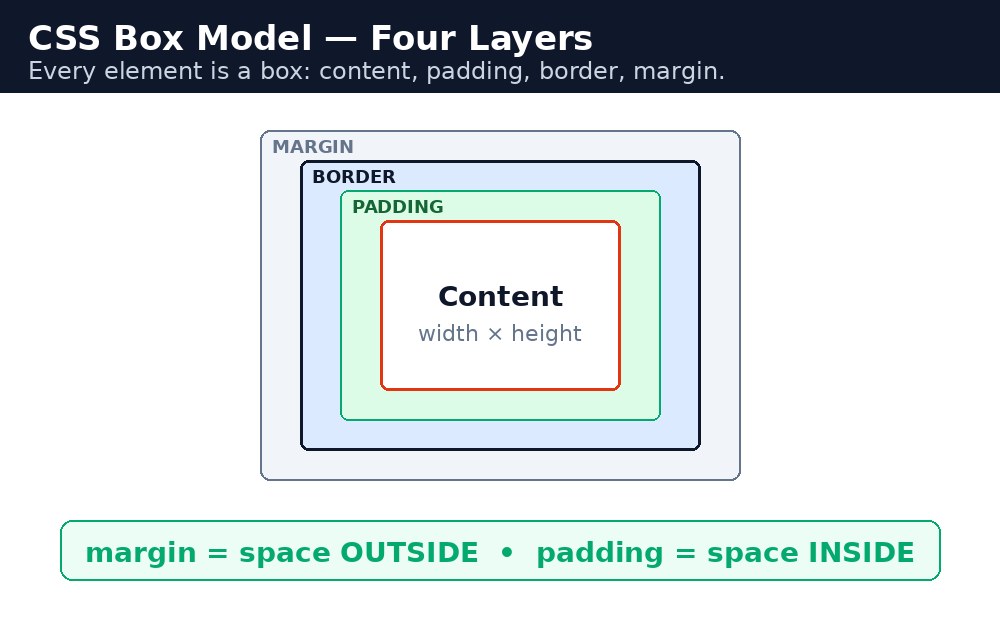
The four layers
From the inside out, the layers are:
- Content — the text or image itself. Its size is set by
widthandheight. - Padding — the space inside the border, around the content. The background colour fills it.
- Border — a line around the padding. It has a width, a style and a colour.
- Margin — the empty space outside the border, between this box and its neighbours. It is always transparent.
How wide is a box, really?
By default, width sets only the content. A box with width: 200px; padding: 20px; border: 5px solid black; is actually 250px wide on the page: 200 + 20 + 20 + 5 + 5. This surprises every beginner — the box you asked for is not the box you got.
box-sizing: border-box
box-sizing: border-box; changes the maths: now width includes the padding and the border. That same box is exactly 200px wide, and the content shrinks to fit inside. Most developers turn this on for every element at the start of a project:
* {
  box-sizing: border-box;
}
The * selector means "every element". With this one rule, widths behave the way you expect.
Syntax — the box model in action
.card {
  width: 200px;
  padding: 20px;
  border: 5px solid #1e3a5f;
  margin: 10px;
  box-sizing: border-box;
}
margin: 20px; have a 20px gap between them, not 40px. This is called margin collapsing.Common mistakes
- Putting two
width: 50%;boxes side by side and adding padding — with the defaultcontent-boxthey become wider than 50% and the second box drops to the next line. - Setting
width: 100%and then adding a border — the border pushes the box wider than its parent. Usebox-sizing: border-box. - Expecting vertical margins to add up — they collapse, and only the larger one counts.
- Forgetting that
heightbehaves the same way aswidth— padding and border are added on top unlessborder-boxis set.
Remember
- Every element is a box: content, padding, border, margin — inside out.
- By default,
widthandheightmeasure only the content. box-sizing: border-box;makes width include padding and border.- Margin is outside the border and always transparent; padding is inside and shows the background.
- Vertical margins collapse — the bigger one wins.
Example explained
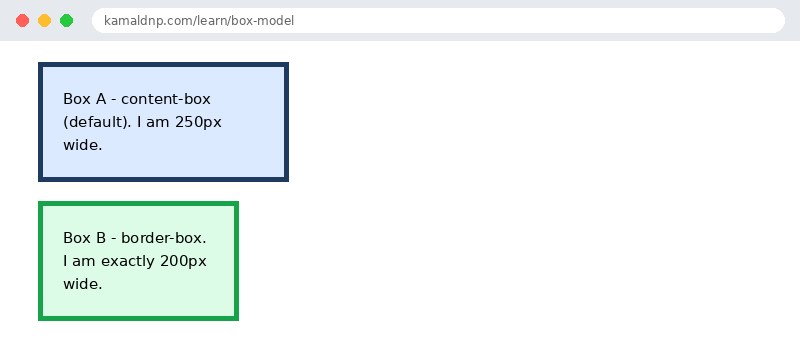
.box-a { width: 200px; padding: 20px; border: 5px solid #1e3a5f; }— with the defaultcontent-box, this box is 250px wide on the page: 200 + 20 + 20 + 5 + 5..box-b { width: 200px; padding: 20px; border: 5px solid #16a34a; box-sizing: border-box; }— the same numbers, butborder-boxsqueezes the padding and border inside the 200px, so the box is exactly 200px wide.margin: 10px;on both boxes — the empty gap between the two boxes, outside their borders.background: #dbeafe;on.box-a— the pale blue fills the content and the padding, but not the margin. That is how you can see where padding ends and margin begins.
Example
<!DOCTYPE html>
<html>
<head>
<title>Box Model - Two Boxes</title>
<style>
.box-a { width: 200px; padding: 20px; border: 5px solid #1e3a5f; background: #dbeafe; margin: 10px; }
.box-b { width: 200px; padding: 20px; border: 5px solid #16a34a; background: #dcfce7; margin: 10px; box-sizing: border-box; }
</style>
</head>
<body>

<div class="box-a">Box A - content-box (default). I am 250px wide.</div>
<div class="box-b">Box B - border-box. I am exactly 200px wide.</div>

</body>
</html>
Output
Try it yourself — live editor
Change the code below and press Run to see the result instantly. No file to save, no login needed.
Why learn this yourself — and not just ask AI?
AI can write code for you, but it cannot think for you. When you learn HTML yourself, your brain builds the real skill: you understand why a page looks the way it does, you can fix it when it breaks, and you can answer it in an exam or an interview without help. That is the skill that gets you a job — not a copied answer.
Get certified — just ₹10
Finish all 30 lessons, pass the test (80%), pay ₹10 and get your certificate.
Take the testPrefer watching? Video courses teach the same topics step by step.
Go further with a full course
Free tutorials teach you the basics. Our paid courses add live projects, mentorship and a certificate.
Browse all courses