CSS How To
4 min read · Free · No login needed
There are three ways to add CSS to a web page: inline, internal, and external. They all do the same job — they attach rules to your HTML — but they live in different places, and they suit different situations. Real websites use the external way almost all the time. Learn all three, then use the right one.
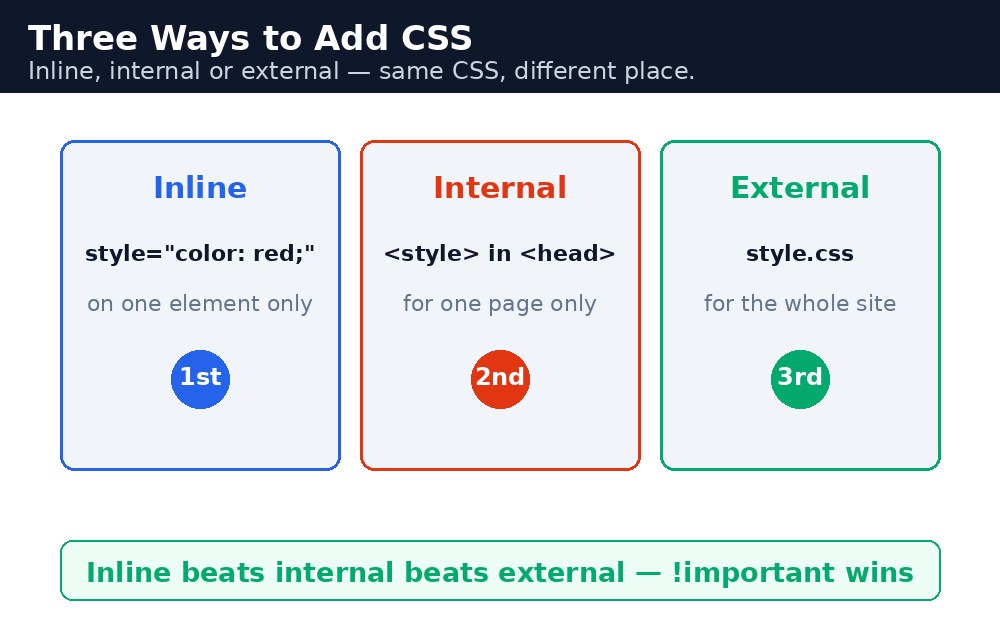
The three ways
| Way | Where it lives | Good for |
|---|---|---|
| Inline | In a style attribute on one element | One quick fix on one element only |
| Internal | Inside a <style> block in the <head> | One single page |
| External | In a separate .css file, linked with <link> | A whole website |
Syntax — all three ways
Inline: the style sits right on the element. It affects only that one element.
<h1 style="color: blue;">Hello</h1>
Internal: the rules sit in a <style> block in the head. They affect the whole page.
<head>
<style>
  h1 { color: blue; }
</style>
</head>
External: the rules live in a separate file, for example style.css, and the page links to it. One file can style a hundred pages.
<head>
<link rel="stylesheet" href="style.css">
</head>
<link> tag must sit inside the <head>, and the href must point to the real file. If the path is wrong — even by one folder — the page loads with no styling at all, and the browser gives no error message. When a page suddenly looks plain, the stylesheet link is the first thing to check.The cascade — which rule wins?
When two rules disagree about the same element, the browser follows the cascade — a set of tie-breakers, in this order:
- Inline styles win over internal and external styles.
- Later rules win over earlier ones, when they are equally strong.
- More specific selectors win over less specific ones. An id beats a class, a class beats an element. This is called specificity.
So #title { color: red; } beats .heading { color: blue; }, which beats h1 { color: green; } — even if the h1 rule comes last. The browser counts the strength of each selector, not just the order.
!important — the emergency override
There is one thing that beats everything: adding !important after a value.
p { color: red !important; }
This rule wins over inline styles, ids, and everything else. It exists for emergencies — for example, when you must override a style from a library you cannot edit. But use it almost never. Once !important appears in a project, people start adding more of it to beat the first one, and soon nobody can tell which rule wins. A stylesheet full of !important is a sign that the selectors need fixing, not more force.
Common mistakes
- Linking the stylesheet with a wrong path —
href="styles.css"when the file is calledstyle.css, or in a different folder. - Using inline styles everywhere — quick at first, impossible to maintain. One colour change means editing every element by hand.
- Expecting an internal rule to beat an inline style — inline always wins, unless the internal rule uses
!important. - Spraying
!importanton every rule — it kills the cascade and makes future changes a fight. - Forgetting that a later rule only wins when specificity is equal — a later element selector still loses to an earlier id selector.
Remember
- Inline =
styleattribute, internal =<style>in the head, external =<link>to a.cssfile. - External is the professional way — one file styles the whole site.
- Cascade order: inline wins, then the more specific selector, then the later rule.
- Specificity: id beats class, class beats element.
!importantbeats everything — use it only in a real emergency.
Example explained
h1 { color: green; }— the internal rule in the<style>block. It styles everyh1on the page green.<h1 style="color: blue;">— the inline style on the first heading. Inline wins over the internal rule, so this heading is blue, not green.<h1>Our Courses</h1>— the second heading has no inline style, so the internal rule applies and it is green..note { color: grey; }— a class rule from the same internal block. It styles the paragraph withclass="note".<!-- <link rel="stylesheet" href="style.css"> -->— the comment shows the external way. In a real site this line (without the comment marks) would load the shared stylesheet instead of the internal block.
Example
<!DOCTYPE html>
<html>
<head>
<title>How to Add CSS</title>
<style>
h1 { color: green; }
.note { color: grey; }
</style>
<!-- In a real site, use this instead of the style block above:
<link rel="stylesheet" href="style.css"> -->
</head>
<body>

<h1 style="color: blue;">Welcome to KAMALDNP</h1>
<h1>Our Courses</h1>
<p class="note">The first heading is blue because its inline style beats the internal rule. The second heading is green because only the internal rule applies to it.</p>

</body>
</html>
Output

Try it yourself — live editor
Change the code below and press Run to see the result instantly. No file to save, no login needed.
Check yourself — did you get it?
Finished the lesson? Test yourself with 5 quick questions — you get the answer instantly, with the reason for each one.
1. Which way of adding CSS is best for a whole website?
2. Where must the <link> tag for a stylesheet sit?
3. When an inline style and an internal rule disagree, which one wins?
4. Which selector wins in a fight: #title, .heading, or h1?
5. What does !important do?
Interview questions — can you answer these?
Read the question first, try to answer it in your own words, then open it to check. These are the questions interviewers actually ask.
1. What are the three ways to add CSS to a page, and which one should you use for a real website?
Inline (a style attribute on one element), internal (a <style> block in the <head>, for one page), and external (a separate .css file linked with <link>). For a real website, use external — one file styles the whole site, so a colour change in one place updates every page.
2. When two CSS rules disagree, which one wins?
The browser follows the cascade, in this order: inline styles win over internal and external styles; then the more specific selector wins — an id beats a class, a class beats an element (this is specificity); and when two rules are equally specific, the later one wins.
3. What does !important do, and why should you almost never use it?
!important after a value beats everything — inline styles, ids, all of it. It exists for emergencies, like overriding a style from a library you cannot edit. But use it almost never: once it appears, people add more of it to beat the first one, and soon nobody can tell which rule wins. A stylesheet full of !important means the selectors need fixing, not more force.
Try it yourself — build this
Reading is not enough — now build it yourself. Write the code in the live editor, run it, check the hint if you get stuck, and open the solution only after you have tried.
1. Three ways, one winner
Create a page that shows the three ways to add CSS AND the cascade. Put an internal rule in a <style> block (h1 green, .note grey). Give the first <h1> an inline style that makes it blue — inline beats internal, so it must end up blue while the second <h1> stays green. Then add an HTML comment in the <head> showing the external way: the <link rel="stylesheet" href="style.css"> line, commented out.
Show solution
<!DOCTYPE html>
<html>
<head>
<title>How to Add CSS</title>
<style>
h1 { color: green; }
.note { color: grey; }
</style>
<!-- In a real site, use this instead of the style block above:
<link rel="stylesheet" href="style.css"> -->
</head>
<body>

<h1 style="color: blue;">Welcome to KAMALDNP</h1>
<h1>Our Courses</h1>
<p class="note">The first heading is blue because its inline style beats the internal rule. The second heading is green because only the internal rule applies to it.</p>

</body>
</html>Why learn this yourself — and not just ask AI?
AI can write code for you, but it cannot think for you. When you learn HTML yourself, your brain builds the real skill: you understand why a page looks the way it does, you can fix it when it breaks, and you can answer it in an exam or an interview without help. That is the skill that gets you a job — not a copied answer.
Get certified — just ₹10
Finish all 30 lessons, pass the test (80%), pay ₹10 and get your certificate.
Take the testPrefer watching? Video courses teach the same topics step by step.
Go further with a full course
Free tutorials teach you the basics. Our paid courses add live projects, mentorship and a certificate.
Browse all courses