CSS Links
3 min read · Free · No login needed
A link is not one thing — it is four. A link you have never clicked looks one way, a link you have visited looks another, and a link changes again while your mouse is over it and while you are pressing it. CSS gives each of these moments its own selector, called a pseudo-class.
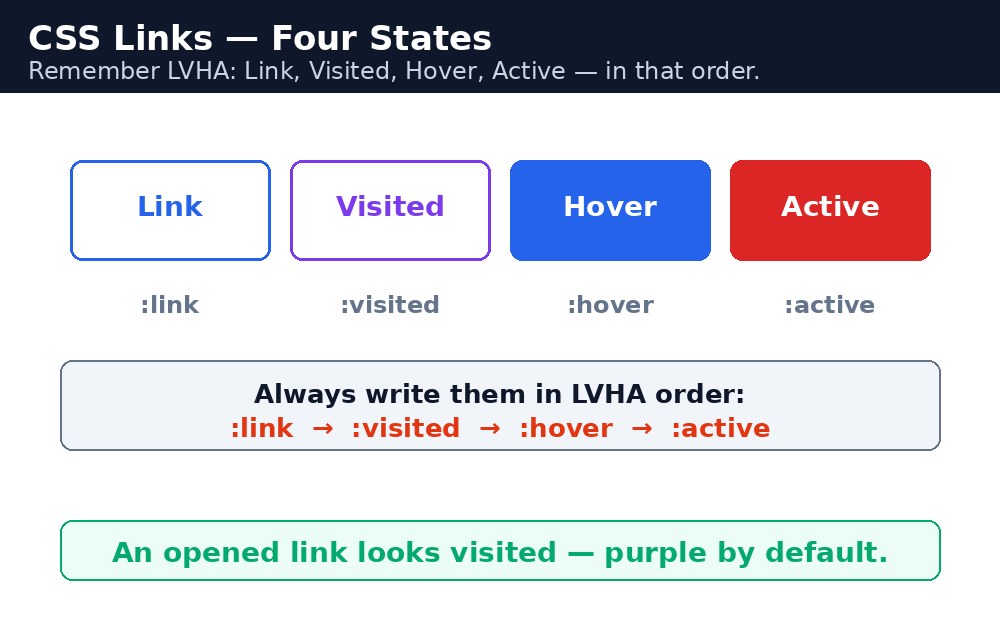
The four link states
a:link— a normal, unvisited link.a:visited— a link the visitor has already opened.a:hover— the mouse is over the link.a:active— the link is being clicked right now.
The order matters: always write them link, visited, hover, active. A handy way to remember it is "LoVe HAte" — Link, Visited, Hover, Active. If hover comes before visited, the visited colour wins and the hover effect never shows.
Styling links
Links start blue and underlined. Change them with the same properties you already know: color, text-decoration, background-color and font-weight. Removing the underline is common — text-decoration: none; — but then the link needs another clue, like a colour or a hover background, or visitors will not know it is clickable.
Syntax — links in action
a:link {
  color: #2563eb;
  text-decoration: none;
}
a:visited {
  color: #7c3aed;
}
a:hover {
  color: #ea580c;
  text-decoration: underline;
}
a:active {
  color: #dc2626;
}
Link buttons
A link can look like a button: give it padding, a background colour and rounded corners. The trick is display: inline-block; — without it, top and bottom padding on a link does not push anything around.
.btn:link, .btn:visited {
  display: inline-block;
  background: #16a34a;
  color: white;
  padding: 10px 20px;
  border-radius: 6px;
  text-decoration: none;
}
.btn:hover {
  background: #15803d;
}
:visited can change, for privacy — only colour-related properties like color and background-color work. A visited link cannot change its padding or font size.:hover and :focus together. Keyboard users never hover — they tab to a link, and :focus is their version of hover.Common mistakes
- Writing the four states in the wrong order — hover must come after link and visited, or it will not show.
- Removing the underline from links without adding another clue — visitors cannot tell what is clickable.
- Forgetting
display: inline-block;on a link button — the padding then paints but does not push other elements away. - Styling only
aand wondering why visited links look different — the browser's default visited colour (purple) still applies.
Remember
- Four states, in this order: link, visited, hover, active — "LoVe HAte".
:hoveris for the mouse;:focusis for the keyboard. Style both.text-decoration: none;removes the underline.- A link button needs
display: inline-block;for its padding to work. :visitedcan only change colours, for privacy.
Example explained
a:link { color: #2563eb; text-decoration: none; }— unvisited links are blue with no underline, so the menu looks clean.a:visited { color: #7c3aed; }— a page you have already opened turns purple, so you can see where you have been.a:hover { color: #ea580c; text-decoration: underline; }— when the mouse rests on a link, it turns orange and the underline comes back, telling you it is clickable..btn:link, .btn:visited { display: inline-block; background: #16a34a; }— the "Join Now" link gets a green button look, andinline-blockmakes its padding work properly..btn:hover { background: #15803d; }— the button turns a darker green on hover, like a real button being pressed.
Example
<!DOCTYPE html>
<html>
<head>
<title>Links - Course Menu</title>
<style>
a:link { color: #2563eb; text-decoration: none; }
a:visited { color: #7c3aed; }
a:hover { color: #ea580c; text-decoration: underline; }
a:active { color: #dc2626; }
.btn:link, .btn:visited { display: inline-block; background: #16a34a; color: white; padding: 10px 20px; border-radius: 6px; text-decoration: none; }
.btn:hover { background: #15803d; }
</style>
</head>
<body>

<h1>Our Courses</h1>
<p><a href="#">HTML Course</a> | <a href="#">CSS Course</a> | <a href="#">JavaScript Course</a></p>
<p><a class="btn" href="#">Join Now</a></p>

</body>
</html>
Output

Try it yourself — live editor
Change the code below and press Run to see the result instantly. No file to save, no login needed.
Why learn this yourself — and not just ask AI?
AI can write code for you, but it cannot think for you. When you learn HTML yourself, your brain builds the real skill: you understand why a page looks the way it does, you can fix it when it breaks, and you can answer it in an exam or an interview without help. That is the skill that gets you a job — not a copied answer.
Get certified — just ₹10
Finish all 30 lessons, pass the test (80%), pay ₹10 and get your certificate.
Take the testPrefer watching? Video courses teach the same topics step by step.
Go further with a full course
Free tutorials teach you the basics. Our paid courses add live projects, mentorship and a certificate.
Browse all courses