CSS Text Effects — Shadows, Wrapping & Overflow
4 min read · Free · No login needed
Think of a shop signboard. The letters are big, they cast a soft shadow in the sun, and they never spill off the edge of the board — even a very long shop name is handled neatly. CSS text effects give you the same control over words on a page: shadows that lift headings off the background, rules that stop long words from breaking your layout, and even text that runs vertically like the title on a book spine.
Shadows that lift text off the page
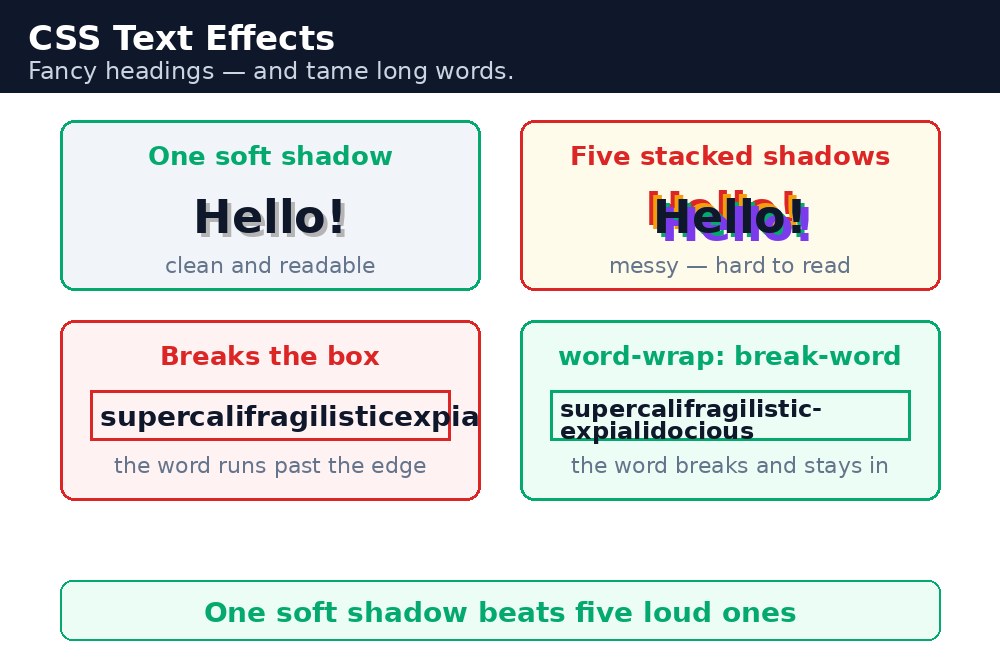
text-shadow takes up to four values: the horizontal offset, the vertical offset, the blur radius, and the colour. text-shadow: 2px 2px 4px rgba(0,0,0,0.3); puts a soft grey shadow 2px right and 2px down from each letter. You can stack several shadows with commas — a light shadow above and a dark shadow below can make text look carved into the page. The key is restraint: one soft shadow adds depth, five shadows just look messy.
Long words that break the layout
Normally a browser breaks lines only at spaces. A single very long word — a long link, a username, a German compound word — has no spaces, so it can overflow its box and break the whole layout. overflow-wrap: break-word; (also written as word-wrap) tells the browser it may break a long word when it has to. The opposite problem is a headline that must stay on one line: white-space: nowrap; stops wrapping, overflow: hidden; clips the extra text, and text-overflow: ellipsis; adds the three dots that say "there is more".
Writing sideways
writing-mode changes the direction text flows in. writing-mode: vertical-rl; makes text run top to bottom, right to left — exactly what you want for a side heading, a vertical notice board, or a book spine. The box itself does not change shape; only the text inside turns upright.
text-overflow: ellipsis; only works when all three pieces are present: white-space: nowrap;, overflow: hidden;, and a fixed width (or a max-width) on the element. Miss any one of the three and the text just wraps or overflows as usual, with no dots.overflow-wrap: break-word; on comment boxes, chat messages, and any place where users can type. You cannot control what users type, but you can stop one long pasted link from breaking your whole page.Common mistakes
- Using
text-overflow: ellipsis;on its own — withoutnowrapandoverflow: hiddenit does nothing. - Forgetting that
text-shadowoffsets come in pairs — the first value moves the shadow sideways, the second moves it down; swapping them moves the shadow the wrong way. - Stacking five or six shadows on one heading — it looks muddy; one soft shadow usually beats a pile of them.
- Using
word-break: break-all;everywhere — it breaks words even when they would fit, making normal text hard to read; preferoverflow-wrap: break-word;. - Expecting
writing-modeto rotate the box — it only turns the text; the box keeps its normal width and height.
Remember
text-shadow: x y blur colour;lifts text off the background; keep it to one soft shadow.overflow-wrap: break-word;lets very long words break instead of overflowing their box.white-space: nowrap;+overflow: hidden;+text-overflow: ellipsis;gives the three-dots effect — all three are required.writing-mode: vertical-rl;runs text top to bottom for side headings.- Put word-wrap on user-typed content, so one long link never breaks your layout.
Example explained
h1.shadow { text-shadow: 2px 2px 4px rgba(0,0,0,0.3); }— the big green heading gets a soft grey shadow 2px right and 2px down, which lifts it off the page..long-word { overflow-wrap: break-word; }— the extremely long word in the first card breaks across lines instead of bursting out of its box..ellipsis { white-space: nowrap; overflow: hidden; text-overflow: ellipsis; }— the long headline in the second card stays on one line and ends with three dots..side { writing-mode: vertical-rl; }— the dark "Notice Board" strip runs its text top to bottom, like a book spine..wrap { display: flex; }— the vertical strip and its paragraph sit side by side, so the side heading looks like a real notice board.
Example
<!DOCTYPE html>
<html>
<head>
<title>Text That Stands Out</title>
<style>
* { box-sizing: border-box; }
body { font-family: Arial, sans-serif; margin: 0; padding: 20px; background-color: #f2f2f2; }
h1.shadow { text-align: center; color: #04aa6d; font-size: 48px; text-shadow: 2px 2px 4px rgba(0,0,0,0.3); }
.card { background-color: white; max-width: 600px; margin: 20px auto; padding: 25px; border-radius: 10px; }
.long-word { overflow-wrap: break-word; border: 1px solid #ccc; padding: 15px; }
.ellipsis { white-space: nowrap; overflow: hidden; text-overflow: ellipsis; border: 1px solid #ccc; padding: 15px; }
.side { writing-mode: vertical-rl; background-color: #333; color: white; padding: 15px; font-size: 20px; font-weight: bold; }
.wrap { display: flex; gap: 20px; max-width: 600px; margin: 20px auto; }
.wrap p { background-color: white; padding: 20px; border-radius: 10px; flex: 1; }
</style>
</head>
<body>

<h1 class="shadow">Welcome to KAMALDNP</h1>

<div class="card">
<h2>A very long word</h2>
<p class="long-word">ThisIsAnExtremelyLongWordThatWouldNormallyBreakTheLayoutButWordWrapKeepsItInsideTheBox</p>
</div>

<div class="card">
<h2>One line only</h2>
<p class="ellipsis">This headline is far too long for one line, so it ends with three dots instead of wrapping.</p>
</div>

<div class="wrap">
<div class="side">Notice Board</div>
<p>Vertical text like this is common on side headings and book spines. The writing-mode property turns the whole block upright.</p>
</div>

</body>
</html>
Output
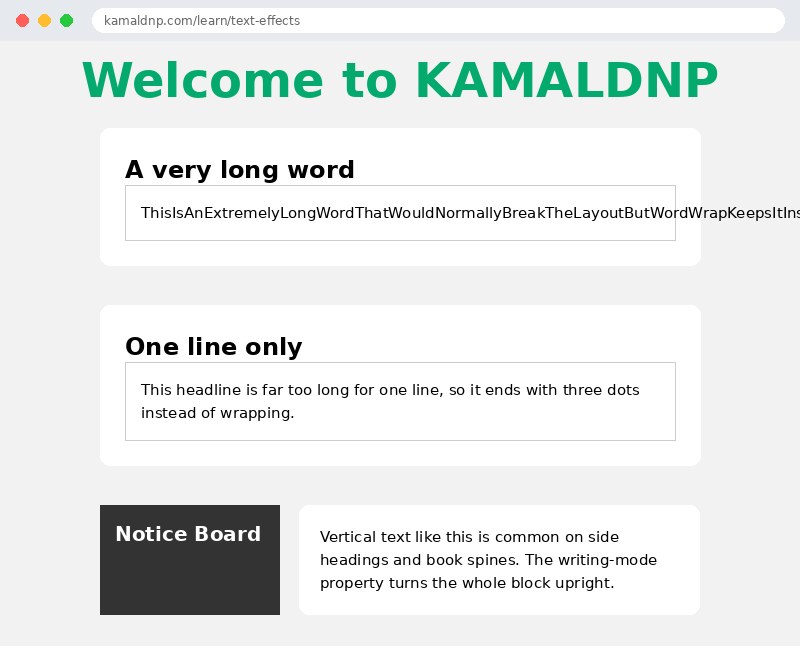
Try it yourself — live editor
Change the code below and press Run to see the result instantly. No file to save, no login needed.
Related lessons
Frequently asked questions
The questions learners ask most about this lesson — read the question, then open it to see the answer.
1. How do you make long words stop breaking a layout?
With overflow-wrap: break-word, which lets very long words break instead of overflowing their box.
2. What three things make the three-dots effect?
white-space: nowrap, overflow: hidden, and text-overflow: ellipsis — all three are required.
3. What order does text-shadow use?
Horizontal offset, vertical offset, blur, then colour — like text-shadow: x y blur colour.
Why learn this yourself — and not just ask AI?
AI can write code for you, but it cannot think for you. When you learn HTML yourself, your brain builds the real skill: you understand why a page looks the way it does, you can fix it when it breaks, and you can answer it in an exam or an interview without help. That is the skill that gets you a job — not a copied answer.
Get certified — just ₹10
Finish all 35 lessons, pass the test (80%), pay ₹10 and get your certificate.
Take the testPrefer watching? Video courses teach the same topics step by step.
Go further with a full course
Free tutorials teach you the basics. Our paid courses add live projects, mentorship and a certificate.
Browse all courses