CSS Text
3 min read · Free · No login needed
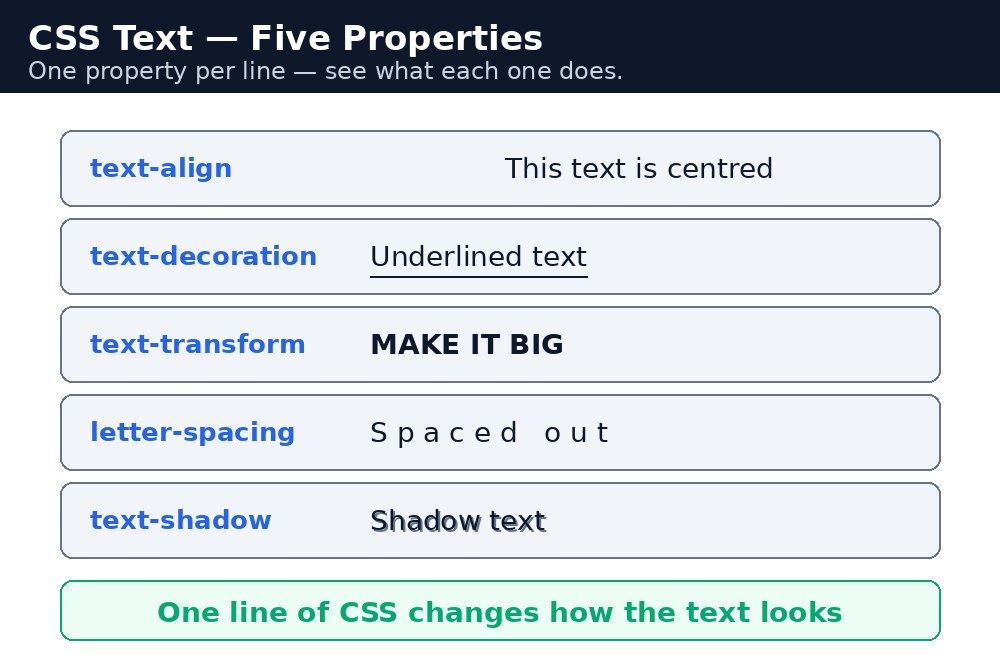
HTML gives a page its words; CSS decides how those words look. The text properties control colour, alignment, the gaps between letters and lines, and whether words are upper or lower case. A few of them turn plain text into a headline, a notice, or a warning.
Colour and alignment
color sets the text colour. text-align sets where the lines sit: left, right, center or justify. Centred text suits headings and invitations; body text is almost always left-aligned, because centred paragraphs are hard to read.
Decoration and case
text-decoration draws lines on text: underline, line-through (a strike through the middle, good for old prices), or none (used to remove the underline from links). text-transform changes the case without changing the typed text: uppercase, lowercase or capitalize (first letter of every word).
Spacing and shadows
letter-spacing— space between letters. A little extra space makes headings look elegant.word-spacing— space between words.line-height— space between lines. A unitless number like1.6means "1.6 times the font size" and is the best choice for readable paragraphs.text-shadow— a shadow behind the text: horizontal offset, vertical offset, blur, colour.text-shadow: 2px 2px 4px grey;lifts a heading off the page.
Syntax — text in action
h1 {
  color: #1e3a5f;
  text-align: center;
  text-transform: uppercase;
  letter-spacing: 3px;
  text-shadow: 2px 2px 4px #cbd5e1;
}
p {
  line-height: 1.6;
}
.old-price {
  text-decoration: line-through;
  color: grey;
}
text-transform: uppercase only changes how the text looks — the typed text stays the same. Screen readers still read the original words, which is why it is better than typing in all capitals.line-height of 1.5 to 1.7. Lines that are too close together tire the eyes; lines that are too far apart lose their connection to each other.Common mistakes
- Justifying narrow columns of text — the browser stretches the spaces and leaves white rivers running down the page. Left-align is safer.
- Using
text-align: centeron long paragraphs — the eye has to find the start of every line. Centre headings, not body text. - Adding
letter-spacingto body text — wide letter spacing is for headings; in paragraphs it slows reading down. - Typing headings in all capitals instead of using
text-transform— the typed text is then hard to reuse anywhere else.
Remember
colorcolours the text;text-alignplaces the lines.text-decoration: noneremoves underlines;line-throughstrikes text out.text-transformchanges the look, not the typed text.- Use a unitless
line-heightlike1.6for readable paragraphs. text-shadowtakes horizontal, vertical, blur, then colour.
Example explained
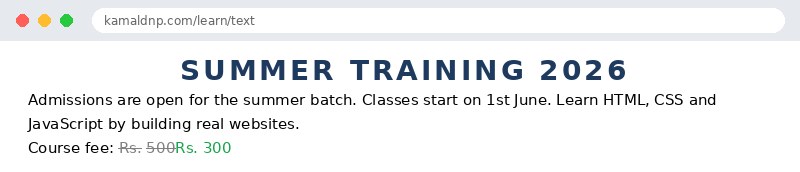
h1 { text-align: center; text-transform: uppercase; letter-spacing: 3px; }— the heading sits in the middle, appears in capitals, and has 3px of space between letters, which is what makes it look like a proper notice-board title.h1 { text-shadow: 2px 2px 4px #cbd5e1; }— a soft grey shadow, 2px right and 2px down with 4px of blur, lifts the heading off the white page.p { line-height: 1.6; }— every paragraph gets roomy lines, 1.6 times the font size, so the notice is comfortable to read..old-price { text-decoration: line-through; }— the old fee of Rs. 500 is struck through, and the new fee of Rs. 300 stands next to it..new-price { color: #16a34a; }— the new fee is green, so the eye finds the good news first.
Example
<!DOCTYPE html>
<html>
<head>
<title>Text - Notice Board</title>
<style>
h1 { color: #1e3a5f; text-align: center; text-transform: uppercase; letter-spacing: 3px; text-shadow: 2px 2px 4px #cbd5e1; }
p { line-height: 1.6; }
.old-price { text-decoration: line-through; color: grey; }
.new-price { color: #16a34a; }
</style>
</head>
<body>

<h1>Summer Training 2026</h1>
<p>Admissions are open for the summer batch. Classes start on 1st June. Learn HTML, CSS and JavaScript by building real websites.</p>
<p>Course fee: <span class="old-price">Rs. 500</span> <span class="new-price">Rs. 300</span></p>

</body>
</html>
Output
Try it yourself — live editor
Change the code below and press Run to see the result instantly. No file to save, no login needed.
Why learn this yourself — and not just ask AI?
AI can write code for you, but it cannot think for you. When you learn HTML yourself, your brain builds the real skill: you understand why a page looks the way it does, you can fix it when it breaks, and you can answer it in an exam or an interview without help. That is the skill that gets you a job — not a copied answer.
Get certified — just ₹10
Finish all 30 lessons, pass the test (80%), pay ₹10 and get your certificate.
Take the testPrefer watching? Video courses teach the same topics step by step.
Go further with a full course
Free tutorials teach you the basics. Our paid courses add live projects, mentorship and a certificate.
Browse all courses