CSS Variables
4 min read · Free · No login needed
Imagine your website uses the same green colour in twenty places — headings, buttons, links, borders, and the header background. Then one day you want to change that green to blue. Without variables, you must hunt down all twenty places and change each one, hoping you do not miss any. With CSS variables, you change one line and the whole site updates at once.
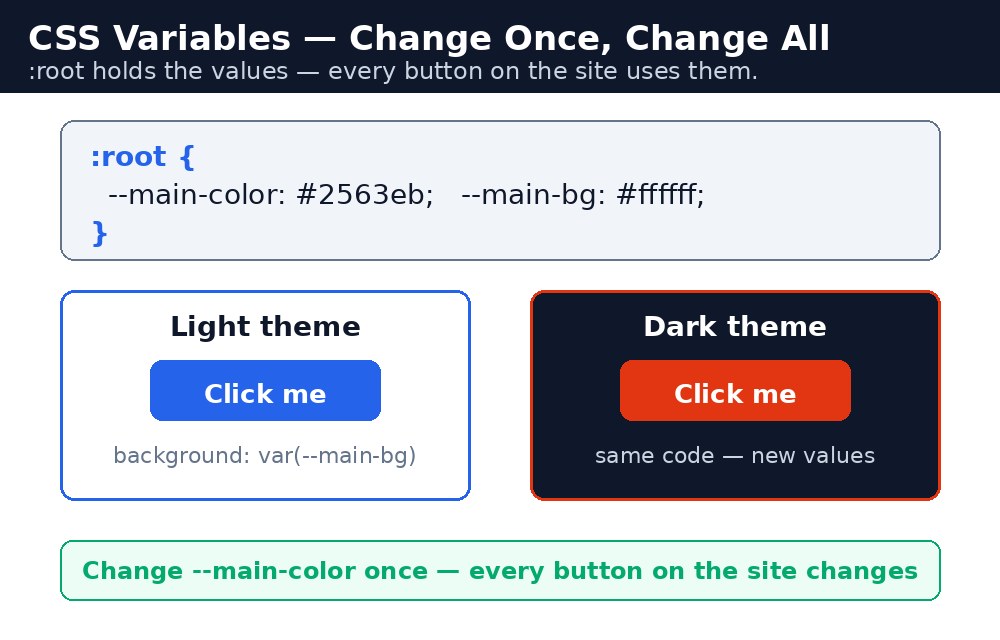
A CSS variable, also called a custom property, is a value you store under a name and reuse anywhere in your stylesheet. You define it once, and every rule that uses it picks up the value automatically.
Defining and using a variable
A variable name always starts with two dashes, like --main-color. The usual place to define it is :root, which means the top of the document — a variable defined there is available everywhere. You read the value back with the var() function.
Syntax — one colour, used everywhere
:root {
  --main-color: #04aa6d;
  --dark-color: #333;
}
h1 { color: var(--main-color); }
button {
  background-color: var(--main-color);
  color: white;
}
Now the heading and the button share the same green. Change --main-color in :root from green to blue, and both change together. That single line is the whole theme.
Changing a theme with one value
Because a variable is just a value, you can build an entire colour theme from a handful of them: --main-color for the brand colour, --bg-color for page backgrounds, --text-color for text, and --accent-color for highlights. A dark section of the page can even redefine the same variables locally — inside that section, --bg-color becomes dark and --text-color becomes white, while the rest of the page stays light.
.dark-box {
  --bg-color: #333;
  --text-color: white;
  background-color: var(--bg-color);
  color: var(--text-color);
}
:root works everywhere, but one defined inside .dark-box only works inside that box. This is why :root is the standard place for theme values.--main-color is better than --green. If the brand colour changes from green to blue one day, --green holding a blue value would confuse everyone who reads the code.Common mistakes
- Forgetting the two dashes —
main-colorwithout--is not a variable, and the browser will ignore it. - Writing
var(main-color)without the dashes insidevar()— the name inside must match exactly, dashes included. - Defining a variable inside one element and trying to use it somewhere else on the page — it only works in that element and its children.
- Naming a variable after its value, like
--green— when the colour changes, the name lies. - Forgetting that variable names are case-sensitive —
--Main-Colorand--main-colorare two different variables.
Remember
- A CSS variable is a custom property: a value stored under a name starting with
--. - Define theme variables in
:rootso the whole page can use them. - Read a variable with
var(--name), for examplevar(--main-color). - Change one value in
:rootand every rule using it updates at once. - Name variables by purpose (
--main-color), not by value (--green).
Example explained
:root { --main-color: #04aa6d; }— the theme is defined once at the top of the document: the brand green, a dark grey, a light background, and a text colour.h1 { color: var(--main-color); }— the heading reads the brand colour from the variable instead of writing the colour code directly.button { background-color: var(--main-color); }— the button uses the very same variable, so the heading and the button always match..dark-box { --bg-color: #333; --text-color: white; }— inside the dark box the background and text variables are redefined, so only that box turns dark while the rest of the page stays light.var(--main-color, blue)— the second value insidevar()is a fallback: if the variable were ever missing, blue would be used instead.
Example
<!DOCTYPE html>
<html>
<head>
<title>CSS Variables Theme</title>
<style>
:root {
  --main-color: #04aa6d;
  --dark-color: #333;
  --bg-color: #f2f2f2;
  --text-color: #333;
}
body { font-family: Arial, sans-serif; margin: 0; padding: 20px; background-color: var(--bg-color); color: var(--text-color); }
h1 { color: var(--main-color); text-align: center; }
.card {
  background-color: white;
  max-width: 500px;
  margin: 20px auto;
  padding: 25px;
  border-radius: 10px;
  text-align: center;
}
button {
  background-color: var(--main-color);
  color: white;
  padding: 12px 24px;
  border: none;
  border-radius: 6px;
  font-size: 18px;
  cursor: pointer;
}
.dark-box {
  --bg-color: #333;
  --text-color: white;
  background-color: var(--bg-color);
  color: var(--text-color);
  max-width: 500px;
  margin: 20px auto;
  padding: 25px;
  border-radius: 10px;
  text-align: center;
}
.dark-box button { background-color: var(--main-color, blue); }
</style>
</head>
<body>

<h1>One Change, Whole Theme</h1>

<div class="card">
<h2>Light Card</h2>
<p>This card uses the theme colours from :root. Change --main-color once and the heading and button change together.</p>
<button>Join Now</button>
</div>

<div class="dark-box">
<h2>Dark Box</h2>
<p>This box redefines --bg-color and --text-color locally, so only this box turns dark.</p>
<button>Learn More</button>
</div>

</body>
</html>
Output
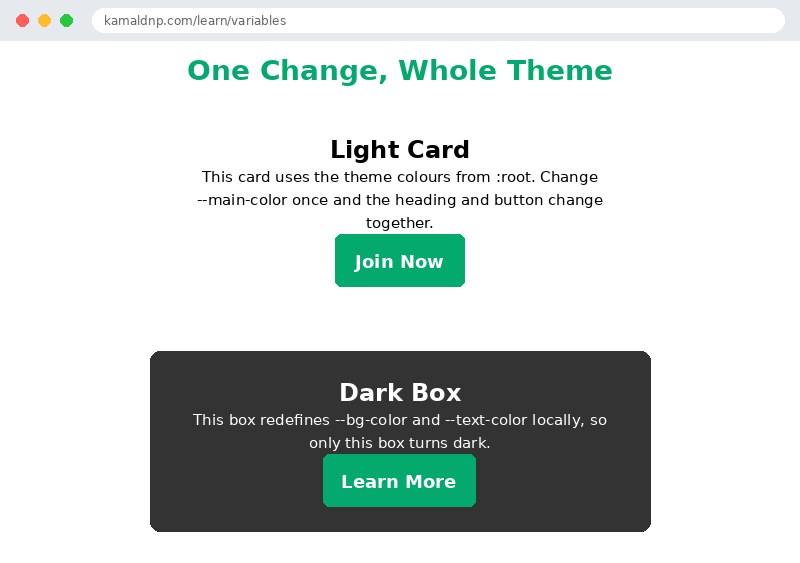
Try it yourself — live editor
Change the code below and press Run to see the result instantly. No file to save, no login needed.
Why learn this yourself — and not just ask AI?
AI can write code for you, but it cannot think for you. When you learn HTML yourself, your brain builds the real skill: you understand why a page looks the way it does, you can fix it when it breaks, and you can answer it in an exam or an interview without help. That is the skill that gets you a job — not a copied answer.
Get certified — just ₹10
Finish all 30 lessons, pass the test (80%), pay ₹10 and get your certificate.
Take the testPrefer watching? Video courses teach the same topics step by step.
Go further with a full course
Free tutorials teach you the basics. Our paid courses add live projects, mentorship and a certificate.
Browse all courses