JavaScript Array Methods
6 min read · Free · No login needed
An array holds a list of things — students, prices, marks, cricket scores. But a list sitting still is not very useful. You usually want to do something with every item: double every price, keep only the passing marks, print every name, find one student, or put the scores in order. JavaScript gives you five methods for exactly that: map, filter, forEach, find and sort.
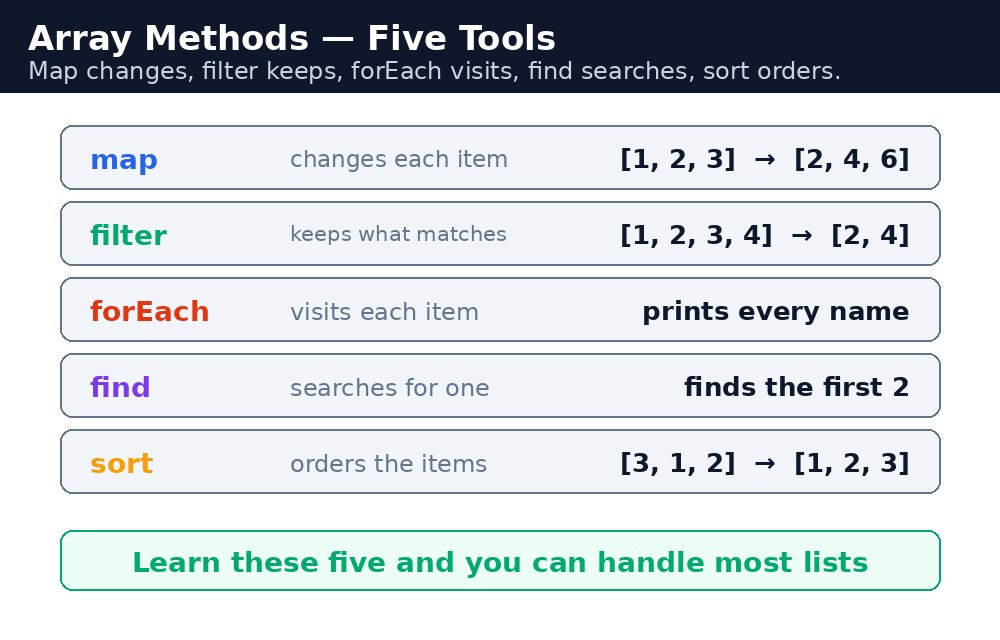
Think of a chai shop. The owner has a list of prices: 10, 15, 20, 25. map is like rewriting the menu with new prices. filter is like picking only the chais under ₹20. forEach is like calling out every item on the list. find is like asking "where is the kulhad chai?" sort is like arranging the menu from cheapest to costliest. Five small tools — and almost every JavaScript program you will ever write uses at least one of them.
Remember it like this: map changes, filter keeps, forEach visits, find searches, sort orders. Say that line once and you will never mix them up again.
map — change every item
map runs a function on every item of an array and returns a new array with the results. The original array is not changed. That is the whole idea: you take a list in, you get a new list out.
let prices = [10, 15, 20, 25];
let doubled = prices.map(function(price) {
  return price * 2;
});
// doubled is [20, 30, 40, 50]
// prices is still [10, 15, 20, 25]
Read it like a sentence: "For every price, return the price times two, and collect the answers in a new array." The function you give to map receives each item one by one, and whatever it returns becomes the item in the new array.
filter — keep only what matches
filter also returns a new array, but it keeps only the items that pass a test. The test is a function that returns true or false. True means keep it, false means drop it.
let marks = [45, 82, 30, 91, 67];
let passed = marks.filter(function(mark) {
  return mark >= 40;
});
// passed is [45, 82, 91, 67]
The 30 fails the test, so it is left out. The original array is untouched. filter is the method you reach for whenever you hear "only the ones that..." — only the passed students, only the chais under ₹20, only the items in stock.
forEach — visit every item
forEach runs a function on every item, one by one — but unlike map and filter, it returns nothing. You use it when you want to do something with each item, not build a new array: print it, add it to a total, or show it on the page.
let students = ["Rahul", "Priya", "Amit"];
students.forEach(function(name) {
  console.log("Hello, " + name);
});
// Hello, Rahul
// Hello, Priya
// Hello, Amit
map and forEach look similar, but they answer different questions. map asks "what is the new list?" forEach asks "what should I do with each item?" If you find yourself using map but throwing away its result, you wanted forEach.find — search for one item
find returns the first item that passes a test. If nothing passes, it returns undefined — JavaScript's way of saying "not found".
let scores = [12, 45, 78, 33];
let firstBig = scores.find(function(score) {
  return score > 50;
});
// firstBig is 78 (the first one over 50)
Notice it stops at 78. The 33 is never checked, because find only wants the first match. If you need all the matches, use filter instead.
sort — put things in order
sort rearranges the array itself — it changes the original array, so be careful. With words, plain sort() works fine: it puts them in alphabetical order. With numbers, you must give it a small comparison function, because plain sort() treats numbers as text and would put 100 before 20.
let names = ["Priya", "Amit", "Rahul"];
names.sort();
// ["Amit", "Priya", "Rahul"]

let numbers = [100, 20, 3];
numbers.sort(function(a, b) {
  return a - b;
});
// [3, 20, 100]
The comparison function returns a negative number when a should come first, a positive number when b should come first, and zero when they are equal. a - b does exactly that for numbers, smallest first. For biggest first, use b - a.
sort is the only one of these five that changes the original array. If you want to keep the original order, copy the array first: let sorted = [...numbers].sort(function(a, b) { return a - b; }); — the three dots spread the items into a new array, and then you sort the copy.Common mistakes
- Forgetting that
mapandfilterreturn a new array — calling them without saving the result throws the answer away. - Using
mapwhen you only want to print or add things up — that isforEach's job, andmapwastes the new array. - Sorting numbers with plain
sort()— it sorts them as text, so 100 comes before 20. Always pass thea - bfunction for numbers. - Expecting
findto return all matches — it returns only the first one. Usefilterfor all of them. - Writing
returninside aforEachand expecting it to stop the loop —forEachhas no way to stop early. Use aforloop when you need to break out.
Remember
- map changes, filter keeps, forEach visits, find searches, sort orders.
map,filterandfindreturn a new value; the original array stays the same.forEachreturns nothing — use it for actions, not for building lists.sortchanges the original array, and numbers need thea - bcomparison function.
Example explained
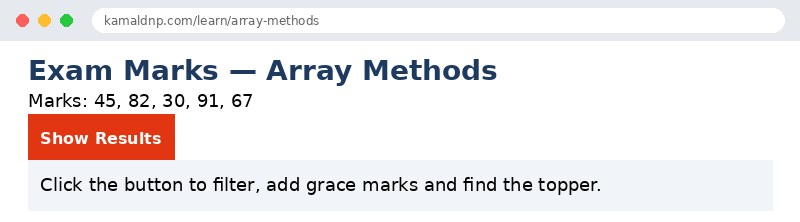
let marks = [45, 82, 30, 91, 67];— the exam marks of five students, stored in one array.marks.filter(function(mark) { return mark >= 40; })— keeps only the marks that are 40 or more, so the 30 drops out and the result is a new array[45, 82, 91, 67].passed.map(function(mark) { return mark + 5; })— adds 5 grace marks to each passing mark, giving[50, 87, 96, 72]. The originalmarksarray is never changed.passed.find(function(mark) { return mark > 90; })— finds the first mark above 90, which is 91.document.getElementById("result").innerHTML = ...— writes the answer into the page, so you can see it without opening the console.
Example
<!DOCTYPE html>
<html>
<head>
<title>Array Methods — Exam Marks</title>
<style>
body { font-family: Verdana, sans-serif; padding: 20px; }
h1 { color: #1e3a5f; }
button { background-color: #e13611; color: white; border: none; padding: 10px 18px; font-size: 16px; cursor: pointer; }
p { font-size: 18px; }
.result { background-color: #f1f5f9; padding: 12px; }
</style>
</head>
<body>

<h1>Exam Marks — Array Methods</h1>
<p>Marks: 45, 82, 30, 91, 67</p>
<button onclick="showResults()">Show Results</button>
<p class="result" id="result">Click the button to filter, add grace marks and find the topper.</p>

<script>
function showResults() {
  let marks = [45, 82, 30, 91, 67];
  let passed = marks.filter(function(mark) {
    return mark >= 40;
  });
  let withGrace = passed.map(function(mark) {
    return mark + 5;
  });
  let topper = passed.find(function(mark) {
    return mark > 90;
  });
  document.getElementById("result").innerHTML =
    "Passed: " + passed.join(", ") +
    "<br>With 5 grace marks: " + withGrace.join(", ") +
    "<br>First mark above 90: " + topper;
}
</script>

</body>
</html>
Output
Try it yourself — live editor
Change the code below and press Run to see the result instantly. No file to save, no login needed.
Why learn this yourself — and not just ask AI?
AI can write code for you, but it cannot think for you. When you learn HTML yourself, your brain builds the real skill: you understand why a page looks the way it does, you can fix it when it breaks, and you can answer it in an exam or an interview without help. That is the skill that gets you a job — not a copied answer.
Get certified — just ₹10
Finish all 30 lessons, pass the test (80%), pay ₹10 and get your certificate.
Take the testPrefer watching? Video courses teach the same topics step by step.
Go further with a full course
Free tutorials teach you the basics. Our paid courses add live projects, mentorship and a certificate.
Browse all courses

