JavaScript Arrays
4 min read · Free · No login needed
An array is a single variable that holds an ordered list of values. A class has 40 students — you could make 40 variables, or one array called students that holds all 40 names. Think of a train: each coach has a number, and the coaches sit in order. In an array, each value sits in a numbered seat called an index, and the first seat is number 0.
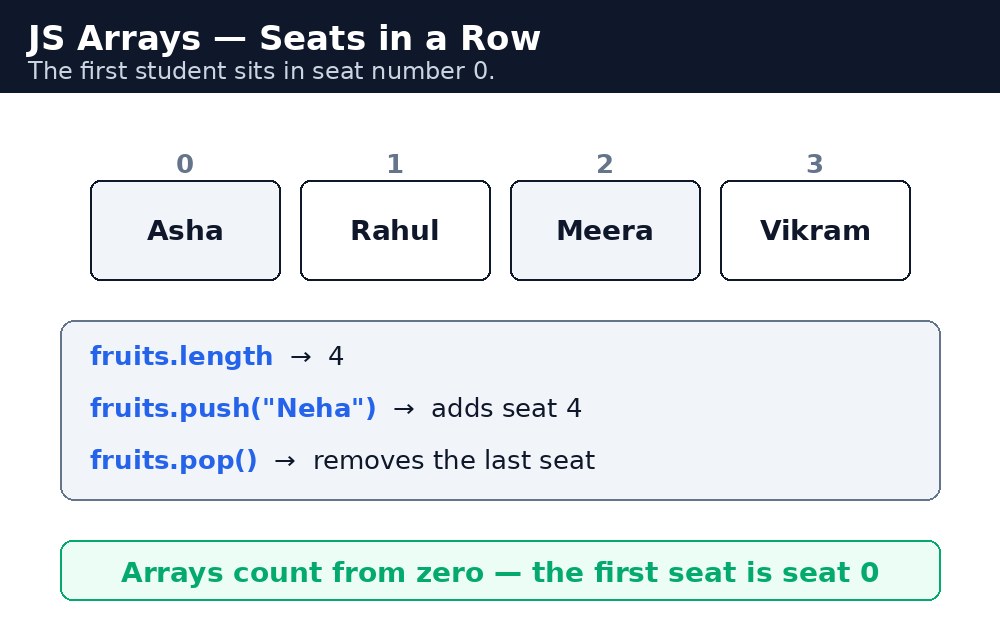
Arrays are the workhorse of JavaScript. Menus, student lists, exam marks, cricket scores, photo galleries — any time you have more than one of something, an array is probably the right box for it.
Creating and reading an array
You create an array with square brackets, values separated by commas. You read one value by its index in square brackets.
let students = ["Rahul", "Priya", "Amit", "Sana"];
students[0];  // "Rahul" — the first seat is 0
students[2];  // "Amit"
students.length;  // 4 — the number of values
The length property tells you how many values the array holds. The last value is always at index length - 1 — for 4 students, the last one sits at index 3.
Adding and removing values
Four methods do almost all the adding and removing you will ever need. push() adds to the end, pop() removes from the end, unshift() adds to the start, and shift() removes from the start.
let queue = ["Rahul", "Priya"];
queue.push("Amit");    // ["Rahul", "Priya", "Amit"]
queue.pop();           // removes "Amit", returns it
queue.unshift("Sana"); // ["Sana", "Rahul", "Priya"]
queue.shift();         // removes "Sana", returns it
Notice that pop() and shift() return the value they removed. That is handy: you can take the next student from a queue and use their name in the same line.
typeof students gives "object", not "array". To check whether something really is an array, use Array.isArray(students) — it returns true for arrays and false for everything else.Changing a value and looping
You change a value by assigning to its index: students[1] = "Priya Sharma". And you visit every value with a for loop — the loop counter walks from 0 to length - 1. You will learn loops properly in the next lessons, but here is the pattern you will use a hundred times:
for (let i = 0; i < students.length; i++) {
  console.log(students[i]);
}
i <= students.length instead of i < students.length. The last valid index is length - 1, so <= walks one seat too far and reads undefined. Write < and the bug never appears.Common mistakes
- Starting to count from 1 — the first element is at index 0, not 1.
- Reading past the end —
students[4]in a 4-item array isundefined, not an error, so it fails silently. - Using
<= lengthin a loop — one step too far, oneundefinedat the end. - Forgetting that
push()returns the new length, not the array —let x = queue.push("Amit")makesxa number.
Remember
- An array is an ordered list in square brackets:
["Rahul", "Priya", "Amit"]. - Indexing starts at 0; the last value is at
length - 1. push()/pop()work at the end;unshift()/shift()work at the start.Array.isArray()is the real test for "is this an array?"- Arrays count from zero — the first student sits in seat number 0.
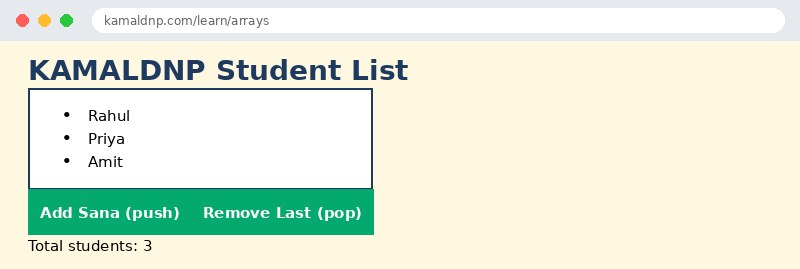
Example explained
let students = ["Rahul", "Priya", "Amit"];— one array holding three names, in order. Rahul sits at index 0.students.push("Sana")— adds Sana to the end of the list, so the array grows to 4 names.students.pop()— removes the last name from the list and returns it, so the page can say who was removed.students.length— after each change, the page shows the new count, so the visitor sees the list grow and shrink.document.getElementById("list").innerHTML = ...— rebuilds the visible list from the array, so the page always matches the data.
Example
<!DOCTYPE html>
<html>
<head>
<title>KAMALDNP Student List</title>
<style>
body { font-family: Verdana, sans-serif; background-color: #fff8e1; }
h1 { color: #1e3a5f; }
ul { background-color: white; border: 2px solid #1e3a5f; padding: 14px 30px; width: 280px; }
button { background-color: #04aa6d; color: white; padding: 10px 18px; border: none; margin: 4px; }
</style>
</head>
<body>

<h1>KAMALDNP Student List</h1>
<ul id="list">
<li>Rahul</li>
<li>Priya</li>
<li>Amit</li>
</ul>
<button onclick="addStudent()">Add Sana (push)</button>
<button onclick="removeStudent()">Remove Last (pop)</button>
<p id="count">Total students: 3</p>

<script>
let students = ["Rahul", "Priya", "Amit"];
function showList() {
  let html = "";
  for (let i = 0; i < students.length; i++) {
    html = html + "<li>" + students[i] + "</li>";
  }
  document.getElementById("list").innerHTML = html;
  document.getElementById("count").innerHTML = "Total students: " + students.length;
}
function addStudent() {
  students.push("Sana");
  showList();
}
function removeStudent() {
  let removed = students.pop();
  showList();
  if (removed) {
    document.getElementById("count").innerHTML = "Removed: " + removed + " — Total students: " + students.length;
  }
}
</script>

</body>
</html>
Output
Try it yourself — live editor
Change the code below and press Run to see the result instantly. No file to save, no login needed.
Why learn this yourself — and not just ask AI?
AI can write code for you, but it cannot think for you. When you learn HTML yourself, your brain builds the real skill: you understand why a page looks the way it does, you can fix it when it breaks, and you can answer it in an exam or an interview without help. That is the skill that gets you a job — not a copied answer.
Get certified — just ₹10
Finish all 30 lessons, pass the test (80%), pay ₹10 and get your certificate.
Take the testPrefer watching? Video courses teach the same topics step by step.
Go further with a full course
Free tutorials teach you the basics. Our paid courses add live projects, mentorship and a certificate.
Browse all courses