JavaScript Conditions
5 min read · Free · No login needed
Programs make decisions all the time. If the marks are 40 or more, print "Pass". If the age is under 18, block the page. If the bill is over ₹500, give a discount. JavaScript makes these decisions with if, else if and else — the same words you use in real life.
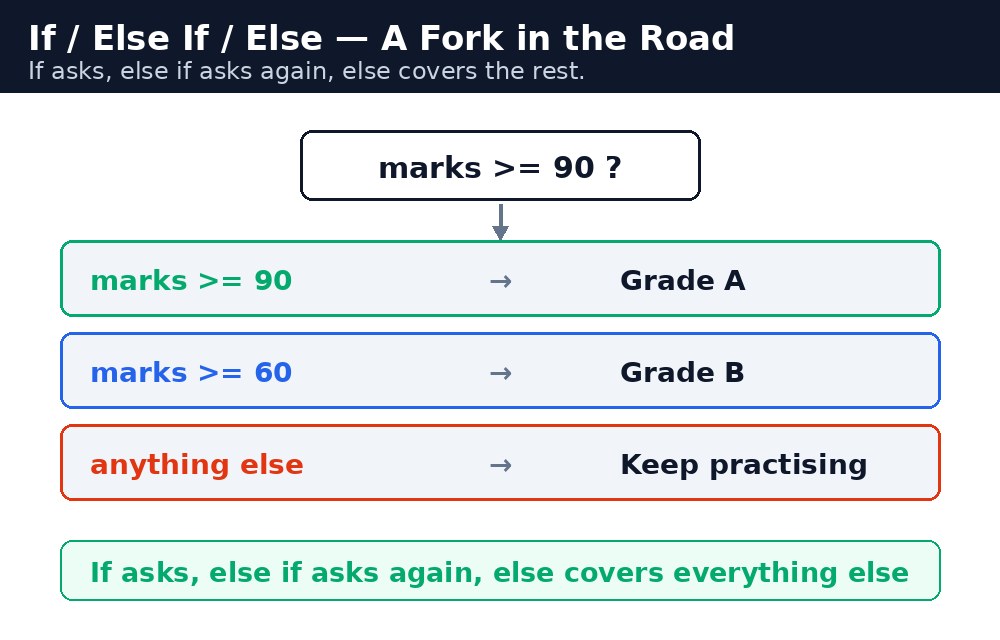
Think of a traffic signal. if the light is green, go. else if it is yellow, slow down. else — in every other case — stop. The computer checks the conditions from top to bottom and runs the first one that is true. Once one block runs, the rest are skipped. That is the whole trick: the computer follows the first true branch and ignores the rest.
Remember it like this: if asks, else if asks again, else covers everything else.
if — one question, one answer
The simplest condition is a single if. You write a test inside round brackets, and a block of code inside curly braces. If the test is true, the block runs. If it is false, the block is skipped and the program carries on.
let marks = 82;
if (marks >= 40) {
  console.log("Pass");
}
// "Pass" — because 82 is more than 40
The test is usually a comparison: >= (more than or equal), < (less than), === (exactly equal), !== (not equal). The result is always true or false, and that one word decides everything.
else — the other side
else is the "otherwise" branch. It runs only when the if test is false. Together they cover every case: one of the two blocks always runs.
let age = 15;
if (age >= 18) {
  console.log("You can vote");
} else {
  console.log("Too young to vote");
}
// "Too young to vote"
Notice the shape: the else has no test of its own. It simply catches everything the if rejected. That makes if...else perfect for two-way choices: pass or fail, open or closed, member or guest.
else if — a chain of questions
Sometimes two branches are not enough. A student can get a distinction, a first division, a second division, or fail — four outcomes, not two. You chain them with else if: the computer asks the first question, then the next, then the next, until one is true.
let marks = 82;
if (marks >= 90) {
  console.log("Distinction");
} else if (marks >= 60) {
  console.log("First division");
} else if (marks >= 40) {
  console.log("Second division");
} else {
  console.log("Fail");
}
// "First division"
>= 40 test first, every passing student would get "Second division", because 82 is also more than 40. Always check the strictest condition first — biggest number first, then work downwards.Ternary operator — if...else in one line
When a condition only picks between two values, you can write it in one line with the ternary operator: ? and :. It is called ternary because it has three parts: the test, the value if true, and the value if false.
let age = 20;
let status = (age >= 18) ? "Adult" : "Minor";
// status is "Adult"
Read it like a sentence: "If age is 18 or more, Adult, otherwise Minor." The ternary is a shortcut, not a new idea — it does exactly what if...else does, in less space. Use it for simple picks; for anything longer than one line, write the full if...else so the next reader can follow it.
=== (three equals) checks both the value and the type. == (two equals) converts the types first, so "40" == 40 is true but "40" === 40 is false. In conditions, always use === — the two-equals version causes silent surprises, especially when a form gives you text and you compare it with a number.Common mistakes
- Writing
=(one equals) instead of===inside a test — one equals assigns a value, soif (marks = 40)sets marks to 40 and is always true. Always use===for comparing. - Checking the loosest condition first in an
else ifchain — the stricter tests below it never get a chance. Biggest number first, then downwards. - Forgetting the curly braces
{ }around a block — without them, only the first line after theifbelongs to it, and the rest always runs. - Using
==instead of===— the loose version converts types and can say "40" equals 40. Use three equals. - Nesting the ternary too deep —
a ? b : c ? d : eis a puzzle, not code. Write a normalif...elsechain instead.
Remember
- If asks, else if asks again, else covers everything else.
- The computer runs the first true branch and skips the rest — so check the strictest condition first.
===compares value and type;==converts types and can surprise you. Use three equals.- The ternary
test ? valueIfTrue : valueIfFalseis a one-lineif...elsefor simple picks.
Example explained
let marks = 82;— the student's marks, stored in a variable.if (marks >= 90)— the strictest test first: 90 or more means Distinction. 82 fails this test, so the computer moves on.else if (marks >= 60)— 82 passes this test, so "First division" is chosen and the rest of the chain is skipped.else— the safety net: if no test passes, the student has failed.document.getElementById("result").innerHTML = ...— writes the result into the page when the button is clicked, so you can see it without opening the console.
Example
<!DOCTYPE html>
<html>
<head>
<title>Result Checker — JavaScript Conditions</title>
<style>
body { font-family: Verdana, sans-serif; padding: 20px; }
h1 { color: #1e3a5f; }
button { background-color: #e13611; color: white; border: none; padding: 10px 18px; font-size: 16px; cursor: pointer; }
p { font-size: 18px; }
.result { background-color: #f1f5f9; padding: 12px; }
</style>
</head>
<body>

<h1>Result Checker</h1>
<p>Marks: 82 out of 100</p>
<button onclick="checkResult()">Check Result</button>
<p class="result" id="result">Click the button to see the division.</p>

<script>
function checkResult() {
  let marks = 82;
  let division;
  if (marks >= 90) {
    division = "Distinction";
  } else if (marks >= 60) {
    division = "First division";
  } else if (marks >= 40) {
    division = "Second division";
  } else {
    division = "Fail";
  }
  let status = (marks >= 40) ? "Pass" : "Fail";
  document.getElementById("result").innerHTML =
    "Marks: " + marks +
    "<br>Division: " + division +
    "<br>Status: " + status;
}
</script>

</body>
</html>
Output
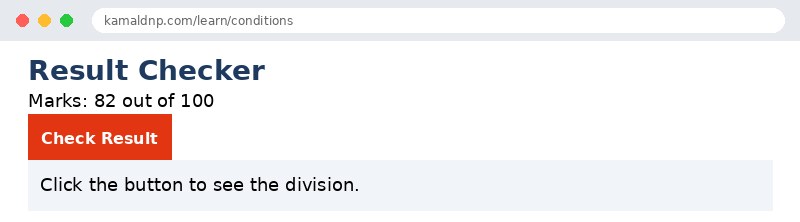
Try it yourself — live editor
Change the code below and press Run to see the result instantly. No file to save, no login needed.
Why learn this yourself — and not just ask AI?
AI can write code for you, but it cannot think for you. When you learn HTML yourself, your brain builds the real skill: you understand why a page looks the way it does, you can fix it when it breaks, and you can answer it in an exam or an interview without help. That is the skill that gets you a job — not a copied answer.
Get certified — just ₹10
Finish all 30 lessons, pass the test (80%), pay ₹10 and get your certificate.
Take the testPrefer watching? Video courses teach the same topics step by step.
Go further with a full course
Free tutorials teach you the basics. Our paid courses add live projects, mentorship and a certificate.
Browse all courses