JavaScript Data Types
4 min read · Free · No login needed
Every value in JavaScript has a type — a kind. A piece of text is a string, a count is a number, a yes/no answer is a boolean. The type decides what you can do with the value: you can add two numbers, but adding a number to a piece of text joins them instead. Knowing the types is knowing what your code is allowed to do.
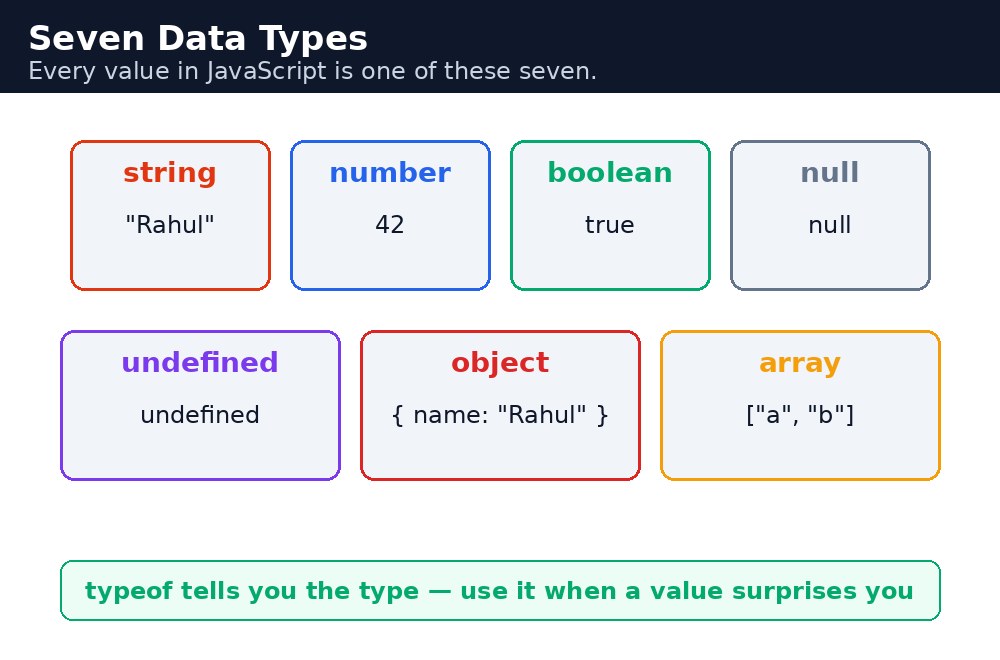
There are eight types in total, but you will use six of them every day: string, number, boolean, undefined, null, and object. Arrays are objects with a special shape. The built-in operator typeof tells you the type of any value — it is the quickest way to check what you are really holding.
String, number, boolean — the three basics
A string is text inside quotes — single, double, or backtick quotes all work. A number is any count or measurement, whole or decimal; JavaScript has only one number type, so 10 and 10.5 are the same kind. A boolean is either true or false — the answer to a yes/no question, like "did the student pass?"
let name = "Rahul Verma";  // string
let marks = 82;            // number
let passed = true;         // boolean
undefined and null — two kinds of "nothing"
undefined means a variable exists but no value was ever put in it. null means a value was deliberately set to "nothing". The difference is intent: undefined is an accident waiting to be fixed, null is a choice — "this student has no middle name" is null, while a variable you forgot to fill is undefined. In practice, check for both when a value might be missing.
let middleName;           // undefined — never given a value
let nickname = null;      // null — deliberately empty
Object and array — values that hold other values
An object groups related values under named labels, called properties. A student has a name, an age, and a course — one object can hold all three. An array holds a list of values in order, reached by position: the first item is at position 0, the second at 1, and so on.
let student = { name: "Rahul", age: 19, course: "HTML" };
let subjects = ["HTML", "CSS", "JavaScript"];
student.name;    // "Rahul"
subjects[0];     // "HTML" — positions start at 0
typeof — asking a value what it is
The typeof operator returns the type as a word: typeof "Rahul" is "string", typeof 82 is "number", typeof true is "boolean". It has two famous quirks: typeof null says "object" (a mistake from the first version of the language, kept forever), and typeof [] also says "object" — arrays are objects. To check for an array properly, use Array.isArray().
document.getElementById("marks").value gives you "82", not 82 — and "82" + 10 is "8210", not 92. Always wrap input values in Number(...) before doing maths with them.console.log(typeof marks, marks). Half of all beginner bugs are a value being the right digits in the wrong type.Common mistakes
- Doing maths with a string from an input box — convert it with
Number()first. - Thinking
typeof nullshould say "null" — it says "object", a historic quirk. Check null with=== nullinstead. - Using
typeofto check for an array — it says "object". UseArray.isArray(). - Counting array positions from 1 — the first item is at position 0, so the last item of a 3-item list is at position 2.
Remember
- String = text in quotes, number = a count or measurement, boolean = true or false.
undefined= never given a value;null= deliberately empty.- An object groups values by name; an array lists values by position, starting at 0.
typeoftells you a value's type — except for null and arrays, which both say "object".
Example explained
let student = { name: "Rahul Verma", age: 19, course: "HTML" };— one object holding three related facts about a student, each under its own label.let subjects = ["HTML", "CSS", "JavaScript"];— an array of three strings, in the order the student is learning them.typeof student.name— asks the type of the name, and gets"string".typeof student.age— asks the type of the age, and gets"number".Array.isArray(subjects)— the proper way to check for an array, sincetypeofwould only say "object".
Example
<!DOCTYPE html>
<html>
<head>
<title>Student Profile — Data Types</title>
<style>
body { background-color: #fff8e1; font-family: Verdana, sans-serif; text-align: center; }
h1 { color: #b45309; }
.card { background-color: white; border: 2px solid #f59e0b; padding: 16px; width: 320px; margin: 20px auto; text-align: left; }
button { background-color: #e13611; color: white; border: none; padding: 12px 24px; font-size: 16px; cursor: pointer; }
#types { color: green; font-weight: bold; font-size: 16px; }
</style>
</head>
<body>

<h1>Student Profile</h1>
<div class="card">
<p>Name: Rahul Verma</p>
<p>Age: 19</p>
<p>Course: HTML</p>
<p>Subjects: HTML, CSS, JavaScript</p>
</div>
<button onclick="showTypes()">Show the types</button>
<p id="types">Click the button to see the type of each value.</p>

<script>
function showTypes() {
  let student = { name: "Rahul Verma", age: 19, course: "HTML" };
  let subjects = ["HTML", "CSS", "JavaScript"];
  let line1 = "name is a " + typeof student.name;
  let line2 = "age is a " + typeof student.age;
  let line3 = "subjects is an array: " + Array.isArray(subjects);
  document.getElementById("types").textContent = line1 + " | " + line2 + " | " + line3;
}
</script>

</body>
</html>
Output
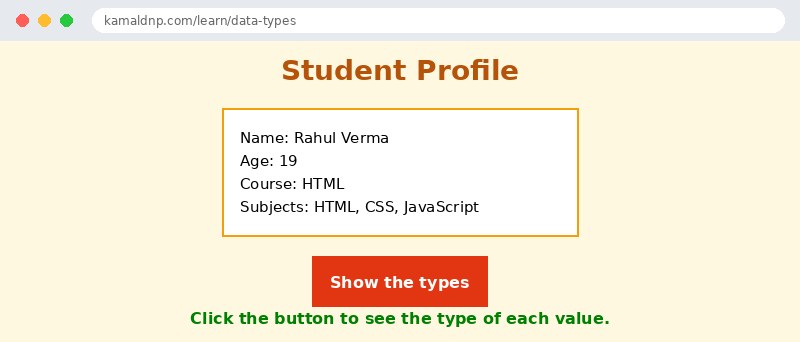
Try it yourself — live editor
Change the code below and press Run to see the result instantly. No file to save, no login needed.
Why learn this yourself — and not just ask AI?
AI can write code for you, but it cannot think for you. When you learn HTML yourself, your brain builds the real skill: you understand why a page looks the way it does, you can fix it when it breaks, and you can answer it in an exam or an interview without help. That is the skill that gets you a job — not a copied answer.
Get certified — just ₹10
Finish all 30 lessons, pass the test (80%), pay ₹10 and get your certificate.
Take the testPrefer watching? Video courses teach the same topics step by step.
Go further with a full course
Free tutorials teach you the basics. Our paid courses add live projects, mentorship and a certificate.
Browse all courses

