JavaScript Dates
5 min read · Free · No login needed
Every website deals with dates: exam dates, birthdays, booking days, "posted 3 days ago". JavaScript has a built-in Date object for all of it. You create a date with new Date(), and then you ask it questions: what year is it, what month, what day, what weekday?
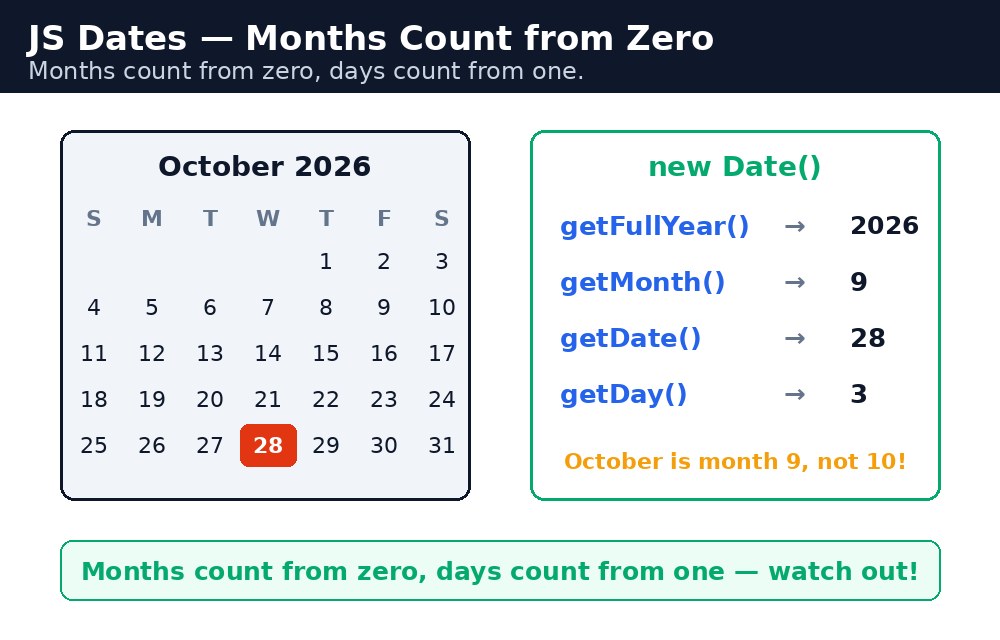
Think of a date like a wall calendar. new Date() opens the calendar to today. Then getFullYear() reads the year printed at the top, getMonth() tells you which page you are on, getDate() points at today's number, and getDay() tells you whether it is Monday or Sunday. Each question is a small method — and together they let you build anything from a countdown to an admit-card page.
Remember it like this: months count from zero, days count from one. January is month 0, December is month 11 — but the 1st of the month is day 1. That one quirk causes more beginner bugs than anything else about dates.
new Date() — today, right now
new Date() with nothing inside it creates a date for this exact moment — today's date and the current time. The word new matters: it builds a fresh Date object for you.
let today = new Date();
console.log(today);
// Something like: Wed Oct 28 2026 20:15:00 GMT+0530
You can also build a date for a specific day by passing the year, month and day: new Date(2026, 10, 15) means 15 November 2026. Watch out — the month is 0-based, so November is 10, not 11. January is 0, February is 1, and December is 11.
getFullYear, getMonth, getDate — reading a date
These three methods read the parts of a date. They are the ones you will use most.
let exam = new Date(2026, 10, 15);
exam.getFullYear(); // 2026
exam.getMonth();    // 10 (November — months start at 0)
exam.getDate();     // 15 (the day of the month)
getFullYear() gives all four digits — 2026, not 26. There is also an old method called getYear() that gives a strange number; never use it. Always use getFullYear().
new Date(2026, 0, 1) is 1 January 2026, and new Date(2026, 11, 31) is 31 December 2026. When you show a month to a user, add 1 first: exam.getMonth() + 1 gives 11 for November.getDay — which weekday is it?
getDay() returns a number from 0 to 6. Sunday is 0, Monday is 1, and Saturday is 6. It is handy when you want to say "exam on Monday" or check whether today is a weekend.
let days = ["Sunday", "Monday", "Tuesday", "Wednesday",
            "Thursday", "Friday", "Saturday"];
let today = new Date();
let weekday = days[today.getDay()];
// "Wednesday" (if today is a Wednesday)
The trick is a small array of weekday names, and getDay() picks the right one. The same trick works for months: keep an array of twelve month names and let getMonth() pick one.
toDateString — a readable date
A raw Date object prints as a long ugly line with the time and timezone. toDateString() gives you a short, human-readable version: just the weekday, month, day and year.
let exam = new Date(2026, 10, 15);
exam.toDateString();
// "Sun Nov 15 2026"
There are more formats too: toLocaleDateString() gives the date in the user's own style (15/11/2026 in India), and toISOString() gives the standard 2026-11-15 format that computers prefer. For showing a date to a student, toDateString() is usually the clearest.
Common mistakes
- Forgetting that months are 0-based — writing
new Date(2026, 11, 15)for November gives you December. November is month 10. - Using
getYear()instead ofgetFullYear()— the old one returns a useless number like 126. Always usegetFullYear(). - Mixing up
getDate()andgetDay()—getDate()is the day of the month (1–31),getDay()is the weekday (0–6). - Showing
getMonth()directly to a user — it prints 0 for January. Add 1 when you display it. - Forgetting the word
new—Date()withoutnewjust returns a text string, not a Date object, so none of the methods work on it.
Remember
- Months count from zero, days count from one. January is 0, the 1st is 1.
new Date()is today;new Date(2026, 10, 15)is 15 November 2026.getFullYear(),getMonth(),getDate()read the parts;getDay()gives the weekday (Sunday is 0).toDateString()turns a date into readable text like "Sun Nov 15 2026".
Example explained
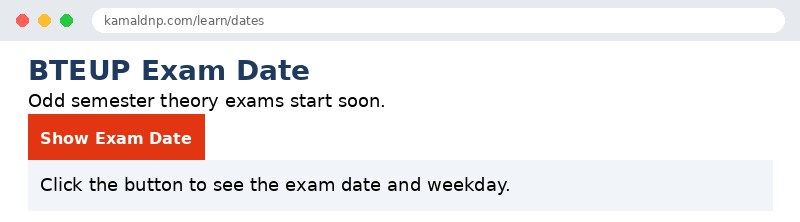
let exam = new Date(2026, 10, 15);— builds the exam date, 15 November 2026. The month is 10 because months count from zero.let days = ["Sunday", "Monday", ...];— an array of weekday names, so the number fromgetDay()can be turned into a word.days[exam.getDay()]—getDay()returns 0 for Sunday, so this picks "Sunday" from the array.exam.toDateString()— gives the short readable form "Sun Nov 15 2026".document.getElementById("result").innerHTML = ...— writes the exam date and weekday into the page when the button is clicked.
Example
<!DOCTYPE html>
<html>
<head>
<title>Exam Date — JavaScript Dates</title>
<style>
body { font-family: Verdana, sans-serif; padding: 20px; }
h1 { color: #1e3a5f; }
button { background-color: #e13611; color: white; border: none; padding: 10px 18px; font-size: 16px; cursor: pointer; }
p { font-size: 18px; }
.result { background-color: #f1f5f9; padding: 12px; }
</style>
</head>
<body>

<h1>BTEUP Exam Date</h1>
<p>Odd semester theory exams start soon.</p>
<button onclick="showExamDate()">Show Exam Date</button>
<p class="result" id="result">Click the button to see the exam date and weekday.</p>

<script>
function showExamDate() {
  let exam = new Date(2026, 10, 15);
  let days = ["Sunday", "Monday", "Tuesday", "Wednesday",
              "Thursday", "Friday", "Saturday"];
  let weekday = days[exam.getDay()];
  document.getElementById("result").innerHTML =
    "Exam date: " + exam.toDateString() +
    "<br>Day: " + weekday +
    "<br>Year: " + exam.getFullYear();
}
</script>

</body>
</html>
Output
Try it yourself — live editor
Change the code below and press Run to see the result instantly. No file to save, no login needed.
Why learn this yourself — and not just ask AI?
AI can write code for you, but it cannot think for you. When you learn HTML yourself, your brain builds the real skill: you understand why a page looks the way it does, you can fix it when it breaks, and you can answer it in an exam or an interview without help. That is the skill that gets you a job — not a copied answer.
Get certified — just ₹10
Finish all 30 lessons, pass the test (80%), pay ₹10 and get your certificate.
Take the testPrefer watching? Video courses teach the same topics step by step.
Go further with a full course
Free tutorials teach you the basics. Our paid courses add live projects, mentorship and a certificate.
Browse all courses