JavaScript Debugging — console.log & Fixing Errors
5 min read · Free · No login needed
Every programmer writes bugs — beginners and experts alike. Debugging is not a sign of failure; it is the job itself. The difference between a stuck beginner and a working developer is not fewer bugs, it is a method for finding them. This lesson gives you that method: a torch, a map of the three common errors, and one golden rule — fix one thing at a time.
console.log — the torch
let price = "20";
let quantity = 5;
console.log("price:", price, "quantity:", quantity);
console.log("total:", price * quantity);
When the page does something wrong, your first job is to see what the code actually sees — not what you think it sees. console.log prints values to the browser console (open it with F12). Print the inputs before the calculation and the result after it. Nine times out of ten, the printed value surprises you — and the surprise IS the bug. In the example above, price is the string "20", not the number 20 — and that single pair of quotes changes everything.
console.log is for you, the developer — visitors never open the console. Remove or keep your logs, but never use console.log to show the visitor something important; use the page itself (textContent) for that.Reading error messages
When JavaScript cannot run your code, it tells you exactly what is wrong — in the console, with the line number. Learn to read three messages:
- ReferenceError: x is not defined — you used a name that does not exist, usually a typo: totl instead of total, or a variable used before it was declared.
- TypeError: Cannot set properties of null —
getElementByIdreturnednullbecause no element has that id, and then the code tried to use it. The id in the HTML and the id in the script must match letter for letter. - SyntaxError: Unexpected token — the code itself is broken: a missing bracket, a missing quote, an extra comma. The code could not even be read, so nothing ran at all.
The message names the problem and the line. Click the line number in the console and the browser shows you the exact spot. Most beginners ignore the message and guess; professionals read the message first, because it is usually pointing straight at the bug.
The debugger mindset — one thing at a time
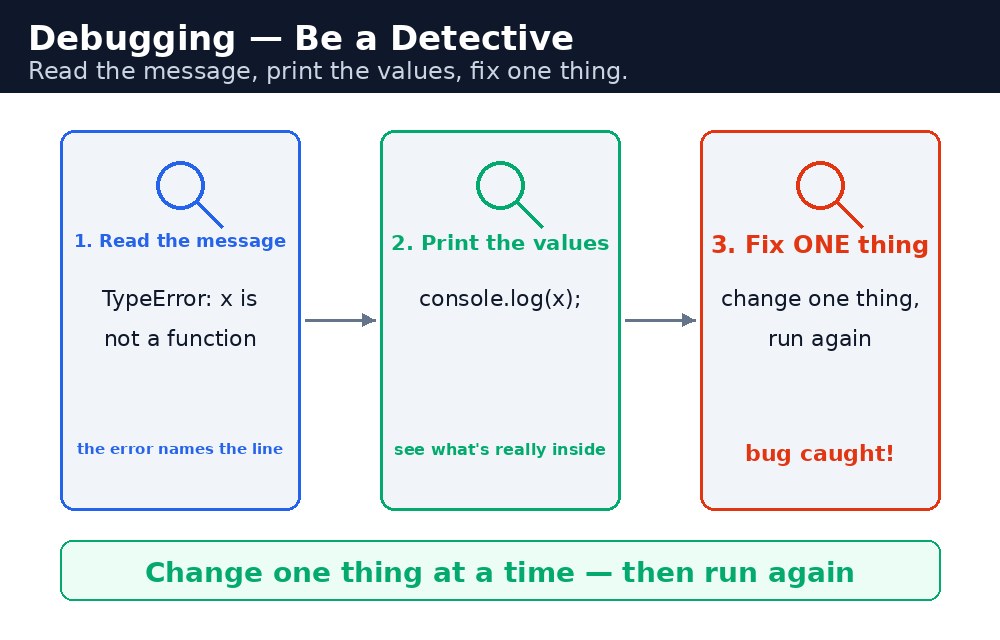
When a page misbehaves, work like a detective: (1) Reproduce it — make the bug happen again, on purpose. (2) Isolate it — remove pieces until only the broken part is left. (3) Guess one cause, and test it with a console.log. (4) Fix it, then check the page works. The example below had a real bug once: the total paragraph's id was "totl" in the HTML but "total" in the script, so getElementById returned null and the button did nothing. The console said "Cannot set properties of null", the line number pointed at the textContent line, and fixing one letter — totl to total — fixed everything.
console.log tells you what, and fixing one thing at a time tells you whether you were right. Change five things at once and you will never know which one worked.Common mistakes
- Ignoring the console — the error message is the fastest clue you will ever get.
- Changing five things at once — fix one, test, then move on.
- Guessing instead of printing —
console.logthe actual values; the bug is usually in what you assumed. - Leaving a typo in an id — the HTML id and the script id must match exactly, including capital letters.
- Treating a string as a number — "20" + 5 is "205"; convert with
Number()before doing maths.
Remember
console.logis your torch: print inputs and results to see what the code really sees.- ReferenceError means a name does not exist; TypeError often means
nullwhere an element was expected; SyntaxError means the code itself is broken. - The console message gives the problem and the line number — read it first.
- Reproduce, isolate, guess one cause, fix, test.
- Read the message, print the values, fix one thing.
Example explained
let price = Number(document.getElementById("price").value);— the input value is a string, soNumber()converts it before any maths. The original bug used the string directly.document.getElementById("total")— the id matches the paragraph's id letter for letter. The original bug had "totl" here, which returnednull.console.log("price:", price, "quantity:", quantity);— the torch: it prints the real values so you can check them in the console.let total = price * quantity;— with both values as numbers, 20 times 5 is 100, not "205".document.getElementById("total").textContent = "Total: Rs " + total;— the fixed result appears on the page in green.
Example
<!DOCTYPE html>
<html>
<head>
<title>Price Calculator — Debugged</title>
<style>
body { font-family: Verdana, sans-serif; background-color: #fff8e1; }
h1 { color: #b45309; text-align: center; }
.card { background-color: white; border: 2px solid #f59e0b; padding: 16px; width: 360px; margin: 20px auto; }
button { background-color: #b45309; color: white; border: none; padding: 10px 18px; font-size: 16px; }
input { width: 120px; padding: 6px; margin: 4px 0; }
#total { font-weight: bold; }
</style>
</head>
<body>

<h1>Price Calculator</h1>
<div class="card">
<p>Price (Rs): <input id="price" type="text" value="20"></p>
<p>Quantity: <input id="quantity" type="text" value="5"></p>
<p><button onclick="showTotal()">Show total</button></p>
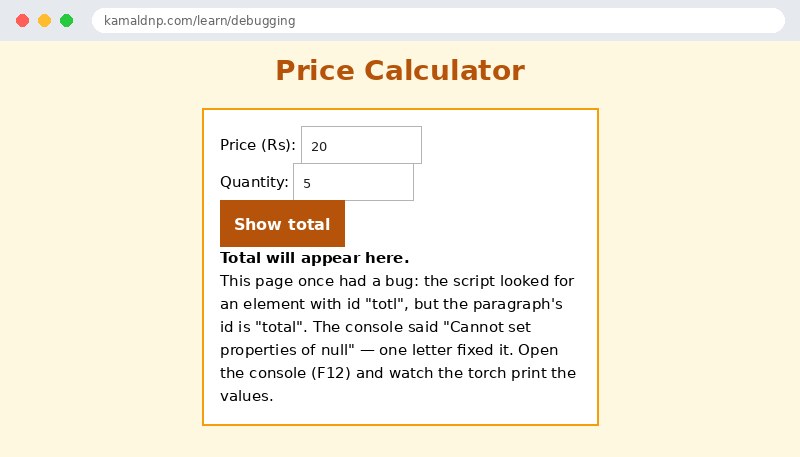
<p id="total">Total will appear here.</p>
<p>This page once had a bug: the script looked for an element with id "totl", but the paragraph's id is "total". The console said "Cannot set properties of null" — one letter fixed it. Open the console (F12) and watch the torch print the values.</p>
</div>

<script>
function showTotal() {
  let price = Number(document.getElementById("price").value);
  let quantity = Number(document.getElementById("quantity").value);
  console.log("price:", price, "quantity:", quantity);
  let total = price * quantity;
  console.log("total:", total);
  let out = document.getElementById("total");
  out.textContent = "Total: Rs " + total;
  out.style.color = "green";
}
</script>

</body>
</html>
Output
Try it yourself — live editor
Change the code below and press Run to see the result instantly. No file to save, no login needed.
Related lessons
Frequently asked questions
The questions learners ask most about this lesson — read the question, then open it to see the answer.
1. What is the first step when a page behaves wrongly?
Print what the code actually sees with console.log — nine times out of ten, the printed value surprises you, and the surprise is the bug.
2. What does ReferenceError: x is not defined mean?
You used a name that does not exist, usually a typo like totl instead of total, or a variable used before declaration.
3. What is the golden rule of debugging?
Fix one thing at a time — change one thing, run, and see whether the bug moved.
Why learn this yourself — and not just ask AI?
AI can write code for you, but it cannot think for you. When you learn HTML yourself, your brain builds the real skill: you understand why a page looks the way it does, you can fix it when it breaks, and you can answer it in an exam or an interview without help. That is the skill that gets you a job — not a copied answer.
Get certified — just ₹10
Finish all 35 lessons, pass the test (80%), pay ₹10 and get your certificate.
Take the testPrefer watching? Video courses teach the same topics step by step.
Go further with a full course
Free tutorials teach you the basics. Our paid courses add live projects, mentorship and a certificate.
Browse all courses