JavaScript Errors — try, catch, finally
5 min read · Free · No login needed
Every program has mistakes. A variable is spelled wrong, a number is divided by nothing, a server does not answer. In JavaScript, a mistake like that is called an error, and by default it stops the whole script — everything after the error never runs. That is why a small typo can blank out an entire page. The fix is to catch the error before it reaches the top: try, catch and finally.
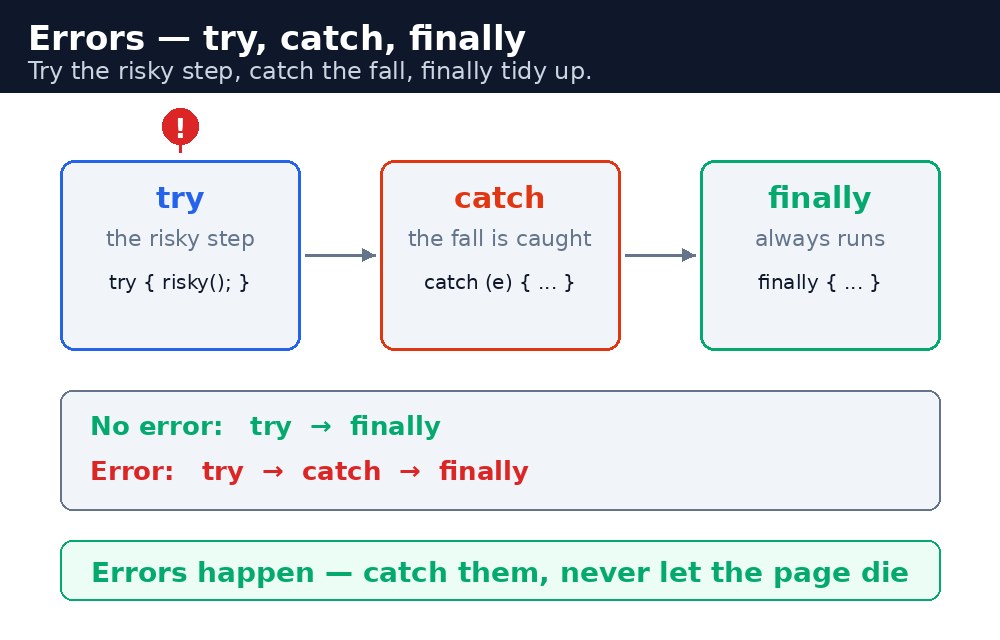
Think of a chai shop order. You try to make the chai (the risky step). If the milk is finished, you catch the problem and serve black tea instead (the backup plan). And finally, whether the order worked or not, you clean the counter (the tidy-up). The shop never closes because of one missing item — and your page should not break because of one bad value.
try, catch, finally — the three parts
try {
  // risky code — if it throws, jump to catch
  let total = price * qty;
} catch (error) {
  // backup plan — error.message tells you what went wrong
  console.log("Something went wrong: " + error.message);
} finally {
  // always runs — tidy up here
  console.log("Done.");
}
The try block holds the risky code. If anything inside it throws an error, JavaScript jumps straight to the catch block and skips the rest of try. The catch block receives the error as an object, and error.message holds a short description. The finally block runs no matter what — error or no error — so it is the right place for clean-up, like closing a loading message.
try block without catch is allowed only if it has finally. But try with finally and no catch does not stop the error — it only runs the tidy-up, then the error continues. To actually handle the error, you need catch.throw — making your own errors
Sometimes the code runs fine but the value is wrong — a negative age, an empty name, a quantity of zero. JavaScript does not know that is an error, so you throw one yourself:
function checkAge(age) {
  if (age < 0) {
    throw new Error("Age cannot be negative.");
  }
  return "Age is fine.";
}
throw new Error("...") stops the function immediately and jumps to the nearest catch. This turns a silent wrong value into a loud, visible problem — much easier to find and fix than a bill that quietly comes out wrong.
Common errors — learn to read them
ReferenceError: x is not defined— you used a variable that does not exist, usually a spelling mistake. Check the name letter by letter.TypeError: Cannot read properties of null— you tried to use something that isnull, often becausegetElementByIdcould not find the element. Check the id in the HTML.SyntaxError: Unexpected token— the code itself is written wrong, like a missing bracket. The browser points at the line — start there.RangeError: Maximum call stack size exceeded— a function calls itself forever. Check that your recursion or loop has a way out.
Read the first line of the error message, not the whole stack. The first line usually tells you the type and the place — that is enough to find the bug in most cases.
try — wrapping your whole program hides the real mistake and makes debugging harder.Common mistakes
- Wrapping everything in one giant
try— you lose track of where the error actually came from. Keep thetryblock small. - An empty
catchblock — the error is swallowed silently and the bug becomes invisible. At least logerror.message. - Forgetting that
tryonly catches errors that happen inside it — an error in a timer or a promise needs its own handling. - Using
throw "some string"instead ofthrow new Error("...")— a string has no stack trace, so you cannot find where it came from.
Remember
tryholds the risky code,catchholds the backup plan,finallyalways runs.throw new Error("...")makes your own error when a value is wrong.- Read the first line of the error — it usually names the type and the place.
- Try the risky step, catch the fall, finally tidy up.
Example explained
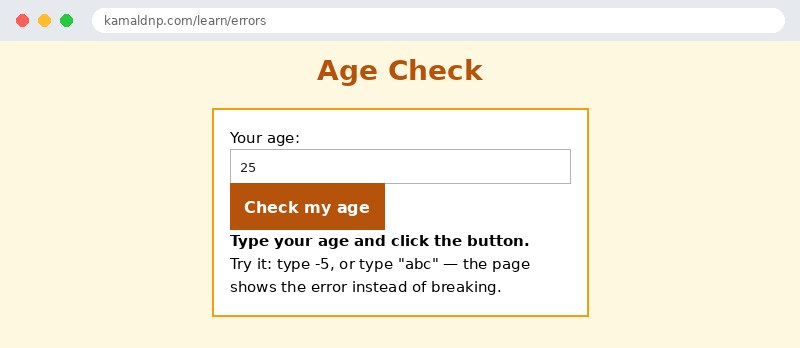
let age = Number(document.getElementById("age").value);— reads the age box and converts the string to a number.if (isNaN(age)) { throw new Error("Please type a number."); }— if the input is not a number, we throw our own error instead of continuing with a broken value.if (age < 0) { throw new Error("Age cannot be negative."); }— a second check: a negative age is impossible, so it is an error too.catch (error) { ... error.message ... }— whichever error was thrown, the message is shown on the page in red. The page never breaks.finally { document.getElementById("age").value = ""; }— the input box is cleared whether the check passed or failed, so the next try starts clean.
Example
<!DOCTYPE html>
<html>
<head>
<title>Age Check — try and catch</title>
<style>
body { font-family: Verdana, sans-serif; background-color: #fff8e1; }
h1 { color: #b45309; text-align: center; }
.card { background-color: white; border: 2px solid #f59e0b; padding: 16px; width: 340px; margin: 20px auto; }
button { background-color: #b45309; color: white; border: none; padding: 10px 18px; font-size: 16px; }
#out { font-weight: bold; }
</style>
</head>
<body>

<h1>Age Check</h1>
<div class="card">
<p>Your age: <input id="age" type="text" value="25"></p>
<p><button onclick="checkAge()">Check my age</button></p>
<p id="out">Type your age and click the button.</p>
<p>Try it: type -5, or type "abc" — the page shows the error instead of breaking.</p>
</div>

<script>
function checkAge() {
  let out = document.getElementById("out");
  try {
    let age = Number(document.getElementById("age").value);
    if (isNaN(age)) { throw new Error("Please type a number."); }
    if (age < 0) { throw new Error("Age cannot be negative."); }
    out.style.color = "green";
    out.textContent = "Your age is " + age + ". All good!";
  } catch (error) {
    out.style.color = "red";
    out.textContent = "Error: " + error.message;
  } finally {
    document.getElementById("age").value = "";
  }
}
</script>

</body>
</html>
Output
Try it yourself — live editor
Change the code below and press Run to see the result instantly. No file to save, no login needed.
Why learn this yourself — and not just ask AI?
AI can write code for you, but it cannot think for you. When you learn HTML yourself, your brain builds the real skill: you understand why a page looks the way it does, you can fix it when it breaks, and you can answer it in an exam or an interview without help. That is the skill that gets you a job — not a copied answer.
Get certified — just ₹10
Finish all 30 lessons, pass the test (80%), pay ₹10 and get your certificate.
Take the testPrefer watching? Video courses teach the same topics step by step.
Go further with a full course
Free tutorials teach you the basics. Our paid courses add live projects, mentorship and a certificate.
Browse all courses

