JavaScript Functions
4 min read · Free · No login needed
A function is a named block of code that does one job. You write it once, give it a name, and then you can run it again and again just by calling its name. Think of a recipe: a chai recipe says how to make one cup. You do not rewrite the recipe every time someone orders chai — you follow the same recipe again. A function is the recipe; calling it is making the chai.
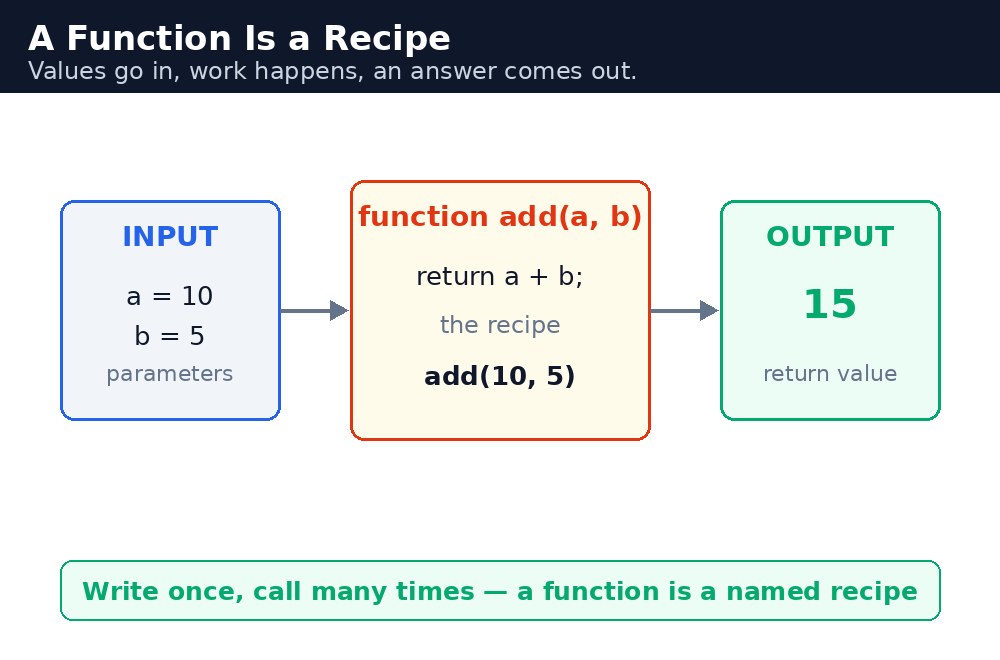
Without functions, you would copy the same lines of code everywhere you need them. If the price of chai changes, you would have to find and fix every copy. With a function, the price lives in one place. Change it once, and every call uses the new price. That is why professional programmers put almost everything inside functions.
Declaring and calling a function
You declare a function with the word function, a name, round brackets, and a body in curly braces. To run it, you write its name followed by round brackets — that is called calling the function.
function sayHello() {
  alert("Namaste! Welcome to KAMALDNP.");
}
sayHello();
Nothing happens when you only declare a function — the code inside waits quietly until someone calls it. One declaration can be called a hundred times, from anywhere in your page.
$, and it cannot start with a digit. Use a verb that says what it does — calculateBill() is better than doThing(). Good names are half of good code.Parameters and arguments
Most functions need some input to work with. The values you list inside the brackets when you declare the function are called parameters. The actual values you pass when you call it are called arguments. In the chai example below, cups is the parameter and 3 is the argument.
function chaiBill(cups) {
  return cups * 10;
}
let total = chaiBill(3);  // total is 30
A function can take as many parameters as it needs, separated by commas. If you call it with fewer arguments than it expects, the missing ones become undefined — so always pass what the function needs.
Return — sending an answer back
The return keyword sends a value back to the place that called the function. Without return, a function still runs, but it gives back undefined. Think of it this way: a function that only shows a message is like a cook who serves the chai; a function with return is like a cashier who tells you the total so you can use it.
Once a function hits return, it stops immediately — no lines after it will run. That is a handy way to exit early when you already have the answer.
calculateBill() should only calculate the bill — not also print it, save it, and send a message. Small functions are easier to test, easier to reuse, and easier to fix when something goes wrong.Common mistakes
- Forgetting the brackets when calling —
sayHellowithout()does nothing; it only refers to the function, it does not run it. - Using
returnand then expecting more lines to run — code afterreturnnever executes. - Forgetting to pass an argument — the parameter becomes
undefinedand your maths turns intoNaN. - Naming a function the same as a variable — the later one wins and the first one is lost.
Remember
- A function is a named block of code: declare once, call many times.
- Parameters are the inputs in the declaration; arguments are the values you pass when calling.
returnsends a value back; without it, a function gives backundefined.- Write once, call many times — a function is a recipe you name and reuse.
Example explained
function chaiBill(cups) { return cups * 10; }— the recipe: one cup costs ₹10, so the bill is the number of cups times 10.cupsis the parameter.document.getElementById("cups").value— reads the number the visitor typed into the input box.let total = chaiBill(3);— calling the function with 3 cups returns 30, which is stored intotal.onclick="showBill()"— when the visitor clicks the button, theshowBillfunction runs and fills in the answer.document.getElementById("result").innerHTML = ...— writes the answer into the result paragraph on the page, so the visitor sees it without reloading.
Example
<!DOCTYPE html>
<html>
<head>
<title>Chai Bill Calculator</title>
<style>
body { font-family: Verdana, sans-serif; background-color: #fff8e1; }
h1 { color: #b45309; }
button { background-color: #e13611; color: white; padding: 10px 18px; border: none; }
#result { font-weight: bold; color: green; }
</style>
</head>
<body>

<h1>Chai Bill Calculator</h1>
<p>One cup of chai costs ₹10. How many cups do you want?</p>
<input type="number" id="cups" value="3">
<button onclick="showBill()">Calculate Bill</button>
<p id="result">Your bill will appear here.</p>

<script>
function chaiBill(cups) {
  return cups * 10;
}
function showBill() {
  let cups = document.getElementById("cups").value;
  let total = chaiBill(cups);
  document.getElementById("result").innerHTML = "Your bill is ₹" + total;
}
</script>

</body>
</html>
Output
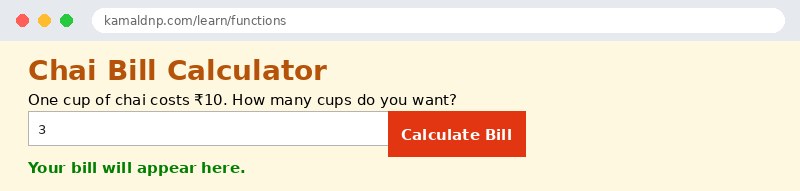
Try it yourself — live editor
Change the code below and press Run to see the result instantly. No file to save, no login needed.
Why learn this yourself — and not just ask AI?
AI can write code for you, but it cannot think for you. When you learn HTML yourself, your brain builds the real skill: you understand why a page looks the way it does, you can fix it when it breaks, and you can answer it in an exam or an interview without help. That is the skill that gets you a job — not a copied answer.
Get certified — just ₹10
Finish all 30 lessons, pass the test (80%), pay ₹10 and get your certificate.
Take the testPrefer watching? Video courses teach the same topics step by step.
Go further with a full course
Free tutorials teach you the basics. Our paid courses add live projects, mentorship and a certificate.
Browse all courses