JavaScript Introduction
5 min read · Free · No login needed
JavaScript is the language that makes a web page do things. HTML builds the page, CSS dresses it up, and JavaScript brings it to life. When you click a button and something changes, when a form warns you that you forgot a field, when a menu opens and closes — that is JavaScript at work.
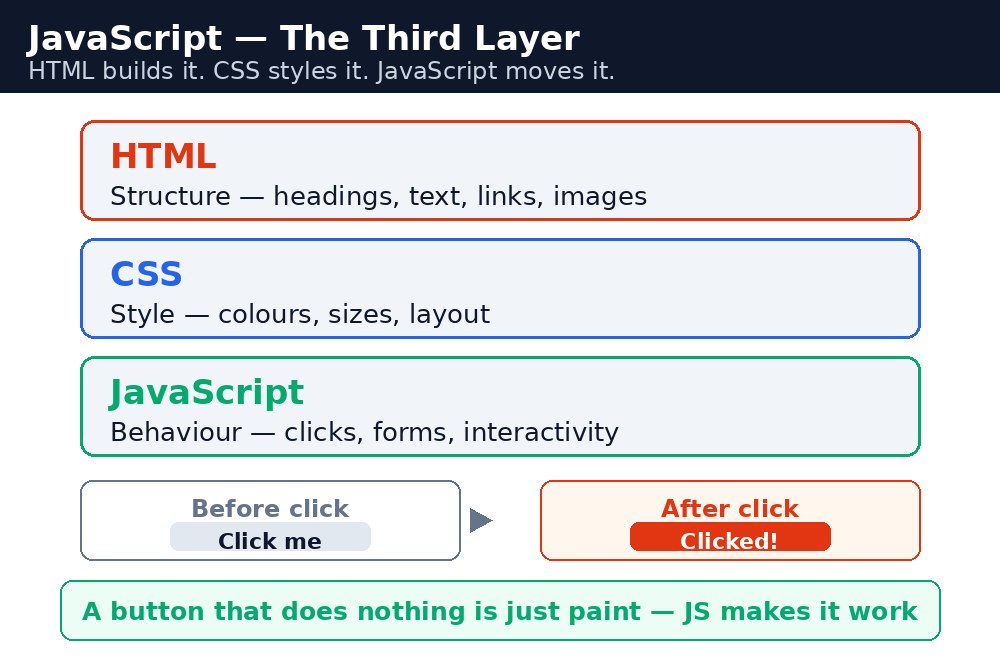
Think of a house again. HTML is the walls, the rooms, and the doors — the structure. CSS is the paint on the walls, the curtains, and the furniture — the decoration. JavaScript is the electricity, the fans, and the doorbell — the action. A house without electricity still stands, but nothing moves in it. A page without JavaScript still shows, but nothing reacts to you.
Remember it like this: HTML = ढाँचा, CSS = सजावट, JavaScript = हरकत. HTML is the skeleton, CSS is the decoration, JavaScript is the action. You already know HTML and CSS. This course teaches you JavaScript — the third of the three, and the one that turns you from a page designer into a real web developer.
What JavaScript actually does
JavaScript runs in the browser, on the visitor's own computer. It can read what the visitor types, change the text on the page, hide and show parts of the page, check a form before it is sent, and even talk to a server to fetch new data without reloading the page. It is the only programming language that every browser understands, which is why it runs on almost every website in the world.
Here is the key idea: HTML and CSS describe a page, but JavaScript controls it. You write small instructions — called a script — and the browser follows them step by step. A script can say "when this button is clicked, change this heading to red", and the browser will do exactly that, every time.
Where JavaScript lives
JavaScript code sits inside a web page, in a <script> tag, or in a separate .js file that the page loads. When the browser opens the page, it reads the HTML, paints the page with CSS, and then runs the JavaScript. Your code can run as soon as the page loads, or it can wait — for a click, a keypress, or a form being submitted. You will learn all three ways in this course.
You do not need to install anything to learn JavaScript. Every browser already has it. You can open the live editor in this course, type a few lines, press Run, and see the result at once. That is the fastest way to learn: change one line, run it, and watch what changes.
Common mistakes
- Thinking JavaScript and Java are the same language — they are not. The similar name is a historical accident.
- Thinking JavaScript only makes animations — it also checks forms, fetches data, saves settings, and runs whole applications like Gmail and YouTube.
- Expecting the page to change without writing any code that says when — JavaScript only acts when your code tells it to, usually on an event like a click.
- Mixing up HTML, CSS, and JavaScript jobs — structure is HTML, looks are CSS, behaviour is JavaScript. Keep each in its place.
Remember
- JavaScript makes a page react: clicks, forms, menus, and live updates.
- HTML = ढाँचा (skeleton), CSS = सजावट (decoration), JavaScript = हरकत (action).
- JavaScript runs in the browser, on the visitor's computer — no installation needed.
- A script is a list of instructions the browser follows step by step.
Example explained
<script>— the JavaScript lives inside the<script>block. Everything between<script>and</script>is code, not HTML.function showSpecial() { ... }— a function is a named block of instructions. Nothing inside it runs until something calls it by name.document.getElementById("special")— this finds the element on the page whoseidis "special". It is how JavaScript reaches into the HTML..textContent = "Today's special: Kulhad Chai — ₹20 only!"— this changes the text inside that element. The page updates at once, without reloading.onclick="showSpecial()"— this attribute on the button says "when this button is clicked, run the function called showSpecial". The click is the trigger; the function is the action.
Example
<!DOCTYPE html>
<html>
<head>
<title>My Chai Shop</title>
<style>
body { background-color: #fff8e1; font-family: Verdana, sans-serif; text-align: center; }
h1 { color: #b45309; }
button { background-color: #e13611; color: white; border: none; padding: 12px 24px; font-size: 16px; cursor: pointer; }
#special { color: green; font-weight: bold; font-size: 18px; }
</style>
</head>
<body>

<h1>My Chai Shop</h1>
<p>Masala Chai — ₹10 | Adrak Chai — ₹15 | Kulhad Chai — ₹20</p>
<button onclick="showSpecial()">Show today's special</button>
<p id="special">Click the button to see today's special.</p>

<script>
function showSpecial() {
  document.getElementById("special").textContent = "Today's special: Kulhad Chai — ₹20 only!";
}
</script>

</body>
</html>
Output
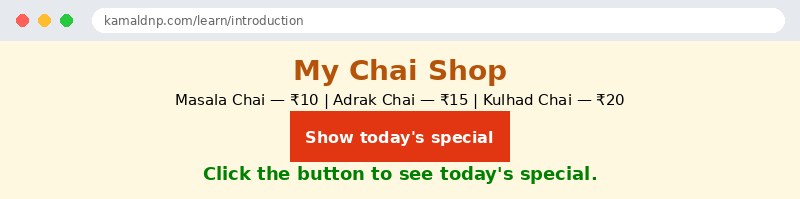
Try it yourself — live editor
Change the code below and press Run to see the result instantly. No file to save, no login needed.
Check yourself — did you get it?
Finished the lesson? Test yourself with 5 quick questions — you get the answer instantly, with the reason for each one.
1. What does JavaScript do to a web page?
2. In the house analogy, what is JavaScript?
3. Is JavaScript a programming language?
4. What is a script?
5. What is true about JavaScript and Java?
Interview questions — can you answer these?
Read the question first, try to answer it in your own words, then open it to check. These are the questions interviewers actually ask.
1. What is JavaScript, and what does it do on a web page?
JavaScript is the programming language that makes a web page react to the visitor. It can change text, check a form before it is sent, open and close menus, and fetch new data without reloading the page. HTML builds the page and CSS dresses it up, but JavaScript is what brings the page to life.
2. What is the difference between HTML, CSS and JavaScript?
HTML is the structure (walls, rooms, doors of a house), CSS is the presentation (paint, furniture, decoration), and JavaScript is the behaviour (electricity, moving parts — things that change and respond). Remember it as: HTML is the skeleton, CSS is the decoration, JavaScript is the action.
3. Is JavaScript the same as Java?
No, and the similar name is a historical accident — it was chosen long ago for marketing reasons. JavaScript is the only programming language every browser understands, while Java is a separate language that runs on servers and in applications. Knowing Java can help because some ideas feel familiar, but JavaScript has its own rules.
Try it yourself — build this
Reading is not enough — now build it yourself. Write the code in the live editor, run it, check the hint if you get stuck, and open the solution only after you have tried.
1. Press the button, change the page
Create a chai shop page with a heading "My Chai Shop", a button "Show today's special", and a paragraph with id="special" that says "Click the button to see today's special." Write a function showSpecial() inside a <script> block: when the button is clicked, the paragraph must change to "Today's special: Adrak Chai — ₹15 only!" Remember: HTML builds the page, CSS dresses it, JavaScript makes it react.
Show solution
<!DOCTYPE html>
<html>
<head>
<title>My Chai Shop — Today's Special</title>
<style>
body { background-color: #fff8e1; font-family: Verdana, sans-serif; text-align: center; }
h1 { color: #b45309; }
button { background-color: #e13611; color: white; border: none; padding: 12px 24px; font-size: 16px; cursor: pointer; }
#special { color: green; font-weight: bold; font-size: 18px; }
</style>
</head>
<body>

<h1>My Chai Shop</h1>
<p>Masala Chai — ₹10 | Adrak Chai — ₹15 | Kulhad Chai — ₹20</p>
<button onclick="showSpecial()">Show today's special</button>
<p id="special">Click the button to see today's special.</p>

<script>
function showSpecial() {
  document.getElementById("special").textContent = "Today's special: Adrak Chai — ₹15 only!";
}
</script>

</body>
</html>Why learn this yourself — and not just ask AI?
AI can write code for you, but it cannot think for you. When you learn HTML yourself, your brain builds the real skill: you understand why a page looks the way it does, you can fix it when it breaks, and you can answer it in an exam or an interview without help. That is the skill that gets you a job — not a copied answer.
Get certified — just ₹10
Finish all 30 lessons, pass the test (80%), pay ₹10 and get your certificate.
Take the testPrefer watching? Video courses teach the same topics step by step.
Go further with a full course
Free tutorials teach you the basics. Our paid courses add live projects, mentorship and a certificate.
Browse all courses