JavaScript JSON
4 min read · Free · No login needed
Websites rarely work alone. Your page talks to a server: it asks for a student's record, a list of courses, or a chai order — and the server answers. That answer travels as text, because text is the one thing every computer can read. The format of that text is called JSON — JavaScript Object Notation. It looks like a JavaScript object, but it is only text.
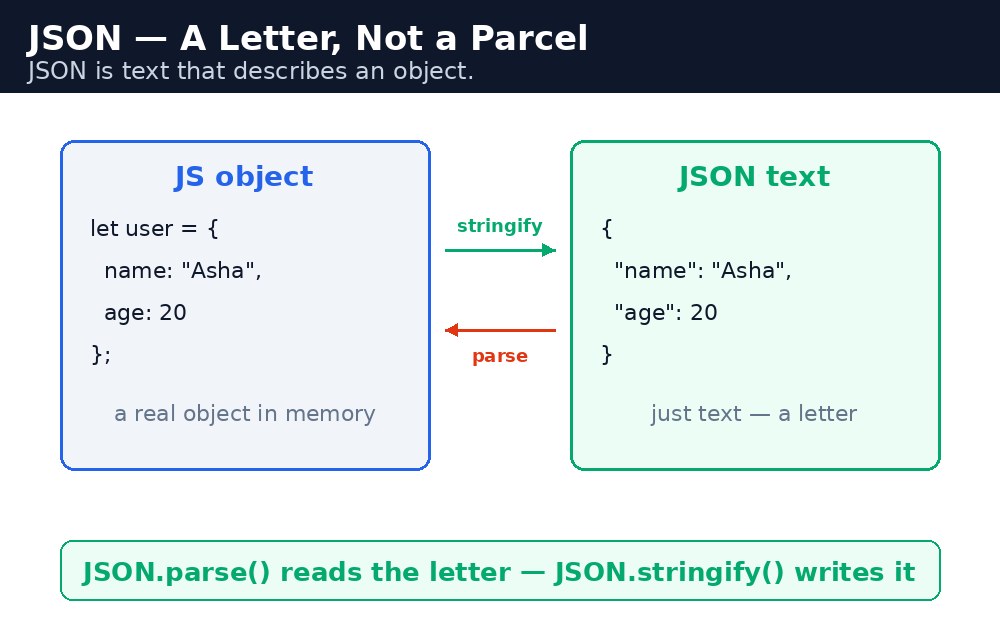
Think of it like a letter. A JavaScript object is a parcel — it holds real things you can use directly. JSON is the letter that describes the parcel, so it can travel by post. When the letter arrives, you open it and rebuild the parcel. JSON.stringify() writes the letter. JSON.parse() opens it.
JSON.stringify — object to text
let student = { name: "Priya", course: "HTML", marks: 92 };
let text = JSON.stringify(student);
// text is '{"name":"Priya","course":"HTML","marks":92}'
The result is a plain string. You can send it to a server, save it in the browser's storage, or print it on the page. Notice the double quotes — JSON always uses double quotes around names and string values. Single quotes are not allowed in JSON.
JSON.parse — text back to object
let back = JSON.parse(text);
console.log(back.name); // "Priya"
JSON.parse() reads the text and rebuilds the object, so you can use back.name and back.marks like normal. If the text is broken — a missing quote, a trailing comma — parse throws an error, so it is a good idea to wrap it in try...catch (the lesson before this one).
undefined, no comments, and no trailing comma after the last item. If you break a rule, JSON.parse() fails.Where you meet JSON every day
- Fetching data — when a page loads a list of courses or exam results from a server, the answer is almost always JSON.
- Browser storage —
localStoragecan only store strings, so youstringifyan object before saving it andparseit when you read it back. - Forms and APIs — when a form is sent to a server, the data is usually packed into JSON first.
stringify writes the letter, parse opens it. If you remember which way each one goes, you will never mix them up.Common mistakes
- Using single quotes in JSON —
{'name': 'Priya'}is valid JavaScript but broken JSON. JSON needs double quotes. - Leaving a trailing comma —
{"a": 1,}fails to parse. The last item has no comma after it. - Putting a function in JSON — functions are dropped silently by
stringify. JSON carries data, not behaviour. - Forgetting that
parsethrows on bad text — wrap it intry...catchwhen the text comes from outside your code. - Using the parsed result as a string — after
parseyou have a real object, so useback.name, notback["name"]as text.
Remember
- JSON is text that looks like an object — it is how data travels between computers.
JSON.stringify(object)turns an object into a JSON string.JSON.parse(text)turns a JSON string back into an object.- JSON rules: double quotes only, no functions, no trailing commas.
- JSON is a letter, not a parcel — text that describes the object.
Example explained
let student = { name: "Rahul", course: "CSS", marks: 88 };— a normal JavaScript object, the parcel.let text = JSON.stringify(student);— writes the letter: a string with double quotes around every name and string value.document.getElementById("jsonText").textContent = text;— the JSON text is shown in the box on the page, so you can see exactly what travels to the server.let back = JSON.parse(text);— opens the letter again and rebuilds the object.document.getElementById("out").textContent = back.name + " scored " + back.marks;— the rebuilt object works like the original:back.nameis"Rahul"andback.marksis88.
Example
<!DOCTYPE html>
<html>
<head>
<title>Student Card — JSON</title>
<style>
body { font-family: Verdana, sans-serif; background-color: #fff8e1; }
h1 { color: #b45309; text-align: center; }
.card { background-color: white; border: 2px solid #f59e0b; padding: 16px; width: 380px; margin: 20px auto; }
button { background-color: #b45309; color: white; border: none; padding: 10px 18px; font-size: 16px; }
pre { background-color: #f1f5f9; padding: 10px; }
#out { font-weight: bold; color: green; }
</style>
</head>
<body>

<h1>Student Card</h1>
<div class="card">
<p><button onclick="sendCard()">Send my card as JSON</button></p>
<p>The JSON text that travels:</p>
<pre id="jsonText">{"name":"Rahul","course":"CSS","marks":88}</pre>
<p id="out">Click the button to pack the card, send it, and open it again.</p>
</div>

<script>
function sendCard() {
  let student = { name: "Rahul", course: "CSS", marks: 88 };
  let text = JSON.stringify(student);
  document.getElementById("jsonText").textContent = text;
  let back = JSON.parse(text);
  document.getElementById("out").textContent = back.name + " scored " + back.marks + " in " + back.course + ".";
}
</script>

</body>
</html>
Output
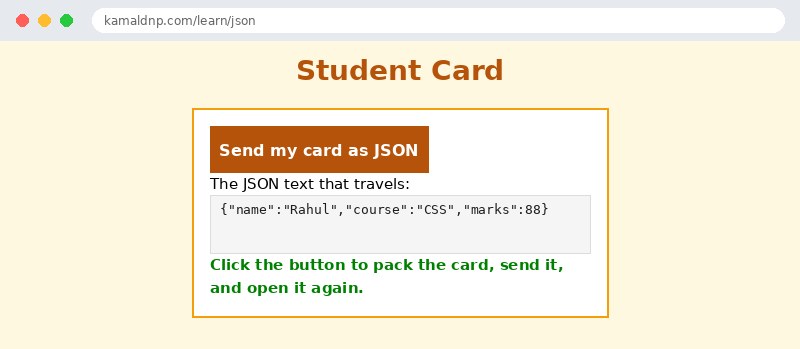
Try it yourself — live editor
Change the code below and press Run to see the result instantly. No file to save, no login needed.
Why learn this yourself — and not just ask AI?
AI can write code for you, but it cannot think for you. When you learn HTML yourself, your brain builds the real skill: you understand why a page looks the way it does, you can fix it when it breaks, and you can answer it in an exam or an interview without help. That is the skill that gets you a job — not a copied answer.
Get certified — just ₹10
Finish all 30 lessons, pass the test (80%), pay ₹10 and get your certificate.
Take the testPrefer watching? Video courses teach the same topics step by step.
Go further with a full course
Free tutorials teach you the basics. Our paid courses add live projects, mentorship and a certificate.
Browse all courses