JavaScript For Loops
5 min read · Free · No login needed
Computers are good at repetition. A teacher who must print the same line 100 times would write it 100 times; a program writes it once, inside a loop, and the computer repeats it. The for loop is JavaScript's main tool for repeating work a known number of times — and it is the first loop every programmer learns.
Think of a chai shop owner counting cups. He does not write "cup 1, cup 2, cup 3" all the way to 100. He counts: start at 1, add one each time, stop at 100. A for loop is exactly that counting, written as code: where to start, when to stop, and how to step.
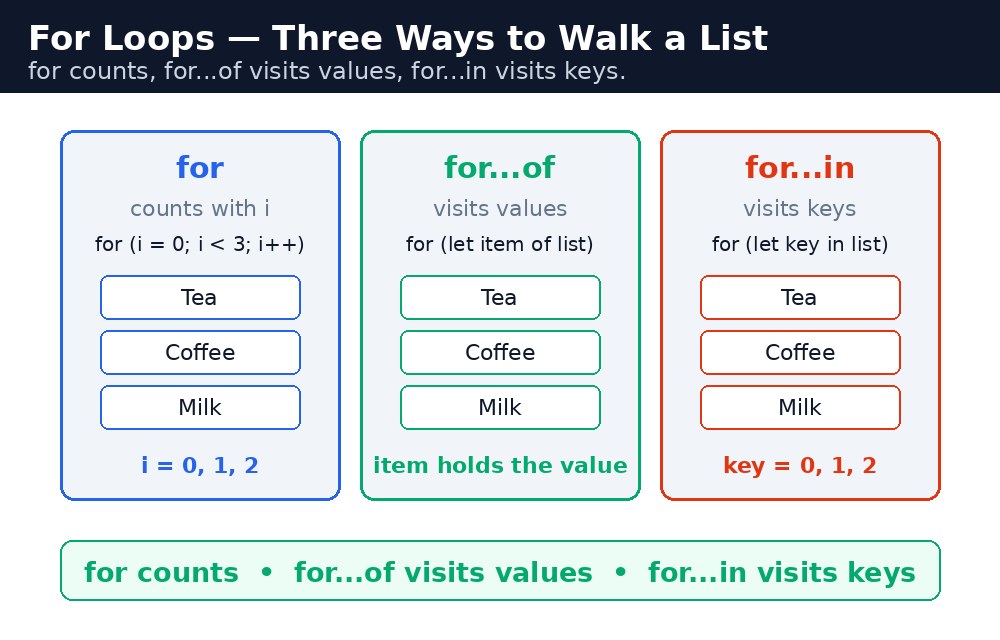
Remember it like this: for counts, for...of visits values, for...in visits keys.
The for loop — start, stop, step
A for loop has three parts inside its round brackets, separated by semicolons: the starting point, the condition to keep going, and the step after each round.
for (let i = 0; i < 5; i++) {
  console.log("Cup " + (i + 1));
}
// Cup 1, Cup 2, Cup 3, Cup 4, Cup 5
Read it slowly: let i = 0 creates a counter called i and starts it at 0. i < 5 is the condition — keep going while i is less than 5. i++ adds 1 to the counter after each round. The loop runs five times: i = 0, 1, 2, 3, 4. The moment i becomes 5, the condition is false and the loop stops.
The letter i is a tradition — it stands for "index". You can name the counter anything, but almost every programmer in the world uses i for the first loop, j for a loop inside it. Follow the tradition and your code will look familiar to everyone.
Adding up a list with a loop
The most common use of a for loop is walking through an array and doing something with each item — adding marks, counting passed students, or building a list on the page. The pattern is always the same: start at 0, stop before the array's length, and use i to pick each item.
let marks = [45, 82, 30, 91, 67];
let total = 0;
for (let i = 0; i < marks.length; i++) {
  total = total + marks[i];
}
// total is 315
marks.length is 5, so the loop runs for i = 0 to 4, and marks[i] picks each mark in turn. Notice the condition is i < marks.length, not i <= marks.length — because the last index is 4, not 5. Using <= would read one item past the end and give you undefined.
for...of — visit every value
When you only need the values and not the index, for...of is simpler. It takes each item from the array, one by one, and hands it to you in a variable. No counter, no length, no chance of an off-by-one mistake.
let students = ["Rahul", "Priya", "Amit"];
for (let name of students) {
  console.log("Hello, " + name);
}
// Hello, Rahul / Hello, Priya / Hello, Amit
Read it as plain English: "for each name of students, say hello". Use for...of when you want the values. Use the plain for loop when you need the index too — for example, when you want to print "Student 1: Rahul, Student 2: Priya".
for...in — visit every key
for...in walks through the keys of an object — the names of its properties. It is the loop for objects, the way for...of is the loop for arrays.
let student = { name: "Rahul", course: "CSE", marks: 82 };
for (let key in student) {
  console.log(key + ": " + student[key]);
}
// name: Rahul / course: CSE / marks: 82
for...in on arrays. It gives you the indexes as text ("0", "1", "2"), not numbers, and it can also pick up extra properties. For arrays, use for or for...of. For objects, use for...in.Common mistakes
- Writing
i <= marks.lengthinstead ofi < marks.length— the loop reads one item past the end and getsundefined. - Starting the counter at 1 — you skip the first item of the array. Arrays start at 0.
- Forgetting
i++— without the step,inever changes, the condition stays true forever, and the browser freezes. This is called an infinite loop. - Using
for...inon an array — it gives text indexes and can pick up extra properties. Usefor...offor array values. - Declaring the counter without
let—for (i = 0; ...)makesia global variable that leaks into the rest of the program. Always writelet i.
Remember
- For counts, for...of visits values, for...in visits keys.
- A
forloop is start, stop, step:for (let i = 0; i < 5; i++). - Arrays start at 0 — start the counter at 0 and stop before the length.
- Always include the step (
i++), or the loop never ends.
Example explained
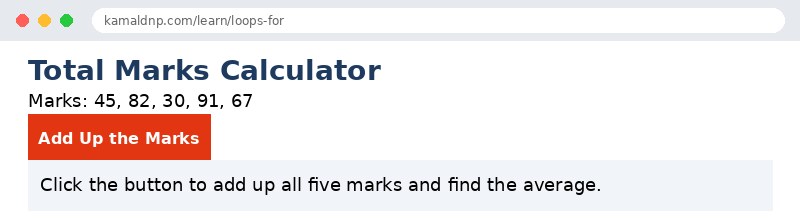
let marks = [45, 82, 30, 91, 67];— the exam marks of five students.let total = 0;— a bucket that starts empty; the loop adds each mark into it.for (let i = 0; i < marks.length; i++)— the loop runs five times, withigoing 0, 1, 2, 3, 4.total = total + marks[i];— each round adds one mark to the bucket, so after five rounds the total is 315.document.getElementById("result").innerHTML = ...— writes the total and the average into the page when the button is clicked.
Example
<!DOCTYPE html>
<html>
<head>
<title>Total Marks — JavaScript For Loop</title>
<style>
body { font-family: Verdana, sans-serif; padding: 20px; }
h1 { color: #1e3a5f; }
button { background-color: #e13611; color: white; border: none; padding: 10px 18px; font-size: 16px; cursor: pointer; }
p { font-size: 18px; }
.result { background-color: #f1f5f9; padding: 12px; }
</style>
</head>
<body>

<h1>Total Marks Calculator</h1>
<p>Marks: 45, 82, 30, 91, 67</p>
<button onclick="addMarks()">Add Up the Marks</button>
<p class="result" id="result">Click the button to add up all five marks and find the average.</p>

<script>
function addMarks() {
  let marks = [45, 82, 30, 91, 67];
  let total = 0;
  for (let i = 0; i < marks.length; i++) {
    total = total + marks[i];
  }
  let average = total / marks.length;
  let names = "";
  for (let mark of marks) {
    names = names + mark + " ";
  }
  document.getElementById("result").innerHTML =
    "Total: " + total +
    "<br>Average: " + average +
    "<br>Marks visited: " + names;
}
</script>

</body>
</html>
Output
Try it yourself — live editor
Change the code below and press Run to see the result instantly. No file to save, no login needed.
Why learn this yourself — and not just ask AI?
AI can write code for you, but it cannot think for you. When you learn HTML yourself, your brain builds the real skill: you understand why a page looks the way it does, you can fix it when it breaks, and you can answer it in an exam or an interview without help. That is the skill that gets you a job — not a copied answer.
Get certified — just ₹10
Finish all 30 lessons, pass the test (80%), pay ₹10 and get your certificate.
Take the testPrefer watching? Video courses teach the same topics step by step.
Go further with a full course
Free tutorials teach you the basics. Our paid courses add live projects, mentorship and a certificate.
Browse all courses