JavaScript While Loops
6 min read · Free · No login needed
A for loop is for when you know how many times to repeat — five students, ten cups, a hundred lines. But sometimes you do not know the number in advance. A student keeps guessing a number until he gets it right. A login form keeps asking for the password until it is correct. A game keeps running until someone wins. For that, you use a while loop: it repeats while a condition is true, and stops the moment it becomes false.
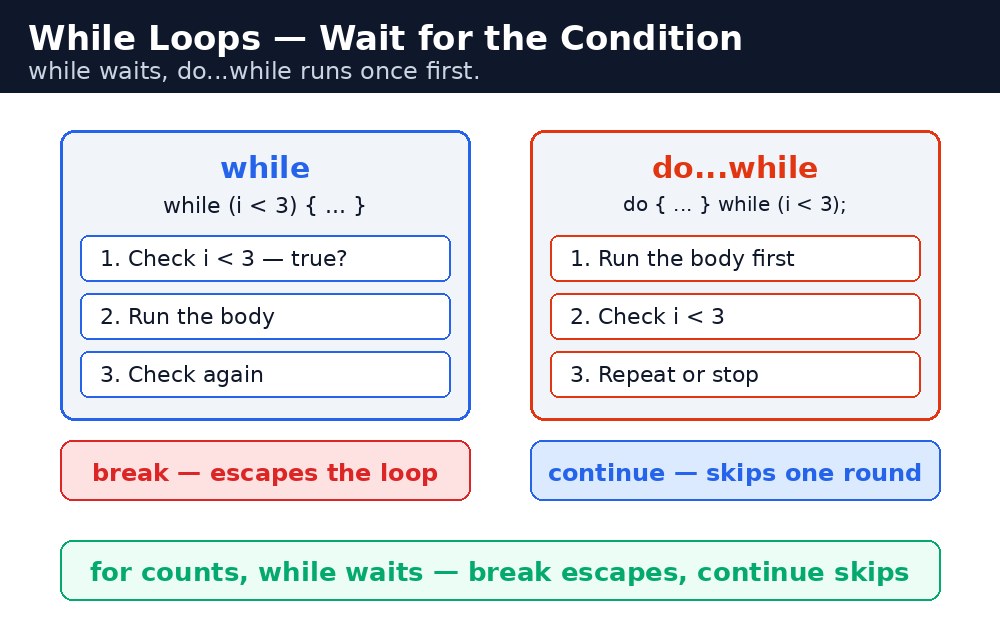
Think of filling a bucket from a tap. You do not count the seconds in advance — you keep the tap open while the bucket is not full, and you close it when it is. A while loop is the same idea: keep going while the condition holds, stop when it does not.
Remember it like this: for counts, while waits — break escapes, continue skips.
while — repeat while the condition is true
A while loop has only one part in its brackets: the condition. Before every round, the computer checks it. True means run the block again; false means stop.
let cups = 0;
while (cups < 5) {
  cups = cups + 1;
  console.log("Cup " + cups + " poured");
}
// Cup 1 poured, Cup 2 poured, ... Cup 5 poured
Notice the difference from a for loop: the counter lives outside the loop, and the step (cups = cups + 1) lives inside the block. You manage the counter yourself. That is what makes while flexible — the condition can be anything, not just a count: "while the password is wrong", "while the player has lives left", "while the total is under 100".
while loop is forgetting the step. If nothing inside the block ever changes the condition, it stays true forever and the loop never ends — an infinite loop. The browser tab freezes and has to be closed. Every while loop you write must have a line inside it that moves the condition towards false.do...while — run once, then check
A normal while loop checks the condition before the first round. If the condition is already false, the block never runs — not even once. A do...while loop flips that: it runs the block first, then checks. So the block always runs at least once, even if the condition is false from the start.
let number = 10;
do {
  console.log("Number is " + number);
  number = number + 1;
} while (number < 5);
// "Number is 10" — printed once, even though 10 is not less than 5
When is that useful? For anything you must do at least once: show a menu, ask for a password, roll the dice. You always ask once, and only then decide whether to ask again. Notice the semicolon after while (number < 5); — do...while is the only loop that ends with a semicolon.
break — escape the loop early
Sometimes you find what you are looking for before the loop would naturally end. break jumps straight out of the loop, skipping everything that is left — the remaining rounds and the rest of the current round.
let marks = [45, 82, 30, 91, 67];
let i = 0;
while (i < marks.length) {
  if (marks[i] === 30) {
    console.log("Found the fail mark at position " + i);
    break;
  }
  i++;
}
// "Found the fail mark at position 2" — the loop stops early
Without the break, the loop would have checked all five marks. With it, the search stops the moment it finds the answer. That is break's job: "I found it, I can stop now."
continue — skip this round, keep going
continue is the opposite of break. It does not leave the loop — it skips the rest of the current round and jumps to the next one. It is for "skip this one, but keep going".
let marks = [45, 82, 30, 91, 67];
for (let i = 0; i < marks.length; i++) {
  if (marks[i] < 40) {
    continue;
  }
  console.log(marks[i] + " passed");
}
// 45 passed, 82 passed, 91 passed, 67 passed — the 30 is skipped
The 30 fails the test, so continue skips its print line and moves on to the next mark. The loop itself keeps running. One warning: in a while loop, put the step before the continue — otherwise the counter never moves and the loop spins forever.
break and continue work in for loops and while loops alike. When you are choosing a loop, ask one question: "Do I know how many times?" If yes, use for. If no, use while. If the answer is "at least once, maybe more", use do...while.Common mistakes
- Forgetting the step inside a
whileloop — the condition never changes, the loop never ends, and the browser tab freezes. - Putting
continuebefore the step in awhileloop — the counter never moves, so the loop spins forever. Put the step first. - Using
breakwhen you meantcontinue—breakleaves the loop completely,continueonly skips one round. - Forgetting the semicolon after
while (...);in ado...whileloop — it is the only loop that ends with one. - Writing a condition that is never true in a plain
whileloop and expecting the block to run once — it runs zero times. That is whatdo...whileis for.
Remember
- For counts, while waits — break escapes, continue skips.
whilechecks before each round;do...whileruns once first and checks after.- Every
whileloop needs a step inside it that moves the condition towards false. breakleaves the loop;continueskips one round and keeps going.
Example explained
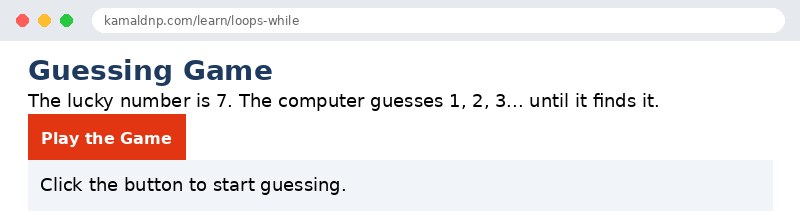
let target = 7;— the number the student has to guess, like a lucky-draw number.let guess = 0;— the current guess, starting at 0 so the loop is sure to run.while (guess !== target)— the loop keeps going while the guess is not 7. The moment it becomes 7, the loop stops.guess = guess + 1;— the step: each round the guess moves one closer to the target, so the loop is guaranteed to end.document.getElementById("result").innerHTML = ...— writes how many tries it took into the page when the button is clicked.
Example
<!DOCTYPE html>
<html>
<head>
<title>Guessing Game — JavaScript While Loop</title>
<style>
body { font-family: Verdana, sans-serif; padding: 20px; }
h1 { color: #1e3a5f; }
button { background-color: #e13611; color: white; border: none; padding: 10px 18px; font-size: 16px; cursor: pointer; }
p { font-size: 18px; }
.result { background-color: #f1f5f9; padding: 12px; }
</style>
</head>
<body>

<h1>Guessing Game</h1>
<p>The lucky number is 7. The computer guesses 1, 2, 3... until it finds it.</p>
<button onclick="playGame()">Play the Game</button>
<p class="result" id="result">Click the button to start guessing.</p>

<script>
function playGame() {
  let target = 7;
  let guess = 0;
  let tries = 0;
  while (guess !== target) {
    guess = guess + 1;
    tries = tries + 1;
  }
  document.getElementById("result").innerHTML =
    "Found it! The lucky number is " + guess +
    "<br>Tries taken: " + tries;
}
</script>

</body>
</html>
Output
Try it yourself — live editor
Change the code below and press Run to see the result instantly. No file to save, no login needed.
Why learn this yourself — and not just ask AI?
AI can write code for you, but it cannot think for you. When you learn HTML yourself, your brain builds the real skill: you understand why a page looks the way it does, you can fix it when it breaks, and you can answer it in an exam or an interview without help. That is the skill that gets you a job — not a copied answer.
Get certified — just ₹10
Finish all 30 lessons, pass the test (80%), pay ₹10 and get your certificate.
Take the testPrefer watching? Video courses teach the same topics step by step.
Go further with a full course
Free tutorials teach you the basics. Our paid courses add live projects, mentorship and a certificate.
Browse all courses