JavaScript Math
5 min read · Free · No login needed
JavaScript's Math object is a toolbox for numbers. It has no constructor — you never write new Math(). You just call its methods: Math.random() for a lucky draw, Math.round() to tidy a decimal, Math.max() to find the biggest number in a list. Every quiz app, every discount calculator and every game uses it.
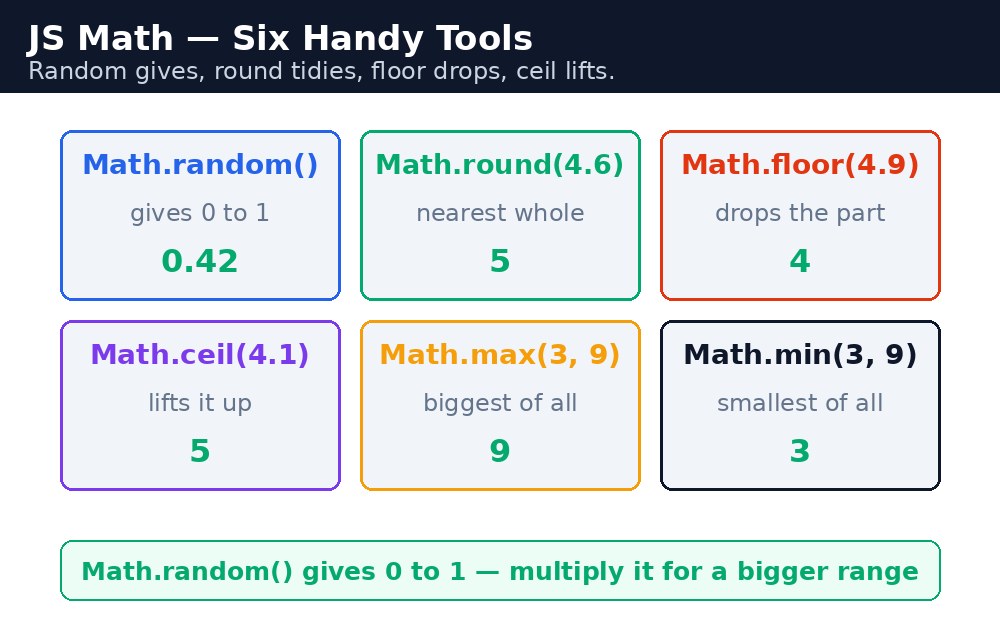
Think of a cricket match. The umpire tosses a coin — that is Math.random(). The scorer rounds a run-rate of 7.63 to 8 — that is Math.round(). The captain picks the highest score of the day — that is Math.max(). One object, many small jobs, and each method does exactly one thing.
Remember it like this: random gives, round tidies, floor drops, ceil lifts, max picks biggest, min picks smallest.
Math.random — a number from nowhere
Math.random() returns a decimal number from 0 up to (but never including) 1 — something like 0.483921. On its own it is not very useful, so you usually stretch it to the range you want. To get a whole number from 1 to 6, like a dice roll, you multiply by 6, drop the decimal, and add 1.
let dice = Math.floor(Math.random() * 6) + 1;
// A whole number from 1 to 6
Read it inside out: Math.random() gives 0 to 0.999..., times 6 gives 0 to 5.999..., Math.floor() drops the decimal to give 0 to 5, and adding 1 gives 1 to 6. Every time the page runs, you get a different number — that is the whole point.
Math.round, Math.floor, Math.ceil — tidying decimals
These three all turn a decimal into a whole number, but in different ways. Math.round() rounds to the nearest whole number: 4.5 becomes 5, 4.4 becomes 4. Math.floor() always rounds down: 4.9 becomes 4. Math.ceil() always rounds up: 4.1 becomes 5.
Math.round(4.5); // 5
Math.round(4.4); // 4
Math.floor(4.9); // 4
Math.ceil(4.1);  // 5
When would you use each one? Math.round() is for bills and averages, where nearest is fairest. Math.floor() is for counting whole things — how many full boxes fit, how many complete pages. Math.ceil() is for "how many do I need?" — if 4.1 buses are needed, you need 5 buses, not 4.
Math.max and Math.min — biggest and smallest
Math.max() returns the biggest of the numbers you give it, and Math.min() returns the smallest. You can pass as many numbers as you like, separated by commas.
let scores = [45, 82, 30, 91, 67];
Math.max(45, 82, 30, 91, 67); // 91
Math.min(45, 82, 30, 91, 67); // 30
But what if the numbers are already inside an array? Math.max(scores) does not work — it returns NaN, because the method expects separate numbers, not one array. The fix is the spread operator, three dots, which unpacks the array into separate numbers: Math.max(...scores) gives 91. You will meet the spread operator properly later; for now, just remember the three dots.
Math.random() is not truly random — it is pseudo-random, good enough for games, quizzes and lucky draws, but never use it for passwords or security. For a classroom dice or a lucky-draw winner, it is perfect.Common mistakes
- Writing
new Math()—Mathis not a constructor. There is nonewhere; you callMath.round()directly. - Expecting
Math.random()to give a whole number — it always gives a decimal from 0 to just under 1. Multiply and floor it to get a whole number. - Using
Math.max()on an array directly — it returnsNaN. Spread the array first:Math.max(...scores). - Mixing up
Math.floor()andMath.ceil()— floor goes down, ceil goes up. Remember the floor and the ceiling. - Forgetting that
Math.round(4.5)is 5 butMath.round(-4.5)is -4 — rounding negative numbers goes towards positive infinity, not away from zero.
Remember
- Random gives, round tidies, floor drops, ceil lifts, max picks biggest, min picks smallest.
- A dice roll is
Math.floor(Math.random() * 6) + 1— random, stretch, drop the decimal, add 1. Math.max(...array)andMath.min(...array)work on arrays; without the three dots they returnNaN.- Never write
new Math()—Mathis used directly, with no constructor.
Example explained
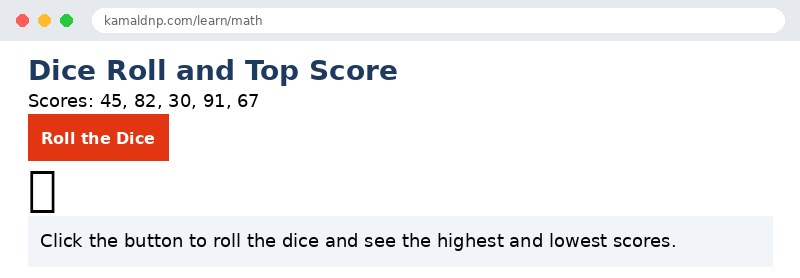
Math.floor(Math.random() * 6) + 1— rolls a dice: a random decimal, stretched to 0–5.999, floored to 0–5, then plus 1 gives 1–6.Math.max(...scores)— the three dots unpack the scores array, soMath.maxsees separate numbers and returns the biggest, 91.Math.min(...scores)— the same trick gives the smallest score, 30.Math.round(82.5)— rounds the average to the nearest whole number.document.getElementById("result").innerHTML = ...— writes the dice roll and the highest and lowest scores into the page when the button is clicked.
Example
<!DOCTYPE html>
<html>
<head>
<title>Dice Roll — JavaScript Math</title>
<style>
body { font-family: Verdana, sans-serif; padding: 20px; }
h1 { color: #1e3a5f; }
button { background-color: #e13611; color: white; border: none; padding: 10px 18px; font-size: 16px; cursor: pointer; }
p { font-size: 18px; }
.result { background-color: #f1f5f9; padding: 12px; }
.dice { font-size: 48px; }
</style>
</head>
<body>

<h1>Dice Roll and Top Score</h1>
<p>Scores: 45, 82, 30, 91, 67</p>
<button onclick="rollDice()">Roll the Dice</button>
<p class="dice" id="dice">🎲</p>
<p class="result" id="result">Click the button to roll the dice and see the highest and lowest scores.</p>

<script>
function rollDice() {
  let dice = Math.floor(Math.random() * 6) + 1;
  let scores = [45, 82, 30, 91, 67];
  let highest = Math.max(...scores);
  let lowest = Math.min(...scores);
  let average = Math.round(315 / 5);
  document.getElementById("dice").innerHTML = "🎲 " + dice;
  document.getElementById("result").innerHTML =
    "You rolled: " + dice +
    "<br>Highest score: " + highest +
    "<br>Lowest score: " + lowest +
    "<br>Average (rounded): " + average;
}
</script>

</body>
</html>
Output
Try it yourself — live editor
Change the code below and press Run to see the result instantly. No file to save, no login needed.
Why learn this yourself — and not just ask AI?
AI can write code for you, but it cannot think for you. When you learn HTML yourself, your brain builds the real skill: you understand why a page looks the way it does, you can fix it when it breaks, and you can answer it in an exam or an interview without help. That is the skill that gets you a job — not a copied answer.
Get certified — just ₹10
Finish all 30 lessons, pass the test (80%), pay ₹10 and get your certificate.
Take the testPrefer watching? Video courses teach the same topics step by step.
Go further with a full course
Free tutorials teach you the basics. Our paid courses add live projects, mentorship and a certificate.
Browse all courses