JavaScript Numbers
4 min read · Free · No login needed
JavaScript has only one kind of number — there is no separate type for whole numbers and decimals. 10, 3.14 and -5 are all just numbers. That simplicity is convenient, but it hides a few traps, and this lesson is about walking around them.
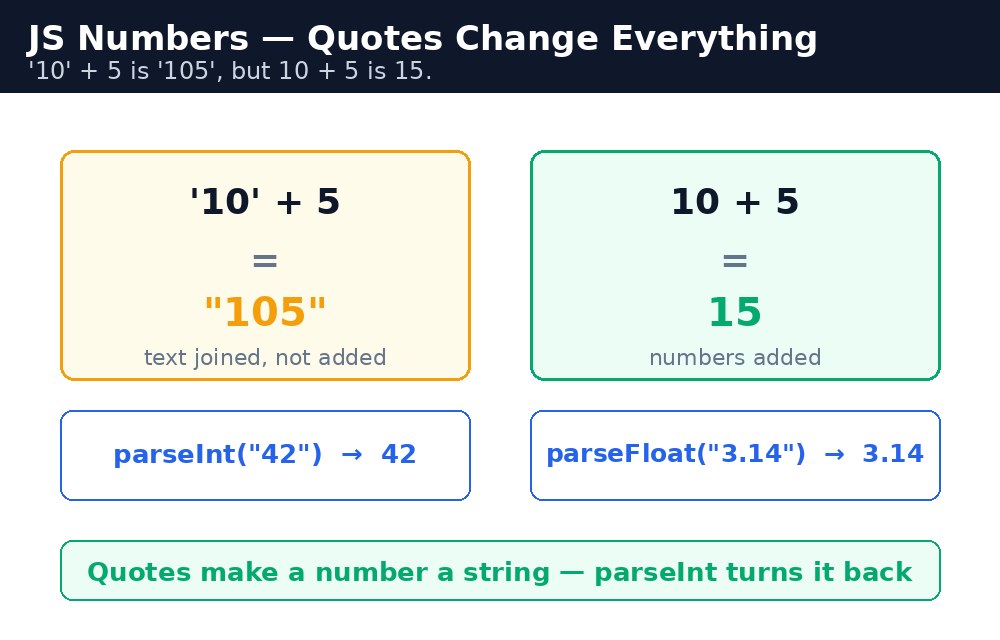
The biggest trap is the + sign. With two numbers it adds; with a string anywhere near it, it joins. 10 + 5 is 15, but "10" + 5 is "105". Form inputs always give you strings, so a marks calculator that forgets to convert will happily tell a student they scored 105 out of 100.
Converting text to numbers
When a number comes from a form or a prompt, it arrives as a string. Convert it before doing maths. parseInt() reads a whole number, parseFloat() reads a decimal, and Number() converts the whole value at once.
parseInt("42");      // 42
parseFloat("3.14");  // 3.14
Number("85");        // 85
Number("");          // 0 — an empty string becomes zero
If the text is not a number at all, the result is NaN — "Not a Number". parseInt("Rahul") is NaN, and any maths with NaN stays NaN, like a stain that spreads to everything it touches.
Checking with isNaN
Because NaN is the only value in JavaScript that is not equal to itself (NaN === NaN is false), you cannot test for it with ===. Use isNaN() instead — it tells you whether a value is Not a Number, so you can warn the user before your calculation goes wrong.
isNaN(42);       // false — 42 is a number
isNaN("Rahul");  // true
isNaN(NaN);      // true
isNaN() first converts its argument to a number, so isNaN("42") is false — the string "42" becomes the number 42 first. The stricter Number.isNaN() does no converting: Number.isNaN("42") is false too, but for the opposite reason — "42" is simply not the value NaN. For beginners, the global isNaN() is the friendlier one.Rounding with toFixed
Decimal maths in JavaScript can produce long, ugly results: 0.1 + 0.2 is 0.30000000000000004, not 0.3. That is how computers store decimals, and every language has the same quirk. For display, use toFixed(n) — it rounds a number to n decimal places and returns a string, perfect for showing a percentage like 87.5%.
let percent = (85 / 100) * 100;   // 85
(2 / 3).toFixed(2);               // "0.67"
(87.456).toFixed(1);              // "87.5"
toFixed() returns a string, not a number. If you need to keep calculating, convert it back with Number(...) or parseFloat(...). A common pattern is: calculate with numbers, format with toFixed() only at the very end, when you show the result.Common mistakes
- Adding form values without converting —
"85" + "10"is"8510", not95. Convert first withNumber(). - Testing for
NaNwith===— it never matches. UseisNaN(). - Trusting
0.1 + 0.2to be exactly0.3— it is0.30000000000000004. Round for display. - Using
parseInt()on a decimal like"3.99"and losing the.99— useparseFloat()for decimals.
Remember
- JavaScript has one number type for integers and decimals alike.
parseInt()reads whole numbers,parseFloat()reads decimals,Number()converts a whole value.NaNmeans "Not a Number"; test for it withisNaN(), never with===.toFixed(n)rounds for display and returns a string.- "10" + 5 is "105", 10 + 5 is 15 — quotes change everything.
Example explained
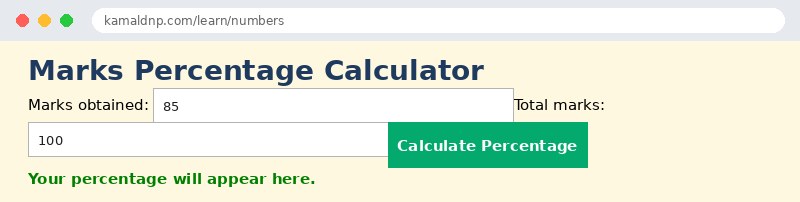
Number(document.getElementById("got").value)— the marks from the input arrive as a string, soNumber()turns them into a real number before any maths.isNaN(got) || isNaN(total)— if either box holds text that is not a number, the function shows a warning instead of a wrong answer.(got / total) * 100— the percentage formula: marks obtained divided by total marks, times 100.percent.toFixed(1)— rounds the answer to one decimal place, so 87.456 shows as 87.5%.percent >= 40 ? "Passed" : "Failed"— a short if-else (the ternary operator): 40 or above passes, below fails.
Example
<!DOCTYPE html>
<html>
<head>
<title>Marks Percentage Calculator</title>
<style>
body { font-family: Verdana, sans-serif; background-color: #fff8e1; }
h1 { color: #1e3a5f; }
label { display: block; margin: 8px 0; }
button { background-color: #04aa6d; color: white; padding: 10px 18px; border: none; }
#result { font-weight: bold; color: green; }
</style>
</head>
<body>

<h1>Marks Percentage Calculator</h1>
<label>Marks obtained: <input type="text" id="got" value="85"></label>
<label>Total marks: <input type="text" id="total" value="100"></label>
<button onclick="calcPercent()">Calculate Percentage</button>
<p id="result">Your percentage will appear here.</p>

<script>
function calcPercent() {
  let got = Number(document.getElementById("got").value);
  let total = Number(document.getElementById("total").value);
  if (isNaN(got) || isNaN(total) || total === 0) {
    document.getElementById("result").innerHTML = "Please enter valid numbers.";
    return;
  }
  let percent = (got / total) * 100;
  let status = percent >= 40 ? "Passed" : "Failed";
  document.getElementById("result").innerHTML = "Percentage: " + percent.toFixed(1) + "% — " + status;
}
</script>

</body>
</html>
Output
Try it yourself — live editor
Change the code below and press Run to see the result instantly. No file to save, no login needed.
Why learn this yourself — and not just ask AI?
AI can write code for you, but it cannot think for you. When you learn HTML yourself, your brain builds the real skill: you understand why a page looks the way it does, you can fix it when it breaks, and you can answer it in an exam or an interview without help. That is the skill that gets you a job — not a copied answer.
Get certified — just ₹10
Finish all 30 lessons, pass the test (80%), pay ₹10 and get your certificate.
Take the testPrefer watching? Video courses teach the same topics step by step.
Go further with a full course
Free tutorials teach you the basics. Our paid courses add live projects, mentorship and a certificate.
Browse all courses