JavaScript Operators
4 min read · Free · No login needed
An operator is a small symbol that does something to values: + adds, * multiplies, === checks whether two things are equal. Operators are the verbs of JavaScript — variables hold the nouns, and operators are what you do with them.
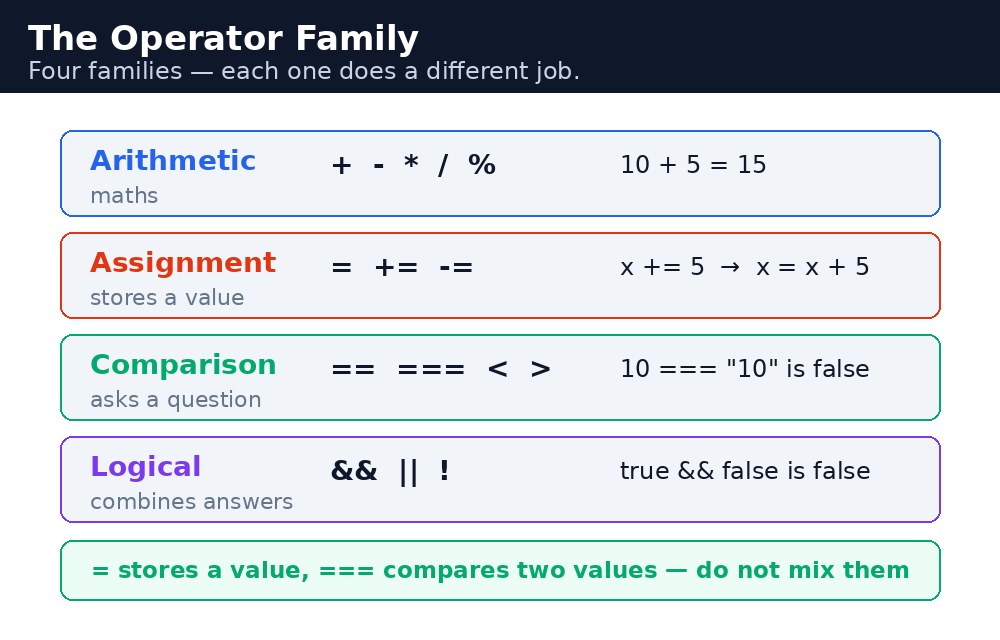
There are four groups you need: arithmetic operators for maths, assignment operators for storing values, comparison operators for asking questions, and logical operators for combining questions. Together they cover almost everything a beginner program does.
Arithmetic — doing the maths
The arithmetic operators are + add, - subtract, * multiply, / divide, % remainder, and ** power. The remainder operator % is the one beginners meet last and use most: 10 % 3 is 1, because 10 divided by 3 leaves 1 over. It is how programs check whether a number is even (n % 2 === 0) or split items into groups.
let total = 4 * 15;      // 60
let change = 100 - 60;   // 40
let isEven = 10 % 2 === 0; // true
Assignment — storing and updating
The plain assignment = stores a value. The shortcuts combine an operation with storing: += adds and stores, -= subtracts and stores, *= and /= do the same for multiply and divide. total += 10 means exactly the same as total = total + 10, but shorter. Two more shortcuts: ++ adds one, -- subtracts one.
let score = 50;
score += 10; // score is now 60
score++;     // score is now 61
Comparison — asking yes/no questions
Comparison operators answer with true or false: === strictly equal, !== strictly not equal, > greater than, < less than, >= and <=. Always use === and !==, not == and !=. The double-equals versions convert types before comparing, so "10" == 10 is true — a surprise nobody wants. Triple equals compares value and type, so "10" === 10 is false, which is honest.
let marks = 75;
marks >= 33;  // true — the student passed
marks === 75; // true
"75" === 75;  // false — a string is not a number
Logical — combining questions
Logical operators combine true/false answers: && means AND (both must be true), || means OR (at least one must be true), ! means NOT (flips true to false). A scholarship might need marks above 80 and attendance above 90% — that is one &&. A discount might apply to students or teachers — that is one ||.
let passed = marks >= 33;
let distinction = marks >= 75;
passed && distinction; // true only if both are true
= stores a value, === compares two values. Writing if (marks = 33) stores 33 into marks and is always true — the classic beginner bug. If your condition always passes, check for a single = where you meant ===.*, /, %, then + and -. When in doubt, add brackets — (2 + 3) * 4 is clearer than 2 + 3 * 4, even though both are correct.Common mistakes
- Using
==instead of===— the loose version converts types and hides real differences between strings and numbers. - Using
=inside a condition — it stores a value instead of comparing, and the condition is always true. - Writing
&or|(single) when you mean&&or||(double) — the single versions are bit operators, a different thing entirely. - Forgetting that
+also joins text —"5" + 3is"53", not 8, because+with a string means "join".
Remember
- Arithmetic:
+ - * / % **. The remainder%checks even numbers and groups. - Assignment:
= += -= *= /=, plus++and--. - Comparison:
=== !== > < >= <=. Always use the triple versions. - Logical:
&&AND,||OR,!NOT.
Example explained
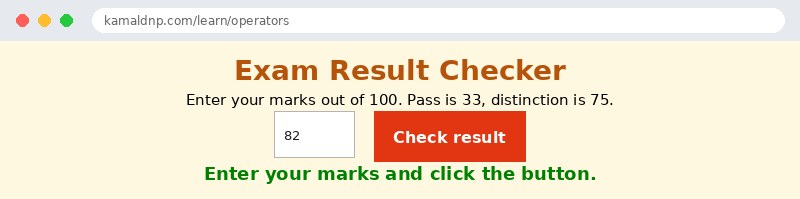
Number(document.getElementById("marks").value)— reads the marks the visitor typed and turns the text into a number, so the maths works properly.marks >= 33— a comparison that answers true or false: did the student reach the pass marks?marks >= 75— a second comparison for distinction. Both answers are stored in variables, not thrown away.passed && distinction— the AND operator: true only when the student both passed and scored a distinction.if ... else— picks one of two messages based on the answers. You will learn the fullifstatement in the Conditions lesson; here, just notice how the operators feed it true or false.
Example
<!DOCTYPE html>
<html>
<head>
<title>Exam Result Checker</title>
<style>
body { background-color: #fff8e1; font-family: Verdana, sans-serif; text-align: center; }
h1 { color: #b45309; }
input { padding: 10px; font-size: 16px; width: 80px; text-align: center; }
button { background-color: #e13611; color: white; border: none; padding: 12px 24px; font-size: 16px; cursor: pointer; }
#result { color: green; font-weight: bold; font-size: 18px; }
</style>
</head>
<body>

<h1>Exam Result Checker</h1>
<p>Enter your marks out of 100. Pass is 33, distinction is 75.</p>
<input id="marks" type="number" value="82">
<button onclick="checkResult()">Check result</button>
<p id="result">Enter your marks and click the button.</p>

<script>
function checkResult() {
  let marks = Number(document.getElementById("marks").value);
  let passed = marks >= 33;
  let distinction = marks >= 75;
  if (passed && distinction) {
    document.getElementById("result").textContent = "Pass with distinction! Great work.";
  } else if (passed) {
    document.getElementById("result").textContent = "Pass. Keep improving!";
  } else {
    document.getElementById("result").textContent = "Fail. Try again next time.";
  }
}
</script>

</body>
</html>
Output
Try it yourself — live editor
Change the code below and press Run to see the result instantly. No file to save, no login needed.
Why learn this yourself — and not just ask AI?
AI can write code for you, but it cannot think for you. When you learn HTML yourself, your brain builds the real skill: you understand why a page looks the way it does, you can fix it when it breaks, and you can answer it in an exam or an interview without help. That is the skill that gets you a job — not a copied answer.
Get certified — just ₹10
Finish all 30 lessons, pass the test (80%), pay ₹10 and get your certificate.
Take the testPrefer watching? Video courses teach the same topics step by step.
Go further with a full course
Free tutorials teach you the basics. Our paid courses add live projects, mentorship and a certificate.
Browse all courses