JavaScript Promises and async/await
4 min read · Free · No login needed
Most JavaScript runs instantly: add two numbers, show a message, done. But some work takes time — asking a server for data, waiting for a file to load, or simply waiting two seconds. JavaScript does not freeze the page while it waits. Instead it makes a Promise: "I will give you an answer later." Your code can carry on with other things, and when the answer arrives, JavaScript lets you know.
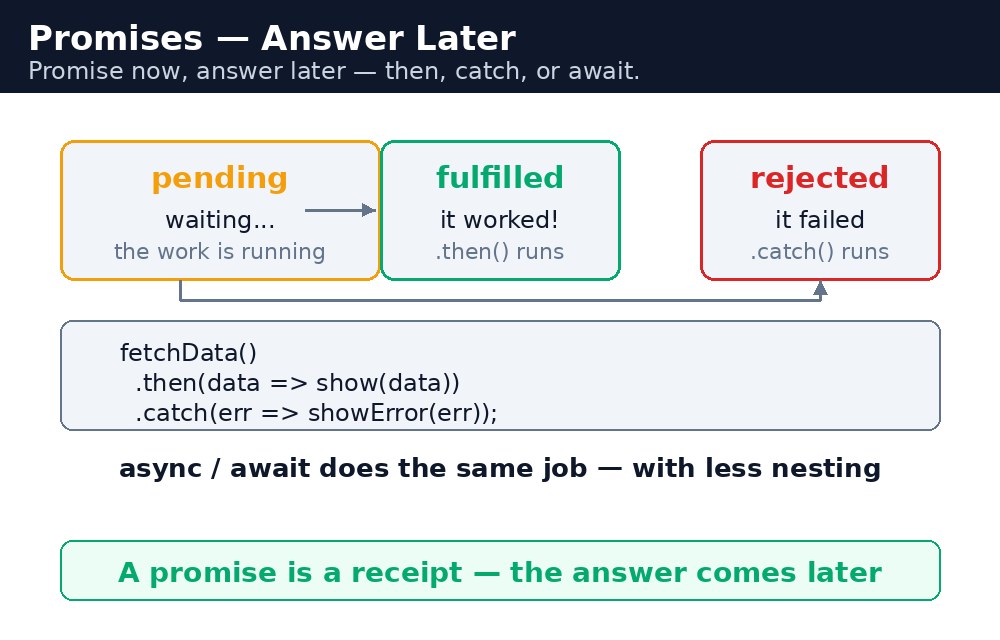
Think of ordering chai at a busy shop. You do not stand at the counter blocking everyone else — you get a token number, sit down, and the shop calls your number when the chai is ready. The token is the Promise. The call is the answer. And async/await is like sitting at the table and simply waiting for your number to be called, without doing anything else in between.
Promises — then and catch
let order = new Promise((resolve, reject) => {
  setTimeout(() => resolve("Your chai is ready!"), 2000);
});
order.then(message => console.log(message))
     .catch(error => console.log("Failed: " + error));
A Promise has three states: pending (waiting), fulfilled (done, with a value) and rejected (failed, with a reason). You create one with new Promise and two functions: resolve for success and reject for failure. .then() runs when the promise succeeds and receives the value. .catch() runs when it fails and receives the reason. You can chain them: each .then() passes its result to the next one, like a line of people passing a parcel.
.catch() anywhere becomes an "unhandled rejection" — the browser complains in the console, and the failure is easy to miss. Always end a promise chain with a .catch(), even if it only logs the error.async/await — waiting in plain words
async function orderChai() {
  try {
    let message = await order;
    console.log(message);
  } catch (error) {
    console.log("Failed: " + error);
  }
}
async/await is the same idea written in plain words. Mark a function async, and inside it you can write await before a promise — the function pauses there until the promise settles, then carries on with the value, as if the waiting never happened. Errors are caught with the same try...catch you already know. It reads like normal step-by-step code, which is why it is the standard style in real projects.
Two rules: await only works inside an async function, and an async function always returns a promise itself — even if you return a plain value, it comes back wrapped in a promise.
setTimeout — the simplest wait
setTimeout(function, milliseconds) runs a function once, after a delay. setTimeout(() => console.log("Done"), 2000) waits two seconds, then prints. It is not a promise itself, but you can wrap it in one — which is exactly what the example below does. setInterval is its cousin: it repeats the function every so many milliseconds, until you stop it with clearInterval.
.then() for short chains and async/await when the steps read better top to bottom. Either way, always catch the failure.Common mistakes
- Forgetting
.catch()— a rejected promise with no handler fails silently in your code and loudly in the console. - Using
awaitoutside anasyncfunction — it is a syntax error. The function must be markedasync. - Thinking
awaitfreezes the whole page — it only pauses that one function. The rest of the page keeps working. - Returning a value from an
asyncfunction and treating it as a plain value — it is a promise, so you need.then()or anotherawaitto read it.
Remember
- A Promise is pending, then fulfilled or rejected.
resolvesucceeds,rejectfails. .then()handles success,.catch()handles failure. Chain them in order.async/awaitreads like step-by-step code;awaitonly works insideasync.setTimeout(fn, ms)runs a function once after a delay.- Promise now, answer later — then, catch, or await.
Example explained
function makeChai() { return new Promise((resolve) => { ... }); }— a function that returns a promise. The chai takes 2 seconds, so the promise settles later.setTimeout(() => resolve("Your masala chai is ready!"), 2000);— after 2000 milliseconds the promise is fulfilled with the message.document.getElementById("out").textContent = "Making your chai...";— the status changes immediately, so the user knows the order was accepted.makeChai().then(message => { ... });— when the promise settles, the message is shown on the page. Nothing is frozen while waiting..catch(error => { ... })— if anything failed, the error message would be shown instead. Always catch.
Example
<!DOCTYPE html>
<html>
<head>
<title>Order Chai — Promises</title>
<style>
body { font-family: Verdana, sans-serif; background-color: #fff8e1; }
h1 { color: #b45309; text-align: center; }
.card { background-color: white; border: 2px solid #f59e0b; padding: 16px; width: 340px; margin: 20px auto; }
button { background-color: #b45309; color: white; border: none; padding: 10px 18px; font-size: 16px; }
#out { font-weight: bold; color: green; }
</style>
</head>
<body>

<h1>Order Chai</h1>
<div class="card">
<p><button onclick="orderChai()">Order masala chai</button></p>
<p id="out">Your chai status will appear here.</p>
<p>Try it: click the button — the status changes at once, and the chai is ready after 2 seconds.</p>
</div>

<script>
function makeChai() {
  return new Promise((resolve) => {
    setTimeout(() => resolve("Your masala chai is ready!"), 2000);
  });
}
function orderChai() {
  document.getElementById("out").textContent = "Making your chai...";
  makeChai()
    .then(message => {
      document.getElementById("out").textContent = message;
    })
    .catch(error => {
      document.getElementById("out").textContent = "Failed: " + error;
    });
}
</script>

</body>
</html>
Output
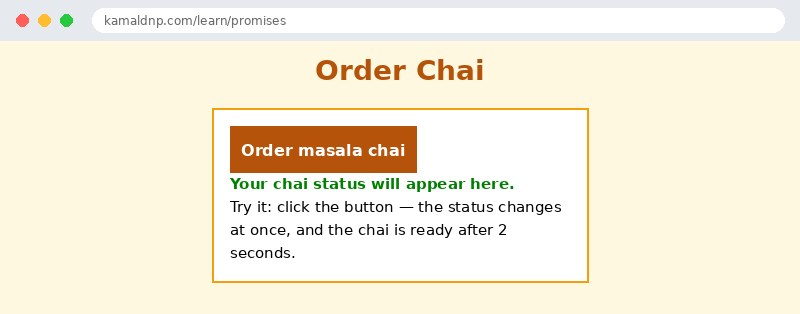
Try it yourself — live editor
Change the code below and press Run to see the result instantly. No file to save, no login needed.
Why learn this yourself — and not just ask AI?
AI can write code for you, but it cannot think for you. When you learn HTML yourself, your brain builds the real skill: you understand why a page looks the way it does, you can fix it when it breaks, and you can answer it in an exam or an interview without help. That is the skill that gets you a job — not a copied answer.
Get certified — just ₹10
Finish all 30 lessons, pass the test (80%), pay ₹10 and get your certificate.
Take the testPrefer watching? Video courses teach the same topics step by step.
Go further with a full course
Free tutorials teach you the basics. Our paid courses add live projects, mentorship and a certificate.
Browse all courses