JavaScript Scope
5 min read · Free · No login needed
Scope is the answer to one simple question: where in your code can a variable be seen? A variable declared inside a function can only be used inside that function. A variable declared outside all functions can be used anywhere. Think of a village and a house: something announced in the village square (global) is known to everyone, but something said inside one house (local) is heard only by the people in that house.
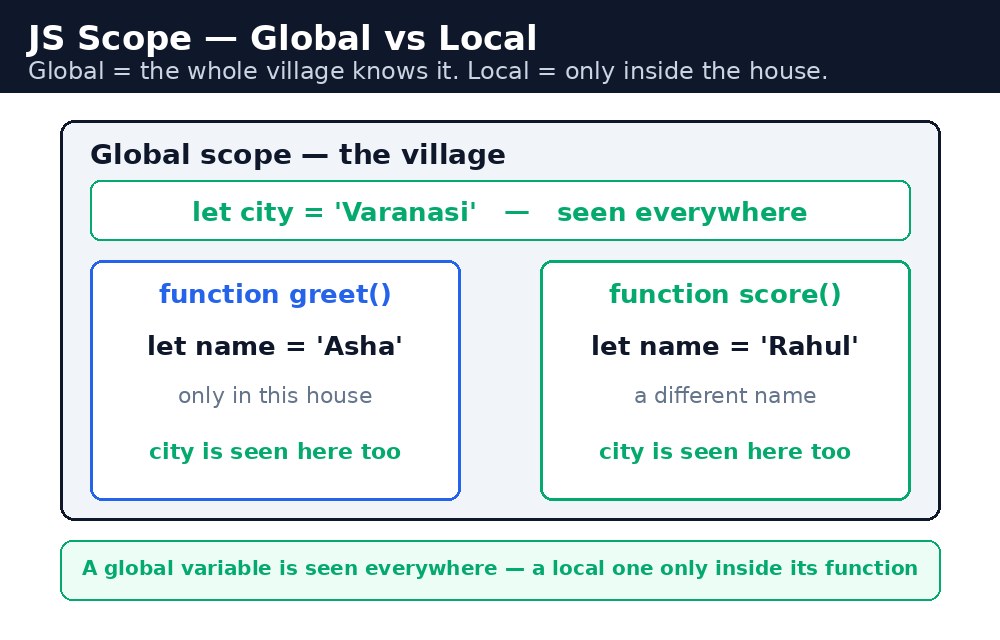
Scope matters because it stops your code from stepping on itself. Two functions can both use a variable called total without clashing — as long as each total is local to its own function. Without scope, every name would be global, and a big program would be a mess of accidental overwrites.
Global scope
A variable declared outside any function is global. Every function, and every script on the page, can read it and change it. Globals are convenient, but they are also dangerous — any part of your code can accidentally change them, and then a bug can appear far away from where it was caused. Professional code uses as few globals as possible.
let chaiPrice = 10;  // global — every function can see it
function chaiBill(cups) {
  return cups * chaiPrice;
}
Local scope — function scope
A variable declared inside a function is local to that function. It is created when the function runs and destroyed when the function finishes. Nothing outside the function can see it — trying to read it from outside gives a ReferenceError.
function greet() {
  let message = "Namaste!";  // local — only greet() can see it
  return message;
}
greet();
console.log(message);  // Error! message is not defined here
This is a feature, not a bug. The function's private variables are its own workspace. When it finishes, the workspace is cleared, and the names are free for other functions to use.
return it.Block scope — let and const vs var
A block is any code between curly braces, like the body of an if or a loop. Variables declared with let or const are block-scoped: they exist only inside that block. Variables declared with the older var ignore blocks and are visible through the whole function. That is one of the main reasons modern code prefers let and const over var.
if (true) {
  let a = 5;   // only inside this if-block
  var b = 6;   // visible in the whole function
}
console.log(a);  // Error!
console.log(b);  // 6 — var escaped the block
Hoisting — a quick warning
JavaScript moves declarations to the top of their scope before running the code — this is called hoisting. A var variable is hoisted and starts as undefined, so using it too early gives a confusing undefined instead of an error. A let or const variable is also hoisted, but it stays in a "temporal dead zone" until its line runs — using it too early gives a clear error. The practical rule is simple: always declare your variables at the top of their scope, and prefer let and const.
Common mistakes
- Reading a local variable outside its function and getting
ReferenceError: message is not defined. - Using
varinside anifor loop and being surprised the variable is visible afterwards. - Declaring a global by accident — writing
total = 5withoutlet,constorvarcreates a global. - Shadowing by accident — a local variable with the same name as a global hides the global inside that function.
Remember
- Global scope: declared outside all functions, visible everywhere.
- Local scope: declared inside a function, visible only there.
letandconstare block-scoped;varis function-scoped and can leak out of blocks.- Global = the whole village knows it; local = only inside the house.
Example explained
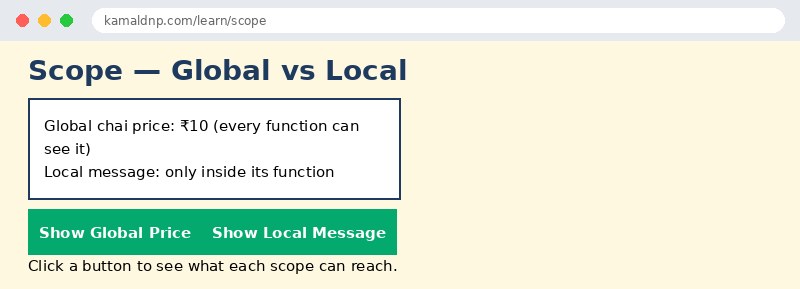
let chaiPrice = 10;— a global variable, declared outside all functions. Both buttons on the page can see it.function showGlobal() { ... }— reads the globalchaiPricefrom inside the function. That works, because functions can see outwards.let message = "Only inside this function";— a local variable insideshowLocal(). It exists only while that function runs.document.getElementById("out").innerHTML = message;— this line is inside the function, so it can read the local variable. The same line outside the function would fail.var leaked = "I escaped the block";— declared withvarinside anifblock, it is still visible after the block ends. Aletin the same place would not be.
Example
<!DOCTYPE html>
<html>
<head>
<title>Scope — Global vs Local</title>
<style>
body { font-family: Verdana, sans-serif; background-color: #fff8e1; }
h1 { color: #1e3a5f; }
.box { background-color: white; border: 2px solid #1e3a5f; padding: 14px; margin: 10px 0; width: 340px; }
button { background-color: #04aa6d; color: white; padding: 10px 18px; border: none; margin: 4px; }
</style>
</head>
<body>

<h1>Scope — Global vs Local</h1>
<div class="box">
<p>Global chai price: ₹10 (every function can see it)</p>
<p>Local message: only inside its function</p>
</div>
<button onclick="showGlobal()">Show Global Price</button>
<button onclick="showLocal()">Show Local Message</button>
<p id="out">Click a button to see what each scope can reach.</p>

<script>
let chaiPrice = 10;
function showGlobal() {
  document.getElementById("out").innerHTML = "Global price is ₹" + chaiPrice;
}
function showLocal() {
  let message = "Only inside this function";
  document.getElementById("out").innerHTML = message;
}
if (true) {
  var leaked = "I escaped the block";
}
</script>

</body>
</html>
Output
Try it yourself — live editor
Change the code below and press Run to see the result instantly. No file to save, no login needed.
Why learn this yourself — and not just ask AI?
AI can write code for you, but it cannot think for you. When you learn HTML yourself, your brain builds the real skill: you understand why a page looks the way it does, you can fix it when it breaks, and you can answer it in an exam or an interview without help. That is the skill that gets you a job — not a copied answer.
Get certified — just ₹10
Finish all 30 lessons, pass the test (80%), pay ₹10 and get your certificate.
Take the testPrefer watching? Video courses teach the same topics step by step.
Go further with a full course
Free tutorials teach you the basics. Our paid courses add live projects, mentorship and a certificate.
Browse all courses