JavaScript Strings
4 min read · Free · No login needed
A string is text inside quotes — a name, a message, a sentence. JavaScript gives you a whole toolbox for working with strings: you can count their letters, cut out a piece, replace a word, change the case, or build a new sentence from parts. Strings are the most common data in any web page, because almost everything a user types or reads is text.
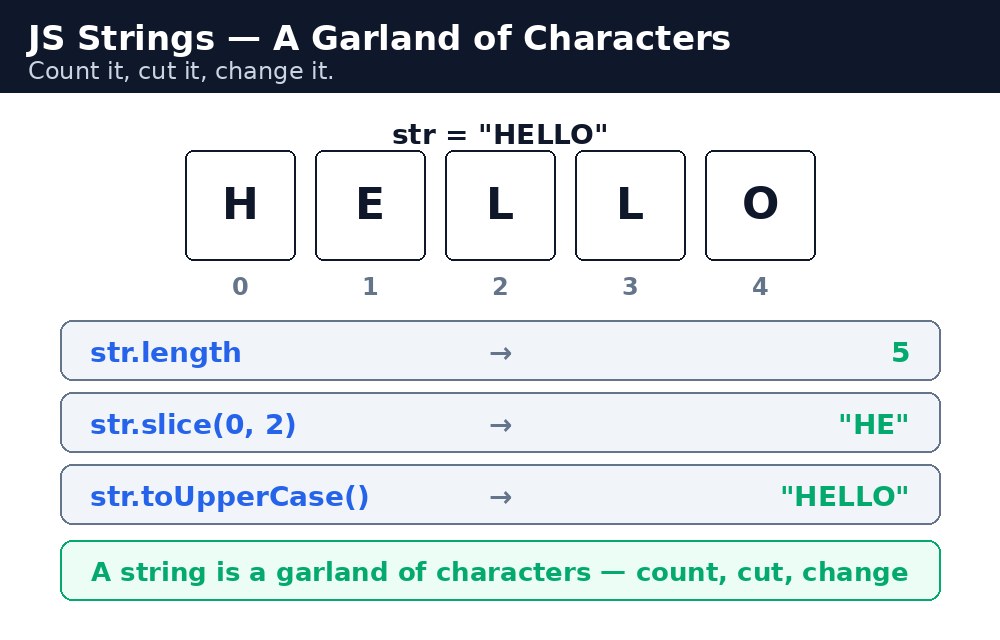
A string is a garland of characters, and every character has a position, starting from 0. The first letter of "Rahul" is at position 0, the second at position 1, and so on. Almost every string method works by position, so counting from zero is a habit you must build early.
Length and positions
The length property tells you how many characters a string has — including spaces. You can read a single character with bracket notation, just like an array.
let name = "Rahul Verma";
name.length;   // 11 (the space counts too)
name[0];       // "R"
name[6];       // "V"
Cutting and changing strings
slice(start, end) cuts out a piece: it starts at start and stops just before end. replace(old, new) swaps the first occurrence of a word. toUpperCase() and toLowerCase() change the case, and trim() removes spaces from both ends — very handy for cleaning up what a user typed into a form.
let city = "  Varanasi  ";
city.trim();                    // "Varanasi"
"hello world".toUpperCase();    // "HELLO WORLD"
"Ram Kumar".replace("Kumar", "Verma");  // "Ram Verma"
"Rahul Verma".slice(0, 5);      // "Rahul"
Remember: strings are immutable — methods like replace() do not change the original string; they return a brand-new one. You must store the result in a variable, or it is lost.
slice() and substring() look similar, but they differ with negative numbers: slice(-4) takes the last 4 characters, while substring(-4) treats the negative as 0. Beginners should stick to slice() — it behaves more predictably.Template literals — sentences from parts
Joining strings with + gets messy fast: "Hello " + name + ", your score is " + marks. Template literals use backticks (the ` key, next to the 1) and let you drop values straight into the sentence with ${ }. They can also span several lines, which normal quotes cannot.
let name = "Priya";
let marks = 92;
let msg = `Hello ${name}, your score is ${marks} / 100.`;
`2 + 3 is ${2 + 3}`;  // "2 + 3 is 5" — even maths works inside ${ }
trim() it and capitalise the first letter: name.trim().charAt(0).toUpperCase() + name.trim().slice(1). It turns " rahul " into "Rahul" — a small touch that makes your website look professional.Common mistakes
- Forgetting strings are immutable —
city.replace("a", "o")alone does nothing; you must writecity = city.replace("a", "o"). - Counting positions from 1 instead of 0 — the first character is at position 0, so
name[1]is the second letter. - Mixing up quotes — a string that starts with
"must end with", not'. - Using normal quotes for
${ }— the placeholder only works inside backticks, not inside"or'.
Remember
lengthcounts characters, spaces included; positions start at 0.slice()cuts,replace()swaps,toUpperCase()/toLowerCase()change case,trim()cleans spaces.- Strings are immutable — every method returns a new string.
- Template literals use backticks and
${ }to build sentences from values. - A string is a garland of characters — count it, cut it, change it.
Example explained
let name = document.getElementById("name").value;— reads whatever the visitor typed into the input box.name.trim()— removes any accidental spaces the visitor typed before or after the name.clean.length— counts the letters in the cleaned name and shows the number.clean.toUpperCase()— shows the name in capital letters, like a name on a certificate.`Hello ${clean}, welcome to KAMALDNP!`— a template literal builds the greeting sentence with the visitor's name dropped inside${ }.
Example
<!DOCTYPE html>
<html>
<head>
<title>Name Formatter</title>
<style>
body { font-family: Verdana, sans-serif; background-color: #fff8e1; }
h1 { color: #1e3a5f; }
button { background-color: #04aa6d; color: white; padding: 10px 18px; border: none; }
#out { background-color: white; border: 2px solid #1e3a5f; padding: 14px; width: 340px; }
</style>
</head>
<body>

<h1>Name Formatter</h1>
<p>Type your name (with extra spaces if you like) and format it:</p>
<input type="text" id="name" value="  rahul verma ">
<button onclick="formatName()">Format My Name</button>
<div id="out">
<p>Greeting: —</p>
<p>Length: —</p>
<p>Uppercase: —</p>
</div>

<script>
function formatName() {
  let raw = document.getElementById("name").value;
  let clean = raw.trim();
  let greet = `Hello ${clean}, welcome to KAMALDNP!`;
  document.getElementById("out").innerHTML =
    "<p>Greeting: " + greet + "</p>" +
    "<p>Length: " + clean.length + " letters</p>" +
    "<p>Uppercase: " + clean.toUpperCase() + "</p>";
}
</script>

</body>
</html>
Output
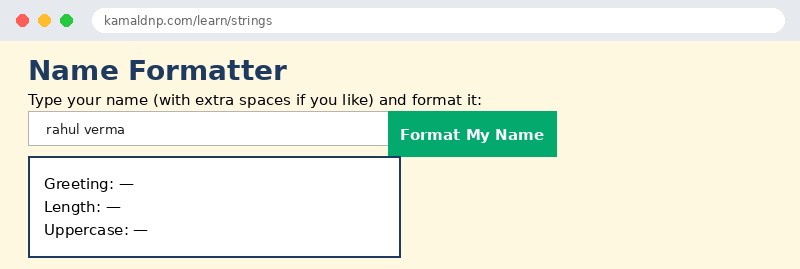
Try it yourself — live editor
Change the code below and press Run to see the result instantly. No file to save, no login needed.
Why learn this yourself — and not just ask AI?
AI can write code for you, but it cannot think for you. When you learn HTML yourself, your brain builds the real skill: you understand why a page looks the way it does, you can fix it when it breaks, and you can answer it in an exam or an interview without help. That is the skill that gets you a job — not a copied answer.
Get certified — just ₹10
Finish all 30 lessons, pass the test (80%), pay ₹10 and get your certificate.
Take the testPrefer watching? Video courses teach the same topics step by step.
Go further with a full course
Free tutorials teach you the basics. Our paid courses add live projects, mentorship and a certificate.
Browse all courses