JavaScript Type Conversion
5 min read · Free · No login needed
JavaScript is a loose language. A value can be a number one minute and a string the next, and JavaScript will happily change it for you — sometimes when you did not ask. That is called type conversion. You need it all the time, because the most common source of values — a form on a web page — always gives you strings, even when the user types a number.
Think of a chai shop order form. The customer types 3 in the quantity box. JavaScript reads it as the string "3", not the number 3. If you add "3" + 1, you get "31" — the string and the number glued together. If you convert first with Number("3"), you get 3 + 1 = 4, the answer you wanted. One small conversion, one big difference.
Converting on purpose — Number, String, Boolean
JavaScript gives you three simple tools for changing a type on purpose:
Number("42")turns a string into a number:42.Number("hello")cannot be a number, so it givesNaN— "Not a Number".Number("")gives0, andNumber(true)gives1.String(42)turns a number into a string:"42".String(true)gives"true". You use it when you want to join a value into a message.Boolean(1)givestrue.Boolean(0),Boolean(""),Boolean(null)andBoolean(undefined)all givefalse— these are the falsy values. Everything else is truthy, including the string"0"and an empty array[].
You can also use shortcuts: +"42" (a plus sign in front) works like Number("42"), and "" + 42 works like String(42). They are short, but for a beginner the named functions are clearer — use them until the shortcuts feel natural.
NaN is strange: it is not equal to anything, not even itself. NaN === NaN is false. To check whether a value is NaN, use Number.isNaN(value) — never compare it with ===.== vs === — the question that decides interviews
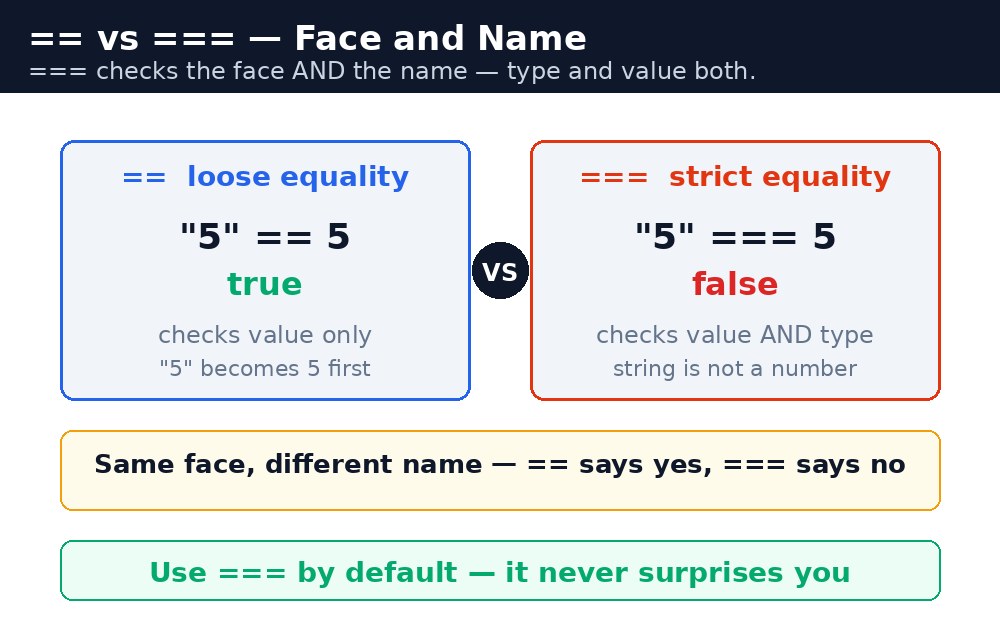
JavaScript has two equality signs, and they are not the same. == (loose equality) converts the types first, then compares: "5" == 5 is true, because the string "5" becomes the number 5. === (strict equality) checks the type and the value, with no conversion: "5" === 5 is false, because a string is not a number.
Always use === unless you have a clear reason not to. Loose equality hides bugs — a string that looks like a number passes a check it should fail, and the mistake shows up far away from where it was made. The same rule applies to != and !==: prefer !==.
== only checks the face and lets the name slide. In real code and in interviews, === is the safe answer.Truthy and falsy — the short list to memorise
When JavaScript needs a true/false answer — inside an if, for example — it converts the value with the Boolean rules. Only six values are falsy: false, 0, "" (empty string), null, undefined, and NaN. Everything else is truthy. That means if ("hello") runs, if (0) does not, and if ("0") runs — because "0" is a non-empty string, and non-empty strings are truthy.
This is useful for defaults. let name = input || "Guest"; gives "Guest" when the input is empty, because an empty string is falsy and the || moves on to the next value. You will see this pattern everywhere in real code.
Common mistakes
- Adding a form value without converting it —
"3" + 1is"31", not4. Convert withNumber()first. - Using
==and wondering why"5" == 5is true — use===unless you truly want conversion. - Checking
value === NaN— it is always false. UseNumber.isNaN(value). - Thinking
"0"is falsy — it is a non-empty string, so it is truthy. Only the empty string""is falsy. - Trusting
Number("42px")— it givesNaN.parseInt("42px")gives42, because it reads the number at the start and stops at the letters.
Remember
Number(),String()andBoolean()convert a value on purpose.===checks type AND value;==converts first. Prefer===.- Only six values are falsy:
false,0,"",null,undefined,NaN. - Form inputs are always strings — convert them before doing maths.
===checks the face AND the name — type and value both.
Example explained
<input id="qty" value="3">— the quantity box. Whatever the user types, JavaScript reads it as a string.let qty = Number(document.getElementById("qty").value);— converts the string"3"into the number3, so the maths works.let total = qty * 10;— 3 cups at ₹10 each is ₹30. Multiplication would convert the string by itself, but addition would not — so converting first keeps every operation safe.if (qty === 0)— strict equality: if the user typed0, the number0matches, but the string"0"would not have matched before conversion.document.getElementById("out").textContent = "Total: ₹" + total;— shows the answer on the page. Here the+joins strings on purpose.
Example
<!DOCTYPE html>
<html>
<head>
<title>Chai Bill — Type Conversion</title>
<style>
body { font-family: Verdana, sans-serif; background-color: #fff8e1; }
h1 { color: #b45309; text-align: center; }
.card { background-color: white; border: 2px solid #f59e0b; padding: 16px; width: 340px; margin: 20px auto; }
button { background-color: #b45309; color: white; border: none; padding: 10px 18px; font-size: 16px; }
#out { font-weight: bold; color: green; }
</style>
</head>
<body>

<h1>Chai Bill</h1>
<div class="card">
<p>How many cups? <input id="qty" type="text" value="3"></p>
<p><button onclick="makeBill()">Make my bill</button></p>
<p id="out">Your total will appear here.</p>
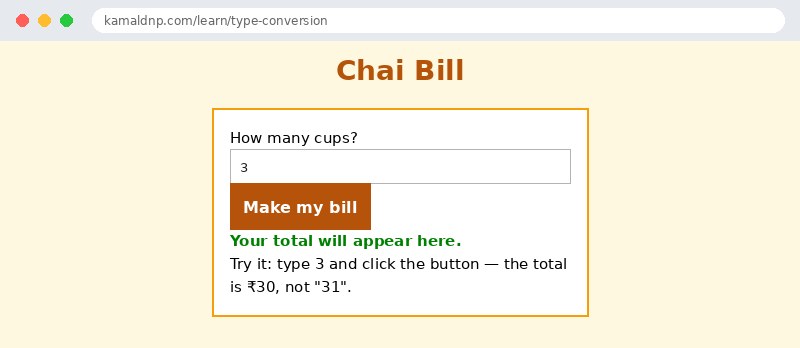
<p>Try it: type 3 and click the button — the total is ₹30, not "31".</p>
</div>

<script>
function makeBill() {
  let qty = Number(document.getElementById("qty").value);
  let total = qty * 10;
  if (qty === 0) {
    document.getElementById("out").textContent = "You ordered 0 cups — nothing to pay!";
  } else {
    document.getElementById("out").textContent = "Total: ₹" + total;
  }
}
</script>

</body>
</html>
Output
Try it yourself — live editor
Change the code below and press Run to see the result instantly. No file to save, no login needed.
Why learn this yourself — and not just ask AI?
AI can write code for you, but it cannot think for you. When you learn HTML yourself, your brain builds the real skill: you understand why a page looks the way it does, you can fix it when it breaks, and you can answer it in an exam or an interview without help. That is the skill that gets you a job — not a copied answer.
Get certified — just ₹10
Finish all 30 lessons, pass the test (80%), pay ₹10 and get your certificate.
Take the testPrefer watching? Video courses teach the same topics step by step.
Go further with a full course
Free tutorials teach you the basics. Our paid courses add live projects, mentorship and a certificate.
Browse all courses