CSS Backgrounds
4 min read · Free · No login needed
Every element has a background — by default it is transparent, so you see whatever is behind it. The background properties let you paint that space: a flat colour, a picture, a gradient, or all three together. A good background makes a page feel finished; a bad one makes the text unreadable.
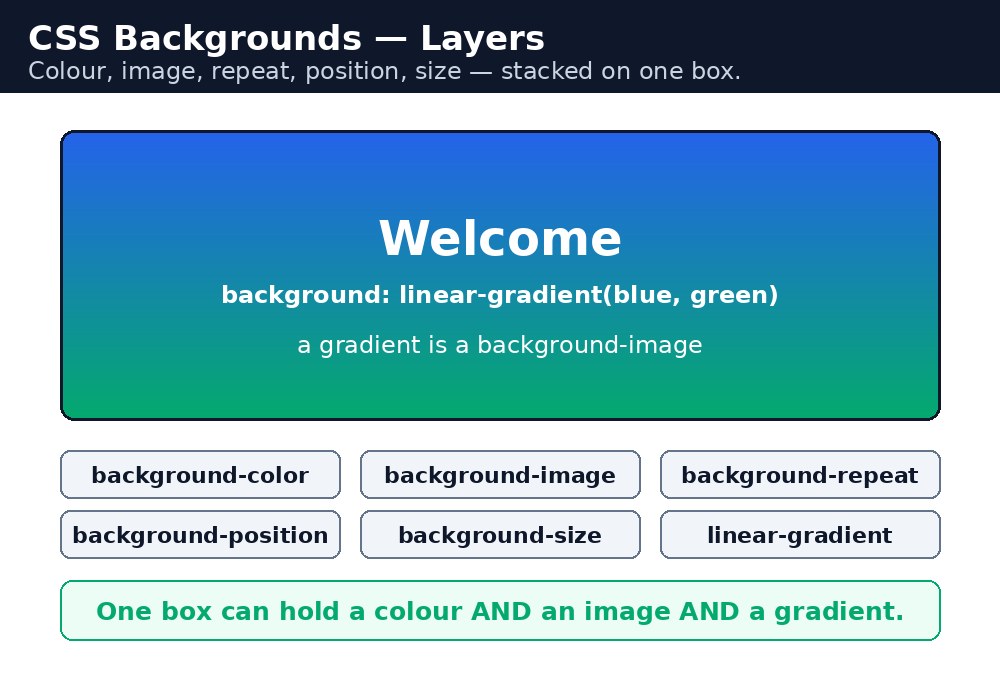
The background properties
| Property | Example | What it does |
|---|---|---|
background-color | #fff8e1 | Paints a flat colour behind the element. |
background-image | url("photo.jpg") | Places a picture behind the element. |
background-repeat | no-repeat | Stops the picture from tiling like bathroom tiles. |
background-position | center | Chooses where the picture sits: top, center, right, or exact numbers. |
background-size | cover | cover fills the whole area; contain shows the whole picture. |
background-attachment | fixed | fixed keeps the picture still while the page scrolls. |
Syntax — a hero banner
.hero {
  background-color: #1e3a8a;
  background-image: url("campus.jpg");
  background-repeat: no-repeat;
  background-position: center;
  background-size: cover;
}
Read it top to bottom: paint the banner dark blue first (so the text is readable even if the picture fails to load), then place the photo on top, do not repeat it, centre it, and stretch it until it covers the whole banner. The colour is the safety net; the picture is the decoration.
The shorthand
All six properties can be written in one line, in this order: colour, image, repeat, attachment, position, then a slash, then size.
.hero {
  background: #1e3a8a url("campus.jpg") no-repeat center / cover;
}
Shorthand is shorter, but it is also easier to get wrong — one word in the wrong place and the whole line is ignored. While learning, write the long form. Use the shorthand only when you are sure of the order.
<img> tag instead, so screen readers can read its alt text. Backgrounds are for patterns, textures, and banners.Gradients — backgrounds without any picture
A gradient is a smooth blend from one colour to another, and CSS draws it for you — no image file needed. A gradient is a background-image, so it sits in that property.
.sunset {
  background-image: linear-gradient(to right, orange, pink);
}
.ball {
  background-image: radial-gradient(circle, yellow, red);
}
linear-gradient blends in a straight line — to right, to bottom, or an angle like 45deg. radial-gradient blends out from a centre point, like a ball lit from above. You can blend three or more colours by listing them: linear-gradient(red, yellow, green).
background-size: cover is the one value to remember for full-width banners. It scales the picture until the whole area is covered, cropping the edges if needed. Use it for hero sections, and your banner will look right on a phone and on a big screen.Common mistakes
- Forgetting
no-repeat— by default a background picture repeats in both directions, so a small photo tiles across the whole element. - Writing a wrong image path — the
url()is relative to the CSS file, not the HTML file. If the CSS is in a different folder, the path must account for that. - No fallback colour — if the picture fails to load, dark text on a transparent background can become unreadable. Always set a
background-colorfirst. - Using
backgroundshorthand in the wrong order — the browser ignores the whole line instead of guessing what you meant. - Putting text over a busy picture with no overlay — the words disappear into the photo. A dark gradient or a semi-transparent colour behind the text fixes it.
Remember
background-coloris the safety net — set it before any picture.background-repeat: no-repeatstops the picture from tiling.background-size: coverfills the area;containshows the whole picture.- Gradients are
background-imagevalues — no image file needed. - Backgrounds are decoration; real content pictures belong in an
<img>tag.
Example explained
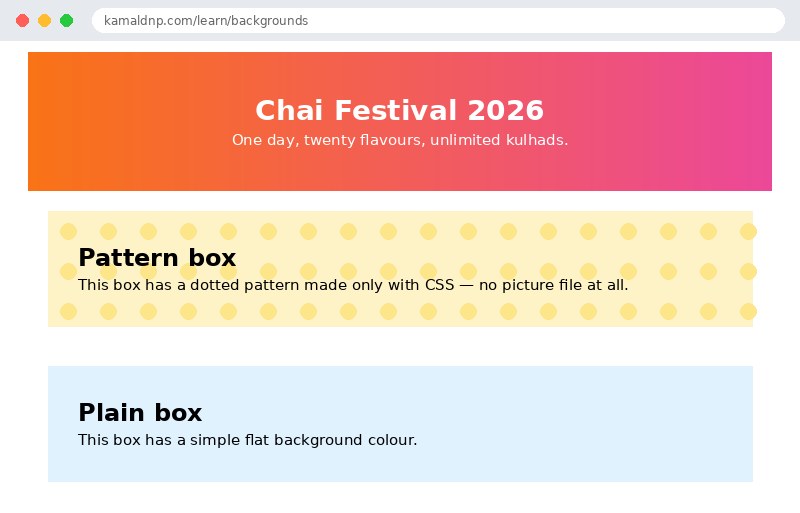
.hero { background-image: linear-gradient(to right, #f97316, #ec4899); }— a gradient background, orange blending into pink, drawn by CSS with no picture file at all..hero { color: white; }— white text on the bright gradient, so the words stay readable..pattern { background-color: #fef3c7; background-image: radial-gradient(circle, #fde68a 20%, transparent 20%); background-size: 40px 40px; }— a pale yellow base with small dots, repeated every 40 pixels like a polka-dot pattern..plain { background-color: #e0f2fe; }— the simplest background: one flat colour, no picture, no gradient.
Example
<!DOCTYPE html>
<html>
<head>
<title>CSS Backgrounds</title>
<style>
body { font-family: Verdana, sans-serif; margin: 0; }
.hero { background-image: linear-gradient(to right, #f97316, #ec4899); color: white; text-align: center; padding: 40px; }
.pattern { background-color: #fef3c7; background-image: radial-gradient(circle, #fde68a 20%, transparent 20%); background-size: 40px 40px; padding: 30px; margin: 20px; }
.plain { background-color: #e0f2fe; padding: 30px; margin: 20px; }
</style>
</head>
<body>

<div class="hero">
<h1>Chai Festival 2026</h1>
<p>One day, twenty flavours, unlimited kulhads.</p>
</div>
<div class="pattern">
<h2>Pattern box</h2>
<p>This box has a dotted pattern made only with CSS — no picture file at all.</p>
</div>
<div class="plain">
<h2>Plain box</h2>
<p>This box has a simple flat background colour.</p>
</div>

</body>
</html>
Output
Try it yourself — live editor
Change the code below and press Run to see the result instantly. No file to save, no login needed.
Why learn this yourself — and not just ask AI?
AI can write code for you, but it cannot think for you. When you learn HTML yourself, your brain builds the real skill: you understand why a page looks the way it does, you can fix it when it breaks, and you can answer it in an exam or an interview without help. That is the skill that gets you a job — not a copied answer.
Get certified — just ₹10
Finish all 30 lessons, pass the test (80%), pay ₹10 and get your certificate.
Take the testPrefer watching? Video courses teach the same topics step by step.
Go further with a full course
Free tutorials teach you the basics. Our paid courses add live projects, mentorship and a certificate.
Browse all courses