CSS Pseudo-classes
4 min read · Free · No login needed
Sometimes you want to style an element only in a special situation: a link when the mouse is over it, a box when the visitor clicks into it, the first item in a list, every second row of a table. A pseudo-class does exactly that — it is a keyword you add to a selector, after a single colon, that picks an element in a special state.
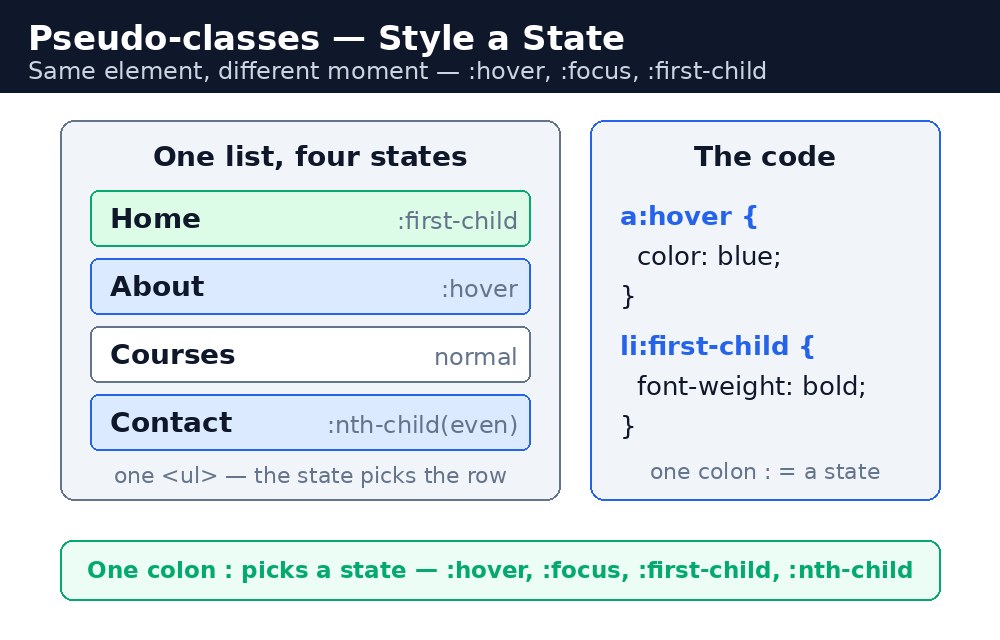
The word "pseudo" means "not real". A pseudo-class is not a real class in your HTML — you never write it in a class attribute. It is a condition the browser checks for you: is the mouse over this link right now? Is this the first child of its parent? If yes, the style applies.
Hover and focus — the interactive states
:hover applies while the mouse is over an element. It is the most used pseudo-class of all — links that change colour, buttons that darken, cards that lift slightly. :focus applies when an element has keyboard focus, like a form box the visitor has clicked into. Always style :focus: keyboard users and phone users depend on it to see where they are on the page.
a:hover {
  color: red;
}
input:focus {
  border-color: green;
  outline: none;
}
Link states — :link, :visited, :active
Links have four states, and they have a famous order you must remember: LVHA — :link, :visited, :hover, :active. A link is :visited after the visitor has clicked it once, and :active in the split second while it is being clicked. If you write them in the wrong order, the later rule wins and one state can hide another.
First-child and last-child
:first-child picks an element that is the first child of its parent, and :last-child picks the last one. They are perfect for small touches: make the first item in a list bold, or remove the bottom border from the last row of a table.
li:first-child {
  font-weight: bold;
}
li:last-child {
  border-bottom: none;
}
Nth-child — patterns in a list
:nth-child() picks children by a number or a pattern. :nth-child(2) picks the second child. :nth-child(even) picks the 2nd, 4th and 6th. :nth-child(odd) picks the 1st, 3rd and 5th. :nth-child(3n) picks every third. This is the engine behind zebra-striped tables — you used it in the tables lesson before you knew its name.
Not — everything except this
:not() does the opposite: it picks everything that does not match. li:not(.topper) styles every list item except the one with the class topper. It is a neat way to say "all of these, except that one".
li:not(.topper) {
  color: #334155;
}
:nth-child counts all the children of a parent, not just the ones that match your selector. In a list with a heading followed by items, li:nth-child(2) is the first list item, because the heading is child number 1. This catches out almost everyone once.:hover and :focus together on buttons and links. Mouse users get the hover effect, keyboard users get the focus effect, and nobody is left guessing what they are about to click.Common mistakes
- Writing link states in the wrong order — remember LVHA: link, visited, hover, active.
- Forgetting the colon and writing
ahoverinstead ofa:hover. - Thinking
:first-childmeans "first of this type" — it means first child of the parent, whatever it is. Use:first-of-typefor the first of a type. - Using
:nth-childand being surprised when it counts headings and other siblings too. - Styling
:hoverbeautifully and forgetting:focus, so keyboard users cannot see where they are.
Remember
- A pseudo-class starts with one colon and picks an element in a special state.
:hoveris for the mouse;:focusis for the keyboard — style both.- Link states go in LVHA order: link, visited, hover, active.
:first-childand:last-childpick the ends of a list;:nth-child()picks by number or pattern.:not()picks everything except what is inside the brackets.:nth-childcounts all siblings, not just the matching ones.
Example explained
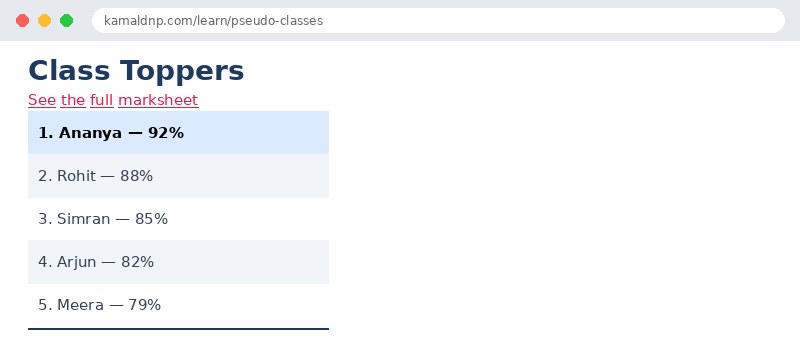
a { color: #1d4ed8; }— the link starts blue, so the visitor knows it can be clicked.a:hover { color: #e11d48; }— while the mouse is over the link it turns red, showing exactly what will be clicked.input:focus { border-color: #16a34a; outline: none; }— when the visitor clicks into the search box, its border turns green so they can see it is active.li:first-child { background-color: #dbeafe; font-weight: bold; }— the first student in the list, the topper, gets a blue background and bold text.li:nth-child(even) { background-color: #f1f5f9; }— every even row gets a light grey background, giving the list its zebra stripes.li:not(.topper) { color: #334155; }— every list item except the topper gets the same dark grey text colour.
Example
<!DOCTYPE html>
<html>
<head>
<title>Pseudo-classes — Student List</title>
<style>
body {
  font-family: Arial, sans-serif;
}
h1 {
  color: #1e3a5f;
}
a {
  color: #1d4ed8;
}
a:hover {
  color: #e11d48;
}
input {
  padding: 8px;
  border: 2px solid #94a3b8;
}
input:focus {
  border-color: #16a34a;
  outline: none;
}
ul {
  list-style: none;
  padding: 0;
  width: 300px;
}
li {
  padding: 10px;
}
li:first-child {
  background-color: #dbeafe;
  font-weight: bold;
}
li:nth-child(even) {
  background-color: #f1f5f9;
}
li:last-child {
  border-bottom: 2px solid #1e3a5f;
}
li:not(.topper) {
  color: #334155;
}
</style>
</head>
<body>

<h1>Class Toppers</h1>
<p><a href="#">See the full marksheet</a></p>
<p><input type="text" placeholder="Search a student..."></p>

<ul>
<li class="topper">1. Ananya — 92%</li>
<li>2. Rohit — 88%</li>
<li>3. Simran — 85%</li>
<li>4. Arjun — 82%</li>
<li>5. Meera — 79%</li>
</ul>

</body>
</html>
Output
Try it yourself — live editor
Change the code below and press Run to see the result instantly. No file to save, no login needed.
Why learn this yourself — and not just ask AI?
AI can write code for you, but it cannot think for you. When you learn HTML yourself, your brain builds the real skill: you understand why a page looks the way it does, you can fix it when it breaks, and you can answer it in an exam or an interview without help. That is the skill that gets you a job — not a copied answer.
Get certified — just ₹10
Finish all 30 lessons, pass the test (80%), pay ₹10 and get your certificate.
Take the testPrefer watching? Video courses teach the same topics step by step.
Go further with a full course
Free tutorials teach you the basics. Our paid courses add live projects, mentorship and a certificate.
Browse all courses