CSS Selectors
4 min read · Free · No login needed
A selector is the part of a CSS rule that points at the HTML you want to style. Get the selector right, and the rule lands exactly where you want it. Get it wrong, and either nothing changes or the wrong thing changes. Most CSS mistakes are actually selector mistakes.
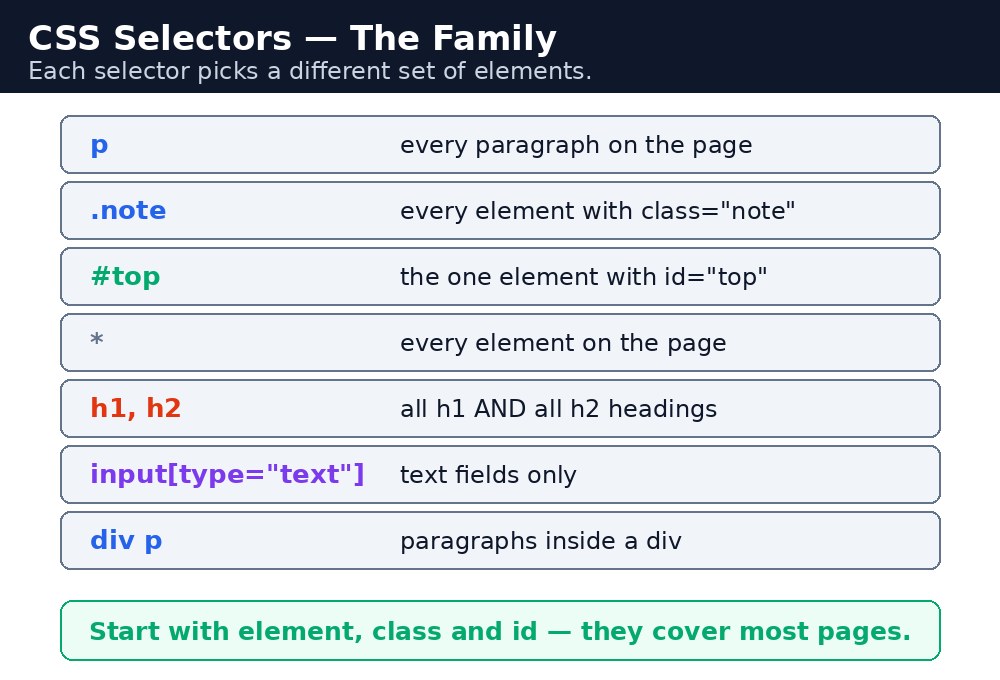
The basic selectors
There are five selectors you will use every day. Learn them first; everything else is built on them.
| Selector | Example | What it picks |
|---|---|---|
| Element | p | Every <p> on the page. |
| Class | .warning | Every element with class="warning". |
| ID | #top | The one element with id="top". |
| Universal | * | Every element on the page. |
| Grouping | h1, h2, h3 | Every h1, every h2, and every h3. |
A class starts with a dot, an id starts with a hash. That one character is the whole difference in writing — but a big difference in meaning: a class can be reused on many elements, an id must belong to exactly one element on the page.
Syntax — the five basics in one file
p { color: #333; }
.notice { background-color: #fef3c7; }
#main-title { text-align: center; }
* { box-sizing: border-box; }
h1, h2 { font-family: Georgia, serif; }
Read each line as a sentence: "All paragraphs are dark grey." "Anything with the class notice gets a pale yellow background." "The one element with the id main-title is centred." "Every element uses border-box sizing." "All h1 and h2 headings use Georgia."
Attribute selectors
Sometimes you want to style elements by their attributes, not by a class. An attribute selector uses square brackets: [type="text"] picks every element whose type attribute is text. a[target="_blank"] picks only links that open in a new tab. img[alt] picks every image that has an alt attribute at all.
Combinators — selectors that describe relationships
A combinator joins two selectors to describe how elements are related to each other. There are four:
| Combinator | Example | What it picks |
|---|---|---|
| Descendant (space) | div p | Any <p> inside a <div>, at any depth. |
| Child (>) | div > p | Only <p> that is a direct child of a <div>. |
| Adjacent sibling (+) | h2 + p | The first <p> right after an <h2>. |
| General sibling (~) | h2 ~ p | Every <p> that follows an <h2> at the same level. |
div p reaches deep into nested divs and can style paragraphs you never meant to touch. Prefer a class on the exact element when you can — it is clearer and it never surprises you later.Common mistakes
- Forgetting the dot for a class —
warning { }looks for a<warning>tag, which does not exist. It must be.warning. - Using the same id twice — an id must be unique. Two elements with
id="top"is invalid, and your styles will behave oddly. - Writing
div pwhen you meantdiv > p— the space reaches all descendants, the>reaches only direct children. - Putting a space where there should not be one —
.card pand.cardpare completely different selectors. - Grouping without commas —
h1 h2 { }means "h2 inside h1". To group, you need the comma:h1, h2 { }.
Remember
- Element = tag name, class = dot + name, id = hash + name, universal =
*, grouping = commas. - A class can be reused; an id must be unique on the page.
- Attribute selectors use square brackets:
[type="text"]. - Combinators: space = descendant,
>= child,+= next sibling,~= all following siblings.
Example explained
h2 { color: #1e3a8a; }— the element selector. Both headings on the scorecard turn dark blue..winner { background-color: #dcfce7; }— the class selector. Only the row markedclass="winner"gets the green background.#top-scorer { font-weight: bold; }— the id selector. Only the one element withid="top-scorer"becomes bold.table td { padding: 8px; }— the descendant combinator. Every cell inside the table gets padding, wherever it sits.table > caption { font-size: 20px; }— the child combinator. Only a caption that is a direct child of the table gets the bigger font.
Example
<!DOCTYPE html>
<html>
<head>
<title>Cricket Scorecard</title>
<style>
h2 { color: #1e3a8a; }
.winner { background-color: #dcfce7; }
#top-scorer { font-weight: bold; }
table td { padding: 8px; border: 1px solid #999; }
table > caption { font-size: 20px; font-weight: bold; }
</style>
</head>
<body>

<h2>Inter-School Cricket Final</h2>
<table>
<caption>KAMALDNP XI vs City School</caption>
<tr><td>Rahul</td><td>78 runs</td></tr>
<tr class="winner"><td id="top-scorer">Amit</td><td>102 runs</td></tr>
<tr><td>Suresh</td><td>45 runs</td></tr>
</table>

</body>
</html>
Output
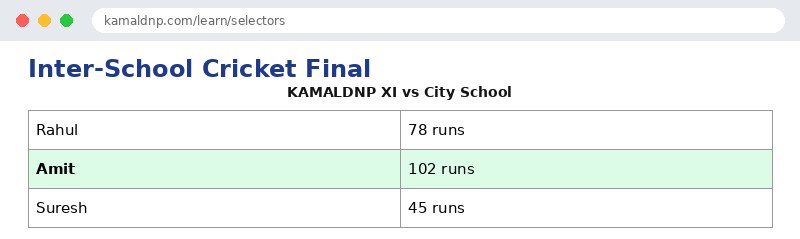
Try it yourself — live editor
Change the code below and press Run to see the result instantly. No file to save, no login needed.
Check yourself — did you get it?
Finished the lesson? Test yourself with 5 quick questions — you get the answer instantly, with the reason for each one.
1. What does a dot before a name mean in a selector?
2. What does a hash # before a name mean?
3. What does the universal selector * pick?
4. How do you write one rule for both h1 and h2?
5. What does div > p pick?
Interview questions — can you answer these?
Read the question first, try to answer it in your own words, then open it to check. These are the questions interviewers actually ask.
1. What is the difference between a class selector and an id selector?
A class starts with a dot (.warning) and can be reused on many elements; an id starts with a hash (#top) and must belong to exactly one element on the page. Use classes for everyday styling and ids for one-of-a-kind things — and if you style with an id, you can never reuse that style.
2. What does the universal selector (*) do, and when would you use it?
The universal selector * picks every element on the page. A common use is * { box-sizing: border-box; } so every element sizes itself the same way. But be careful — it touches everything, so a rule with * affects the whole page at once.
3. What is the difference between 'div p' and 'div > p'?
div p is the descendant selector — it picks any <p> inside a <div> at any depth. div > p is the child selector — it picks only <p> elements that are direct children of a <div>. The space reaches deep into nested divs; the > reaches only one level down.
Try it yourself — build this
Reading is not enough — now build it yourself. Write the code in the live editor, run it, check the hint if you get stuck, and open the solution only after you have tried.
1. Pick them with selectors
Create a cricket scorecard page that uses five different selectors: an element selector (h2 dark blue), a class selector (.winner with a light green #dcfce7 background), an id selector (#top-scorer bold), a grouping selector (h1, h2 in Georgia font), and a descendant selector (table td with 8px padding and a 1px solid #999 border). The table must have three players, and the top scorer's row must use class="winner" and the top scorer's name cell must use id="top-scorer".
Show solution
<!DOCTYPE html>
<html>
<head>
<title>Cricket Scorecard</title>
<style>
h1, h2 { font-family: Georgia, serif; }
h2 { color: #1e3a8a; }
.winner { background-color: #dcfce7; }
#top-scorer { font-weight: bold; }
table td { padding: 8px; border: 1px solid #999; }
</style>
</head>
<body>

<h2>Inter-School Cricket Final</h2>
<table>
<tr><td>Rahul</td><td>78 runs</td></tr>
<tr class="winner"><td id="top-scorer">Amit</td><td>102 runs</td></tr>
<tr><td>Suresh</td><td>45 runs</td></tr>
</table>

</body>
</html>Why learn this yourself — and not just ask AI?
AI can write code for you, but it cannot think for you. When you learn HTML yourself, your brain builds the real skill: you understand why a page looks the way it does, you can fix it when it breaks, and you can answer it in an exam or an interview without help. That is the skill that gets you a job — not a copied answer.
Get certified — just ₹10
Finish all 30 lessons, pass the test (80%), pay ₹10 and get your certificate.
Take the testPrefer watching? Video courses teach the same topics step by step.
Go further with a full course
Free tutorials teach you the basics. Our paid courses add live projects, mentorship and a certificate.
Browse all courses