CSS सेलेक्टर्स
4 मिनट पढ़ें · मुफ़्त · बिना लॉगिन
Selector CSS नियम का वह हिस्सा है जो उस HTML की ओर इशारा करता है जिसे आप सजाना चाहते हैं। Selector सही हो, तो नियम ठीक वहीं लगता है जहाँ आप चाहते हैं। गलत हो, तो या तो कुछ बदलता ही नहीं, या गलत चीज़ बदल जाती है। ज़्यादातर CSS गलतियाँ असल में selector की गलतियाँ होती हैं।
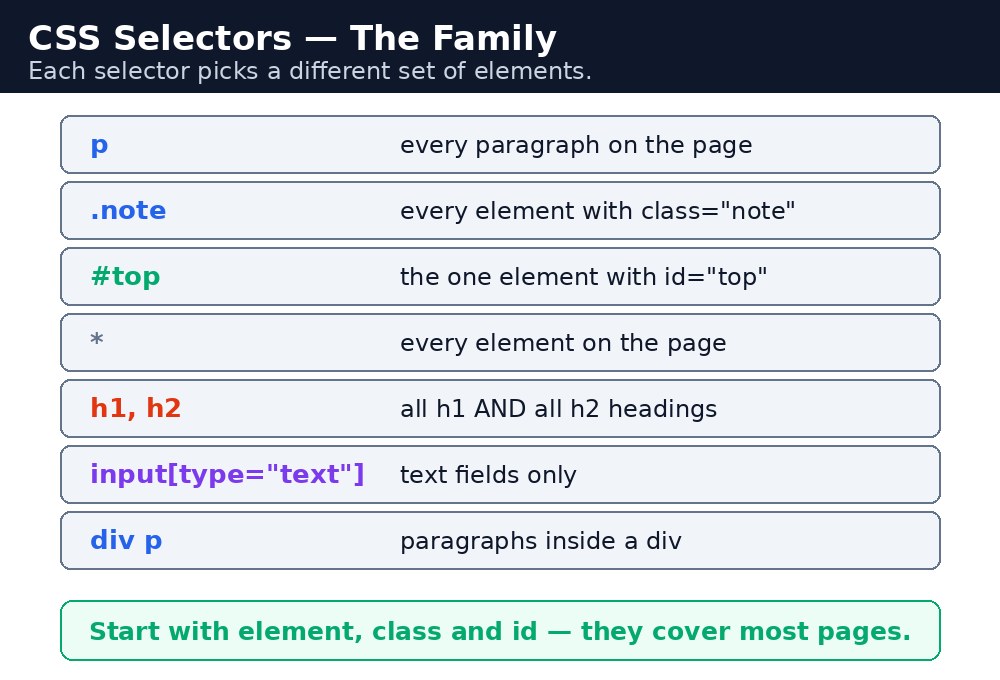
बुनियादी selectors
पाँच selectors ऐसे हैं जिन्हें आप हर दिन इस्तेमाल करेंगे। पहले इन्हें सीख लीजिए; बाकी सब इन्हीं पर बना है।
| Selector | उदाहरण | किसे चुनता है |
|---|---|---|
| Element | p | पेज का हर <p>। |
| Class | .warning | class="warning" वाला हर element। |
| ID | #top | id="top" वाला एक element। |
| Universal | * | पेज का हर element। |
| Grouping | h1, h2, h3 | हर h1, हर h2 और हर h3। |
Class dot से शुरू होती है, id hash से। लिखने में बस यही एक character का फ़र्क है — लेकिन मतलब में बड़ा फ़र्क है: class कई elements पर दोबारा इस्तेमाल हो सकती है, id पेज पर सिर्फ एक ही element की होनी चाहिए।
सिंटैक्स — पाँचों बुनियादी selectors एक file में
p { color: #333; }
.notice { background-color: #fef3c7; }
#main-title { text-align: center; }
* { box-sizing: border-box; }
h1, h2 { font-family: Georgia, serif; }
हर line को एक वाक्य की तरह पढ़िए: "सभी paragraphs गहरे भूरे हैं।" "notice class वाली किसी भी चीज़ को हल्की पीली पृष्ठभूमि मिलती है।" "main-title id वाला एक element बीच में है।" "हर element border-box sizing इस्तेमाल करता है।" "सभी h1 और h2 headings Georgia font में हैं।"
Attribute selectors — attributes से चुनना
कभी-कभी आप elements को class से नहीं, उनके attributes से style करना चाहते हैं। Attribute selector square brackets इस्तेमाल करता है: [type="text"] हर उस element को चुनता है जिसका type attribute text है। a[target="_blank"] सिर्फ उन links को चुनता है जो नए tab में खुलते हैं। img[alt] हर उस image को चुनता है जिसमें alt attribute है।
Combinators — रिश्ते बताने वाले selectors
Combinator दो selectors को जोड़कर बताता है कि elements एक-दूसरे से कैसे जुड़े हैं। चार तरह के होते हैं:
| Combinator | उदाहरण | किसे चुनता है |
|---|---|---|
| Descendant (space) | div p | <div> के अंदर का कोई भी <p>, चाहे कितनी भी गहराई पर हो। |
| Child (>) | div > p | सिर्फ वह <p> जो <div> का सीधा child हो। |
| Adjacent sibling (+) | h2 + p | <h2> के ठीक बाद वाला पहला <p>। |
| General sibling (~) | h2 ~ p | <h2> के बाद आने वाला हर <p>, उसी level पर। |
div p nested divs में गहराई तक पहुँच जाता है और उन paragraphs को भी style कर सकता है जिन्हें आप छूना ही नहीं चाहते थे। जब हो सके, ठीक element पर class लगाना बेहतर है — यह साफ़ है और बाद में कभी चौंकाता नहीं।आम गलतियाँ
- Class के लिए dot भूल जाना —
warning { }एक<warning>tag ढूँढता है, जो होता ही नहीं। यह.warningहोना चाहिए। - एक ही id दो बार इस्तेमाल करना — id unique होनी चाहिए।
id="top"वाले दो elements गलत हैं, और आपके styles अजीब व्यवहार करेंगे। div > pकी जगहdiv pलिखना — space सभी descendants तक पहुँचता है,>सिर्फ सीधे children तक।- वहाँ space डाल देना जहाँ नहीं होना चाहिए —
.card pऔर.cardpबिल्कुल अलग selectors हैं। - बिना comma के grouping करना —
h1 h2 { }का मतलब है "h1 के अंदर h2"। Group करने के लिए comma चाहिए:h1, h2 { }।
याद रखें
- Element = tag का नाम, class = dot + नाम, id = hash + नाम, universal =
*, grouping = commas। - Class दोबारा इस्तेमाल हो सकती है; id पेज पर unique होनी चाहिए।
- Attribute selectors square brackets इस्तेमाल करते हैं:
[type="text"]। - Combinators: space = descendant,
>= child,+= अगला sibling,~= बाद वाले सभी siblings।
उदाहरण समझिए
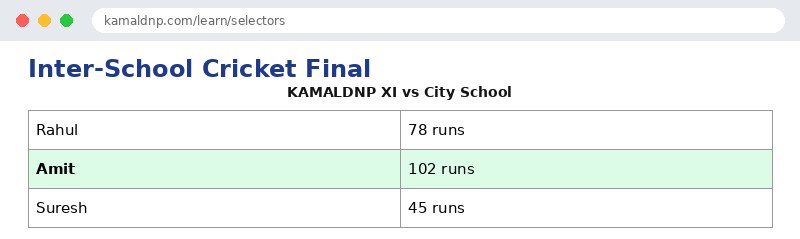
h2 { color: #1e3a8a; }— element selector। Scorecard की दोनों headings गहरी नीली हो जाती हैं।.winner { background-color: #dcfce7; }— class selector। सिर्फclass="winner"वाली row को हरी पृष्ठभूमि मिलती है।#top-scorer { font-weight: bold; }— id selector। सिर्फid="top-scorer"वाला एक element bold बनता है।table td { padding: 8px; }— descendant combinator। Table के अंदर के हर cell को padding मिलती है, चाहे वह कहीं भी हो।table > caption { font-size: 20px; }— child combinator। सिर्फ वह caption जो table का सीधा child है, उसे बड़ा font मिलता है।
उदाहरण
<!DOCTYPE html>
<html>
<head>
<title>Cricket Scorecard</title>
<style>
h2 { color: #1e3a8a; }
.winner { background-color: #dcfce7; }
#top-scorer { font-weight: bold; }
table td { padding: 8px; border: 1px solid #999; }
table > caption { font-size: 20px; font-weight: bold; }
</style>
</head>
<body>

<h2>Inter-School Cricket Final</h2>
<table>
<caption>KAMALDNP XI vs City School</caption>
<tr><td>Rahul</td><td>78 runs</td></tr>
<tr class="winner"><td id="top-scorer">Amit</td><td>102 runs</td></tr>
<tr><td>Suresh</td><td>45 runs</td></tr>
</table>

</body>
</html>
परिणाम
खुद करके देखें — लाइव एडिटर
नीचे दिया गया कोड बदलें और चलाएँ दबाएँ — परिणाम तुरंत दिखेगा। कोई फाइल सहेजनी नहीं है, कोई लॉगिन नहीं चाहिए।
Check yourself — did you get it?
Finished the lesson? Test yourself with 5 quick questions — you get the answer instantly, with the reason for each one.
1. What does a dot before a name mean in a selector?
2. What does a hash # before a name mean?
3. What does the universal selector * pick?
4. How do you write one rule for both h1 and h2?
5. What does div > p pick?
Interview questions — can you answer these?
Read the question first, try to answer it in your own words, then open it to check. These are the questions interviewers actually ask.
1. What is the difference between a class selector and an id selector?
A class starts with a dot (.warning) and can be reused on many elements; an id starts with a hash (#top) and must belong to exactly one element on the page. Use classes for everyday styling and ids for one-of-a-kind things — and if you style with an id, you can never reuse that style.
2. What does the universal selector (*) do, and when would you use it?
The universal selector * picks every element on the page. A common use is * { box-sizing: border-box; } so every element sizes itself the same way. But be careful — it touches everything, so a rule with * affects the whole page at once.
3. What is the difference between 'div p' and 'div > p'?
div p is the descendant selector — it picks any <p> inside a <div> at any depth. div > p is the child selector — it picks only <p> elements that are direct children of a <div>. The space reaches deep into nested divs; the > reaches only one level down.
Try it yourself — build this
Reading is not enough — now build it yourself. Write the code in the live editor, run it, check the hint if you get stuck, and open the solution only after you have tried.
1. Pick them with selectors
Create a cricket scorecard page that uses five different selectors: an element selector (h2 dark blue), a class selector (.winner with a light green #dcfce7 background), an id selector (#top-scorer bold), a grouping selector (h1, h2 in Georgia font), and a descendant selector (table td with 8px padding and a 1px solid #999 border). The table must have three players, and the top scorer's row must use class="winner" and the top scorer's name cell must use id="top-scorer".
Show solution
<!DOCTYPE html>
<html>
<head>
<title>Cricket Scorecard</title>
<style>
h1, h2 { font-family: Georgia, serif; }
h2 { color: #1e3a8a; }
.winner { background-color: #dcfce7; }
#top-scorer { font-weight: bold; }
table td { padding: 8px; border: 1px solid #999; }
</style>
</head>
<body>

<h2>Inter-School Cricket Final</h2>
<table>
<tr><td>Rahul</td><td>78 runs</td></tr>
<tr class="winner"><td id="top-scorer">Amit</td><td>102 runs</td></tr>
<tr><td>Suresh</td><td>45 runs</td></tr>
</table>

</body>
</html>खुद क्यों सीखें — AI से पूछने के बजाय?
AI आपके लिए कोड लिख सकता है, लेकिन वह आपके लिए सोच नहीं सकता। जब आप HTML खुद सीखते हैं, तो आपका दिमाग असली कौशल बनाता है: आप समझते हैं कि पेज ऐसा क्यों दिखता है, टूटने पर उसे ठीक कर सकते हैं, और परीक्षा या इंटरव्यू में बिना मदद के जवाब दे सकते हैं। यही कौशल नौकरी दिलाता है — कॉपी किया हुआ जवाब नहीं।
सर्टिफिकेट पाएँ — सिर्फ ₹10
सभी 30 पाठ पूरे करें, टेस्ट पास करें (80%), ₹10 दें और अपना सर्टिफिकेट पाएँ।
टेस्ट देंदेखकर सीखना पसंद है? वीडियो कोर्स में वही विषय एक-एक करके सिखाए जाते हैं।
Go further with a full course
Free tutorials teach you the basics. Our paid courses add live projects, mentorship and a certificate.
Browse all courses