CSS Syntax
4 min read · Free · No login needed
Every CSS rule follows the same shape. Once you learn this shape, you can read any CSS in the world, because every rule — from the simplest colour change to a full page layout — is built from the same pieces.
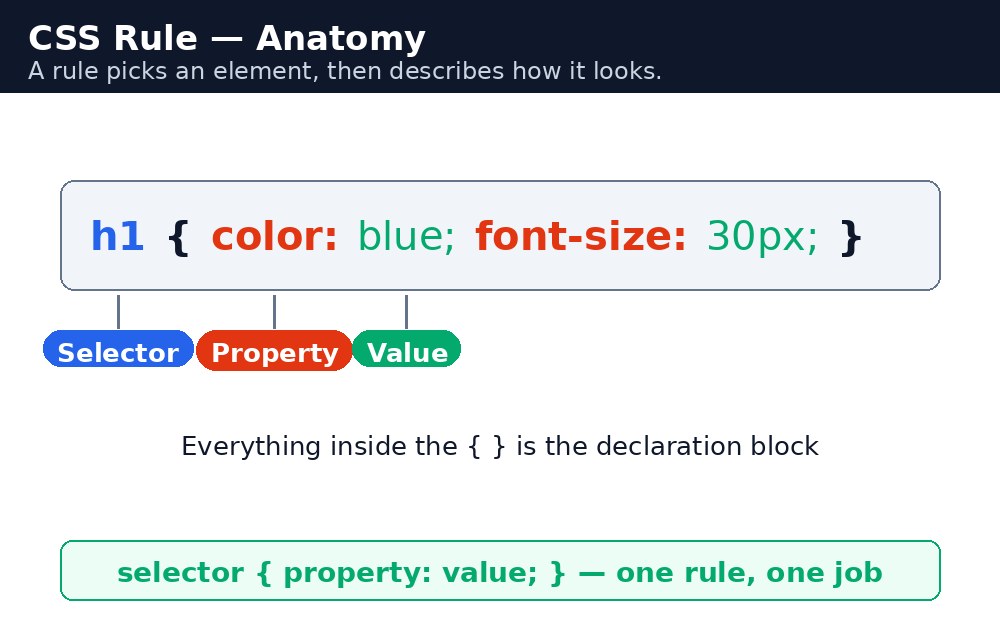
The parts of a rule
A rule has two parts. First comes the selector — it says which part of the page to style. Then comes the declaration block, inside curly braces { } — it says how that part should look.
Inside the braces are declarations. Each declaration has a property (what to change, like color) and a value (what to change it to, like red). The property and the value are separated by a colon :, and each declaration ends with a semicolon ;.
Syntax — the shape of a rule
selector {
  property: value;
  property: value;
}
Here is a real rule, with each part labelled:
p {
  color: darkblue;
  font-size: 18px;
}
The selector is p — every paragraph on the page. The first declaration, color: darkblue;, makes the text dark blue. The second declaration, font-size: 18px;, makes the text 18 pixels tall. The semicolon after each declaration tells the browser "this instruction is finished, the next one starts here".
p{color:red;} and a nicely spaced version mean exactly the same thing to the browser. But humans read the spaced version far more easily — so always write one declaration per line, with a space after each colon.Comments in CSS
Sometimes you want to leave a note for yourself in the code — a note the browser must ignore. CSS comments start with /* and end with */. Anything between them is ignored, even if it spans many lines.
/* This rule styles the main heading */
h1 {
  color: green; /* green means "fresh" on our site */
}
Comments are free: they cost nothing, and they save future-you a lot of confusion. Use them to explain why a rule exists, not what it does — the code already says what it does.
Common mistakes
- Forgetting the colon between property and value —
color red;does nothing. It must becolor: red;. - Forgetting the semicolon — the next declaration gets glued to the previous one and both break.
- Forgetting a closing brace
}— every rule after it stops working, because the browser thinks it is still inside the first rule. - Using
=instead of:— CSS uses a colon, not an equals sign.color = redis not CSS. - Writing property names with capital letters —
Colorandcolorare different to CSS. Always use lowercase.
Remember
- A rule is
selector { property: value; }— selector picks, declarations style. - Colon separates property and value; semicolon ends each declaration.
- Curly braces
{ }hold the declaration block — every opening brace needs a closing one. - Comments look like
/* this */and are ignored by the browser. - Spacing and line breaks do not change the meaning — use them to make your code readable.
Example explained
h1 { color: darkgreen; }— one rule, one declaration. Everyh1on the page becomes dark green.p { color: #333; font-size: 18px; line-height: 1.6; }— one rule, three declarations. All paragraphs get dark grey text, 18 pixels tall, with generous space between the lines..highlight { background-color: yellow; }— the dot means "class". Only elements withclass="highlight"get the yellow background.#special { font-weight: bold; }— the hash means "id". Only the one element withid="special"becomes bold./* Welcome message */— a comment. The browser ignores it completely; it is there only for the human reading the code.
Example
<!DOCTYPE html>
<html>
<head>
<title>CSS Syntax</title>
<style>
/* Welcome message */
h1 { color: darkgreen; }
p { color: #333; font-size: 18px; line-height: 1.6; }
.highlight { background-color: yellow; }
#special { font-weight: bold; }
</style>
</head>
<body>

<h1>Welcome to KAMALDNP Academy</h1>
<p>We teach HTML, CSS and JavaScript in simple words.</p>
<p class="highlight">Admissions are open for the new batch.</p>
<p id="special">Call us today to book your seat.</p>

</body>
</html>
Output

Try it yourself — live editor
Change the code below and press Run to see the result instantly. No file to save, no login needed.
Check yourself — did you get it?
Finished the lesson? Test yourself with 5 quick questions — you get the answer instantly, with the reason for each one.
1. What separates a property from its value in a declaration?
2. What ends each declaration?
3. What does /* ... */ mean in CSS?
4. What happens if you forget a closing brace }?
5. Which of these is a correct declaration?
Interview questions — can you answer these?
Read the question first, try to answer it in your own words, then open it to check. These are the questions interviewers actually ask.
1. What are the parts of a CSS rule?
A selector and a declaration block. The selector picks which part of the page to style, and the declaration block — inside curly braces { } — holds the declarations. Each declaration is a property and a value, separated by a colon and ended with a semicolon: selector { property: value; }.
2. What does the semicolon do in CSS, and what happens if you forget it?
The semicolon ends one declaration and tells the browser the next one starts. If you forget it, the next declaration gets glued to the previous one and both break. The last declaration in a block does not strictly need one, but write it anyway — the day you add another declaration below it, the new one will silently break.
3. How do you write a comment in CSS?
With /* and */. Anything between them is ignored by the browser, even across many lines. Comments cost nothing and save future-you a lot of confusion — use them to explain why a rule exists, not what it does, because the code already says what it does.
Try it yourself — build this
Reading is not enough — now build it yourself. Write the code in the live editor, run it, check the hint if you get stuck, and open the solution only after you have tried.
1. Write a clean rule
Create a page with a <style> block that has four rules: h1 in dark green, p in dark grey (#333) with font-size 18px and line-height 1.6, a .highlight class with a yellow background, and a #special id that is bold. Add one CSS comment /* Welcome message */ above the first rule. Remember: colon between property and value, semicolon after every declaration, and every { needs a }.
Show solution
<!DOCTYPE html>
<html>
<head>
<title>CSS Syntax</title>
<style>
/* Welcome message */
h1 { color: darkgreen; }
p { color: #333; font-size: 18px; line-height: 1.6; }
.highlight { background-color: yellow; }
#special { font-weight: bold; }
</style>
</head>
<body>

<h1>Welcome to KAMALDNP Academy</h1>
<p>We teach HTML, CSS and JavaScript in simple words.</p>
<p class="highlight">Admissions are open for the new batch.</p>
<p id="special">Call us today to book your seat.</p>

</body>
</html>Why learn this yourself — and not just ask AI?
AI can write code for you, but it cannot think for you. When you learn HTML yourself, your brain builds the real skill: you understand why a page looks the way it does, you can fix it when it breaks, and you can answer it in an exam or an interview without help. That is the skill that gets you a job — not a copied answer.
Get certified — just ₹10
Finish all 30 lessons, pass the test (80%), pay ₹10 and get your certificate.
Take the testPrefer watching? Video courses teach the same topics step by step.
Go further with a full course
Free tutorials teach you the basics. Our paid courses add live projects, mentorship and a certificate.
Browse all courses