CSS सिंटैक्स
4 मिनट पढ़ें · मुफ़्त · बिना लॉगिन
हर CSS नियम एक ही आकार का होता है। एक बार यह आकार सीख लिया, तो आप दुनिया का कोई भी CSS पढ़ सकते हैं, क्योंकि हर नियम — सबसे साधारण रंग बदलने से लेकर पूरे पेज की बनावट तक — उन्हीं टुकड़ों से बना होता है।
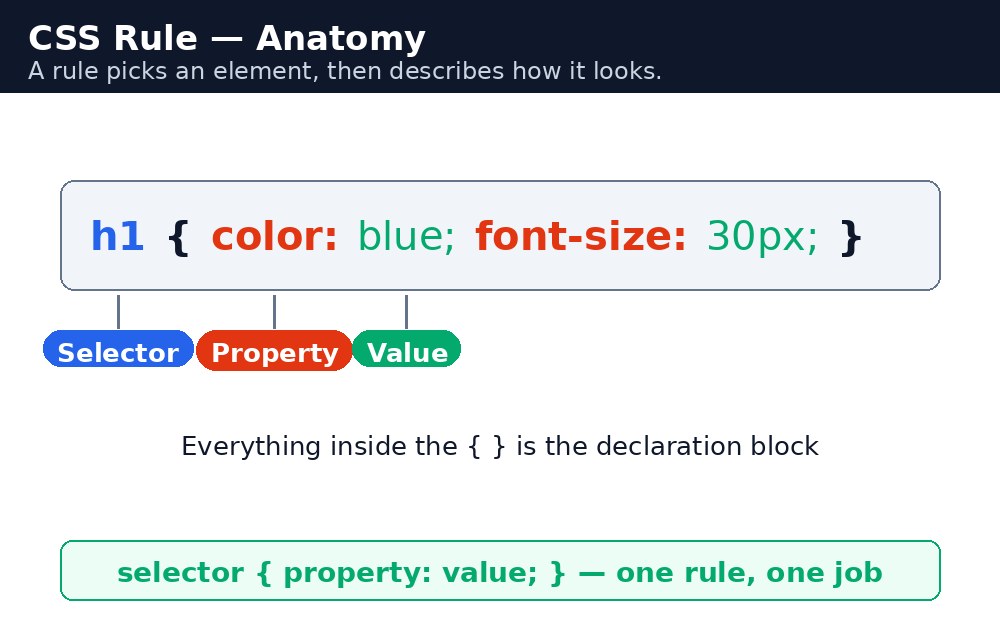
नियम के हिस्से
नियम के दो हिस्से होते हैं। पहले आता है selector — यह बताता है कि पेज के किस हिस्से को सजाना है। फिर आता है declaration block, घुँघराले कोष्ठकों { } के अंदर — यह बताता है कि वह हिस्सा कैसा दिखना चाहिए।
कोष्ठकों के अंदर declarations होते हैं। हर declaration में एक property होती है (क्या बदलना है, जैसे color) और एक value होती है (किसमें बदलना है, जैसे red)। Property और value colon : से अलग होते हैं, और हर declaration semicolon ; पर खत्म होता है।
सिंटैक्स — नियम का आकार
selector {
  property: value;
  property: value;
}
यहाँ एक असली नियम है, जिसका हर हिस्सा बताया गया है:
p {
  color: darkblue;
  font-size: 18px;
}
Selector है p — पेज का हर paragraph। पहला declaration, color: darkblue;, text को गहरा नीला बनाता है। दूसरा declaration, font-size: 18px;, text को 18 pixel ऊँचा बनाता है। हर declaration के बाद semicolon browser को बताता है कि "यह निर्देश खत्म हुआ, अगला यहाँ से शुरू होता है।"
p{color:red;} और साफ़-सुथरे तरीके से लिखा version browser के लिए बिल्कुल एक ही मतलब रखते हैं। लेकिन इंसान spaced version को कहीं ज़्यादा आसानी से पढ़ता है — इसलिए हमेशा एक declaration एक line में लिखें, और हर colon के बाद एक space दें।CSS में Comments
कभी-कभी आप code में अपने लिए एक note छोड़ना चाहते हैं — एक ऐसा note जिसे browser को नज़रअंदाज़ करना है। CSS comments /* से शुरू होते हैं और */ पर खत्म होते हैं। इनके बीच जो कुछ भी है, वह नज़रअंदाज़ कर दिया जाता है, चाहे वह कई lines में ही क्यों न हो।
/* This rule styles the main heading */
h1 {
  color: green; /* green means "fresh" on our site */
}
Comments मुफ्त होते हैं: उनकी कोई कीमत नहीं होती, और वे भविष्य के आपको बहुत उलझन से बचाते हैं। उनका इस्तेमाल यह समझाने के लिए कीजिए कि नियम क्यों है, न कि क्या करता है — code पहले से ही बता देता है कि वह क्या करता है।
आम गलतियाँ
- Property और value के बीच colon भूल जाना —
color red;कुछ नहीं करता। यहcolor: red;होना चाहिए। - Semicolon भूल जाना — अगला declaration पिछले वाले से चिपक जाता है और दोनों टूट जाते हैं।
- Closing brace
}भूल जाना — उसके बाद के हर नियम काम करना बंद कर देते हैं, क्योंकि browser सोचता है कि वह अभी भी पहले नियम के अंदर है। :की जगह=इस्तेमाल करना — CSS में colon चलता है, equals sign नहीं।color = redCSS नहीं है।- Property के नाम capital letters में लिखना — CSS के लिए
Colorऔरcolorअलग हैं। हमेशा lowercase इस्तेमाल करें।
याद रखें
- नियम है
selector { property: value; }— selector चुनता है, declarations सजाते हैं। - Colon property और value को अलग करता है; semicolon हर declaration को खत्म करता है।
- घुँघराले कोष्ठक
{ }declaration block को घेरते हैं — हर opening brace को closing brace चाहिए। - Comments
/* this */जैसे दिखते हैं और browser उन्हें नज़रअंदाज़ कर देता है। - Spacing और line breaks से मतलब नहीं बदलता — उन्हें code को पढ़ने लायक बनाने के लिए इस्तेमाल करें।
उदाहरण समझिए
h1 { color: darkgreen; }— एक नियम, एक declaration। पेज का हरh1गहरा हरा हो जाता है।p { color: #333; font-size: 18px; line-height: 1.6; }— एक नियम, तीन declarations। सभी paragraphs को गहरा भूरा text, 18 pixel ऊँचाई और lines के बीच अच्छी जगह मिलती है।.highlight { background-color: yellow; }— dot का मतलब है "class"। सिर्फclass="highlight"वाले elements को पीली पृष्ठभूमि मिलती है।#special { font-weight: bold; }— hash का मतलब है "id"। सिर्फid="special"वाला एक element bold बनता है।/* Welcome message */— एक comment। Browser इसे पूरी तरह नज़रअंदाज़ कर देता है; यह सिर्फ code पढ़ने वाले इंसान के लिए है।
उदाहरण
<!DOCTYPE html>
<html>
<head>
<title>CSS Syntax</title>
<style>
/* Welcome message */
h1 { color: darkgreen; }
p { color: #333; font-size: 18px; line-height: 1.6; }
.highlight { background-color: yellow; }
#special { font-weight: bold; }
</style>
</head>
<body>

<h1>Welcome to KAMALDNP Academy</h1>
<p>We teach HTML, CSS and JavaScript in simple words.</p>
<p class="highlight">Admissions are open for the new batch.</p>
<p id="special">Call us today to book your seat.</p>

</body>
</html>
परिणाम

खुद करके देखें — लाइव एडिटर
नीचे दिया गया कोड बदलें और चलाएँ दबाएँ — परिणाम तुरंत दिखेगा। कोई फाइल सहेजनी नहीं है, कोई लॉगिन नहीं चाहिए।
Check yourself — did you get it?
Finished the lesson? Test yourself with 5 quick questions — you get the answer instantly, with the reason for each one.
1. What separates a property from its value in a declaration?
2. What ends each declaration?
3. What does /* ... */ mean in CSS?
4. What happens if you forget a closing brace }?
5. Which of these is a correct declaration?
Interview questions — can you answer these?
Read the question first, try to answer it in your own words, then open it to check. These are the questions interviewers actually ask.
1. What are the parts of a CSS rule?
A selector and a declaration block. The selector picks which part of the page to style, and the declaration block — inside curly braces { } — holds the declarations. Each declaration is a property and a value, separated by a colon and ended with a semicolon: selector { property: value; }.
2. What does the semicolon do in CSS, and what happens if you forget it?
The semicolon ends one declaration and tells the browser the next one starts. If you forget it, the next declaration gets glued to the previous one and both break. The last declaration in a block does not strictly need one, but write it anyway — the day you add another declaration below it, the new one will silently break.
3. How do you write a comment in CSS?
With /* and */. Anything between them is ignored by the browser, even across many lines. Comments cost nothing and save future-you a lot of confusion — use them to explain why a rule exists, not what it does, because the code already says what it does.
Try it yourself — build this
Reading is not enough — now build it yourself. Write the code in the live editor, run it, check the hint if you get stuck, and open the solution only after you have tried.
1. Write a clean rule
Create a page with a <style> block that has four rules: h1 in dark green, p in dark grey (#333) with font-size 18px and line-height 1.6, a .highlight class with a yellow background, and a #special id that is bold. Add one CSS comment /* Welcome message */ above the first rule. Remember: colon between property and value, semicolon after every declaration, and every { needs a }.
Show solution
<!DOCTYPE html>
<html>
<head>
<title>CSS Syntax</title>
<style>
/* Welcome message */
h1 { color: darkgreen; }
p { color: #333; font-size: 18px; line-height: 1.6; }
.highlight { background-color: yellow; }
#special { font-weight: bold; }
</style>
</head>
<body>

<h1>Welcome to KAMALDNP Academy</h1>
<p>We teach HTML, CSS and JavaScript in simple words.</p>
<p class="highlight">Admissions are open for the new batch.</p>
<p id="special">Call us today to book your seat.</p>

</body>
</html>खुद क्यों सीखें — AI से पूछने के बजाय?
AI आपके लिए कोड लिख सकता है, लेकिन वह आपके लिए सोच नहीं सकता। जब आप HTML खुद सीखते हैं, तो आपका दिमाग असली कौशल बनाता है: आप समझते हैं कि पेज ऐसा क्यों दिखता है, टूटने पर उसे ठीक कर सकते हैं, और परीक्षा या इंटरव्यू में बिना मदद के जवाब दे सकते हैं। यही कौशल नौकरी दिलाता है — कॉपी किया हुआ जवाब नहीं।
सर्टिफिकेट पाएँ — सिर्फ ₹10
सभी 30 पाठ पूरे करें, टेस्ट पास करें (80%), ₹10 दें और अपना सर्टिफिकेट पाएँ।
टेस्ट देंदेखकर सीखना पसंद है? वीडियो कोर्स में वही विषय एक-एक करके सिखाए जाते हैं।
Go further with a full course
Free tutorials teach you the basics. Our paid courses add live projects, mentorship and a certificate.
Browse all courses