HTML Comments: How to Add Notes & Hide Code in HTML
3 min read · Free · No login needed
An HTML comment is a note you write in your code that the browser completely ignores. Visitors never see it. Only someone reading your source code can see it.
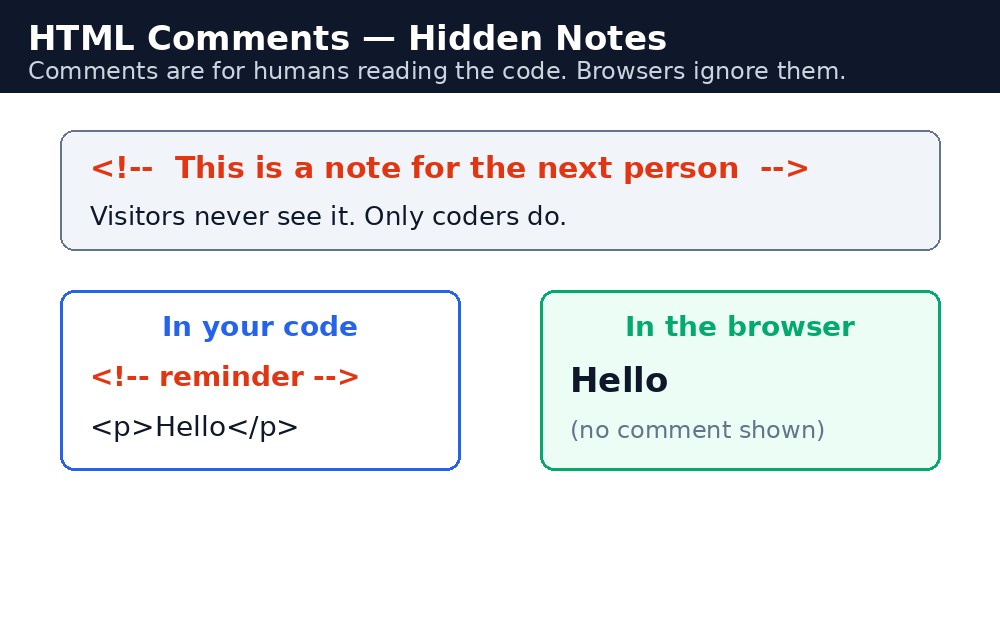
A comment starts with <!-- and ends with -->:
<!-- This is a comment -->
Why use comments?
- Notes for yourself: explain a tricky part of the page so future-you understands it.
- Notes for your team: mark sections like
<!-- Header starts here -->so others can find things fast. - Temporarily hiding code: comment out a section instead of deleting it, so you can bring it back later.
Rules to remember
Comments can span many lines. But never put -- inside a comment, because the browser will think the comment ends there. And remember: comments are visible to anyone who views your page source, so never put passwords, secret keys, or private information in a comment.
What a comment is
An HTML comment is a note you write for yourself (or for other developers) inside the code. The browser skips it completely — it never appears on the page. Comments start with <!-- and end with -->. Everything between those two marks is the comment.
Syntax
<!-- This is a comment. The browser ignores it. -->
<!--
  This comment runs over
  several lines.
-->
<h1>Hello</h1> <!-- a short note after the code -->
You can also use a comment to switch off a piece of code for a while. Instead of deleting a paragraph you might need later, wrap it in a comment — it stays in the file but disappears from the page.
<!-- <p>This paragraph is hidden for now.</p> -->
<!-- Header starts here -->, <!-- Footer starts here -->. When a page grows long, these labels help you find your place in seconds.Common mistakes
- Putting
--inside a comment — the browser may end the comment early and show broken code. - Writing comments inside other comments — HTML does not allow nested comments.
- Leaving dozens of old, commented-out blocks in a finished page — delete what you no longer need.
- Forgetting to close a comment — everything after it disappears from the page until the next
-->.
Example explained
<!-- This heading is the page title -->is a plain note for the developer. The browser skips it completely, so the visitor never sees it — only the<h1>below it shows.<!-- <p>This paragraph is hidden...</p> -->wraps a whole paragraph in a comment, switching it off without deleting it. The page shows nothing from that line, but the code stays in the file for later.<p>This paragraph is visible.</p>sits outside any comment, so it renders normally on the page.
Example
<!DOCTYPE html>
<html>
<head>
<title>Comments</title>
</head>
<body>

<!-- This heading is the page title -->
<h1>Welcome</h1>
<!-- <p>This paragraph is hidden and will not show.</p> -->
<p>This paragraph is visible.</p>

</body>
</html>
Output

Try it yourself — live editor
Change the code below and press Run to see the result instantly. No file to save, no login needed.
Related lessons
Frequently asked questions
The questions learners ask most about this lesson — read the question, then open it to see the answer.
1. What is an HTML comment?
A note you write in your code that the browser completely ignores. Visitors never see it; only someone reading your source code can.
2. How do I write a comment in HTML?
Start with a less-than sign, an exclamation mark, and two hyphens, and end with two hyphens and a greater-than sign.
3. Can I put a password in an HTML comment?
No. Comments are invisible on the page, but anyone can see them by viewing the page source. Never put passwords or secrets in a comment.
Why learn this yourself — and not just ask AI?
AI can write code for you, but it cannot think for you. When you learn HTML yourself, your brain builds the real skill: you understand why a page looks the way it does, you can fix it when it breaks, and you can answer it in an exam or an interview without help. That is the skill that gets you a job — not a copied answer.
Get certified — just ₹10
Finish all 35 lessons, pass the test (80%), pay ₹10 and get your certificate.
Take the testPrefer watching? Video courses teach the same topics step by step.
Go further with a full course
Free tutorials teach you the basics. Our paid courses add live projects, mentorship and a certificate.
Browse all courses