SA-21/06, C-11, Asapur, Varanasi, UP support@kamaldnp.com +91 8318013442
HTML
1. HTML Introduction: What is HTML? Learn with Examples 2. Best Free HTML Editors: Notepad to VS Code for Beginners 3. HTML Basic Structure: Doctype, Head, Body Explained 4. HTML Elements Explained: Tags, Content & Empty Elements 5. HTML Attributes List: href, src, alt, width, title & More 6. HTML Headings h1 to h6: Which Heading Tag to Use When 7. HTML Paragraphs: p Tag, br Line Breaks & pre Text 8. HTML Style Attribute: Colour, Font Size & Alignment 9. HTML Text Formatting Tags: bold, italic, mark & More 10. HTML Comments: How to Add Notes & Hide Code in HTML 11. HTML Colors: Names, HEX, RGB & HSL Colour Codes 12. HTML CSS: Inline, Internal & External Stylesheets 13. HTML Links: a Tag, href, New Tab & Email Links 14. HTML Images: img Tag, src, alt, Width & Formats 15. HTML Favicon: Create & Add a Browser Tab Icon 16. HTML Title Tag: How to Write a Good Page Title 17. HTML Tables: table, tr, th, td, colspan & rowspan 18. HTML Lists: ul, ol, dl & Nested Lists Explained 19. HTML Block vs Inline Elements: div, p, span Explained 20. HTML Div Tag: Group Content & Build Page Layouts 21. HTML Class Attribute: Style Many Elements at Once 22. HTML id Attribute: Unique IDs, Links, CSS & JavaScript 23. HTML Iframes: Embed YouTube, Maps & Pages in HTML 24. HTML JavaScript: script Tag, Clicks & First Example 25. HTML File Paths: Relative vs Absolute Paths Explained 26. HTML Head Element: title, meta, charset & viewport 27. HTML Layout: header, nav, main, footer Page Structure 28. HTML Responsive Design: Viewport, Images & Media Queries 29. Semantic HTML Tags: header, nav, main, article & footer 30. HTML Forms: input, label, select, checkbox & Submit 31. HTML Entities: & < > © with Examples 32. HTML Audio & Video Tags: controls, source & Fallback 33. HTML Accessibility: alt Text, Labels, Landmarks & ARIA 34. HTML Meta Tags & SEO: charset, viewport, OG Tags 35. HTML Quotations: blockquote, q, cite, abbr & address
Final Test — Certificate ₹10
Try this code live
Lesson 31 of 35

HTML Entities: & < > © with Examples

3 min read · Free · No login needed

Some characters are special in HTML. The browser reads < as "a tag is starting" and & as "an entity is starting". So if you want the visitor to actually see a less-than sign or an ampersand on the page, you cannot just type it — you write a small code called an entity instead. An entity starts with &, has a name (or a number), and ends with a semicolon.
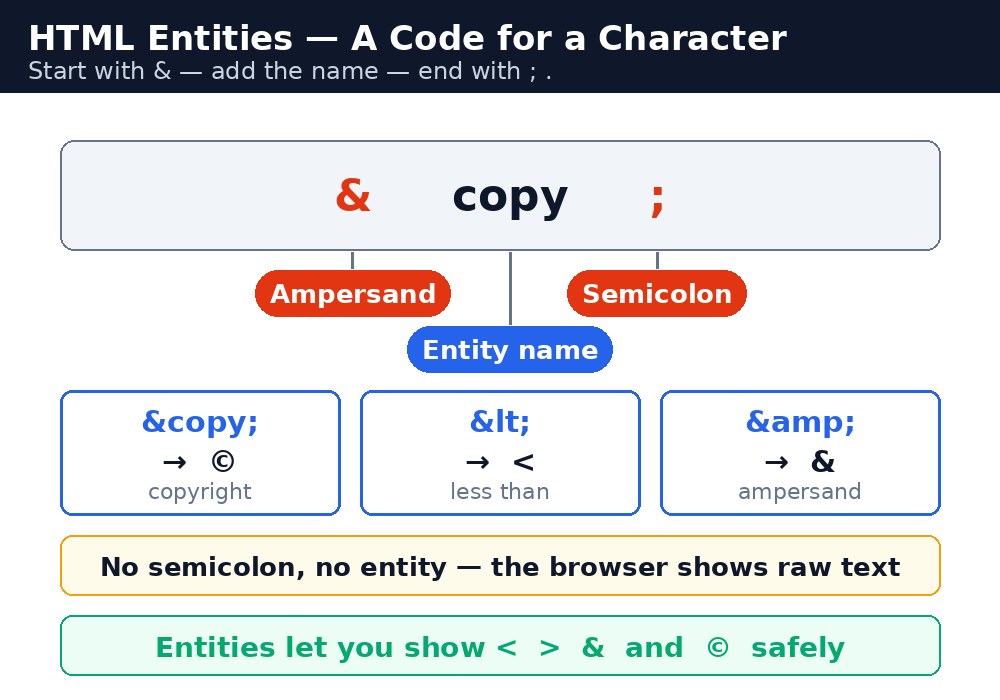
Diagram — see how it fits together
Infographic: anatomy of an HTML entity

Why you cannot just type < and >

Try writing "5 < 10 is true" by typing the real characters, and the browser will try to read < 10 as a tag — and the text will vanish or break the page. The same happens with &: the browser waits for an entity name, and a bare ampersand can swallow the text after it. Entities exist so that what you write is what the visitor sees, no matter what the characters mean to HTML itself.

The entities you will use most

EntityShowsWhen to use it
&amp;&Any time you show an ampersand: "Tom & Jerry", "Q&A".
&lt;<Showing a less-than sign, or showing HTML code as text.
&gt;>Showing a greater-than sign, or closing a code example.
&quot;"A double quote inside an attribute value that uses double quotes.
&apos;'An apostrophe inside an attribute value that uses single quotes.
&nbsp;a space that never breaksKeeping two words on the same line, like "₹ 500" or "Mr. Sharma".
&copy;©The copyright line at the bottom of a page.
&reg;®A registered trademark, after a brand name.
&trade;™A trademark, after a brand name.

The non-breaking space — use it sparingly

&nbsp; is a space that the browser will never break across two lines. It is useful for keeping a number with its unit ("10 kg") or a title with a name ("Mr. Sharma"). But it is not a tool for layout: if you need a gap, use CSS margin or padding. A row of ten &nbsp; entities to push text across the page is a hack that breaks the moment the screen size changes.

Note: The semicolon matters. &amp without the semicolon is not an entity — some browsers will still guess what you meant, but others will print it literally. Always write the full code: ampersand, name, semicolon.
Tip: You only need entities for characters that HTML treats specially, or that your keyboard cannot type. Normal letters, digits, and most punctuation go straight into the page as they are — do not entity-encode everything, or your code becomes unreadable.

Common mistakes

  • Typing a raw < in page text — the browser reads it as a tag and the text disappears.
  • Forgetting the semicolon — &copy is not the same as &copy;.
  • Using &nbsp; for layout spacing instead of CSS margin or padding.
  • Writing &amp; where a plain & in a URL would do — inside an href, an ampersand between parameters should be &amp; too, or the link can break.

Example explained

  • Tom &amp; Jerry — shows "Tom & Jerry". A plain & here could confuse the browser, so the entity is the safe way.
  • 5 &lt; 10 is true — shows "5 < 10 is true". Without the entity, the browser would try to read < 10 as a tag.
  • 10 &gt; 5 is also true — shows "10 > 5 is also true", the mirror image of the line above.
  • &copy; 2026 KAMALDNP Academy — shows "© 2026 KAMALDNP Academy", the standard copyright line.
  • Price: ₹500&nbsp;only — the non-breaking space keeps "₹500" and "only" on the same line, so the price never splits across lines.

Example

Example
<!DOCTYPE html>
<html>
<head>
<title>Entities</title>
</head>
<body>

<h1>Characters That Need Entities</h1>
<p>Tom &amp; Jerry is a famous cartoon.</p>
<p>5 &lt; 10 is true, and 10 &gt; 5 is also true.</p>
<p>Price: ₹500&nbsp;only.</p>
<p>&copy; 2026 KAMALDNP Academy. All rights reserved.</p>

</body>
</html>

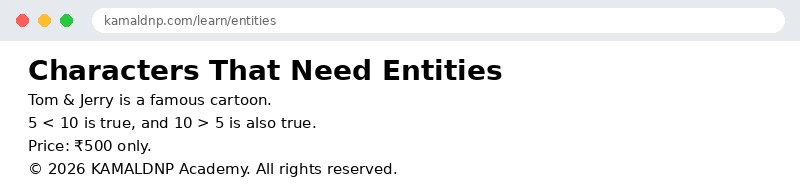
Output

Output — how it looks in the browser
Output of HTML Entities: & < > © with Examples

Try it yourself — live editor

Change the code below and press Run to see the result instantly. No file to save, no login needed.

Result

Frequently asked questions

The questions learners ask most about this lesson — read the question, then open it to see the answer.

1. What is an HTML entity?

A small code that starts with an ampersand, has a name or number, and ends with a semicolon, used to show special characters.

2. Why can you not just type a less-than sign in text?

The browser reads it as a tag starting, so the text can vanish or break the page.

3. Which entity shows the copyright symbol?

The copy entity shows ©, used for the copyright line at the bottom of a page.

Why learn this yourself — and not just ask AI?

AI can write code for you, but it cannot think for you. When you learn HTML yourself, your brain builds the real skill: you understand why a page looks the way it does, you can fix it when it breaks, and you can answer it in an exam or an interview without help. That is the skill that gets you a job — not a copied answer.

Get certified — just ₹10

Finish all 35 lessons, pass the test (80%), pay ₹10 and get your certificate.

Take the test

Prefer watching? Video courses teach the same topics step by step.

Go further with a full course

Free tutorials teach you the basics. Our paid courses add live projects, mentorship and a certificate.

Website Design & Development Workshop 2026
₹299
View
Master Python + AI Skills in 30 Days
₹499
View
Ethical Hacking & Cyber Security Workshop
View
Browse all courses
HTML — Lessons
1. HTML Introduction: What is HTML? Learn with Examples 2. Best Free HTML Editors: Notepad to VS Code for Beginners 3. HTML Basic Structure: Doctype, Head, Body Explained 4. HTML Elements Explained: Tags, Content & Empty Elements 5. HTML Attributes List: href, src, alt, width, title & More 6. HTML Headings h1 to h6: Which Heading Tag to Use When 7. HTML Paragraphs: p Tag, br Line Breaks & pre Text 8. HTML Style Attribute: Colour, Font Size & Alignment 9. HTML Text Formatting Tags: bold, italic, mark & More 10. HTML Comments: How to Add Notes & Hide Code in HTML 11. HTML Colors: Names, HEX, RGB & HSL Colour Codes 12. HTML CSS: Inline, Internal & External Stylesheets 13. HTML Links: a Tag, href, New Tab & Email Links 14. HTML Images: img Tag, src, alt, Width & Formats 15. HTML Favicon: Create & Add a Browser Tab Icon 16. HTML Title Tag: How to Write a Good Page Title 17. HTML Tables: table, tr, th, td, colspan & rowspan 18. HTML Lists: ul, ol, dl & Nested Lists Explained 19. HTML Block vs Inline Elements: div, p, span Explained 20. HTML Div Tag: Group Content & Build Page Layouts 21. HTML Class Attribute: Style Many Elements at Once 22. HTML id Attribute: Unique IDs, Links, CSS & JavaScript 23. HTML Iframes: Embed YouTube, Maps & Pages in HTML 24. HTML JavaScript: script Tag, Clicks & First Example 25. HTML File Paths: Relative vs Absolute Paths Explained 26. HTML Head Element: title, meta, charset & viewport 27. HTML Layout: header, nav, main, footer Page Structure 28. HTML Responsive Design: Viewport, Images & Media Queries 29. Semantic HTML Tags: header, nav, main, article & footer 30. HTML Forms: input, label, select, checkbox & Submit 31. HTML Entities: & < > © with Examples 32. HTML Audio & Video Tags: controls, source & Fallback 33. HTML Accessibility: alt Text, Labels, Landmarks & ARIA 34. HTML Meta Tags & SEO: charset, viewport, OG Tags 35. HTML Quotations: blockquote, q, cite, abbr & address
Final Test — Certificate ₹10

🤖 KAMALDNP AI Assistant

Ask about courses, website & more

Hi! I'm KAMALDNP AI Assistant. Ask me about our courses, website features, or anything else! 😊
Please wait 5s...
🛡️ 7-Day Money-Back Guarantee
🤖 KAMALDNP Assistant ✕

Request human callback:

🔐 Login Required
✕

Download karne ke liye login karo. Login ke baad yahi page pe rahoge!

Naya ho? Register karo →