SA-21/06, C-11, Asapur, Varanasi, UP support@kamaldnp.com +91 8318013442
HTML
1. HTML Introduction: What is HTML? Learn with Examples 2. Best Free HTML Editors: Notepad to VS Code for Beginners 3. HTML Basic Structure: Doctype, Head, Body Explained 4. HTML Elements Explained: Tags, Content & Empty Elements 5. HTML Attributes List: href, src, alt, width, title & More 6. HTML Headings h1 to h6: Which Heading Tag to Use When 7. HTML Paragraphs: p Tag, br Line Breaks & pre Text 8. HTML Style Attribute: Colour, Font Size & Alignment 9. HTML Text Formatting Tags: bold, italic, mark & More 10. HTML Comments: How to Add Notes & Hide Code in HTML 11. HTML Colors: Names, HEX, RGB & HSL Colour Codes 12. HTML CSS: Inline, Internal & External Stylesheets 13. HTML Links: a Tag, href, New Tab & Email Links 14. HTML Images: img Tag, src, alt, Width & Formats 15. HTML Favicon: Create & Add a Browser Tab Icon 16. HTML Title Tag: How to Write a Good Page Title 17. HTML Tables: table, tr, th, td, colspan & rowspan 18. HTML Lists: ul, ol, dl & Nested Lists Explained 19. HTML Block vs Inline Elements: div, p, span Explained 20. HTML Div Tag: Group Content & Build Page Layouts 21. HTML Class Attribute: Style Many Elements at Once 22. HTML id Attribute: Unique IDs, Links, CSS & JavaScript 23. HTML Iframes: Embed YouTube, Maps & Pages in HTML 24. HTML JavaScript: script Tag, Clicks & First Example 25. HTML File Paths: Relative vs Absolute Paths Explained 26. HTML Head Element: title, meta, charset & viewport 27. HTML Layout: header, nav, main, footer Page Structure 28. HTML Responsive Design: Viewport, Images & Media Queries 29. Semantic HTML Tags: header, nav, main, article & footer 30. HTML Forms: input, label, select, checkbox & Submit 31. HTML Entities: & < > © with Examples 32. HTML Audio & Video Tags: controls, source & Fallback 33. HTML Accessibility: alt Text, Labels, Landmarks & ARIA 34. HTML Meta Tags & SEO: charset, viewport, OG Tags 35. HTML Quotations: blockquote, q, cite, abbr & address
Final Test — Certificate ₹10
Try this code live
Lesson 34 of 35

HTML Meta Tags & SEO: charset, viewport, OG Tags

3 min read · Free · No login needed

Visitors never see meta tags — they live in the <head> and never appear on the page. But Google reads them, WhatsApp reads them, and Facebook reads them. They decide what your page is called in search results, what description shows under it, and what preview card appears when someone shares your link. A page with good meta tags gets clicked; a page without them shows up as a bare link with no description.
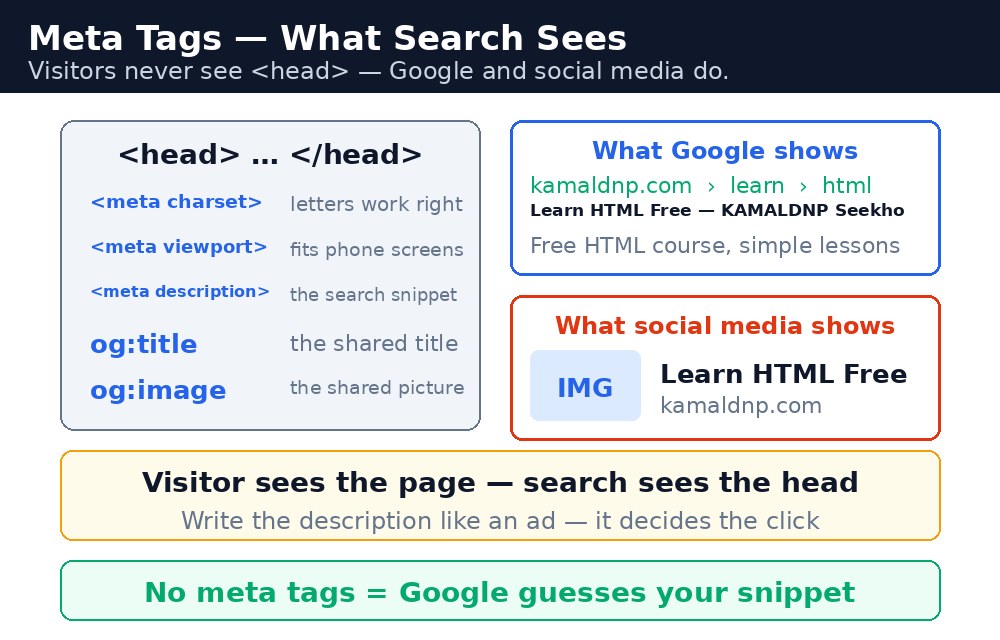
Diagram — see how it fits together
Infographic: meta tags in the head section

The four tags every page needs

TagWhat it does
<meta charset="UTF-8">Tells the browser the page uses UTF-8, so every character — including Hindi and ₹ — displays correctly. Put it first in the head.
<meta name="viewport" content="width=device-width, initial-scale=1.0">Tells mobile browsers to show the page at the phone's real width. Without it, your page looks tiny on a phone.
<title>The page's title — the blue clickable link in Google results and the text on the browser tab. Keep it short, specific, and honest.
<meta name="description" content="...">A one-or-two-sentence summary. Google often shows it under your link in search results — it is your free advertisement.

Open Graph — the tags that make sharing look good

When someone pastes your link into WhatsApp or Facebook, the app looks for Open Graph tags: og:title (the headline), og:description (the summary), og:image (the preview picture), and og:url (the page address). With them, your link becomes a card with a title, a picture, and a description. Without them, it stays a plain blue link that nobody taps. Open Graph tags use property, not name — that is the one detail people get wrong most often.

Note: Meta tags describe your page — they do not rank it by themselves. Google ranks pages on content, links, and usefulness. A great description on a thin page will not save it; a great page with no description will still get fewer clicks than it deserves. Do both: real content first, honest meta tags second.
Tip: Write the description for a human, not for a search engine. "Learn HTML forms — labels, inputs, dropdowns and submit buttons, with examples" beats a list of keywords, because Google shows it to people and people decide whether to click.

Common mistakes

  • Putting meta tags in the <body> — they belong in the <head> and are ignored elsewhere.
  • Skipping the viewport tag — the page then looks broken on every phone.
  • Using the same title and description on every page — Google treats them as duplicates and shows a worse result.
  • Stuffing keywords into the description — it reads badly, and Google often replaces it with text from the page instead.
  • Using name="og:title" instead of property="og:title" — share apps ignore it.

Example explained

  • <meta charset="UTF-8"> — first in the head, so Hindi text and the ₹ sign display correctly.
  • <meta name="viewport" content="width=device-width, initial-scale=1.0"> — the page fits the phone screen instead of shrinking to desktop width.
  • <title>Learn HTML Forms — KAMALDNP Academy</title> — the blue link in Google and the browser tab text.
  • <meta name="description" content="Learn HTML forms — labels, inputs, dropdowns and submit buttons, with examples."> — the summary Google shows under the link.
  • <meta property="og:title" content="Learn HTML Forms"> — the headline on the WhatsApp/Facebook share card.
  • <meta property="og:image" content="https://kamaldnp.com/images/forms.jpg"> — the preview picture on the share card.

Example

Example
<!DOCTYPE html>
<html>
<head>
<meta charset="UTF-8">
<meta name="viewport" content="width=device-width, initial-scale=1.0">
<title>Learn HTML Forms — KAMALDNP Academy</title>
<meta name="description" content="Learn HTML forms — labels, inputs, dropdowns and submit buttons, with examples.">
<meta property="og:title" content="Learn HTML Forms">
<meta property="og:description" content="Learn HTML forms — labels, inputs, dropdowns and submit buttons, with examples.">
<meta property="og:image" content="https://kamaldnp.com/images/forms.jpg">
<meta property="og:url" content="https://kamaldnp.com/learn/html/forms">
</head>
<body>

<h1>Learn HTML Forms</h1>
<p>Labels, inputs, dropdowns and submit buttons, with examples.</p>

</body>
</html>

Output

Output — how it looks in the browser
Output of HTML Meta Tags & SEO: charset, viewport, OG Tags

Try it yourself — live editor

Change the code below and press Run to see the result instantly. No file to save, no login needed.

Result

Frequently asked questions

The questions learners ask most about this lesson — read the question, then open it to see the answer.

1. What are meta tags?

Tags in the head that visitors never see, but Google, WhatsApp and Facebook read to decide the title, description and share preview.

2. What do Open Graph tags do?

They turn a shared link into a card with a headline, picture and description, instead of a plain blue link nobody taps.

3. Do meta tags alone rank a page on Google?

No, Google ranks pages on content, links and usefulness, so real content comes first and honest meta tags second.

Why learn this yourself — and not just ask AI?

AI can write code for you, but it cannot think for you. When you learn HTML yourself, your brain builds the real skill: you understand why a page looks the way it does, you can fix it when it breaks, and you can answer it in an exam or an interview without help. That is the skill that gets you a job — not a copied answer.

Get certified — just ₹10

Finish all 35 lessons, pass the test (80%), pay ₹10 and get your certificate.

Take the test

Prefer watching? Video courses teach the same topics step by step.

Go further with a full course

Free tutorials teach you the basics. Our paid courses add live projects, mentorship and a certificate.

Advanced Cyber Security Industrial Training
₹5,000
View
WordPress Website Development Course (10 Days)
₹399
View
Website Design Using WordPress 3 Days (Basic to Advanced)
₹199
View
Browse all courses
HTML — Lessons
1. HTML Introduction: What is HTML? Learn with Examples 2. Best Free HTML Editors: Notepad to VS Code for Beginners 3. HTML Basic Structure: Doctype, Head, Body Explained 4. HTML Elements Explained: Tags, Content & Empty Elements 5. HTML Attributes List: href, src, alt, width, title & More 6. HTML Headings h1 to h6: Which Heading Tag to Use When 7. HTML Paragraphs: p Tag, br Line Breaks & pre Text 8. HTML Style Attribute: Colour, Font Size & Alignment 9. HTML Text Formatting Tags: bold, italic, mark & More 10. HTML Comments: How to Add Notes & Hide Code in HTML 11. HTML Colors: Names, HEX, RGB & HSL Colour Codes 12. HTML CSS: Inline, Internal & External Stylesheets 13. HTML Links: a Tag, href, New Tab & Email Links 14. HTML Images: img Tag, src, alt, Width & Formats 15. HTML Favicon: Create & Add a Browser Tab Icon 16. HTML Title Tag: How to Write a Good Page Title 17. HTML Tables: table, tr, th, td, colspan & rowspan 18. HTML Lists: ul, ol, dl & Nested Lists Explained 19. HTML Block vs Inline Elements: div, p, span Explained 20. HTML Div Tag: Group Content & Build Page Layouts 21. HTML Class Attribute: Style Many Elements at Once 22. HTML id Attribute: Unique IDs, Links, CSS & JavaScript 23. HTML Iframes: Embed YouTube, Maps & Pages in HTML 24. HTML JavaScript: script Tag, Clicks & First Example 25. HTML File Paths: Relative vs Absolute Paths Explained 26. HTML Head Element: title, meta, charset & viewport 27. HTML Layout: header, nav, main, footer Page Structure 28. HTML Responsive Design: Viewport, Images & Media Queries 29. Semantic HTML Tags: header, nav, main, article & footer 30. HTML Forms: input, label, select, checkbox & Submit 31. HTML Entities: & < > © with Examples 32. HTML Audio & Video Tags: controls, source & Fallback 33. HTML Accessibility: alt Text, Labels, Landmarks & ARIA 34. HTML Meta Tags & SEO: charset, viewport, OG Tags 35. HTML Quotations: blockquote, q, cite, abbr & address
Final Test — Certificate ₹10

🤖 KAMALDNP AI Assistant

Ask about courses, website & more

Hi! I'm KAMALDNP AI Assistant. Ask me about our courses, website features, or anything else! 😊
Please wait 5s...
🛡️ 7-Day Money-Back Guarantee
🤖 KAMALDNP Assistant ✕

Request human callback:

🔐 Login Required
✕

Download karne ke liye login karo. Login ke baad yahi page pe rahoge!

Naya ho? Register karo →