HTML Quotations: blockquote, q, cite, abbr & address
3 min read · Free · No login needed
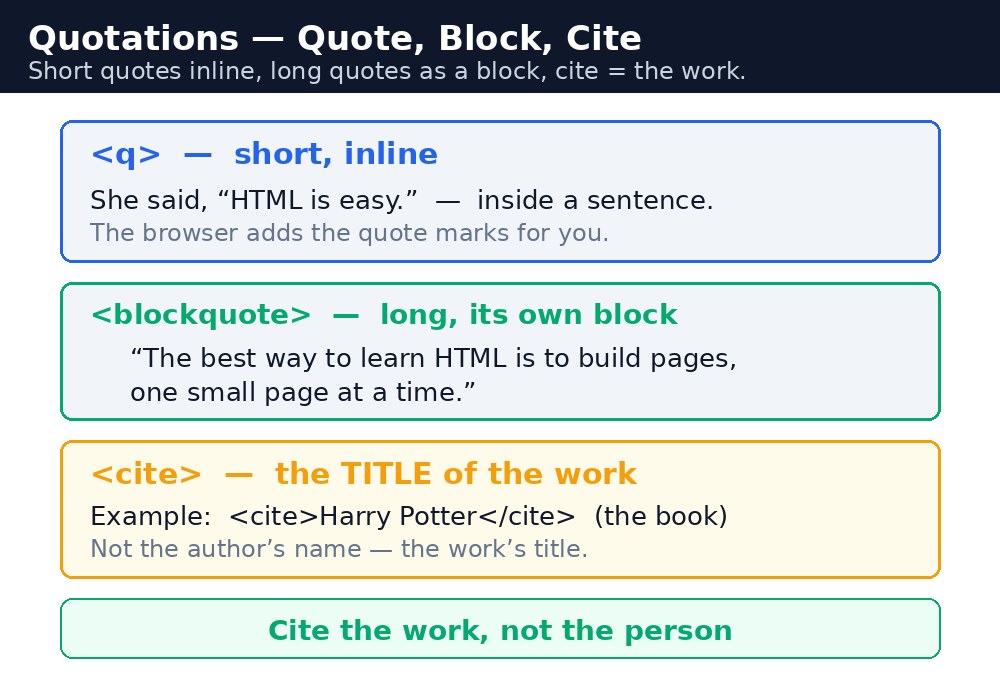
When you quote someone on a web page, do not just type quotation marks by hand. HTML has tags that say this is a quote, this is a long quote, and this is the title of a work. The browser adds the right formatting, search engines understand the meaning, and screen readers announce it properly. Typed quote marks are just punctuation — quotation tags are meaning.
Short quotes, long quotes, and citations
| Tag | Use it for | What the browser does |
|---|---|---|
<q> | A short quote inside a sentence | Adds quotation marks around the text automatically. |
<blockquote> | A long quote, standing on its own | Shows it as its own indented block. Takes a cite attribute with the source URL. |
<cite> | The title of a work — a book, a film, a course | Shows it in italics. It is for titles, not for people's names. |
<abbr> | An abbreviation, with its full form in title | Shows a dotted underline; hovering reveals the full form. |
<address> | Contact information for the page's author or owner | Shows it in italics, usually at the bottom of the page. |
The difference that matters most
<q> is for a quote inside your own sentence: "As Kalam said, <q>Dream is not that which you see while sleeping</q>." <blockquote> is for a quote that deserves its own paragraph — a full passage, a testimonial, a verse. And <cite> is not a person's name: it is the title of the work you are quoting from, like <cite>Wings of Fire</cite>. Mixing these up is the most common mistake in this lesson — a person's name goes in plain text, the book title goes in <cite>.
cite attribute on <blockquote> holds the source URL, but browsers do not display it — it is there for machines and for anyone reading the code. If your visitors should see the source, write it as visible text under the quote as well.<blockquote> just to indent a paragraph. It means "this is a quotation" — using it for indentation tells Google and screen readers something false about your content. For indentation, use CSS margin.Common mistakes
- Typing quotation marks by hand instead of using
<q>— the browser cannot tell it is a quote. - Using
<blockquote>to indent ordinary text — it means quotation, not indentation. - Putting a person's name in
<cite>— cite is for the title of a work, not the author. - Forgetting the
titleon<abbr>— without it, the abbreviation explains nothing.
Example explained
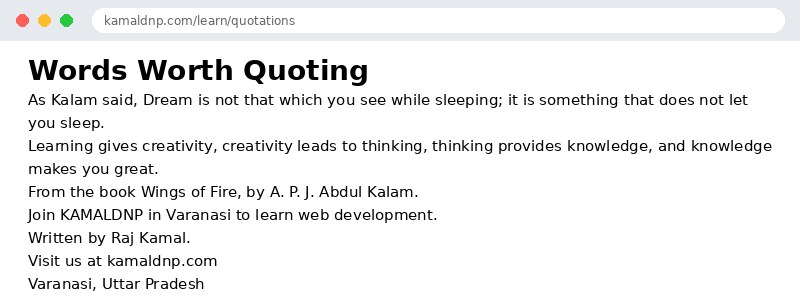
<q>Dream is not that which you see while sleeping</q>— a short quote inside a sentence. The browser adds the quotation marks itself.<blockquote cite="https://example.com/speech">— a long quote as its own block, with the source URL in theciteattribute.<cite>Wings of Fire</cite>— the title of the book being quoted, shown in italics.<abbr title="KAMALDNP Academy">KAMALDNP</abbr>— the abbreviation, with its full form revealed on hover.<address>— the contact block at the bottom: who to write to, and where.
Example
<!DOCTYPE html>
<html>
<head>
<title>Quotations</title>
</head>
<body>

<h1>Words Worth Quoting</h1>
<p>As Kalam said, <q>Dream is not that which you see while sleeping; it is something that does not let you sleep.</q></p>
<blockquote cite="https://example.com/speech">
<p>Learning gives creativity, creativity leads to thinking, thinking provides knowledge, and knowledge makes you great.</p>
</blockquote>
<p>From the book <cite>Wings of Fire</cite>, by A. P. J. Abdul Kalam.</p>
<p>Join <abbr title="KAMALDNP Academy">KAMALDNP</abbr> in Varanasi to learn web development.</p>
<address>
Written by Raj Kamal.<br>
Visit us at kamaldnp.com<br>
Varanasi, Uttar Pradesh
</address>

</body>
</html>
Output
Try it yourself — live editor
Change the code below and press Run to see the result instantly. No file to save, no login needed.
Related lessons
Frequently asked questions
The questions learners ask most about this lesson — read the question, then open it to see the answer.
1. When should you use q instead of blockquote?
Use q for a short quote inside your own sentence, and blockquote for a long quote that stands on its own as a block.
2. What is cite for?
Cite is for the title of a work, such as a book, film or course, shown in italics, not for a person's name.
3. What does abbr do?
It marks an abbreviation with its full form in the title, showing a dotted underline, with the full form revealed on hover.
Why learn this yourself — and not just ask AI?
AI can write code for you, but it cannot think for you. When you learn HTML yourself, your brain builds the real skill: you understand why a page looks the way it does, you can fix it when it breaks, and you can answer it in an exam or an interview without help. That is the skill that gets you a job — not a copied answer.
Get certified — just ₹10
Finish all 35 lessons, pass the test (80%), pay ₹10 and get your certificate.
Take the testPrefer watching? Video courses teach the same topics step by step.
Go further with a full course
Free tutorials teach you the basics. Our paid courses add live projects, mentorship and a certificate.
Browse all courses