JavaScript Arrow Functions
4 min read · Free · No login needed
By now you have written many functions the long way: function add(a, b) { return a + b; }. It works, but it is a lot of typing for a small idea. JavaScript has a shorter way to write the same thing — the arrow function, named after the fat arrow => in the middle. It does the same job in fewer words, and you will see it in almost every modern JavaScript file.
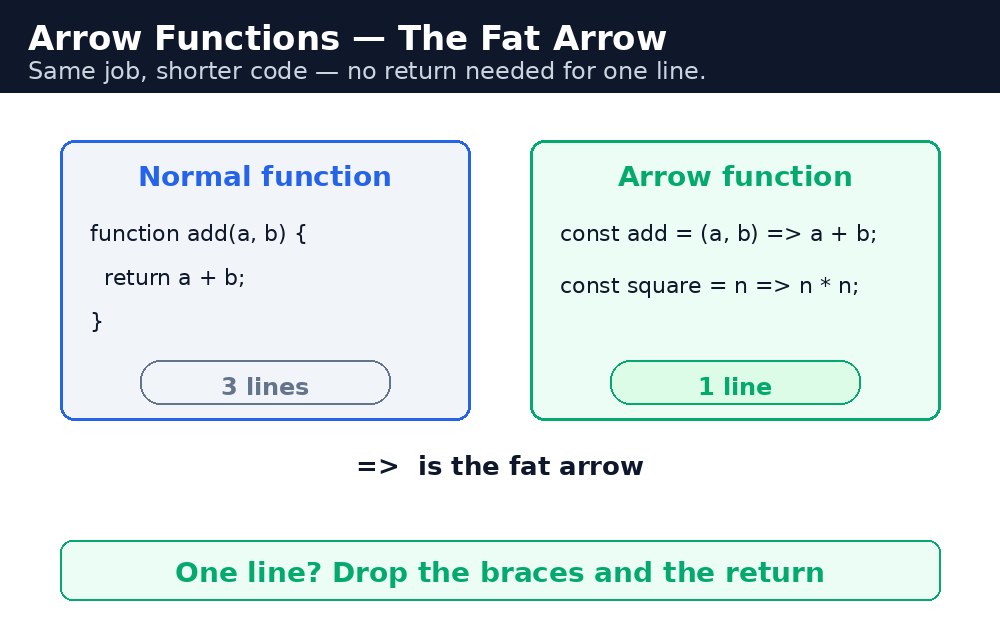
Think of it like a shortcut on your phone. The long way (calling the full number) still works, but the shortcut gets you to the same person faster. Arrow functions are the shortcut: same result, less typing, easier to read once you know the shape.
The shape — three small rules
let add = (a, b) => a + b;      // two params, one line, no return needed
let double = x => x * 2;        // one param — the brackets are optional
let sayHi = () => "Namaste!";   // no params — empty brackets
Rule one: if the body is a single line, you can drop the curly braces — and then the return is automatic. The value of that line is the result. Rule two: with exactly one parameter, the round brackets are optional. Rule three: with no parameters, or more than one, the brackets stay. When the body needs more than one line, you keep the braces and write return yourself, like a normal function.
function form is easier to read. Short job, short form; long job, long form.The one big difference — this
Arrow functions are not just shorter. They handle this differently, and this is the part interviewers love to ask about. A normal function gets its own this depending on how it is called — inside a button click, this is the button. An arrow function has no this of its own: it borrows the this from the code around it.
let shop = {
  name: "Chai Shop",
  items: ["Masala", "Adrak", "Kulhad"],
  list: function () {
    this.items.forEach(item => {
      console.log(this.name + " sells " + item);
    });
  }
};
Inside forEach, the arrow function still sees this.name as "Chai Shop", because it borrowed this from list. If you used a normal function there, this would be something else entirely, and this.name would be undefined. That is why arrows are the standard choice inside map, filter and forEach.
this: an arrow borrows, a normal function owns.Common mistakes
- Using an arrow function as an object method and expecting
thisto be the object — it is not. Methods should be normal functions. - Writing
() => { a + b }and wondering why the answer isundefined— with braces, you must writereturnyourself. - Forgetting the brackets with two parameters —
a, b => a + bis a syntax error. It must be(a, b) => a + b. - Using arrows everywhere, even for long functions — readability suffers. Arrows are for short jobs.
Remember
- Arrow syntax:
(a, b) => a + b— one line, no braces, noreturn. - One parameter can drop its brackets:
x => x * 2. - With braces, you must write
returnyourself. - Arrows have no
thisof their own — they borrow it from the surrounding code. - The fat arrow points at the answer — no return needed for one line.
Example explained
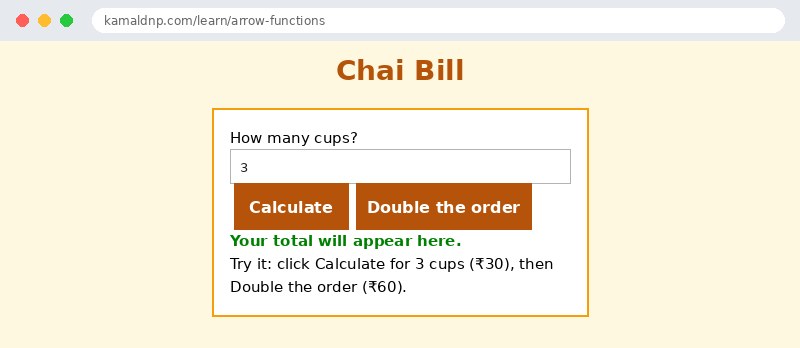
const price = cup => cup * 10;— an arrow with one parameter, no brackets, one line.price(3)returns30.const total = (qty, rate) => qty * rate;— two parameters, so the brackets stay.total(3, 10)returns30.const bill = qty => { let t = qty * 10; return "Total: ₹" + t; };— with braces the body has two lines, soreturnis written by hand.document.getElementById("calc").onclick = () => { ... };— an arrow as a click handler: short, and it borrowsthisfrom outside, which is what we want here.document.getElementById("out").textContent = bill(qty);— the arrow's answer is shown on the page.
Example
<!DOCTYPE html>
<html>
<head>
<title>Chai Bill — Arrow Functions</title>
<style>
body { font-family: Verdana, sans-serif; background-color: #fff8e1; }
h1 { color: #b45309; text-align: center; }
.card { background-color: white; border: 2px solid #f59e0b; padding: 16px; width: 340px; margin: 20px auto; }
button { background-color: #b45309; color: white; border: none; padding: 10px 18px; font-size: 16px; margin: 4px; }
#out { font-weight: bold; color: green; }
</style>
</head>
<body>

<h1>Chai Bill</h1>
<div class="card">
<p>How many cups? <input id="qty" type="text" value="3"></p>
<p>
<button id="calc">Calculate</button>
<button id="double">Double the order</button>
</p>
<p id="out">Your total will appear here.</p>
<p>Try it: click Calculate for 3 cups (₹30), then Double the order (₹60).</p>
</div>

<script>
const price = cup => cup * 10;
const bill = qty => { let t = qty * 10; return "Total: ₹" + t; };
document.getElementById("calc").onclick = () => {
  let qty = Number(document.getElementById("qty").value);
  document.getElementById("out").textContent = bill(qty);
};
document.getElementById("double").onclick = () => {
  let qty = Number(document.getElementById("qty").value) * 2;
  document.getElementById("out").textContent = bill(qty) + " (doubled!)";
};
</script>

</body>
</html>
Output
Try it yourself — live editor
Change the code below and press Run to see the result instantly. No file to save, no login needed.
Why learn this yourself — and not just ask AI?
AI can write code for you, but it cannot think for you. When you learn HTML yourself, your brain builds the real skill: you understand why a page looks the way it does, you can fix it when it breaks, and you can answer it in an exam or an interview without help. That is the skill that gets you a job — not a copied answer.
Get certified — just ₹10
Finish all 30 lessons, pass the test (80%), pay ₹10 and get your certificate.
Take the testPrefer watching? Video courses teach the same topics step by step.
Go further with a full course
Free tutorials teach you the basics. Our paid courses add live projects, mentorship and a certificate.
Browse all courses