JavaScript Arrow Functions — छोटा रूप, बड़ा फर्क
4 मिनट पढ़ें · मुफ़्त · बिना लॉगिन
अब तक आपने कई functions लंबे तरीके से लिखे हैं: function add(a, b) { return a + b; }। यह काम करता है, पर एक छोटे idea के लिए यह बहुत typing है। JavaScript के पास वही चीज़ लिखने का छोटा तरीका है — arrow function, जिसका नाम बीच के मोटे तीर => से पड़ा है। यह कम शब्दों में वही काम करता है, और आपको यह लगभग हर आधुनिक JavaScript file में मिलेगा।
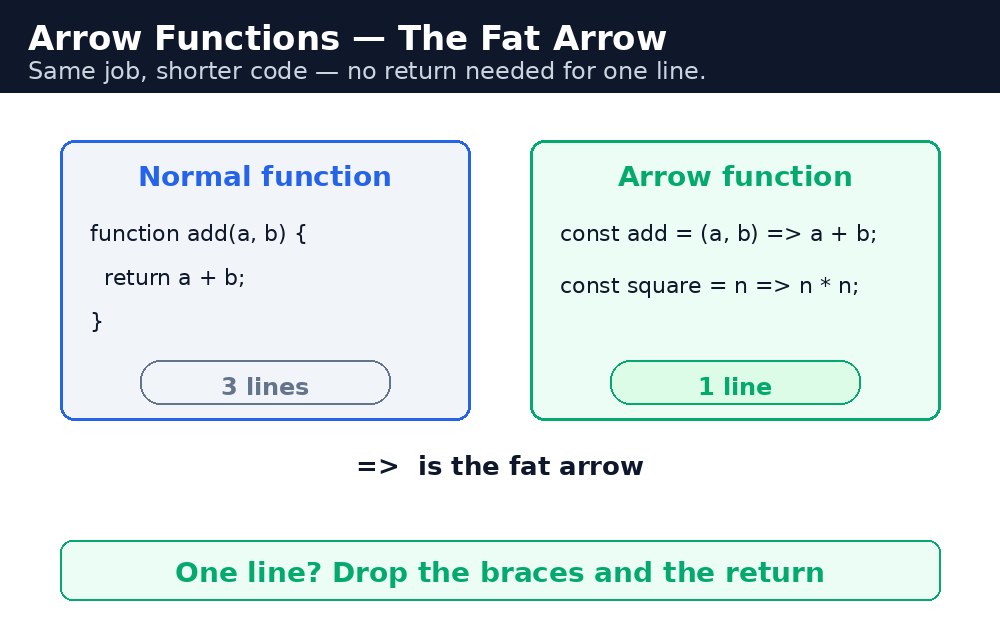
इसे अपने फ़ोन के shortcut की तरह सोचिए। लंबा तरीका (पूरा number मिलाना) अब भी काम करता है, पर shortcut आपको उसी व्यक्ति तक तेज़ी से पहुँचाता है। Arrow functions shortcut हैं: वही नतीजा, कम typing, और एक बार आकार जान लेने पर पढ़ने में आसान।
आकार — तीन छोटे नियम
let add = (a, b) => a + b;      // two params, one line, no return needed
let double = x => x * 2;        // one param — the brackets are optional
let sayHi = () => "Namaste!";   // no params — empty brackets
नियम एक: अगर body एक ही लाइन है, तो आप curly braces हटा सकते हैं — और फिर return अपने आप हो जाता है। उस लाइन की value ही नतीजा है। नियम दो: बिल्कुल एक parameter होने पर round brackets वैकल्पिक हैं। नियम तीन: कोई parameter न हो, या एक से ज़्यादा हों, तो brackets रहते हैं। जब body में एक से ज़्यादा लाइनें चाहिए हों, तो आप braces रखते हैं और return खुद लिखते हैं, जैसे सामान्य function में।
function रूप पढ़ने में आसान है। छोटा काम, छोटा रूप; लंबा काम, लंबा रूप।एक बड़ा फर्क — this
Arrow functions सिर्फ छोटे नहीं होते। वे this को अलग तरीके से सँभालते हैं, और यही वह हिस्सा है जो interviewers को पूछना बहुत पसंद है। एक सामान्य function को अपना this मिलता है, यह इस पर निर्भर करता है कि उसे कैसे बुलाया गया — button click के अंदर this button है। Arrow function का अपना कोई this नहीं होता: वह आस-पास के code से this उधार लेता है।
let shop = {
  name: "Chai Shop",
  items: ["Masala", "Adrak", "Kulhad"],
  list: function () {
    this.items.forEach(item => {
      console.log(this.name + " sells " + item);
    });
  }
};
forEach के अंदर arrow function अब भी this.name को "Chai Shop" के रूप में देखता है, क्योंकि उसने this list से उधार लिया है। अगर आप वहाँ सामान्य function इस्तेमाल करते, तो this कुछ और ही होता, और this.name undefined होता। इसीलिए map, filter और forEach के अंदर arrows ही मानक चुनाव हैं।
this के लिए: arrow उधार लेता है, सामान्य function अपना रखता है।आम गलतियाँ
- Arrow function को object method की तरह इस्तेमाल करना और उम्मीद करना कि
thisobject होगा — ऐसा नहीं है। Methods सामान्य functions होने चाहिए। () => { a + b }लिखना और हैरान होना कि जवाबundefinedक्यों है — braces के साथ आपकोreturnखुद लिखना पड़ता है।- दो parameters के साथ brackets भूल जाना —
a, b => a + bsyntax error है। यह(a, b) => a + bहोना चाहिए। - Arrows को हर जगह इस्तेमाल करना, लंबे functions के लिए भी — पढ़ने में तकलीफ़ होती है। Arrows छोटे कामों के लिए हैं।
याद रखें
- Arrow syntax:
(a, b) => a + b— एक लाइन, कोई braces नहीं, कोईreturnनहीं। - एक parameter अपने brackets हटा सकता है:
x => x * 2। - Braces के साथ आपको
returnखुद लिखना पड़ता है। - Arrows का अपना कोई
thisनहीं होता — वे आस-पास के code से उधार लेते हैं। - मोटा तीर जवाब की ओर इशारा करता है — एक लाइन के लिए return की ज़रूरत नहीं।
उदाहरण समझिए
const price = cup => cup * 10;— एक parameter वाला arrow, कोई brackets नहीं, एक लाइन।price(3)30देता है।const total = (qty, rate) => qty * rate;— दो parameters, इसलिए brackets रहते हैं।total(3, 10)30देता है।const bill = qty => { let t = qty * 10; return "Total: ₹" + t; };— braces के साथ body में दो लाइनें हैं, इसलिएreturnहाथ से लिखा जाता है।document.getElementById("calc").onclick = () => { ... };— click handler के रूप में arrow: छोटा, और यहthisबाहर से उधार लेता है, जो यहाँ हमें चाहिए।document.getElementById("out").textContent = bill(qty);— arrow का जवाब पेज पर दिखाया जाता है।
उदाहरण
<!DOCTYPE html>
<html>
<head>
<title>Chai Bill — Arrow Functions</title>
<style>
body { font-family: Verdana, sans-serif; background-color: #fff8e1; }
h1 { color: #b45309; text-align: center; }
.card { background-color: white; border: 2px solid #f59e0b; padding: 16px; width: 340px; margin: 20px auto; }
button { background-color: #b45309; color: white; border: none; padding: 10px 18px; font-size: 16px; margin: 4px; }
#out { font-weight: bold; color: green; }
</style>
</head>
<body>

<h1>Chai Bill</h1>
<div class="card">
<p>How many cups? <input id="qty" type="text" value="3"></p>
<p>
<button id="calc">Calculate</button>
<button id="double">Double the order</button>
</p>
<p id="out">Your total will appear here.</p>
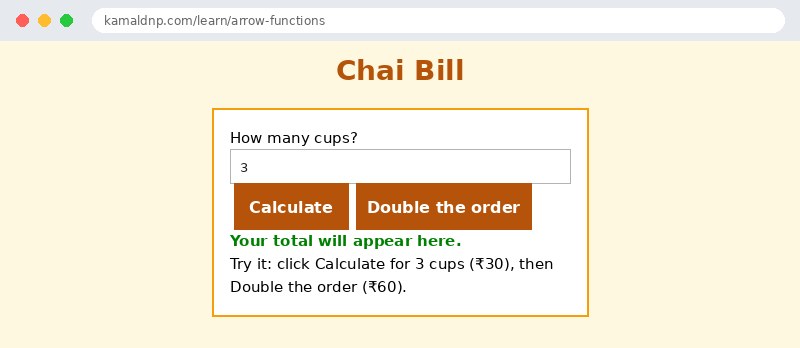
<p>Try it: click Calculate for 3 cups (₹30), then Double the order (₹60).</p>
</div>

<script>
const price = cup => cup * 10;
const bill = qty => { let t = qty * 10; return "Total: ₹" + t; };
document.getElementById("calc").onclick = () => {
  let qty = Number(document.getElementById("qty").value);
  document.getElementById("out").textContent = bill(qty);
};
document.getElementById("double").onclick = () => {
  let qty = Number(document.getElementById("qty").value) * 2;
  document.getElementById("out").textContent = bill(qty) + " (doubled!)";
};
</script>

</body>
</html>
परिणाम
खुद करके देखें — लाइव एडिटर
नीचे दिया गया कोड बदलें और चलाएँ दबाएँ — परिणाम तुरंत दिखेगा। कोई फाइल सहेजनी नहीं है, कोई लॉगिन नहीं चाहिए।
खुद क्यों सीखें — AI से पूछने के बजाय?
AI आपके लिए कोड लिख सकता है, लेकिन वह आपके लिए सोच नहीं सकता। जब आप HTML खुद सीखते हैं, तो आपका दिमाग असली कौशल बनाता है: आप समझते हैं कि पेज ऐसा क्यों दिखता है, टूटने पर उसे ठीक कर सकते हैं, और परीक्षा या इंटरव्यू में बिना मदद के जवाब दे सकते हैं। यही कौशल नौकरी दिलाता है — कॉपी किया हुआ जवाब नहीं।
सर्टिफिकेट पाएँ — सिर्फ ₹10
सभी 30 पाठ पूरे करें, टेस्ट पास करें (80%), ₹10 दें और अपना सर्टिफिकेट पाएँ।
टेस्ट देंदेखकर सीखना पसंद है? वीडियो कोर्स में वही विषय एक-एक करके सिखाए जाते हैं।
Go further with a full course
Free tutorials teach you the basics. Our paid courses add live projects, mentorship and a certificate.
Browse all courses