JavaScript Comments
4 min read · Free · No login needed
A comment is a note you write inside your code for humans. The browser ignores it completely — it never runs, never shows on the page, and never affects the result. Comments exist for one reason: so that a person reading the code later — often you, three months later — can understand what the code is doing and why.
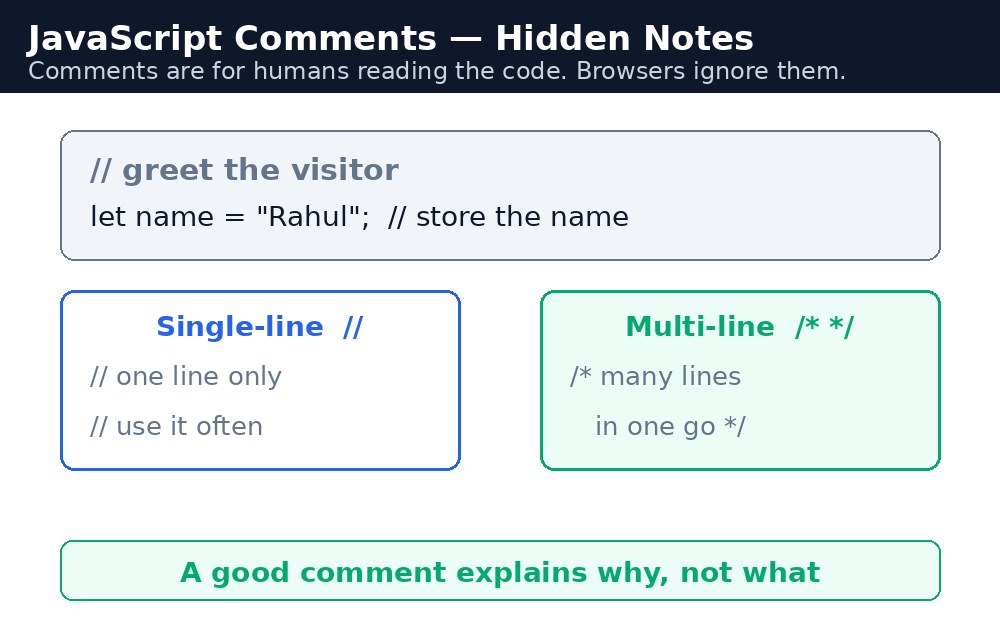
There are two kinds of comments in JavaScript. A single-line comment starts with two slashes // and runs to the end of the line. A multi-line comment starts with /* and ends with */, and can cover as many lines as you like. Both are ignored by the browser.
Single-line comments
Use // for a short note on one line — what a variable holds, why a number is what it is, or what the next line does. You can put it on its own line, or at the end of a line of code.
// Price of one cup of Masala Chai
let price = 10;
let total = price * 3; // 3 cups = ₹30
The first comment explains a value. The second comment, at the end of a line, shows the maths. Both are invisible to the visitor.
Multi-line comments
Use /* ... */ when the note needs more than one line — for example, a short description at the top of a file, or an explanation of a tricky piece of logic. Everything between /* and */ is ignored, even if it spans ten lines.
/*
  This function calculates the bill for a chai order.
  It adds a 5% tax and gives a 10% discount on orders above ₹100.
*/
function calculateBill(cups, price) {
  let total = cups * price;
  return total;
}
*/. If you open a multi-line comment and never close it, the browser treats everything after it as a comment — including your real code — and the program silently does nothing.// and run the page again. If the error goes away, that line was the problem. This trick is called "commenting out", and professionals use it every day.What makes a good comment
A good comment explains why, not what. The code already shows what is happening — let total = cups * price; is obvious. What is not obvious is why the price is 10, or why the discount only applies above ₹100. Write the reason, not the repetition. And keep comments short: if a comment is longer than the code it explains, the code probably needs rewriting, not more comments.
Common mistakes
- Forgetting the closing
*/on a multi-line comment — everything after it becomes a comment, and the code stops working. - Writing comments that repeat the code —
// add 1 to countabovecount = count + 1;adds nothing. Say why instead. - Leaving old, wrong comments behind after changing the code — a comment that lies is worse than no comment at all.
- Commenting out code and forgetting about it — delete dead code instead of leaving it commented in the file.
Remember
//comments out one line;/* ... */comments out many lines.- The browser ignores comments completely — they are notes for humans only.
- Good comments explain why, not what.
- Always close a multi-line comment with
*/.
Example explained
// Price of one cup of Kulhad Chai— a single-line comment above the variable it describes. It tells the reader what the number 20 means.let price = 20; // ₹20 per cup— a comment at the end of a line, adding a small fact about the value on that line./* ... */around the discount rule — a multi-line comment explaining the shop's rule: orders above ₹100 get 10% off. The rule is business logic, not code logic, so it needs a note.let total = cups * price;— no comment needed here. The line is clear on its own, and a comment would only repeat it.// Show the final total on the page— a comment before the last line, marking the step where the answer reaches the visitor.
Example
<!DOCTYPE html>
<html>
<head>
<title>Chai Bill with Comments</title>
<style>
body { background-color: #fff8e1; font-family: Verdana, sans-serif; text-align: center; }
h1 { color: #b45309; }
button { background-color: #e13611; color: white; border: none; padding: 12px 24px; font-size: 16px; cursor: pointer; }
#bill { color: green; font-weight: bold; font-size: 18px; }
</style>
</head>
<body>

<h1>Chai Bill with Discount</h1>
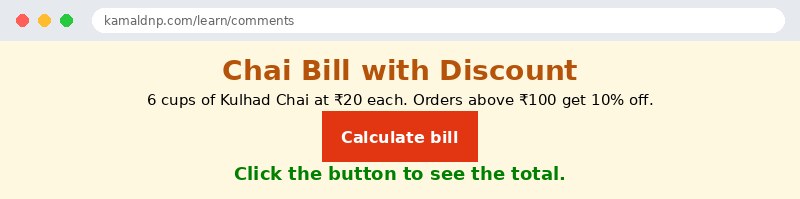
<p>6 cups of Kulhad Chai at ₹20 each. Orders above ₹100 get 10% off.</p>
<button onclick="showBill()">Calculate bill</button>
<p id="bill">Click the button to see the total.</p>

<script>
function showBill() {
  // Price of one cup of Kulhad Chai
  let price = 20; // ₹20 per cup
  let cups = 6;
  let total = cups * price;
  /*
    Shop rule: orders above ₹100 get 10% off.
    6 cups cost ₹120, so the discount applies.
  */
  let discount = total * 0.10;
  let finalTotal = total - discount;
  // Show the final total on the page
  document.getElementById("bill").textContent = "Total after discount: ₹" + finalTotal;
}
</script>

</body>
</html>
Output
Try it yourself — live editor
Change the code below and press Run to see the result instantly. No file to save, no login needed.
Check yourself — did you get it?
Finished the lesson? Test yourself with 5 quick questions — you get the answer instantly, with the reason for each one.
1. What is a comment in JavaScript?
2. Which marks a single-line comment?
3. What happens if you open a multi-line comment with /* and forget the closing */?
4. What makes a good comment?
5. What does 'commenting out' a line mean?
Interview questions — can you answer these?
Read the question first, try to answer it in your own words, then open it to check. These are the questions interviewers actually ask.
1. What is a comment in JavaScript, and what are the two kinds?
A comment is a note inside your code for humans — the browser ignores it completely, so it never runs or shows on the page. A single-line comment starts with // and runs to the end of the line, while a multi-line comment starts with /* and ends with */, and can cover as many lines as you like.
2. What makes a good comment, and what is the most common mistake with multi-line comments?
A good comment explains why, not what — the code already shows what is happening, so write the reason, like why the price is 10 or why the discount only applies above ₹100. The most common mistake is forgetting the closing */: if a multi-line comment is never closed, the browser treats everything after it as a comment, including your real code, and the program silently does nothing.
3. What does "commenting out" mean, and when would you use it?
Commenting out means turning a line of code into a comment with // so the browser skips it, without deleting it. It is a quick way to test: if a line is causing an error and you are not sure why, comment it out and run the page again — if the error goes away, that line was the problem. Professionals use this trick every day, but delete dead code instead of leaving it commented in the file.
Try it yourself — build this
Reading is not enough — now build it yourself. Write the code in the live editor, run it, check the hint if you get stuck, and open the solution only after you have tried.
1. Explain the discount with comments
Create a chai bill page: 6 cups of Kulhad Chai at ₹20 each (₹120 total). Orders above ₹100 get 10% off, so the final total is ₹108. Inside a function showBill(), use BOTH kinds of comments: a single-line comment // above the price line explaining what the number 20 means, a multi-line comment /* ... */ explaining the shop's discount rule (orders above ₹100 get 10% off), and a short single-line comment at the end of the line that calculates the total. The button "Calculate bill" must show "Total after discount: ₹108" in a paragraph with id="bill". Do not forget to close the multi-line comment with */.
Show solution
<!DOCTYPE html>
<html>
<head>
<title>Chai Bill with Discount</title>
<style>
body { background-color: #fff8e1; font-family: Verdana, sans-serif; text-align: center; }
h1 { color: #b45309; }
button { background-color: #e13611; color: white; border: none; padding: 12px 24px; font-size: 16px; cursor: pointer; }
#bill { color: green; font-weight: bold; font-size: 18px; }
</style>
</head>
<body>

<h1>Chai Bill with Discount</h1>
<p>6 cups of Kulhad Chai at ₹20 each. Orders above ₹100 get 10% off.</p>
<button onclick="showBill()">Calculate bill</button>
<p id="bill">Click the button to see the total.</p>

<script>
function showBill() {
  // Price of one cup of Kulhad Chai
  let price = 20;
  let cups = 6;
  let total = cups * price; // 6 cups cost ₹120, so the discount applies
  /*
    Shop rule: orders above ₹100 get 10% off.
    6 cups cost ₹120, so the discount applies.
  */
  let discount = total * 0.10;
  let finalTotal = total - discount;
  // Show the final total on the page
  document.getElementById("bill").textContent = "Total after discount: ₹" + finalTotal;
}
</script>

</body>
</html>Why learn this yourself — and not just ask AI?
AI can write code for you, but it cannot think for you. When you learn HTML yourself, your brain builds the real skill: you understand why a page looks the way it does, you can fix it when it breaks, and you can answer it in an exam or an interview without help. That is the skill that gets you a job — not a copied answer.
Get certified — just ₹10
Finish all 30 lessons, pass the test (80%), pay ₹10 and get your certificate.
Take the testPrefer watching? Video courses teach the same topics step by step.
Go further with a full course
Free tutorials teach you the basics. Our paid courses add live projects, mentorship and a certificate.
Browse all courses