JavaScript कमेंट्स
4 मिनट पढ़ें · मुफ़्त · बिना लॉगिन
Comment एक note है जो आप अपने code के अंदर इंसानों के लिए लिखते हैं। Browser इसे पूरी तरह नज़रअंदाज़ कर देता है — यह कभी चलता नहीं, पेज पर कभी दिखता नहीं, और नतीजे पर कभी असर नहीं डालता। Comments सिर्फ एक वजह से होते हैं: ताकि code पढ़ने वाला व्यक्ति बाद में — अक्सर तीन महीने बाद आप खुद — समझ सके कि code क्या कर रहा है और क्यों।
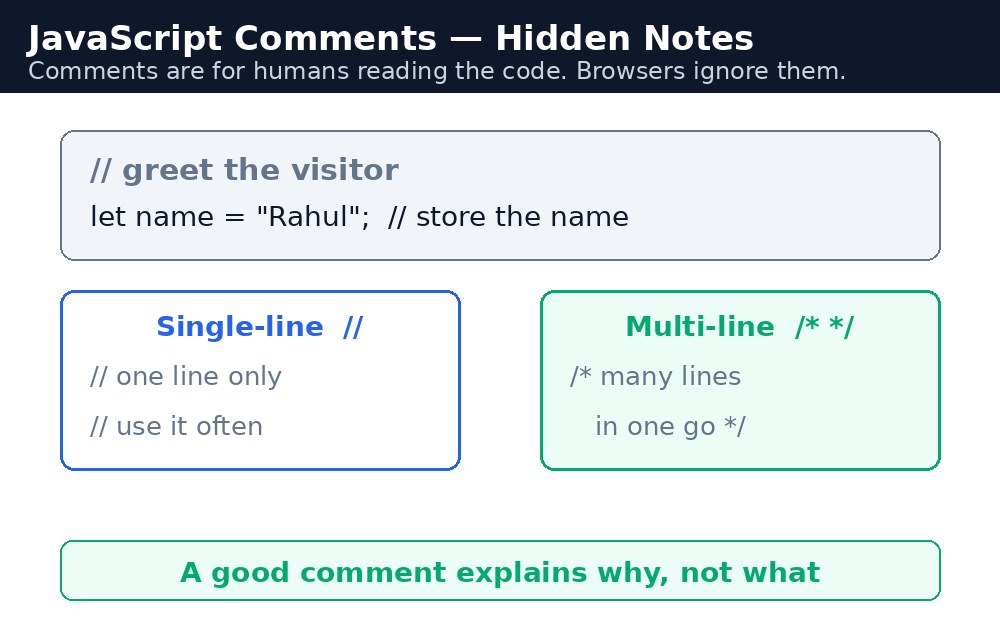
JavaScript में comments दो तरह के होते हैं। Single-line comment दो slashes // से शुरू होता है और line के अंत तक चलता है। Multi-line comment /* से शुरू होता है और */ पर खत्म होता है, और जितनी lines चाहें उतनी cover कर सकता है। दोनों को browser नज़रअंदाज़ कर देता है।
एक line वाले comments
// का इस्तेमाल एक line के छोटे note के लिए कीजिए — कोई variable क्या रखता है, कोई नंबर वही क्यों है, या अगली line क्या करती है। आप इसे अपनी अलग line पर लिख सकते हैं, या code की line के अंत में।
// Price of one cup of Masala Chai
let price = 10;
let total = price * 3; // 3 cups = ₹30
पहला comment एक value समझाता है। दूसरा comment, line के अंत में, गणित दिखाता है। दोनों visitor को दिखाई नहीं देते।
कई lines वाले comments
/* ... */ का इस्तेमाल तब कीजिए जब note को एक से ज़्यादा lines चाहिए — जैसे file के ऊपर एक छोटा विवरण, या किसी मुश्किल logic की व्याख्या। /* और */ के बीच जो कुछ भी है, वह नज़रअंदाज़ कर दिया जाता है, चाहे वह दस lines में ही क्यों न हो।
/*
  This function calculates the bill for a chai order.
  It adds a 5% tax and gives a 10% discount on orders above ₹100.
*/
function calculateBill(cups, price) {
  let total = cups * price;
  return total;
}
*/ भूल जाना। अगर आप multi-line comment खोलते हैं और कभी बंद नहीं करते, तो browser उसके बाद की हर चीज़ को comment मान लेता है — आपका असली code भी — और program चुपचाप कुछ भी नहीं करता।// से comment बना दीजिए और पेज फिर से चलाइए। अगर error चला जाए, तो वही line समस्या थी। इस तरकीब को "commenting out" कहते हैं, और पेशेवर लोग इसे हर दिन इस्तेमाल करते हैं।अच्छा comment कैसा होता है
अच्छा comment क्यों समझाता है, क्या नहीं। Code पहले से दिखाता है कि क्या हो रहा है — let total = cups * price; साफ़ है। जो साफ़ नहीं है, वह यह है कि कीमत 10 क्यों है, या discount सिर्फ ₹100 से ऊपर ही क्यों मिलता है। वजह लिखिए, दोहराव नहीं। और comments छोटे रखिए: अगर comment उस code से लंबा है जिसे वह समझाता है, तो शायद code को दोबारा लिखने की ज़रूरत है, ज़्यादा comments की नहीं।
आम गलतियाँ
- Multi-line comment का closing
*/भूल जाना — उसके बाद की हर चीज़ comment बन जाती है, और code काम करना बंद कर देता है। - ऐसे comments लिखना जो code को दोहराते हैं —
count = count + 1;के ऊपर// add 1 to countकुछ नहीं जोड़ता। क्यों बताइए, बजाय इसके। - Code बदलने के बाद पुराने, गलत comments छोड़ देना — झूठा comment बिना comment के भी बुरा है।
- Code को comment करके भूल जाना — उसे comment में छोड़ने के बजाय delete कर दीजिए।
याद रखें
//एक line को comment बनाता है;/* ... */कई lines को comment बनाता है।- Browser comments को पूरी तरह नज़रअंदाज़ कर देता है — वे सिर्फ इंसानों के लिए notes हैं।
- अच्छे comments क्यों समझाते हैं, क्या नहीं।
- Multi-line comment को हमेशा
*/से बंद कीजिए।
उदाहरण समझिए
// Price of one cup of Kulhad Chai— उस variable के ऊपर single-line comment जिसका वह वर्णन करता है। यह बताता है कि नंबर 20 का मतलब क्या है।let price = 20; // ₹20 per cup— line के अंत में comment, उस line की value के बारे में एक छोटी बात जोड़ता है।- Discount नियम के आसपास
/* ... */— multi-line comment दुकान का नियम समझाता है: ₹100 से ऊपर के orders पर 10% छूट मिलती है। यह नियम business logic है, code logic नहीं, इसलिए इसे note की ज़रूरत है। let total = cups * price;— यहाँ कोई comment ज़रूरी नहीं है। Line अपने आप साफ़ है, और comment सिर्फ उसे दोहराता।// Show the final total on the page— आखिरी line से पहले comment, वह कदम बताता है जहाँ जवाब visitor तक पहुँचता है।
उदाहरण
<!DOCTYPE html>
<html>
<head>
<title>Chai Bill with Comments</title>
<style>
body { background-color: #fff8e1; font-family: Verdana, sans-serif; text-align: center; }
h1 { color: #b45309; }
button { background-color: #e13611; color: white; border: none; padding: 12px 24px; font-size: 16px; cursor: pointer; }
#bill { color: green; font-weight: bold; font-size: 18px; }
</style>
</head>
<body>

<h1>Chai Bill with Discount</h1>
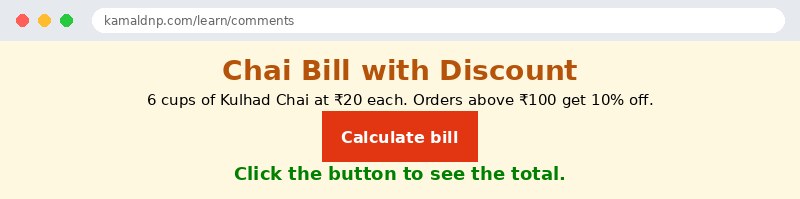
<p>6 cups of Kulhad Chai at ₹20 each. Orders above ₹100 get 10% off.</p>
<button onclick="showBill()">Calculate bill</button>
<p id="bill">Click the button to see the total.</p>

<script>
function showBill() {
  // Price of one cup of Kulhad Chai
  let price = 20; // ₹20 per cup
  let cups = 6;
  let total = cups * price;
  /*
    Shop rule: orders above ₹100 get 10% off.
    6 cups cost ₹120, so the discount applies.
  */
  let discount = total * 0.10;
  let finalTotal = total - discount;
  // Show the final total on the page
  document.getElementById("bill").textContent = "Total after discount: ₹" + finalTotal;
}
</script>

</body>
</html>
परिणाम
खुद करके देखें — लाइव एडिटर
नीचे दिया गया कोड बदलें और चलाएँ दबाएँ — परिणाम तुरंत दिखेगा। कोई फाइल सहेजनी नहीं है, कोई लॉगिन नहीं चाहिए।
Check yourself — did you get it?
Finished the lesson? Test yourself with 5 quick questions — you get the answer instantly, with the reason for each one.
1. What is a comment in JavaScript?
2. Which marks a single-line comment?
3. What happens if you open a multi-line comment with /* and forget the closing */?
4. What makes a good comment?
5. What does 'commenting out' a line mean?
Interview questions — can you answer these?
Read the question first, try to answer it in your own words, then open it to check. These are the questions interviewers actually ask.
1. What is a comment in JavaScript, and what are the two kinds?
A comment is a note inside your code for humans — the browser ignores it completely, so it never runs or shows on the page. A single-line comment starts with // and runs to the end of the line, while a multi-line comment starts with /* and ends with */, and can cover as many lines as you like.
2. What makes a good comment, and what is the most common mistake with multi-line comments?
A good comment explains why, not what — the code already shows what is happening, so write the reason, like why the price is 10 or why the discount only applies above ₹100. The most common mistake is forgetting the closing */: if a multi-line comment is never closed, the browser treats everything after it as a comment, including your real code, and the program silently does nothing.
3. What does "commenting out" mean, and when would you use it?
Commenting out means turning a line of code into a comment with // so the browser skips it, without deleting it. It is a quick way to test: if a line is causing an error and you are not sure why, comment it out and run the page again — if the error goes away, that line was the problem. Professionals use this trick every day, but delete dead code instead of leaving it commented in the file.
Try it yourself — build this
Reading is not enough — now build it yourself. Write the code in the live editor, run it, check the hint if you get stuck, and open the solution only after you have tried.
1. Explain the discount with comments
Create a chai bill page: 6 cups of Kulhad Chai at ₹20 each (₹120 total). Orders above ₹100 get 10% off, so the final total is ₹108. Inside a function showBill(), use BOTH kinds of comments: a single-line comment // above the price line explaining what the number 20 means, a multi-line comment /* ... */ explaining the shop's discount rule (orders above ₹100 get 10% off), and a short single-line comment at the end of the line that calculates the total. The button "Calculate bill" must show "Total after discount: ₹108" in a paragraph with id="bill". Do not forget to close the multi-line comment with */.
Show solution
<!DOCTYPE html>
<html>
<head>
<title>Chai Bill with Discount</title>
<style>
body { background-color: #fff8e1; font-family: Verdana, sans-serif; text-align: center; }
h1 { color: #b45309; }
button { background-color: #e13611; color: white; border: none; padding: 12px 24px; font-size: 16px; cursor: pointer; }
#bill { color: green; font-weight: bold; font-size: 18px; }
</style>
</head>
<body>

<h1>Chai Bill with Discount</h1>
<p>6 cups of Kulhad Chai at ₹20 each. Orders above ₹100 get 10% off.</p>
<button onclick="showBill()">Calculate bill</button>
<p id="bill">Click the button to see the total.</p>

<script>
function showBill() {
  // Price of one cup of Kulhad Chai
  let price = 20;
  let cups = 6;
  let total = cups * price; // 6 cups cost ₹120, so the discount applies
  /*
    Shop rule: orders above ₹100 get 10% off.
    6 cups cost ₹120, so the discount applies.
  */
  let discount = total * 0.10;
  let finalTotal = total - discount;
  // Show the final total on the page
  document.getElementById("bill").textContent = "Total after discount: ₹" + finalTotal;
}
</script>

</body>
</html>खुद क्यों सीखें — AI से पूछने के बजाय?
AI आपके लिए कोड लिख सकता है, लेकिन वह आपके लिए सोच नहीं सकता। जब आप HTML खुद सीखते हैं, तो आपका दिमाग असली कौशल बनाता है: आप समझते हैं कि पेज ऐसा क्यों दिखता है, टूटने पर उसे ठीक कर सकते हैं, और परीक्षा या इंटरव्यू में बिना मदद के जवाब दे सकते हैं। यही कौशल नौकरी दिलाता है — कॉपी किया हुआ जवाब नहीं।
सर्टिफिकेट पाएँ — सिर्फ ₹10
सभी 30 पाठ पूरे करें, टेस्ट पास करें (80%), ₹10 दें और अपना सर्टिफिकेट पाएँ।
टेस्ट देंदेखकर सीखना पसंद है? वीडियो कोर्स में वही विषय एक-एक करके सिखाए जाते हैं।
Go further with a full course
Free tutorials teach you the basics. Our paid courses add live projects, mentorship and a certificate.
Browse all courses