JavaScript Fetch API Tutorial — fetch() with Examples
3 min read · Free · No login needed
A web page is like a shop. Most of the time it shows what it already has on its shelves. But sometimes it needs something from the back room — the server. In the old days the whole page had to reload to get it. The Fetch API is the waiter: it walks to the server, asks for data, and brings it back — while the page stays exactly where it is. The tool is fetch(), and it returns a Promise (remember the promises lesson).
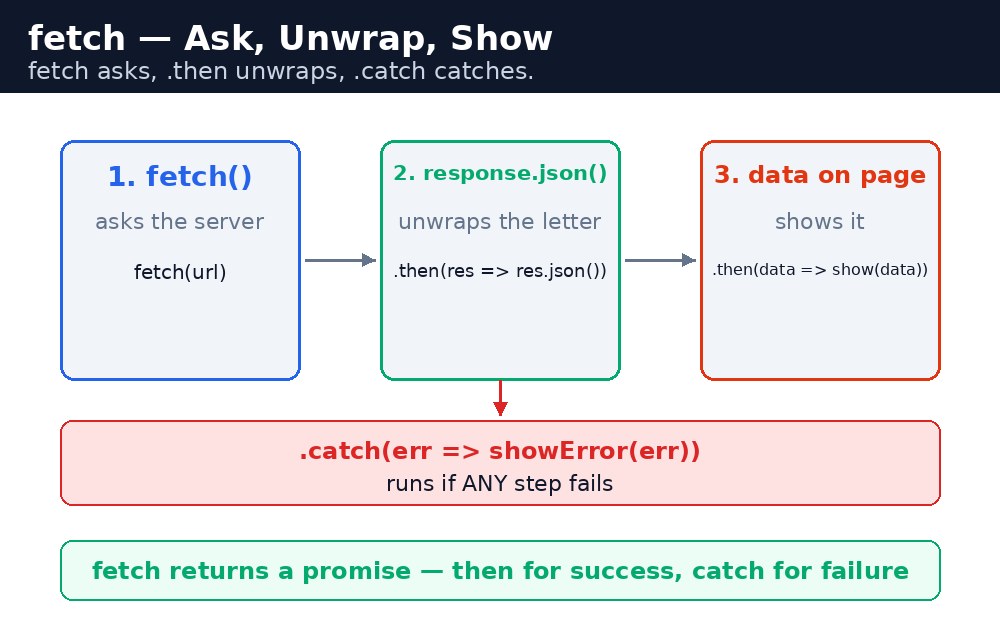
fetch() — ask, then wait
fetch("https://jsonplaceholder.typicode.com/users/1")
  .then(response => response.json())
  .then(user => console.log(user.name));
fetch() takes a URL and returns a promise. The first .then() receives the response — but the response is not the data yet, it is the envelope. response.json() opens the envelope and reads the JSON inside — and that also returns a promise, so a second .then() receives the actual data. JSONPlaceholder is a free practice server that sends back fake user data, perfect for learning.
fetch() only fails its promise on a network problem — no internet, or a server that cannot be reached. A "404 Not Found" answer still counts as a successful fetch! Check response.ok if you need to catch a missing page: if it is false, the server answered but did not find what you asked for.Showing the data on the page
Data is only useful when the visitor can see it. The pattern is always the same: fetch, then put the values into the page with textContent, then handle the failure with .catch().
fetch(url)
  .then(response => response.json())
  .then(user => {
    document.getElementById("out").textContent = user.name;
  })
  .catch(error => {
    document.getElementById("out").textContent = "Could not load data.";
  });
While the data is travelling, show a "Loading..." message. The visitor then knows something is happening instead of staring at a blank page. When the data arrives, replace "Loading..." with the real values; if the fetch fails, replace it with a friendly error instead of leaving the page silent.
fetch(), unwrap the envelope with response.json(), use the data in the second .then(), and always end with .catch() — a network can fail at any moment.Common mistakes
- Forgetting the second
.then()—response.json()is itself a promise; the data is not ready until the second.then(). - Treating a 404 as a failed fetch — fetch only rejects on network errors; check
response.okfor HTTP errors. - Leaving the page blank while waiting — always show "Loading..." first.
- Forgetting the full URL — fetch needs a complete, correct URL, starting with https://.
Remember
fetch(url)returns a promise that settles with the response.response.json()returns another promise that settles with the data.- Chain
.then()for success and.catch()for failure. - Show "Loading..." while waiting; show a friendly message on failure.
- Fetch asks, .then unwraps, .catch catches.
Example explained
fetch("https://jsonplaceholder.typicode.com/users/1")— asks the practice server for user number 1. No page reload happens..then(response => response.json())— the first.then()receives the response envelope and opens it;response.json()returns a promise of the data..then(user => { ... })— the second.then()receives the user object, with.nameand.emailinside.document.getElementById("out").textContent = "Name: " + user.name + ", Email: " + user.email;— puts the real data on the page..catch(error => { ... })— if the network fails, a friendly error message is shown instead of leaving the page blank.
Example
<!DOCTYPE html>
<html>
<head>
<title>Load User Data — Fetch API</title>
<style>
body { font-family: Verdana, sans-serif; background-color: #fff8e1; }
h1 { color: #b45309; text-align: center; }
.card { background-color: white; border: 2px solid #f59e0b; padding: 16px; width: 360px; margin: 20px auto; }
button { background-color: #b45309; color: white; border: none; padding: 10px 18px; font-size: 16px; }
#out { font-weight: bold; }
</style>
</head>
<body>

<h1>Load User Data</h1>
<div class="card">
<p><button onclick="loadUser()">Load data</button></p>
<p id="out">User data will appear here. Click the button to fetch it from a practice server.</p>
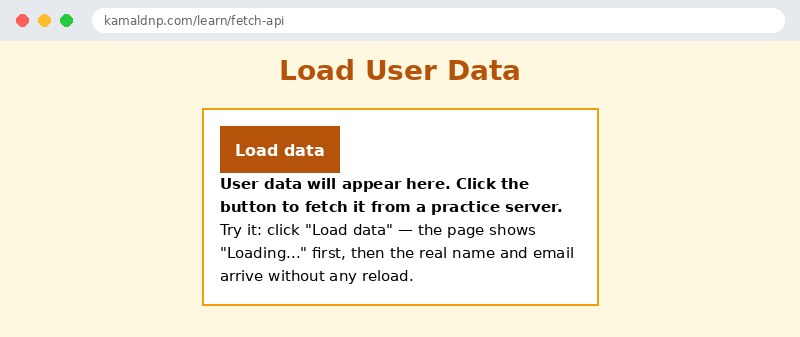
<p>Try it: click "Load data" — the page shows "Loading..." first, then the real name and email arrive without any reload.</p>
</div>

<script>
function loadUser() {
  let out = document.getElementById("out");
  out.textContent = "Loading...";
  fetch("https://jsonplaceholder.typicode.com/users/1")
    .then(response => response.json())
    .then(user => {
      out.textContent = "Name: " + user.name + ", Email: " + user.email;
    })
    .catch(error => {
      out.textContent = "Could not load data. Check your connection and try again.";
    });
}
</script>

</body>
</html>
Output
Try it yourself — live editor
Change the code below and press Run to see the result instantly. No file to save, no login needed.
Related lessons
Frequently asked questions
The questions learners ask most about this lesson — read the question, then open it to see the answer.
1. Why do I need two .then() calls with fetch?
The first receives the response envelope; response.json() opens it and returns another promise, so the second receives the actual data.
2. Does fetch fail when the server answers 404?
No. fetch only rejects on network problems; a 404 still counts as a successful fetch, so check response.ok for HTTP errors.
3. What should I show while data is loading?
A Loading message, so visitors know something is happening instead of staring at a blank page.
Why learn this yourself — and not just ask AI?
AI can write code for you, but it cannot think for you. When you learn HTML yourself, your brain builds the real skill: you understand why a page looks the way it does, you can fix it when it breaks, and you can answer it in an exam or an interview without help. That is the skill that gets you a job — not a copied answer.
Get certified — just ₹10
Finish all 35 lessons, pass the test (80%), pay ₹10 and get your certificate.
Take the testPrefer watching? Video courses teach the same topics step by step.
Go further with a full course
Free tutorials teach you the basics. Our paid courses add live projects, mentorship and a certificate.
Browse all courses