JavaScript Fetch API — सर्वर से डेटा लाना सीखें
4 मिनट पढ़ें · मुफ़्त · बिना लॉगिन
वेब पेज एक दुकान की तरह है। ज़्यादातर समय वह वही दिखाता है जो उसके पास पहले से है। लेकिन कभी-कभी उसे पीछे के कमरे से — सर्वर से — कुछ चाहिए होता है। पुराने ज़माने में इसके लिए पूरा पेज दोबारा load करना पड़ता था। Fetch API एक वेटर की तरह है: वह सर्वर तक जाता है, डेटा माँगता है, और वापस ले आता है — और पेज वहीं का वहीं रहता है। औज़ार है fetch(), और वह एक Promise देता है (promises वाला पाठ याद कीजिए)।
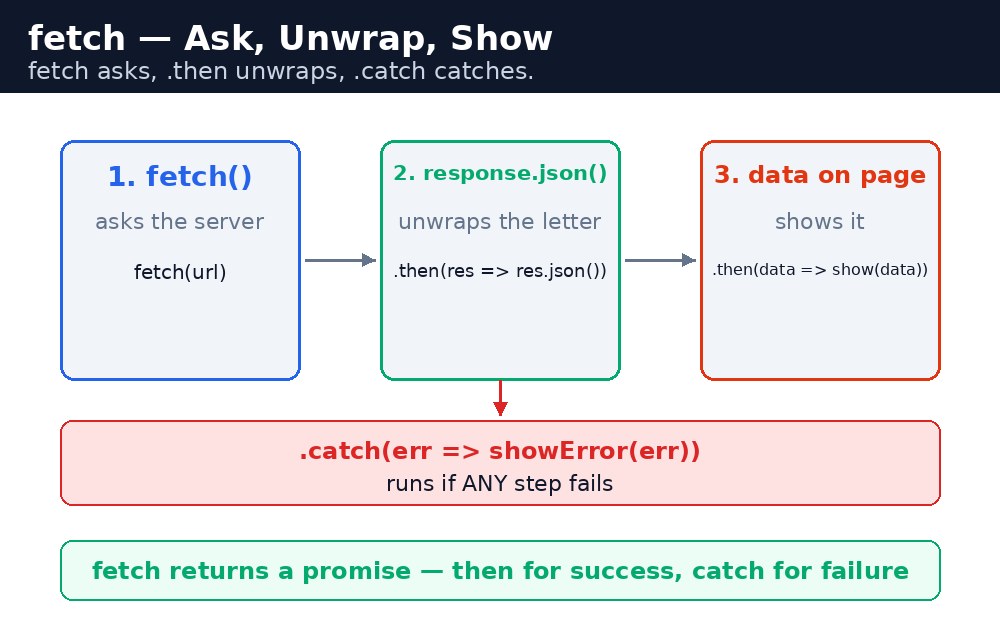
fetch() — पूछिए, फिर इंतज़ार कीजिए
fetch("https://jsonplaceholder.typicode.com/users/1")
  .then(response => response.json())
  .then(user => console.log(user.name));
fetch() एक URL लेता है और एक promise देता है। पहला .then() response पाता है — लेकिन response अभी डेटा नहीं है, वह सिर्फ लिफ़ाफ़ा है। response.json() लिफ़ाफ़ा खोलता है और अंदर का JSON पढ़ता है — और यह भी एक promise देता है, इसलिए दूसरा .then() असली डेटा पाता है। JSONPlaceholder एक मुफ़्त practice सर्वर है जो नकली user डेटा भेजता है — सीखने के लिए एकदम सही।
fetch() का promise सिर्फ network की problem पर fail होता है — internet न हो, या सर्वर तक पहुँच ही न हो। "404 Not Found" जवाब भी एक सफल fetch गिना जाता है! अगर गुम पेज को पकड़ना है तो response.ok देखिए: अगर वह false है, तो सर्वर ने जवाब तो दिया, पर जो माँगा गया वह उसे मिला नहीं।डेटा को पेज पर दिखाइए
डेटा तभी काम का है जब visitor उसे देख सके। तरीका हमेशा एक ही है: fetch कीजिए, फिर textContent से values पेज में डालिए, फिर failure को .catch() से संभालिए।
fetch(url)
  .then(response => response.json())
  .then(user => {
    document.getElementById("out").textContent = user.name;
  })
  .catch(error => {
    document.getElementById("out").textContent = "Could not load data.";
  });
जब तक डेटा रास्ते में है, "Loading..." दिखाइए। तब visitor को पता रहता है कि कुछ हो रहा है, बजाय खाली पेज को घूरने के। जब डेटा आ जाए, तो "Loading..." की जगह असली values रख दीजिए; अगर fetch fail हो जाए, तो पेज को चुप छोड़ने के बजाय एक दोस्ताना error दिखाइए।
fetch() से पूछिए, response.json() से लिफ़ाफ़ा खोलिए, दूसरे .then() में डेटा इस्तेमाल कीजिए, और हमेशा आखिर में .catch() लगाइए — network किसी भी पल fail हो सकता है।आम गलतियाँ
- दूसरा
.then()भूल जाना —response.json()खुद एक promise है; डेटा दूसरे.then()तक तैयार नहीं होता। - 404 को failed fetch समझना — fetch सिर्फ network error पर reject होता है; HTTP error के लिए
response.okदेखिए। - इंतज़ार के दौरान पेज खाली छोड़ देना — पहले हमेशा "Loading..." दिखाइए।
- अधूरा URL देना — fetch को पूरा, सही URL चाहिए, जो https:// से शुरू हो।
याद रखें
fetch(url)एक promise देता है जो response के साथ settle होता है।response.json()एक और promise देता है जो डेटा के साथ settle होता है।- सफलता के लिए
.then()और असफलता के लिए.catch()की chain बनाइए। - इंतज़ार के दौरान "Loading..." दिखाइए; असफलता पर दोस्ताना message दिखाइए।
- fetch पूछता है, .then खोलता है, .catch पकड़ता है।
उदाहरण समझिए
fetch("https://jsonplaceholder.typicode.com/users/1")— practice सर्वर से user number 1 माँगता है। पेज reload नहीं होता।.then(response => response.json())— पहला.then()response लिफ़ाफ़ा पाता है और उसे खोलता है;response.json()डेटा का promise देता है।.then(user => { ... })— दूसरा.then()user object पाता है, जिसके अंदर.nameऔर.emailहैं।document.getElementById("out").textContent = "Name: " + user.name + ", Email: " + user.email;— असली डेटा पेज पर रख देता है।.catch(error => { ... })— अगर network fail हो जाए, तो पेज खाली छोड़ने के बजाय दोस्ताना error message दिखता है।
उदाहरण
<!DOCTYPE html>
<html>
<head>
<title>Load User Data — Fetch API</title>
<style>
body { font-family: Verdana, sans-serif; background-color: #fff8e1; }
h1 { color: #b45309; text-align: center; }
.card { background-color: white; border: 2px solid #f59e0b; padding: 16px; width: 360px; margin: 20px auto; }
button { background-color: #b45309; color: white; border: none; padding: 10px 18px; font-size: 16px; }
#out { font-weight: bold; }
</style>
</head>
<body>

<h1>Load User Data</h1>
<div class="card">
<p><button onclick="loadUser()">Load data</button></p>
<p id="out">User data will appear here. Click the button to fetch it from a practice server.</p>
<p>Try it: click "Load data" — the page shows "Loading..." first, then the real name and email arrive without any reload.</p>
</div>

<script>
function loadUser() {
  let out = document.getElementById("out");
  out.textContent = "Loading...";
  fetch("https://jsonplaceholder.typicode.com/users/1")
    .then(response => response.json())
    .then(user => {
      out.textContent = "Name: " + user.name + ", Email: " + user.email;
    })
    .catch(error => {
      out.textContent = "Could not load data. Check your connection and try again.";
    });
}
</script>

</body>
</html>
परिणाम
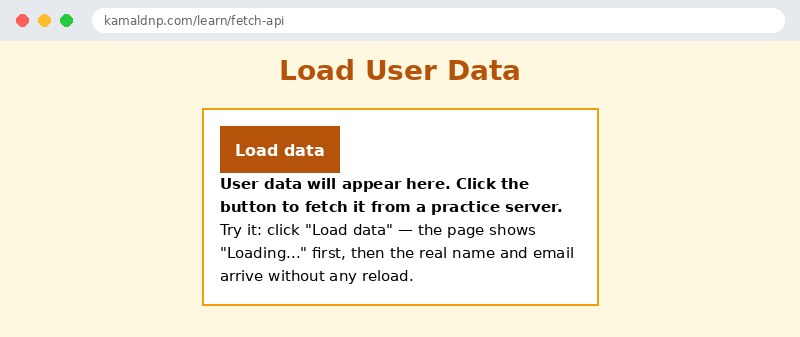
खुद करके देखें — लाइव एडिटर
नीचे दिया गया कोड बदलें और चलाएँ दबाएँ — परिणाम तुरंत दिखेगा। कोई फाइल सहेजनी नहीं है, कोई लॉगिन नहीं चाहिए।
संबंधित पाठ
अक्सर पूछे जाने वाले सवाल
इस पाठ के बारे में सबसे ज़्यादा पूछे जाने वाले सवाल — सवाल पढ़ें, फिर खोलकर जवाब देखें।
1. fetch के साथ दो .then() क्यों चाहिए होते हैं?
पहला response रूपी लिफाफा पाता है; response.json() उसे खोलता है और दूसरा promise देता है, इसलिए दूसरा असली डेटा पाता है।
2. अगर सर्वर 404 जवाब दे तो क्या fetch फेल हो जाएगा?
नहीं। fetch सिर्फ नेटवर्क की दिक्कत पर reject होता है; 404 भी सफल fetch माना जाता है, इसलिए HTTP एरर के लिए response.ok जाँचें।
3. डेटा लोड होते समय क्या दिखाना चाहिए?
Loading वाला मैसेज — ताकि visitor खाली पेज घूरने की जगह जान सके कि कुछ हो रहा है।
खुद क्यों सीखें — AI से पूछने के बजाय?
AI आपके लिए कोड लिख सकता है, लेकिन वह आपके लिए सोच नहीं सकता। जब आप HTML खुद सीखते हैं, तो आपका दिमाग असली कौशल बनाता है: आप समझते हैं कि पेज ऐसा क्यों दिखता है, टूटने पर उसे ठीक कर सकते हैं, और परीक्षा या इंटरव्यू में बिना मदद के जवाब दे सकते हैं। यही कौशल नौकरी दिलाता है — कॉपी किया हुआ जवाब नहीं।
सर्टिफिकेट पाएँ — सिर्फ ₹10
सभी 35 पाठ पूरे करें, टेस्ट पास करें (80%), ₹10 दें और अपना सर्टिफिकेट पाएँ।
टेस्ट देंदेखकर सीखना पसंद है? वीडियो कोर्स में वही विषय एक-एक करके सिखाए जाते हैं।
Go further with a full course
Free tutorials teach you the basics. Our paid courses add live projects, mentorship and a certificate.
Browse all courses