JavaScript Objects
4 min read · Free · No login needed
An object is a single variable that holds many related values together. Think of a student's admission form: name, course, mobile number, marks — four separate variables, or one object called student that holds all four. An object is like a dabba (a lunch box) with labelled compartments: each compartment has a name (the property) and something inside it (the value).
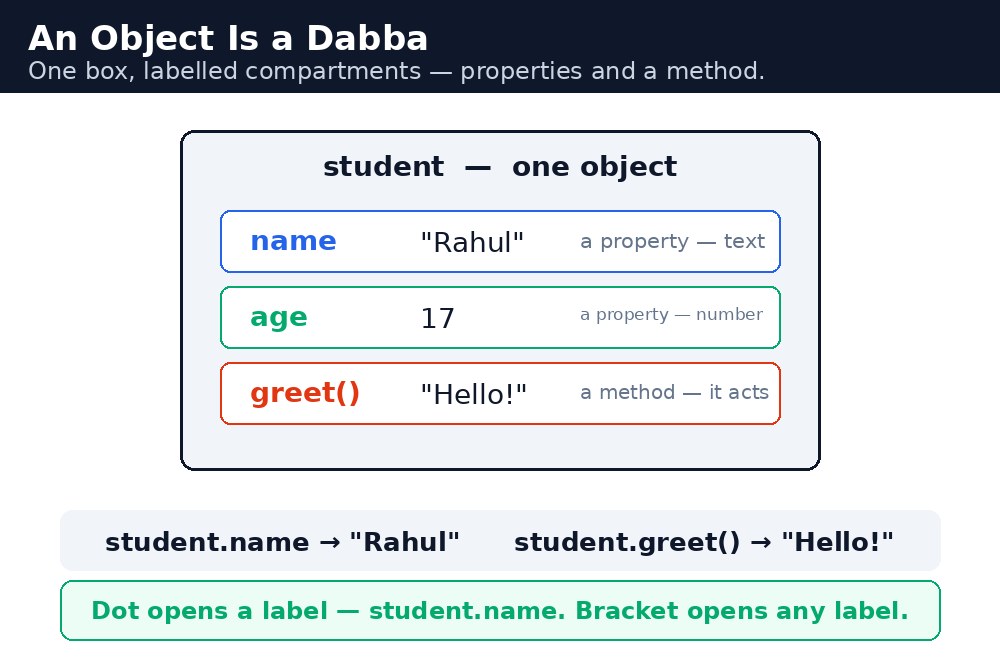
Objects are everywhere in JavaScript because real life is made of things with details. A chai order has a type, a size, and a price. A cricket player has a name, a team, and a score. Whenever details belong together, an object is the right box for them.
Creating an object
You create an object with curly braces. Inside, you write name: value pairs, separated by commas. This is called an object literal.
let student = {
  name: "Rahul Verma",
  course: "HTML",
  marks: 85
};
Property names are usually written without quotes. Values can be anything — a string, a number, a boolean, an array, or even another object.
Dot vs bracket notation
There are two ways to read a property. Dot notation is the common one: student.name gives "Rahul Verma". Bracket notation does the same with a string: student["name"]. Use the dot when you know the property name while writing the code; use brackets when the property name is stored in a variable, or when it has a space in it.
student.marks = 90;              // change a value with the dot
student["course"] = "CSS";       // change a value with brackets
student.mobile = "9876543210";   // add a brand-new property
You can also add new properties after the object is created, just by assigning them. That is how an admission form grows: first the name, then the course, then the photo.
let b = student, both names point at the same object — changing b.marks also changes student.marks. That is why objects are powerful and why you must be careful with them.Methods and this
A property whose value is a function is called a method — it is something the object can do. Inside a method, the word this means "this very object". So this.name inside student means student.name.
let student = {
  name: "Rahul Verma",
  marks: 85,
  pass: function() {
    return this.marks >= 40;
  }
};
student.pass();  // true
Methods keep the data and the actions on it together. The object knows its own marks, and it knows how to check whether it passed.
let students = [{name: "Rahul", marks: 85}, {name: "Priya", marks: 92}]. One array holds the whole class, and each student is an object inside it. You will meet this pattern again and again in real projects.Common mistakes
- Forgetting the comma between properties — every pair except the last needs a comma after it.
- Writing
student.name()whennameis a value, not a function — only methods get brackets. - Using
thisoutside a method — outside an object,thismeans something else entirely. - Expecting a copied object to be independent —
let b = studentcopies the reference, not the object.
Remember
- An object groups related values under named properties:
{ name: "Rahul", marks: 85 }. - Dot notation (
student.name) is the usual way; brackets (student["name"]) work when the name is in a variable. - A method is a function stored as a property; inside it,
thismeans the object itself. - An object is a dabba with labelled compartments — dot opens a label, bracket opens any label.
Example explained
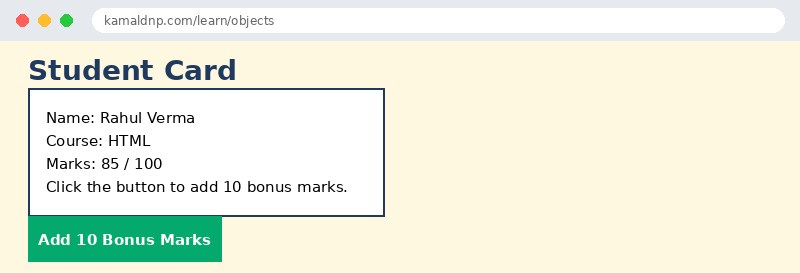
let student = { name: "Rahul Verma", course: "HTML", marks: 85 };— one object holding three related values, like one admission form.pass: function() { return this.marks >= 40; }— a method inside the object.this.marksreads the object's own marks.student.marks = 95;— dot notation changes the marks. The button adds 10 bonus marks the same way.document.getElementById("info").innerHTML = student.name + ...— builds a line of text from the object's properties and shows it on the page.student.pass()— calling the method returnstrueorfalse, so the page can say "Passed" or "Failed".
Example
<!DOCTYPE html>
<html>
<head>
<title>Student Card</title>
<style>
body { font-family: Verdana, sans-serif; background-color: #fff8e1; }
h1 { color: #1e3a5f; }
.card { background-color: white; border: 2px solid #1e3a5f; padding: 16px; width: 320px; }
button { background-color: #04aa6d; color: white; padding: 10px 18px; border: none; }
</style>
</head>
<body>

<h1>Student Card</h1>
<div class="card">
<p>Name: Rahul Verma</p>
<p>Course: HTML</p>
<p>Marks: <span id="marks">85</span> / 100</p>
<p id="info">Click the button to add 10 bonus marks.</p>
</div>
<button onclick="addBonus()">Add 10 Bonus Marks</button>

<script>
let student = {
  name: "Rahul Verma",
  course: "HTML",
  marks: 85,
  pass: function() {
    return this.marks >= 40;
  }
};
function addBonus() {
  student.marks = student.marks + 10;
  document.getElementById("marks").innerHTML = student.marks;
  document.getElementById("info").innerHTML = student.name + " — " + (student.pass() ? "Passed" : "Failed");
}
</script>

</body>
</html>
Output
Try it yourself — live editor
Change the code below and press Run to see the result instantly. No file to save, no login needed.
Why learn this yourself — and not just ask AI?
AI can write code for you, but it cannot think for you. When you learn HTML yourself, your brain builds the real skill: you understand why a page looks the way it does, you can fix it when it breaks, and you can answer it in an exam or an interview without help. That is the skill that gets you a job — not a copied answer.
Get certified — just ₹10
Finish all 30 lessons, pass the test (80%), pay ₹10 and get your certificate.
Take the testPrefer watching? Video courses teach the same topics step by step.
Go further with a full course
Free tutorials teach you the basics. Our paid courses add live projects, mentorship and a certificate.
Browse all courses