JavaScript Regular Expressions — test() & match() Guide
3 min read · Free · No login needed
Checking text by hand is slow: is this a 10-digit mobile number? Does this email have an @ and a dot? A regular expression — regex for short — is a stencil for text. You describe the shape once, and the pattern checks any text against it in a single step. Regex looks like secret code at first, but it is built from a handful of small pieces, and it saves you from writing ten if-statements for every input.
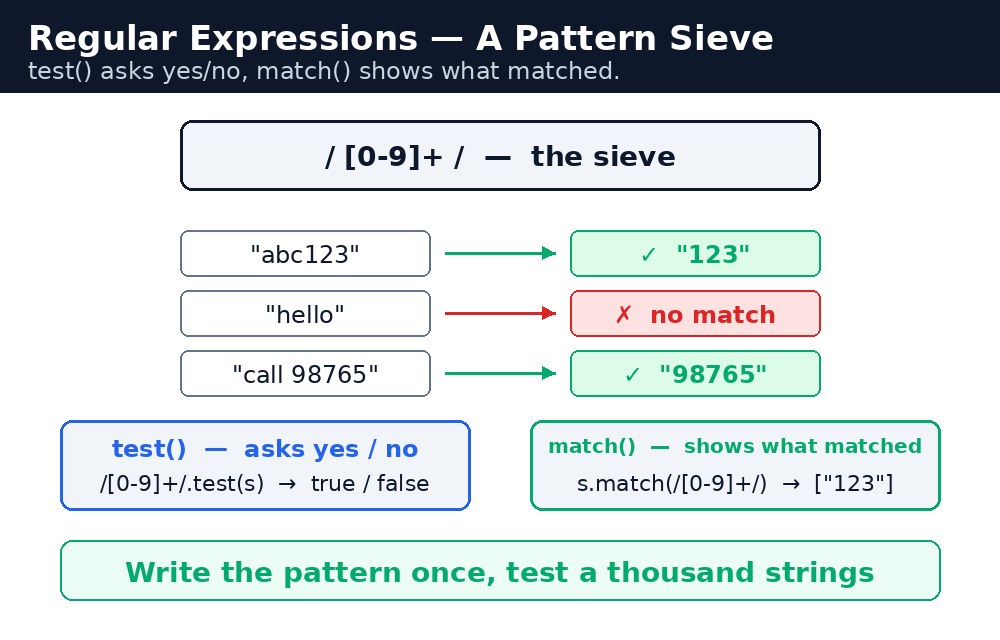
test() — does it match?
let mobilePattern = /^\d{10}$/;
mobilePattern.test("9876543210"); // true
mobilePattern.test("98765");       // false
A regex literal sits between two slashes: /pattern/. Inside, \d means "a digit", {10} means "exactly ten of them", ^ means "the text must start here" and $ means "the text must end here". Together, /^\d{10}$/ means "the whole text, from start to finish, must be exactly ten digits". test() returns true or false — nothing more, which is exactly what a validation check needs.
^ and $. Without them, /\d{10}/ matches any text that contains ten digits anywhere — so "my number is 9876543210, call me" would pass. The anchors force the whole text to be the pattern, not just a part of it.match() — what matched?
let text = "Call me on 9876543210 or 9123456780";
text.match(/\d{10}/g); // ["9876543210", "9123456780"]
Where test() answers yes or no, match() shows you what matched. The letter g after the closing slash means "global" — find every match, not just the first. For an email, the pattern needs a literal dot: /^[^\s@]+@[^\s@]+\.[^\s@]+$/ — one or more characters that are not a space or @, then @, then more such characters, then a dot, then more characters. The backslash before the dot matters: a plain dot means "any character", but \. means "a real dot".
test() when you only need yes or no (validation), and match() when you want the pieces themselves (extracting numbers, emails, or words from a sentence).Common mistakes
- Forgetting
^and$— the pattern then matches a part of the text, not the whole text. - Forgetting to escape the dot — in an email pattern, a plain dot matches any character;
\.matches a real dot. - Wrapping a regex in quotes — "/^\d{10}$/" is a string, not a pattern. Write it between slashes, without quotes.
- Using
match()without thegflag and expecting all matches — withoutgyou only get the first one.
Remember
- A regex literal looks like /pattern/;
\dis a digit,{n}is "exactly n". ^anchors the start,$anchors the end — use both for validation.pattern.test(text)returns true or false.text.match(pattern)returns what matched; addgto find them all.- Test asks, match shows.
Example explained
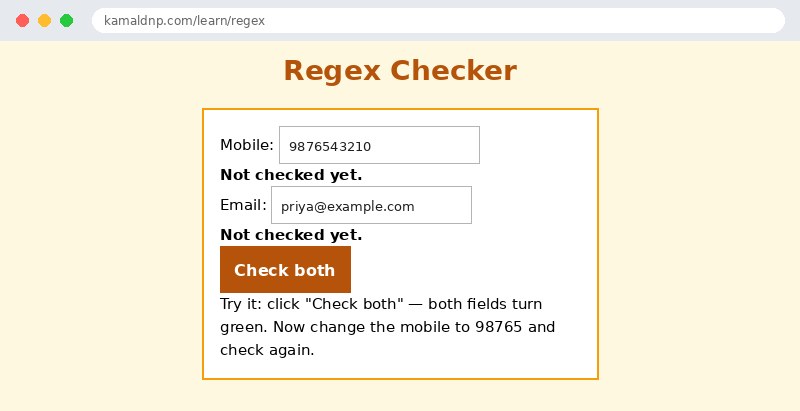
let mobilePattern = /^\d{10}$/;— the whole text must be exactly ten digits, nothing before or after.mobilePattern.test(mobile)— true when the mobile fits the pattern, false otherwise.let emailPattern = /^[^\s@]+@[^\s@]+\.[^\s@]+$/;— text, then @, then text, then a real dot, then text.emailPattern.test(email)— true for a well-shaped email like priya@example.com.- The result areas turn green for "Valid" and red for "Invalid" — the visitor sees the answer next to each field.
Example
<!DOCTYPE html>
<html>
<head>
<title>Regex Checker</title>
<style>
body { font-family: Verdana, sans-serif; background-color: #fff8e1; }
h1 { color: #b45309; text-align: center; }
.card { background-color: white; border: 2px solid #f59e0b; padding: 16px; width: 360px; margin: 20px auto; }
button { background-color: #b45309; color: white; border: none; padding: 10px 18px; font-size: 16px; }
input { width: 200px; padding: 6px; margin: 4px 0; }
#mobileOut, #emailOut { font-weight: bold; }
</style>
</head>
<body>

<h1>Regex Checker</h1>
<div class="card">
<p>Mobile: <input id="mobile" type="text" value="9876543210"></p>
<p id="mobileOut">Not checked yet.</p>
<p>Email: <input id="email" type="text" value="priya@example.com"></p>
<p id="emailOut">Not checked yet.</p>
<p><button onclick="checkAll()">Check both</button></p>
<p>Try it: click "Check both" — both fields turn green. Now change the mobile to 98765 and check again.</p>
</div>

<script>
function checkAll() {
  let mobile = document.getElementById("mobile").value.trim();
  let email = document.getElementById("email").value.trim();
  let mobilePattern = /^\d{10}$/;
  let emailPattern = /^[^\s@]+@[^\s@]+\.[^\s@]+$/;
  let mobileOut = document.getElementById("mobileOut");
  let emailOut = document.getElementById("emailOut");
  if (mobilePattern.test(mobile)) {
    mobileOut.textContent = "Valid mobile number.";
    mobileOut.style.color = "green";
  } else {
    mobileOut.textContent = "Invalid - mobile must be exactly 10 digits.";
    mobileOut.style.color = "red";
  }
  if (emailPattern.test(email)) {
    emailOut.textContent = "Valid email address.";
    emailOut.style.color = "green";
  } else {
    emailOut.textContent = "Invalid - email must look like name@example.com.";
    emailOut.style.color = "red";
  }
}
</script>

</body>
</html>
Output
Try it yourself — live editor
Change the code below and press Run to see the result instantly. No file to save, no login needed.
Related lessons
Frequently asked questions
The questions learners ask most about this lesson — read the question, then open it to see the answer.
1. What does /^\d{10}$/ mean?
From start to finish, the whole text must be exactly ten digits: ^ anchors the start, $ the end, and \d means a digit.
2. What is the difference between test() and match()?
test() answers true or false, while match() shows what matched — with the g flag, every match, not just the first.
3. Why must I not forget ^ and $ in a pattern?
Without them, the pattern matches ten digits anywhere, so a sentence containing a number would wrongly pass.
Why learn this yourself — and not just ask AI?
AI can write code for you, but it cannot think for you. When you learn HTML yourself, your brain builds the real skill: you understand why a page looks the way it does, you can fix it when it breaks, and you can answer it in an exam or an interview without help. That is the skill that gets you a job — not a copied answer.
Get certified — just ₹10
Finish all 35 lessons, pass the test (80%), pay ₹10 and get your certificate.
Take the testPrefer watching? Video courses teach the same topics step by step.
Go further with a full course
Free tutorials teach you the basics. Our paid courses add live projects, mentorship and a certificate.
Browse all courses