JavaScript Syntax
4 min read · Free · No login needed
Every language has rules for how its sentences are written. In JavaScript, those rules are called syntax. The good news is that the rules are few and simple. Learn them once, and every line of JavaScript you ever read will look familiar.
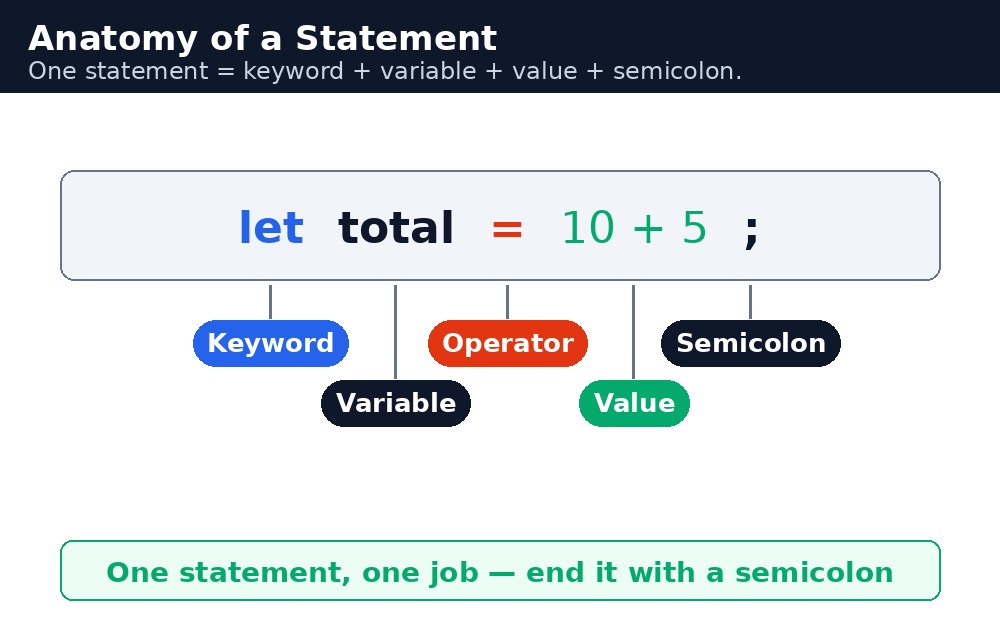
A JavaScript program is a list of statements — one instruction per statement. Each statement usually ends with a semicolon. The browser runs the statements in order, top to bottom, one after another. If a statement has a mistake, the browser stops and reports an error, and the rest of the program never runs.
Statements and semicolons
A statement is a single instruction, like "create a variable" or "show a message". Most statements end with a semicolon ;, which tells the browser "this instruction is finished". JavaScript can often guess where a statement ends without a semicolon, but guessing is risky — always write the semicolon yourself.
let cups = 2;
let price = 20;
let total = cups * price;
alert(total);
Four statements, four semicolons, one result: the number 40. Each line does one small thing, and together they solve a small problem. That is how all programs work — many small steps, in order.
Case sensitivity — small letters matter
JavaScript is case-sensitive: total, Total, and TOTAL are three different names. The built-in words are all lowercase, so alert works but Alert does not. This is the single most common beginner error — a capital letter in the wrong place, and the browser says the name does not exist.
let total = 40;
alert(total);   // works — shows 40
alert(Total);   // error — "Total" was never created
Whitespace and comments
Spaces, tabs, and blank lines are ignored by JavaScript — they exist for humans, not for the browser. Use them to make your code easy to read: one statement per line, a space after each comma, a blank line between sections. Code that is easy to read is code that is easy to fix.
let, const, function, if, and return — are reserved. You cannot use them as variable names. let let = 5; is an error, because let already means something.Common mistakes
- Writing
AlertorDocumentwith a capital letter — built-in names are lowercase, and JavaScript treats capitals as different names. - Forgetting a closing bracket
}or parenthesis)— the browser then cannot tell where your function ends, and nothing runs. - Leaving out semicolons and relying on the browser to guess — it usually guesses right, until the one time it does not.
- Writing two statements on one line without a semicolon between them — the browser reads them as one broken statement.
Remember
- A program is a list of statements, run in order, top to bottom.
- End each statement with a semicolon
;. - JavaScript is case-sensitive:
totalandTotalare different names. - Whitespace is for humans — use it to keep your code readable.
Example explained
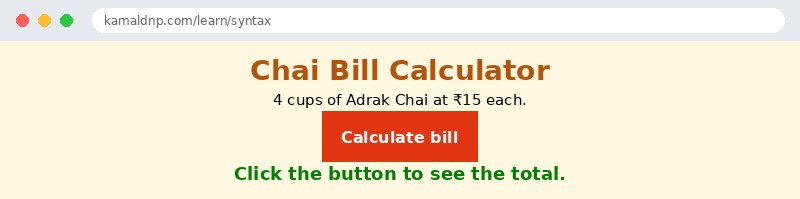
let cups = 4;— a statement that creates a variable called cups and stores 4 in it. The semicolon ends the statement.let price = 15;— a second statement, creating the price of one cup of Adrak Chai.let total = cups * price;— a third statement. The*multiplies 4 by 15, and the answer 60 is stored in total.document.getElementById("bill").textContent = "Total: ₹" + total;— the last statement writes the answer into the paragraph withid="bill". The+joins the text "Total: ₹" with the number 60.function showBill() { ... }— the four statements sit inside a function, so they run only when the button is clicked. The curly braces{ }mark where the function starts and ends.
Example
<!DOCTYPE html>
<html>
<head>
<title>Chai Bill Calculator</title>
<style>
body { background-color: #fff8e1; font-family: Verdana, sans-serif; text-align: center; }
h1 { color: #b45309; }
button { background-color: #e13611; color: white; border: none; padding: 12px 24px; font-size: 16px; cursor: pointer; }
#bill { color: green; font-weight: bold; font-size: 18px; }
</style>
</head>
<body>

<h1>Chai Bill Calculator</h1>
<p>4 cups of Adrak Chai at ₹15 each.</p>
<button onclick="showBill()">Calculate bill</button>
<p id="bill">Click the button to see the total.</p>

<script>
function showBill() {
  let cups = 4;
  let price = 15;
  let total = cups * price;
  document.getElementById("bill").textContent = "Total: ₹" + total;
}
</script>

</body>
</html>
Output
Try it yourself — live editor
Change the code below and press Run to see the result instantly. No file to save, no login needed.
Check yourself — did you get it?
Finished the lesson? Test yourself with 5 quick questions — you get the answer instantly, with the reason for each one.
1. What is a statement in JavaScript?
2. What usually ends a statement?
3. Are total, Total and TOTAL the same name in JavaScript?
4. Which of these is a reserved keyword you cannot use as a variable name?
5. In the lesson's example, 4 cups of Adrak Chai at ₹15 each — what is the total?
Interview questions — can you answer these?
Read the question first, try to answer it in your own words, then open it to check. These are the questions interviewers actually ask.
1. What is a statement in JavaScript, and why does every statement end with a semicolon?
A statement is one instruction, like creating a variable or showing a message, and the browser runs statements in order, top to bottom. The semicolon tells the browser "this instruction is finished" — JavaScript can often guess where a statement ends without one, but guessing is risky, so always write it yourself.
2. Is JavaScript case-sensitive? Give an example of a mistake this causes.
Yes — total, Total and TOTAL are three different names, and built-in words are all lowercase. Writing Alert instead of alert is the single most common beginner error: the browser says the name does not exist and the code stops. When a program does nothing, a wrong capital letter is the first thing to check.
3. What are keywords, and can you use one as a variable name?
Keywords are words like let, const, function, if and return that already mean something in JavaScript, so they are reserved. You cannot use them as variable names — let let = 5; is an error. Whitespace, on the other hand, is ignored by the browser and exists only for humans, so use spaces and blank lines to keep your code easy to read and fix.
Try it yourself — build this
Reading is not enough — now build it yourself. Write the code in the live editor, run it, check the hint if you get stuck, and open the solution only after you have tried.
1. Four statements, one bill
Create a chai bill calculator: 5 cups of Adrak Chai at ₹12 each. Inside a function showBill(), write exactly four statements, each ending with a semicolon: create cups = 5, create price = 12, create total = cups * price, and write "Total: ₹" + total into a paragraph with id="bill" using textContent. A button "Calculate bill" must call showBill() when clicked. Remember: JavaScript is case-sensitive — alert and document are all lowercase, and total and Total are different names.
Show solution
<!DOCTYPE html>
<html>
<head>
<title>Chai Bill Calculator</title>
<style>
body { background-color: #fff8e1; font-family: Verdana, sans-serif; text-align: center; }
h1 { color: #b45309; }
button { background-color: #e13611; color: white; border: none; padding: 12px 24px; font-size: 16px; cursor: pointer; }
#bill { color: green; font-weight: bold; font-size: 18px; }
</style>
</head>
<body>

<h1>Chai Bill Calculator</h1>
<p>5 cups of Adrak Chai at ₹12 each.</p>
<button onclick="showBill()">Calculate bill</button>
<p id="bill">Click the button to see the total.</p>

<script>
function showBill() {
  let cups = 5;
  let price = 12;
  let total = cups * price;
  document.getElementById("bill").textContent = "Total: ₹" + total;
}
</script>

</body>
</html>Why learn this yourself — and not just ask AI?
AI can write code for you, but it cannot think for you. When you learn HTML yourself, your brain builds the real skill: you understand why a page looks the way it does, you can fix it when it breaks, and you can answer it in an exam or an interview without help. That is the skill that gets you a job — not a copied answer.
Get certified — just ₹10
Finish all 30 lessons, pass the test (80%), pay ₹10 and get your certificate.
Take the testPrefer watching? Video courses teach the same topics step by step.
Go further with a full course
Free tutorials teach you the basics. Our paid courses add live projects, mentorship and a certificate.
Browse all courses