JavaScript सिंटैक्स
4 मिनट पढ़ें · मुफ़्त · बिना लॉगिन
हर भाषा के अपने नियम होते हैं कि उसके वाक्य कैसे लिखे जाते हैं। JavaScript में उन नियमों को syntax कहते हैं। अच्छी खबर यह है कि नियम कम और साधारण हैं। एक बार सीख लीजिए, और JavaScript की हर line जो आप कभी पढ़ेंगे, वह परिचित लगेगी।
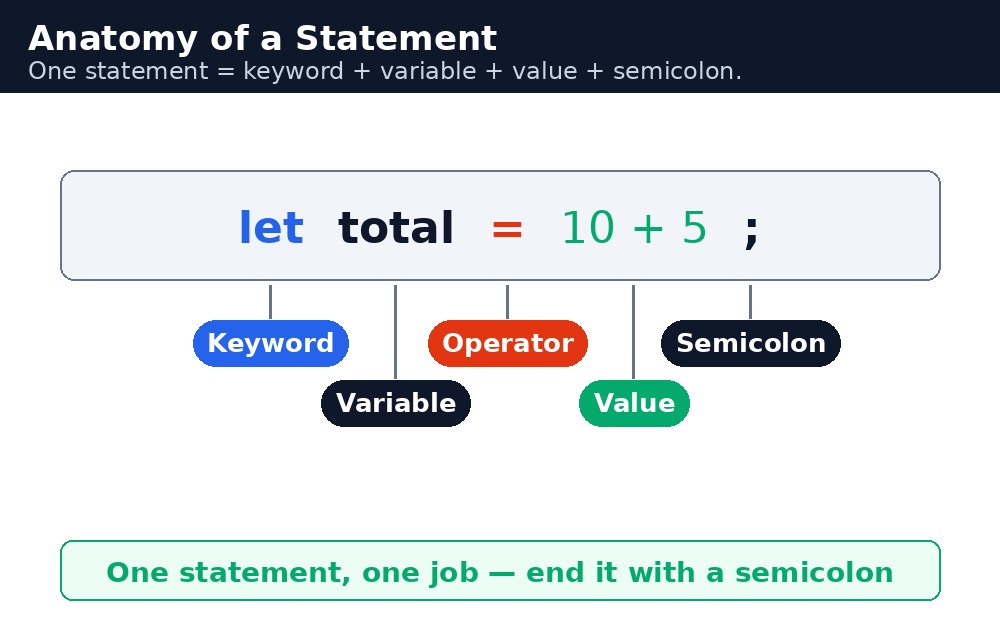
JavaScript program statements की सूची होता है — हर statement एक निर्देश है। हर statement आमतौर पर semicolon पर खत्म होता है। Browser statements को क्रम से, ऊपर से नीचे, एक-एक करके चलाता है। अगर किसी statement में गलती है, तो browser रुक जाता है और error बताता है, और बाकी program कभी चलता ही नहीं।
Statements और semicolons
Statement एक निर्देश है, जैसे "variable बनाओ" या "संदेश दिखाओ"। ज़्यादातर statements semicolon ; पर खत्म होते हैं, जो browser को बताता है कि "यह निर्देश पूरा हुआ"। JavaScript अक्सर बिना semicolon के भी अंदाज़ा लगा सकता है कि statement कहाँ खत्म होता है, पर अंदाज़ा लगाना जोखिम भरा है — semicolon हमेशा खुद लिखिए।
let cups = 2;
let price = 20;
let total = cups * price;
alert(total);
चार statements, चार semicolons, एक नतीजा: नंबर 40। हर line एक छोटा काम करती है, और साथ मिलकर वे एक छोटी समस्या हल करते हैं। सभी programs ऐसे ही काम करते हैं — क्रम से कई छोटे कदम।
Case sensitivity — छोटे अक्षर मायने रखते हैं
JavaScript case-sensitive है: total, Total और TOTAL तीन अलग नाम हैं। Built-in शब्द सब lowercase में होते हैं, इसलिए alert काम करता है पर Alert नहीं। यही शुरुआती लोगों की सबसे आम गलती है — गलत जगह पर capital letter, और browser कहता है कि ऐसा नाम मौजूद ही नहीं है।
let total = 40;
alert(total);   // works — shows 40
alert(Total);   // error — "Total" was never created
Whitespace और comments
Spaces, tabs और खाली lines को JavaScript नज़रअंदाज़ कर देता है — वे इंसानों के लिए हैं, browser के लिए नहीं। उन्हें अपने code को पढ़ने लायक बनाने के लिए इस्तेमाल कीजिए: हर line में एक statement, हर comma के बाद एक space, sections के बीच एक खाली line। जो code पढ़ने में आसान है, उसे ठीक करना भी आसान है।
let, const, function, if और return जैसे शब्द — reserved हैं। आप उन्हें variable के नाम की तरह इस्तेमाल नहीं कर सकते। let let = 5; error है, क्योंकि let का मतलब पहले से तय है।आम गलतियाँ
AlertयाDocumentcapital letter से लिखना — built-in नाम lowercase में होते हैं, और JavaScript capitals को अलग नाम मानता है।- Closing bracket
}या parenthesis)भूल जाना — तब browser समझ नहीं पाता कि आपका function कहाँ खत्म होता है, और कुछ भी नहीं चलता। - Semicolons छोड़कर browser के अंदाज़े पर भरोसा करना — वह आमतौर पर सही अंदाज़ा लगाता है, जब तक एक बार गलत न हो जाए।
- एक line में दो statements बिना बीच में semicolon लिखना — browser उन्हें एक टूटा हुआ statement समझता है।
याद रखें
- Program statements की सूची है, क्रम से, ऊपर से नीचे चलती है।
- हर statement को semicolon
;पर खत्म कीजिए। - JavaScript case-sensitive है:
totalऔरTotalअलग नाम हैं। - Whitespace इंसानों के लिए है — अपने code को पढ़ने लायक रखने के लिए इसका इस्तेमाल कीजिए।
उदाहरण समझिए
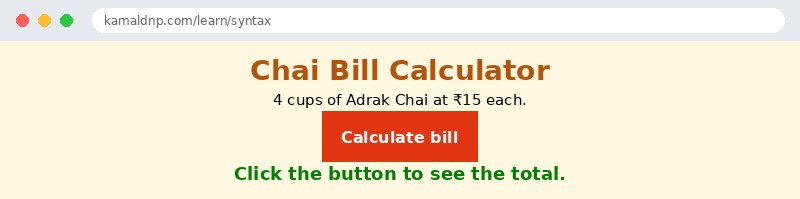
let cups = 4;— एक statement जो cups नाम वाला variable बनाता है और उसमें 4 रखता है। Semicolon statement खत्म करता है।let price = 15;— दूसरा statement, एक कप Adrak Chai की कीमत बनाता है।let total = cups * price;— तीसरा statement।*4 को 15 से गुणा करता है, और जवाब 60 total में रखा जाता है।document.getElementById("bill").textContent = "Total: ₹" + total;— आखिरी statement जवाब कोid="bill"वाले paragraph में लिखता है।+text "Total: ₹" को नंबर 60 से जोड़ता है।function showBill() { ... }— चारों statements एक function के अंदर हैं, इसलिए वे तभी चलते हैं जब button पर click होता है। घुँघराले कोष्ठक{ }बताते हैं कि function कहाँ शुरू और कहाँ खत्म होता है।
उदाहरण
<!DOCTYPE html>
<html>
<head>
<title>Chai Bill Calculator</title>
<style>
body { background-color: #fff8e1; font-family: Verdana, sans-serif; text-align: center; }
h1 { color: #b45309; }
button { background-color: #e13611; color: white; border: none; padding: 12px 24px; font-size: 16px; cursor: pointer; }
#bill { color: green; font-weight: bold; font-size: 18px; }
</style>
</head>
<body>

<h1>Chai Bill Calculator</h1>
<p>4 cups of Adrak Chai at ₹15 each.</p>
<button onclick="showBill()">Calculate bill</button>
<p id="bill">Click the button to see the total.</p>

<script>
function showBill() {
  let cups = 4;
  let price = 15;
  let total = cups * price;
  document.getElementById("bill").textContent = "Total: ₹" + total;
}
</script>

</body>
</html>
परिणाम
खुद करके देखें — लाइव एडिटर
नीचे दिया गया कोड बदलें और चलाएँ दबाएँ — परिणाम तुरंत दिखेगा। कोई फाइल सहेजनी नहीं है, कोई लॉगिन नहीं चाहिए।
Check yourself — did you get it?
Finished the lesson? Test yourself with 5 quick questions — you get the answer instantly, with the reason for each one.
1. What is a statement in JavaScript?
2. What usually ends a statement?
3. Are total, Total and TOTAL the same name in JavaScript?
4. Which of these is a reserved keyword you cannot use as a variable name?
5. In the lesson's example, 4 cups of Adrak Chai at ₹15 each — what is the total?
Interview questions — can you answer these?
Read the question first, try to answer it in your own words, then open it to check. These are the questions interviewers actually ask.
1. What is a statement in JavaScript, and why does every statement end with a semicolon?
A statement is one instruction, like creating a variable or showing a message, and the browser runs statements in order, top to bottom. The semicolon tells the browser "this instruction is finished" — JavaScript can often guess where a statement ends without one, but guessing is risky, so always write it yourself.
2. Is JavaScript case-sensitive? Give an example of a mistake this causes.
Yes — total, Total and TOTAL are three different names, and built-in words are all lowercase. Writing Alert instead of alert is the single most common beginner error: the browser says the name does not exist and the code stops. When a program does nothing, a wrong capital letter is the first thing to check.
3. What are keywords, and can you use one as a variable name?
Keywords are words like let, const, function, if and return that already mean something in JavaScript, so they are reserved. You cannot use them as variable names — let let = 5; is an error. Whitespace, on the other hand, is ignored by the browser and exists only for humans, so use spaces and blank lines to keep your code easy to read and fix.
Try it yourself — build this
Reading is not enough — now build it yourself. Write the code in the live editor, run it, check the hint if you get stuck, and open the solution only after you have tried.
1. Four statements, one bill
Create a chai bill calculator: 5 cups of Adrak Chai at ₹12 each. Inside a function showBill(), write exactly four statements, each ending with a semicolon: create cups = 5, create price = 12, create total = cups * price, and write "Total: ₹" + total into a paragraph with id="bill" using textContent. A button "Calculate bill" must call showBill() when clicked. Remember: JavaScript is case-sensitive — alert and document are all lowercase, and total and Total are different names.
Show solution
<!DOCTYPE html>
<html>
<head>
<title>Chai Bill Calculator</title>
<style>
body { background-color: #fff8e1; font-family: Verdana, sans-serif; text-align: center; }
h1 { color: #b45309; }
button { background-color: #e13611; color: white; border: none; padding: 12px 24px; font-size: 16px; cursor: pointer; }
#bill { color: green; font-weight: bold; font-size: 18px; }
</style>
</head>
<body>

<h1>Chai Bill Calculator</h1>
<p>5 cups of Adrak Chai at ₹12 each.</p>
<button onclick="showBill()">Calculate bill</button>
<p id="bill">Click the button to see the total.</p>

<script>
function showBill() {
  let cups = 5;
  let price = 12;
  let total = cups * price;
  document.getElementById("bill").textContent = "Total: ₹" + total;
}
</script>

</body>
</html>खुद क्यों सीखें — AI से पूछने के बजाय?
AI आपके लिए कोड लिख सकता है, लेकिन वह आपके लिए सोच नहीं सकता। जब आप HTML खुद सीखते हैं, तो आपका दिमाग असली कौशल बनाता है: आप समझते हैं कि पेज ऐसा क्यों दिखता है, टूटने पर उसे ठीक कर सकते हैं, और परीक्षा या इंटरव्यू में बिना मदद के जवाब दे सकते हैं। यही कौशल नौकरी दिलाता है — कॉपी किया हुआ जवाब नहीं।
सर्टिफिकेट पाएँ — सिर्फ ₹10
सभी 30 पाठ पूरे करें, टेस्ट पास करें (80%), ₹10 दें और अपना सर्टिफिकेट पाएँ।
टेस्ट देंदेखकर सीखना पसंद है? वीडियो कोर्स में वही विषय एक-एक करके सिखाए जाते हैं।
Go further with a full course
Free tutorials teach you the basics. Our paid courses add live projects, mentorship and a certificate.
Browse all courses