

Your AKTU admit card is the one document you cannot enter the exam hall without — no printout, no entry. This guide covers the odd-semester 2026-27 admit card: whether it is out yet, when to expect it, the exact ERP download steps, and what to check on it before exam day.
📌 Status — last checked: 18 November 2026. The AKTU odd-semester 2026-27 admit card has NOT been released yet. No admit-card notice for this semester has appeared on any AKTU circular list or college notice we could check. AKTU usually releases admit cards a few days before the exams begin — in the even semester, they appeared about 3 days before the first exam. Keep everything below ready now, so download day takes you two minutes. This page will be updated the day the admit card link goes live.
When Will the AKTU Admit Card 2026-27 Come?
AKTU has announced no admit card date for the odd semester. What we know is the pattern from the last cycle: the even-semester 2026 admit cards were released on the ERP portal in the first week of May, days before the exams that began on 7 May 2026, and education sources put the usual gap at roughly 3–5 days before the exam start. The odd-semester theory exams are officially due to start on 24 November 2026 — on that pattern, the admit card would be expected in the days just before the first exam. But if the exams slip into December, as reports this week suggest, the admit card slips with them. So the honest answer is: watch the ERP daily from this week, and trust only the ERP link — not any date a video promises. Our AKTU exam update post tracks the exam-start question separately.
What You Need Before Download Day
- Your Enrollment Number — the 11-digit number AKTU gave you at admission. It is your ERP User ID. You will find it on your ID card, admission slip, fee receipt or an old admit card. Do not confuse it with your roll number: the roll number is for the One View result page, not the ERP login.
- Your ERP password — the password you set for erp.aktu.ac.in. If you have forgotten it, use the portal's password recovery now, not on admit-card day.
- The mobile number that receives your OTP — every ERP login now needs a 6-digit OTP. Make sure that SIM is in your phone and has network.
- Your date of birth — the alternate download page asks for it (see below).
- A printer, or a print shop nearby — the admit card must be printed. A screenshot on your phone is not enough at the exam centre.
How to Download the AKTU Admit Card (ERP Steps)
These steps follow the ERP route that AKTU has used for admit cards, as described by the university's portal guides and the even-semester 2026 cycle. The admit-card link appears in the ERP only after the university activates it for the semester — if you do not see it yet, it has not been activated, not that your login is broken. Menu names can change slightly between semesters — if a label below looks different on your screen, follow the ERP's own labels; the flow is the same. (Verify on ERP.)
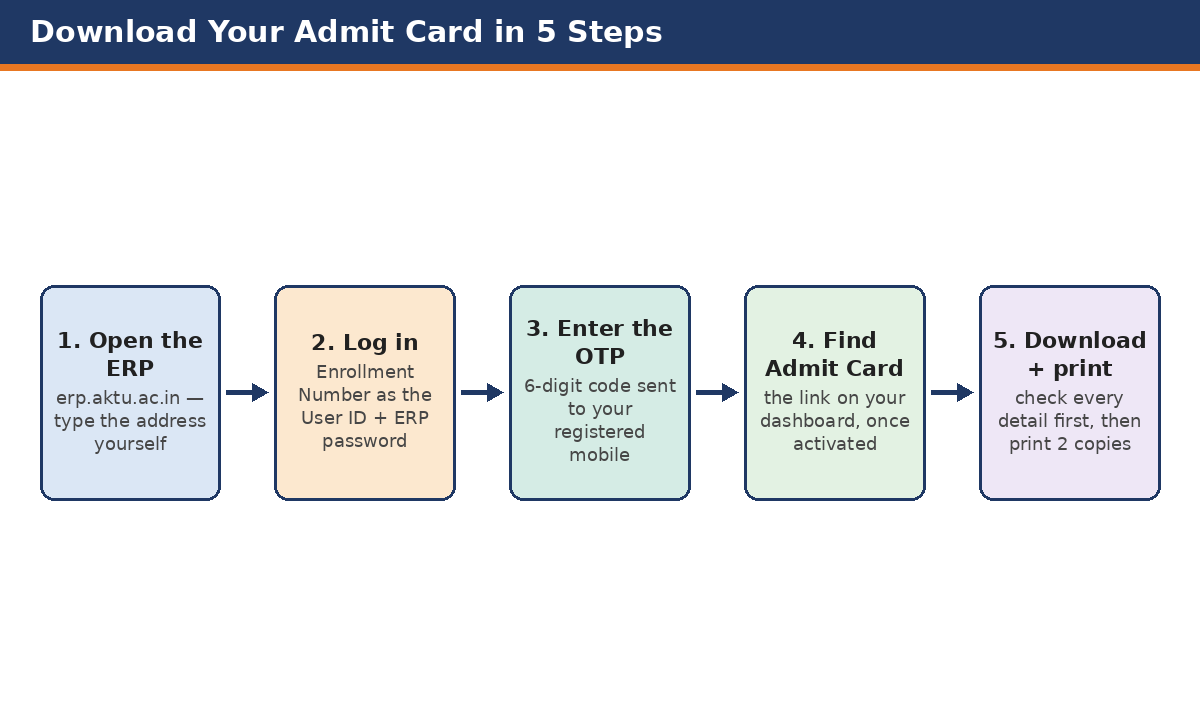
- Open the AKTU ERP portal: erp.aktu.ac.in. Type the address yourself — do not click admit-card links from search results, social media or forwarded messages.
- Log in with your Enrollment Number as the User ID and your ERP password.
- Complete the OTP step — enter the 6-digit code sent to your registered mobile number.
- On your dashboard, look for the Admit Card section or link. (Verify on ERP — the exact menu label can differ.)
- Your admit card will appear on screen. Check every detail on it first (see the checklist below), then download the PDF and print it. Print two copies and keep one spare.
Alternate Route: The Admit Card Page (Enrollment Number + Date of Birth)
In the even-semester 2026 cycle, AKTU also provided a direct admit-card page on the ERP site where students entered their Enrollment Number and Date of Birth instead of logging in. That page was reported at erp.aktu.ac.in/WebPages/public/examination/printadmitcard.aspx. We could not open the ERP from our office to confirm that this page is live for the odd semester, so treat it as an alternate route to try if the dashboard link does not work — verify on ERP — and prefer the dashboard login route above. Either way, never pay anyone for an admit card: it is issued free on the official portal.
One View Is NOT for Admit Cards
AKTU One View (erp.aktu.ac.in/webpages/oneview/oneview.aspx) is the results portal — you open it with your roll number and no password to see marksheets. It does not issue admit cards. If someone sends you a "One View admit card" link, it is the wrong portal.
Check Your Admit Card Before You Print — Checklist
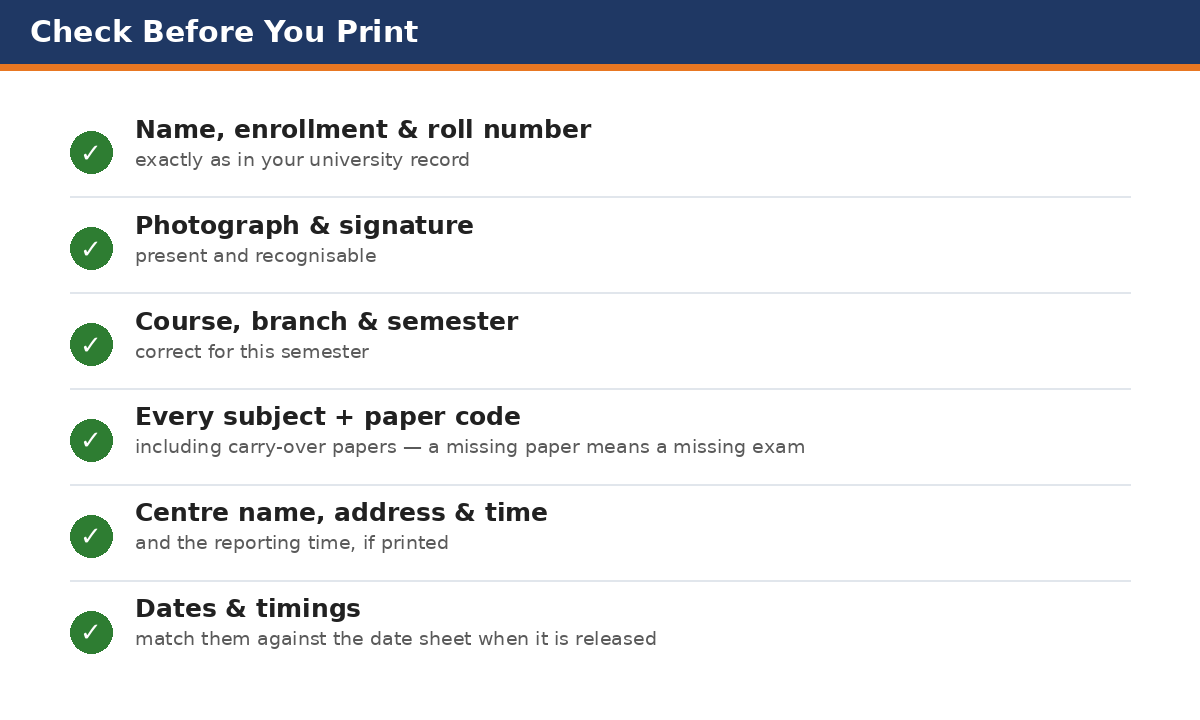
- Your name, enrollment number and roll number — exactly as in your university record.
- Your photograph and signature — present and recognisable.
- Course, branch and semester — correct for this semester.
- Every subject and paper code — including carry-over papers, if you filled the carry-over form. A missing paper means a missing exam.
- Exam centre name and address — and the reporting time, if printed.
- Exam dates and timings — match them against the date sheet when it is released.
If anything is wrong or missing, contact your college examination cell immediately — corrections go through the college to the university, and they take time. Do not wait until the day before the exam.
If Your Admit Card Does Not Appear
Admit cards are generated only for students whose semester record is complete. The usual reasons one does not appear are:
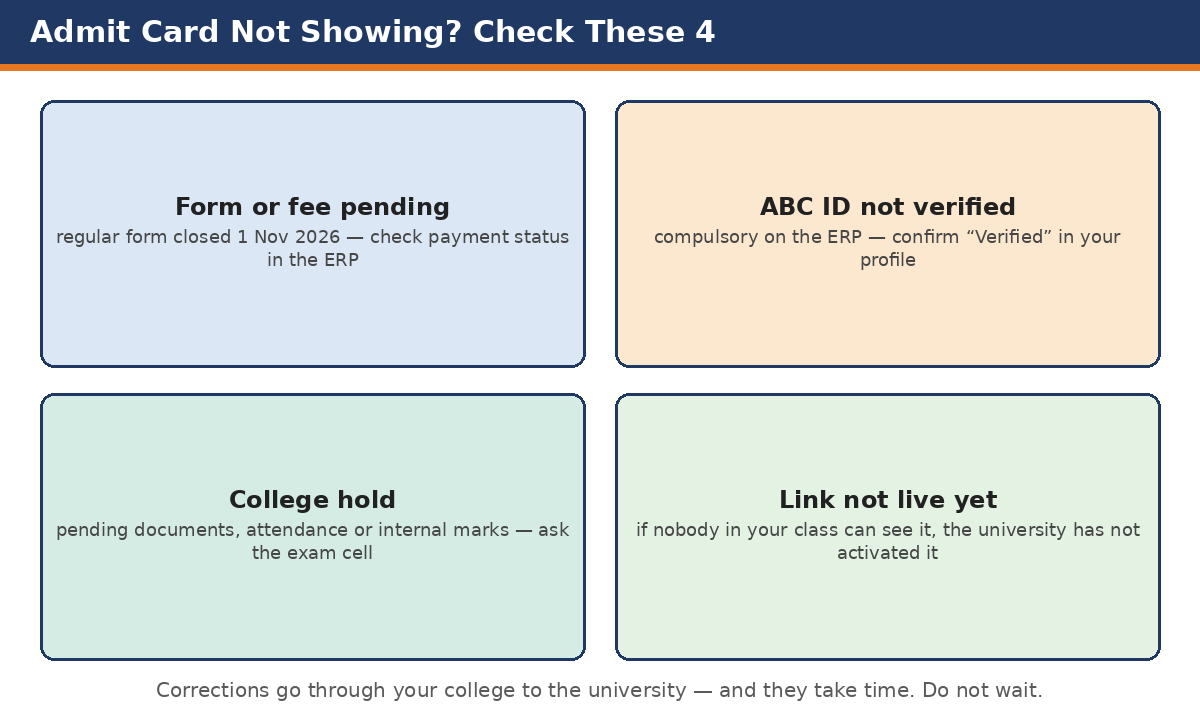
- Exam form or fee pending — the regular form closed on 1 November 2026. If your fee payment did not reconcile, the admit card may be held. Check your payment status in the ERP and with your college.
- ABC ID not linked or not verified — AKTU's October 2026 circular makes ABC ID creation and Aadhaar verification compulsory on the ERP, and colleges have warned that forms — and results — can be held back without it. Confirm your ABC ID shows verified in your ERP profile.
- College hold — pending documents, attendance, or internal marks can hold your card. Your college examination cell is the only office that can tell you which one it is.
- The link is simply not live yet — if nobody in your class can see the admit card, the university has not activated it. Wait, and keep checking the ERP rather than rumour channels.
Exam-Day Rules
- Carry the printed admit card and a valid photo ID (college ID card, Aadhaar card or similar). No student is allowed into the exam hall without a valid printed admit card and ID proof.
- Reach the centre early — find the centre a day before if you have not been there.
- Follow the instructions printed on the admit card itself; they override anything you read elsewhere.
FAQs
Is the AKTU admit card 2026-27 out?
Not yet, as of 18 November 2026. No odd-semester admit card notice has appeared. AKTU usually releases admit cards a few days before the exams begin.
Where do I download the AKTU admit card?
From the AKTU ERP portal, erp.aktu.ac.in, after logging in with your enrollment number, password and OTP. The admit card link appears on your dashboard once the university activates it.
Can I download the admit card from One View?
No. One View is for results only. Admit cards come from the ERP student login (or the ERP admit-card page, with enrollment number and date of birth).
What login ID do I use — roll number or enrollment number?
Your enrollment number is the ERP User ID. Your roll number is used on the One View result page. Some older guides mention the roll number for the ERP — the current portal guides say enrollment number, so use that, and if the login rejects it, check with your college rather than guessing.
My admit card is not showing. What should I do?
First check whether your classmates can see theirs — if nobody can, the link is not live yet. If only yours is missing, check your exam form, fee payment and ABC ID status in the ERP, then speak to your college examination cell.
Do I need to pay for the admit card?
No. The admit card is issued free on the official ERP portal. Never pay any website or person for it.
Sources: AKTU ERP portal guides (erp.aktu.ac.in — enrollment number as User ID, OTP login, admit card on the dashboard); FreeJobAlert AKTU Admit Card 2026 report (even semester, May 2026 — admit-card page route, enrollment number + date of birth, release days before 7 May exams); JagranJosh AKTU admit card report (May 2026 — ERP steps); AKTU Academic Calendar 2026-27 (Ref. AKTU/RO/2026/12402, 3 July 2026 — theory exams from 24 Nov 2026); AKTU ABC ID circular (24 Oct 2026). erp.aktu.ac.in was unreachable from our office on 18 November 2026, so the ERP screens could not be opened directly — the steps follow the documented ERP flow and the even-semester 2026 cycle, and exact menu labels should be verified on the ERP. Status re-checked on 18 November 2026.


Comments (0)
Share your question or experience about this syllabus. Your comment will appear after review.
No comments yet — be the first to share your thoughts!