CSS Colors
4 min read · Free · No login needed
Colour is the first thing a visitor notices on a page, and CSS gives you many ways to describe a colour. They all produce the same result — a colour on the screen — but some ways are easier to read, some are easier to adjust, and one of them lets you make a colour see-through.
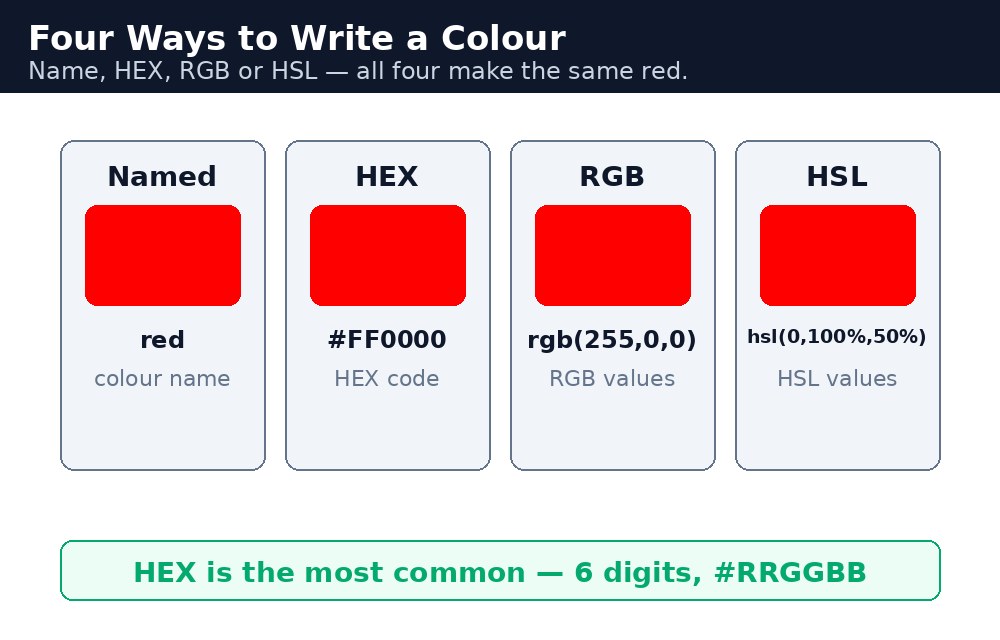
The colour formats
| Format | Example | What it means |
|---|---|---|
| Named colour | red | One of 140 built-in names, like red, tomato, skyblue. |
| HEX | #ff0000 | Red, green and blue as two hex digits each: #RRGGBB. |
| RGB | rgb(255, 0, 0) | Red, green and blue, each from 0 to 255. |
| RGBA | rgba(255, 0, 0, 0.5) | RGB plus alpha — 0 is fully see-through, 1 is fully solid. |
| HSL | hsl(0, 100%, 50%) | Hue (0–360°), saturation, lightness — how humans think about colour. |
| HSLA | hsla(0, 100%, 50%, 0.5) | HSL plus alpha, same idea as RGBA. |
Syntax — the same red, six ways
h1 { color: red; }
h2 { color: #ff0000; }
h3 { color: rgb(255, 0, 0); }
h4 { color: rgba(255, 0, 0, 0.5); }
h5 { color: hsl(0, 100%, 50%); }
h6 { color: hsla(0, 100%, 50%, 0.5); }
All six headings are red. The difference is only how you describe it. Names are the easiest to read. HEX is the most common in real projects — designers and tools all speak HEX. RGB is the clearest when you need to calculate a shade. HSL is the easiest when you want to say "the same colour, but lighter" — just raise the lightness number.
#ff0000 becomes #f00, #ffffff becomes #fff, #000000 becomes #000. Both forms mean exactly the same colour.Opacity — see-through elements
The opacity property makes a whole element see-through, from 0 (invisible) to 1 (fully solid). It is different from RGBA: RGBA makes only the colour see-through, while opacity makes the entire element — text, background, and everything inside it — see-through.
.faded { opacity: 0.5; }
.glass { background-color: rgba(255, 255, 255, 0.5); }
The .faded box and all its text become half-transparent. The .glass box gets a half-transparent white background, but its text stays fully solid and easy to read. When you want a see-through background with readable text, RGBA is almost always the right choice.
Common mistakes
- Forgetting the
#in a HEX colour —ff0000is not a colour to CSS. It must be#ff0000. - Confusing
opacitywith RGBA — opacity fades the text too, so a faded box can become unreadable. - Using an alpha value above 1 — alpha runs from 0 to 1, not 0 to 100.
rgba(255, 0, 0, 50)is invalid. - Writing RGB values above 255 — each channel stops at 255.
rgb(300, 0, 0)is invalid. - Choosing colours that are too close together — light grey text on a white background is unreadable, however pretty it looks in the code.
Remember
colorsets the text colour;background-colorsets the background colour.- HEX is
#RRGGBB—#ff0000is red; the short form#f00means the same. - RGB is 0–255 per channel; RGBA adds an alpha from 0 (see-through) to 1 (solid).
- HSL describes a colour by hue, saturation and lightness — the easiest way to make a lighter or darker version.
opacityfades the whole element including its text; RGBA fades only the colour.
Example explained
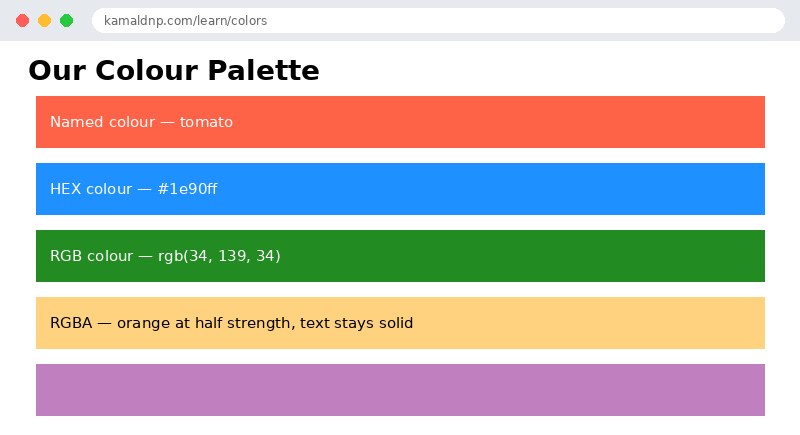
.named { background-color: tomato; }— a named colour. The box turns tomato red, no numbers needed..hex { background-color: #1e90ff; }— a HEX colour. The hash and six digits describe a bright dodger blue..rgb { background-color: rgb(34, 139, 34); }— RGB numbers. Red 34, green 139, blue 34 make forest green..see-through { background-color: rgba(255, 165, 0, 0.5); }— RGBA. Orange at half strength, so the page behind it shows through the background — but the text stays solid..faded { opacity: 0.5; }— opacity on the whole box. Background and text both fade to half, which is why the text looks washed out.
Example
<!DOCTYPE html>
<html>
<head>
<title>CSS Colors</title>
<style>
body { font-family: Verdana, sans-serif; }
.box { color: white; padding: 14px; margin: 8px; }
.named { background-color: tomato; }
.hex { background-color: #1e90ff; }
.rgb { background-color: rgb(34, 139, 34); }
.see-through { background-color: rgba(255, 165, 0, 0.5); color: black; }
.faded { background-color: purple; opacity: 0.5; }
</style>
</head>
<body>

<h1>Our Colour Palette</h1>
<div class="box named">Named colour — tomato</div>
<div class="box hex">HEX colour — #1e90ff</div>
<div class="box rgb">RGB colour — rgb(34, 139, 34)</div>
<div class="box see-through">RGBA — orange at half strength, text stays solid</div>
<div class="box faded">Opacity 0.5 — background and text both fade</div>

</body>
</html>
Output
Try it yourself — live editor
Change the code below and press Run to see the result instantly. No file to save, no login needed.
Check yourself — did you get it?
Finished the lesson? Test yourself with 5 quick questions — you get the answer instantly, with the reason for each one.
1. What colour is #ff0000?
2. What is the short form of #ff0000?
3. In rgba(255, 0, 0, 0.5), what does 0.5 mean?
4. What is the difference between opacity and RGBA?
5. What is the valid range for each RGB channel?
Interview questions — can you answer these?
Read the question first, try to answer it in your own words, then open it to check. These are the questions interviewers actually ask.
1. What colour formats does CSS offer, and which one is most common?
Named colours (red, tomato — 140 built-in names), HEX (#ff0000 — red, green and blue as two hex digits each), RGB (rgb(255, 0, 0), each channel 0 to 255), RGBA (RGB plus an alpha for transparency), and HSL/HSLA (hue, saturation, lightness). HEX is the most common in real projects — designers and tools all speak HEX.
2. What is the difference between opacity and RGBA?
opacity makes the whole element see-through — text, background and everything inside it, from 0 (invisible) to 1 (fully solid). RGBA makes only the colour see-through; the text stays fully solid and easy to read. When you want a see-through background with readable text, RGBA is almost always the right choice.
3. What is wrong with the colour rgb(300, 0, 0)?
Each RGB channel runs from 0 to 255, so 300 is out of range and the value is invalid. The same applies to alpha: it runs from 0 to 1, not 0 to 100, so rgba(255, 0, 0, 50) is also invalid. And a HEX colour needs its hash — ff0000 without the # is not a colour to CSS.
Try it yourself — build this
Reading is not enough — now build it yourself. Write the code in the live editor, run it, check the hint if you get stuck, and open the solution only after you have tried.
1. Build a colour palette
Create a page called "Our Colour Palette" with five boxes, one for each colour format: a named colour (tomato), a HEX colour (#1e90ff), an RGB colour (rgb(34, 139, 34)), an RGBA colour (rgba(255, 165, 0, 0.5) with black text so it stays readable), and a purple box with opacity: 0.5 (background and text both fade). Give every box the class "box" with white text, 14px padding and 8px margin, and give the body a Verdana font.
Show solution
<!DOCTYPE html>
<html>
<head>
<title>CSS Colors</title>
<style>
body { font-family: Verdana, sans-serif; }
.box { color: white; padding: 14px; margin: 8px; }
.named { background-color: tomato; }
.hex { background-color: #1e90ff; }
.rgb { background-color: rgb(34, 139, 34); }
.see-through { background-color: rgba(255, 165, 0, 0.5); color: black; }
.faded { background-color: purple; opacity: 0.5; }
</style>
</head>
<body>

<h1>Our Colour Palette</h1>
<div class="box named">Named colour — tomato</div>
<div class="box hex">HEX colour — #1e90ff</div>
<div class="box rgb">RGB colour — rgb(34, 139, 34)</div>
<div class="box see-through">RGBA — orange at half strength, text stays solid</div>
<div class="box faded">Opacity 0.5 — background and text both fade</div>

</body>
</html>Why learn this yourself — and not just ask AI?
AI can write code for you, but it cannot think for you. When you learn HTML yourself, your brain builds the real skill: you understand why a page looks the way it does, you can fix it when it breaks, and you can answer it in an exam or an interview without help. That is the skill that gets you a job — not a copied answer.
Get certified — just ₹10
Finish all 30 lessons, pass the test (80%), pay ₹10 and get your certificate.
Take the testPrefer watching? Video courses teach the same topics step by step.
Go further with a full course
Free tutorials teach you the basics. Our paid courses add live projects, mentorship and a certificate.
Browse all courses