CSS रंग
4 मिनट पढ़ें · मुफ़्त · बिना लॉगिन
रंग वह पहली चीज़ है जो visitor पेज पर देखता है, और CSS आपको रंग बताने के कई तरीके देता है। सभी का नतीजा एक ही होता है — screen पर एक रंग — लेकिन कुछ तरीके पढ़ने में आसान हैं, कुछ बदलने में आसान हैं, और एक तरीका रंग को आर-पार भी बना देता है।
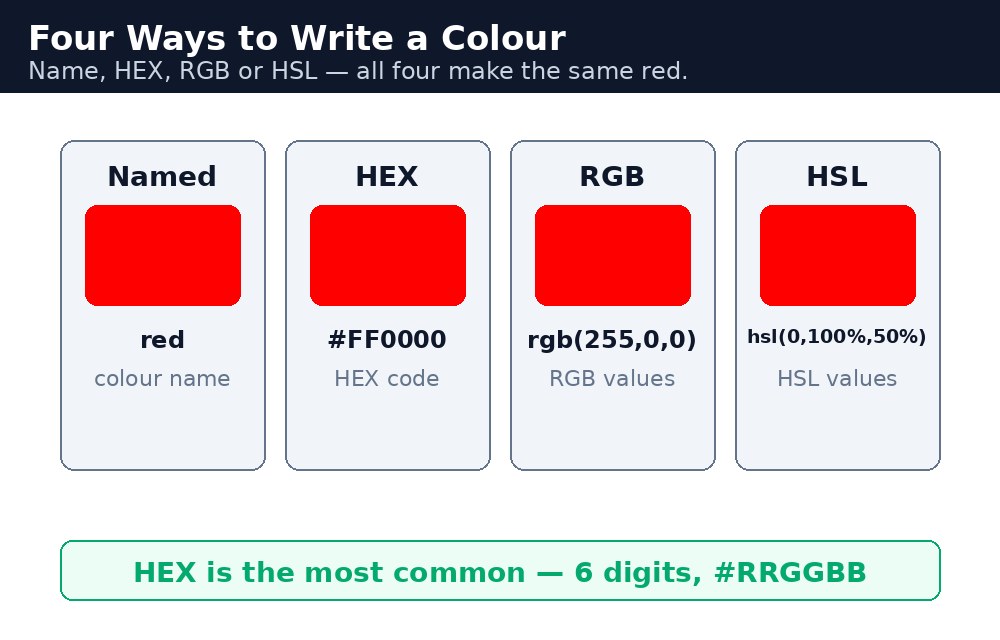
रंग के formats
| Format | उदाहरण | मतलब |
|---|---|---|
| Named colour | red | 140 built-in नामों में से एक, जैसे red, tomato, skyblue। |
| HEX | #ff0000 | लाल, हरा और नीला — हर एक दो hex digits में: #RRGGBB। |
| RGB | rgb(255, 0, 0) | लाल, हरा और नीला, हर एक 0 से 255 तक। |
| RGBA | rgba(255, 0, 0, 0.5) | RGB + alpha — 0 पूरी तरह आर-पार, 1 पूरी तरह ठोस। |
| HSL | hsl(0, 100%, 50%) | Hue (0–360°), saturation, lightness — जैसे इंसान रंग के बारे में सोचता है। |
| HSLA | hsla(0, 100%, 50%, 0.5) | HSL + alpha, RGBA जैसा ही विचार। |
सिंटैक्स — एक ही लाल रंग, छह तरीके
h1 { color: red; }
h2 { color: #ff0000; }
h3 { color: rgb(255, 0, 0); }
h4 { color: rgba(255, 0, 0, 0.5); }
h5 { color: hsl(0, 100%, 50%); }
h6 { color: hsla(0, 100%, 50%, 0.5); }
छहों headings लाल हैं। फ़र्क सिर्फ इतना है कि आप उसे कैसे बताते हैं। नाम पढ़ने में सबसे आसान हैं। HEX असली projects में सबसे आम है — designers और tools सभी HEX बोलते हैं। RGB सबसे साफ़ है जब आपको shade निकालना हो। HSL सबसे आसान है जब आप कहना चाहें "वही रंग, पर हल्का" — बस lightness का number बढ़ा दीजिए।
#ff0000 बन जाता है #f00, #ffffff बन जाता है #fff, #000000 बन जाता है #000। दोनों रूपों का मतलब बिल्कुल एक ही रंग है।Opacity — आर-पार elements
opacity property पूरे element को आर-पार बना देती है, 0 (अदृश्य) से 1 (पूरी तरह ठोस) तक। यह RGBA से अलग है: RGBA सिर्फ रंग को आर-पार बनाता है, जबकि opacity पूरे element को — text, पृष्ठभूमि और उसके अंदर की हर चीज़ को — आर-पार बना देता है।
.faded { opacity: 0.5; }
.glass { background-color: rgba(255, 255, 255, 0.5); }
.faded box और उसका सारा text आधा पारदर्शी हो जाता है। .glass box को आधी पारदर्शी सफ़ेद पृष्ठभूमि मिलती है, लेकिन उसका text पूरी तरह ठोस और पढ़ने में आसान रहता है। जब आपको आर-पार पृष्ठभूमि के साथ पढ़ने लायक text चाहिए, तो RGBA लगभग हमेशा सही चुनाव है।
आम गलतियाँ
- HEX रंग में
#भूल जाना —ff0000CSS के लिए रंग नहीं है। यह#ff0000होना चाहिए। opacityको RGBA से उलझा देना — opacity text को भी फीका कर देती है, इसलिए फीका box पढ़ने में मुश्किल हो सकता है।- Alpha की value 1 से ज़्यादा लिखना — alpha 0 से 1 तक चलता है, 0 से 100 तक नहीं।
rgba(255, 0, 0, 50)गलत है। - RGB की value 255 से ज़्यादा लिखना — हर channel 255 पर रुकता है।
rgb(300, 0, 0)गलत है। - ऐसे रंग चुनना जो एक-दूसरे के बहुत करीब हों — सफ़ेद पृष्ठभूमि पर हल्का भूरा text पढ़ा नहीं जाता, code में चाहे कितना भी सुंदर लगे।
याद रखें
colortext का रंग तय करता है;background-colorपृष्ठभूमि का रंग तय करता है।- HEX है
#RRGGBB—#ff0000लाल है; छोटा रूप#f00भी वही है। - RGB हर channel में 0–255 है; RGBA में alpha जुड़ता है, 0 (आर-पार) से 1 (ठोस) तक।
- HSL रंग को hue, saturation और lightness से बताता है — हल्का या गहरा version बनाने का सबसे आसान तरीका।
opacitytext समेत पूरे element को फीका करती है; RGBA सिर्फ रंग को फीका करता है।
उदाहरण समझिए
.named { background-color: tomato; }— नाम वाला रंग। Box टमाटर-लाल हो जाता है, बिना किसी number के।.hex { background-color: #1e90ff; }— HEX रंग। Hash और छह digits एक चमकीला dodger नीला बताते हैं।.rgb { background-color: rgb(34, 139, 34); }— RGB numbers। लाल 34, हरा 139, नीला 34 मिलकर forest green बनाते हैं।.see-through { background-color: rgba(255, 165, 0, 0.5); }— RGBA। आधी ताकत वाला नारंगी, इसलिए उसके पीछे का पेज पृष्ठभूमि से झाँकता है — लेकिन text ठोस रहता है।.faded { opacity: 0.5; }— पूरे box पर opacity। पृष्ठभूमि और text दोनों आधे फीके हो जाते हैं, इसीलिए text धुला हुआ लगता है।
उदाहरण
<!DOCTYPE html>
<html>
<head>
<title>CSS Colors</title>
<style>
body { font-family: Verdana, sans-serif; }
.box { color: white; padding: 14px; margin: 8px; }
.named { background-color: tomato; }
.hex { background-color: #1e90ff; }
.rgb { background-color: rgb(34, 139, 34); }
.see-through { background-color: rgba(255, 165, 0, 0.5); color: black; }
.faded { background-color: purple; opacity: 0.5; }
</style>
</head>
<body>

<h1>Our Colour Palette</h1>
<div class="box named">Named colour — tomato</div>
<div class="box hex">HEX colour — #1e90ff</div>
<div class="box rgb">RGB colour — rgb(34, 139, 34)</div>
<div class="box see-through">RGBA — orange at half strength, text stays solid</div>
<div class="box faded">Opacity 0.5 — background and text both fade</div>

</body>
</html>
परिणाम
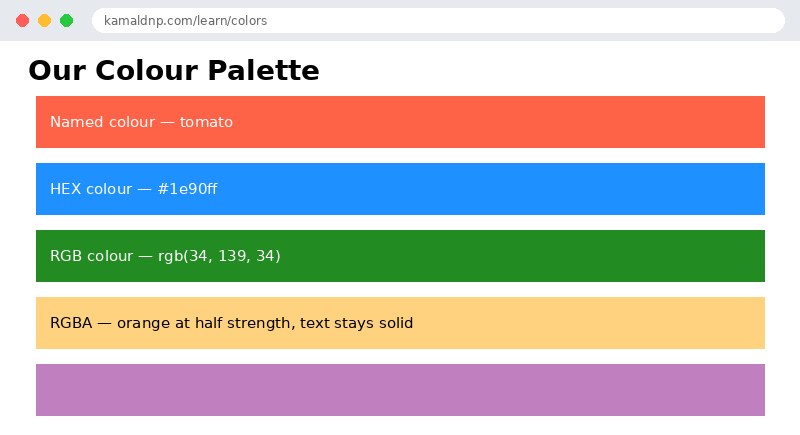
खुद करके देखें — लाइव एडिटर
नीचे दिया गया कोड बदलें और चलाएँ दबाएँ — परिणाम तुरंत दिखेगा। कोई फाइल सहेजनी नहीं है, कोई लॉगिन नहीं चाहिए।
Check yourself — did you get it?
Finished the lesson? Test yourself with 5 quick questions — you get the answer instantly, with the reason for each one.
1. What colour is #ff0000?
2. What is the short form of #ff0000?
3. In rgba(255, 0, 0, 0.5), what does 0.5 mean?
4. What is the difference between opacity and RGBA?
5. What is the valid range for each RGB channel?
Interview questions — can you answer these?
Read the question first, try to answer it in your own words, then open it to check. These are the questions interviewers actually ask.
1. What colour formats does CSS offer, and which one is most common?
Named colours (red, tomato — 140 built-in names), HEX (#ff0000 — red, green and blue as two hex digits each), RGB (rgb(255, 0, 0), each channel 0 to 255), RGBA (RGB plus an alpha for transparency), and HSL/HSLA (hue, saturation, lightness). HEX is the most common in real projects — designers and tools all speak HEX.
2. What is the difference between opacity and RGBA?
opacity makes the whole element see-through — text, background and everything inside it, from 0 (invisible) to 1 (fully solid). RGBA makes only the colour see-through; the text stays fully solid and easy to read. When you want a see-through background with readable text, RGBA is almost always the right choice.
3. What is wrong with the colour rgb(300, 0, 0)?
Each RGB channel runs from 0 to 255, so 300 is out of range and the value is invalid. The same applies to alpha: it runs from 0 to 1, not 0 to 100, so rgba(255, 0, 0, 50) is also invalid. And a HEX colour needs its hash — ff0000 without the # is not a colour to CSS.
Try it yourself — build this
Reading is not enough — now build it yourself. Write the code in the live editor, run it, check the hint if you get stuck, and open the solution only after you have tried.
1. Build a colour palette
Create a page called "Our Colour Palette" with five boxes, one for each colour format: a named colour (tomato), a HEX colour (#1e90ff), an RGB colour (rgb(34, 139, 34)), an RGBA colour (rgba(255, 165, 0, 0.5) with black text so it stays readable), and a purple box with opacity: 0.5 (background and text both fade). Give every box the class "box" with white text, 14px padding and 8px margin, and give the body a Verdana font.
Show solution
<!DOCTYPE html>
<html>
<head>
<title>CSS Colors</title>
<style>
body { font-family: Verdana, sans-serif; }
.box { color: white; padding: 14px; margin: 8px; }
.named { background-color: tomato; }
.hex { background-color: #1e90ff; }
.rgb { background-color: rgb(34, 139, 34); }
.see-through { background-color: rgba(255, 165, 0, 0.5); color: black; }
.faded { background-color: purple; opacity: 0.5; }
</style>
</head>
<body>

<h1>Our Colour Palette</h1>
<div class="box named">Named colour — tomato</div>
<div class="box hex">HEX colour — #1e90ff</div>
<div class="box rgb">RGB colour — rgb(34, 139, 34)</div>
<div class="box see-through">RGBA — orange at half strength, text stays solid</div>
<div class="box faded">Opacity 0.5 — background and text both fade</div>

</body>
</html>खुद क्यों सीखें — AI से पूछने के बजाय?
AI आपके लिए कोड लिख सकता है, लेकिन वह आपके लिए सोच नहीं सकता। जब आप HTML खुद सीखते हैं, तो आपका दिमाग असली कौशल बनाता है: आप समझते हैं कि पेज ऐसा क्यों दिखता है, टूटने पर उसे ठीक कर सकते हैं, और परीक्षा या इंटरव्यू में बिना मदद के जवाब दे सकते हैं। यही कौशल नौकरी दिलाता है — कॉपी किया हुआ जवाब नहीं।
सर्टिफिकेट पाएँ — सिर्फ ₹10
सभी 30 पाठ पूरे करें, टेस्ट पास करें (80%), ₹10 दें और अपना सर्टिफिकेट पाएँ।
टेस्ट देंदेखकर सीखना पसंद है? वीडियो कोर्स में वही विषय एक-एक करके सिखाए जाते हैं।
Go further with a full course
Free tutorials teach you the basics. Our paid courses add live projects, mentorship and a certificate.
Browse all courses