JavaScript Classes
4 min read · Free · No login needed
So far you have made objects one by one: { name: "Priya", marks: 92 }, then another, then another — copying the same shape every time. When you need ten students, that copying gets old. A class fixes it: you write the shape once, like a blueprint, and then stamp out as many objects as you need.
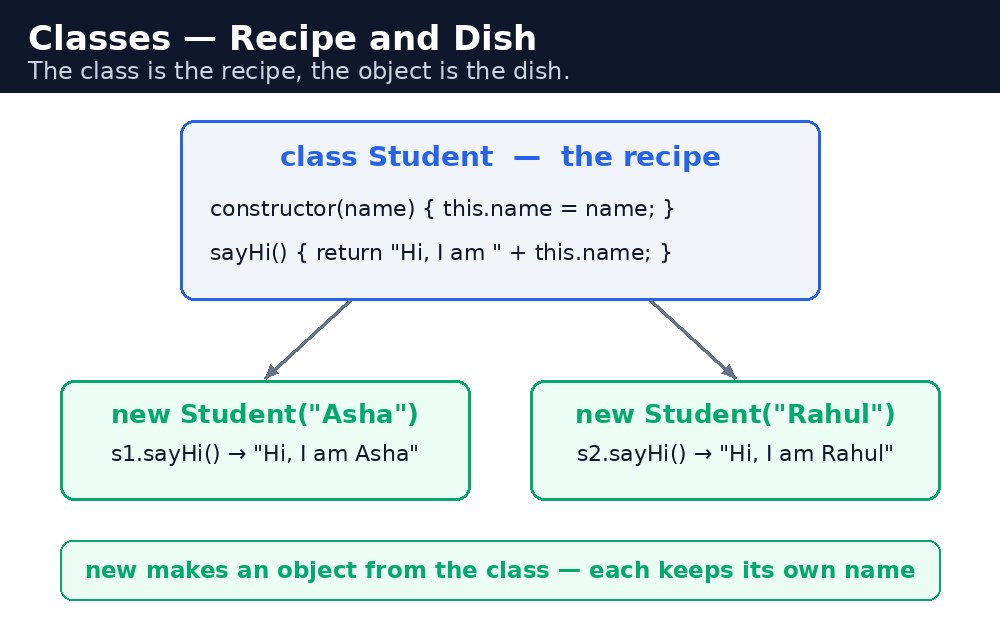
Think of a recipe. The recipe for masala chai is written once — tea, milk, ginger, sugar. Every cup you make follows the same recipe, but each cup is its own cup. A class is the recipe. Each object made from it is a cup. The recipe is called the class; the cup is called an instance.
Writing a class — class, constructor, methods
class Student {
  constructor(name, marks) {
    this.name = name;
    this.marks = marks;
  }
  result() {
    return this.marks >= 40 ? "Pass" : "Fail";
  }
}
let priya = new Student("Priya", 92);
console.log(priya.result()); // "Pass"
Three parts to learn. The class keyword names the blueprint. The constructor is a special method that runs when you create a new object with new — it receives the starting values and stores them on this. And the methods — like result() — are the things every object made from the class can do. Notice there are no commas between the methods, and no function keyword in front of them: inside a class, you just write the name.
this inside a class method means "this object" — the particular student you are working with. priya.result() reads priya.marks; rahul.result() reads rahul.marks. Same method, different object, different answer.Inheritance — extends and super
Sometimes one blueprint is almost like another. A Teacher has a name and a subject; a Student has a name and marks. Both have a name. Instead of writing the name part twice, one class can extend another:
class Person {
  constructor(name) { this.name = name; }
}
class Student extends Person {
  constructor(name, marks) {
    super(name);      // calls the parent's constructor
    this.marks = marks;
  }
}
extends says "this class builds on that one". super(name) calls the parent's constructor first — it must come before you use this in the child's constructor, or JavaScript throws an error. The child gets everything the parent has, plus its own extras.
super always goes first — the parent sets the table before the child sits down.Common mistakes
- Forgetting
new—Student("Priya", 92)withoutnewruns the constructor as a plain function and returnsundefined. Always writenew. - Using
thisbeforesuper()in a child constructor — JavaScript throws an error. Callsuper()first. - Putting commas between methods in a class — methods are separated by nothing, just like in an object literal without commas. A comma there is a syntax error.
- Writing
functionbefore a method name inside a class — the keyword is not used there. Just writeresult() { ... }.
Remember
- A class is a blueprint; an object made from it is an instance.
constructorruns when you writenewand sets the starting values.- Methods inside a class have no
functionkeyword and no commas between them. extendsbuilds one class on another;super()calls the parent's constructor first.- The class is the recipe, the object is the dish.
Example explained
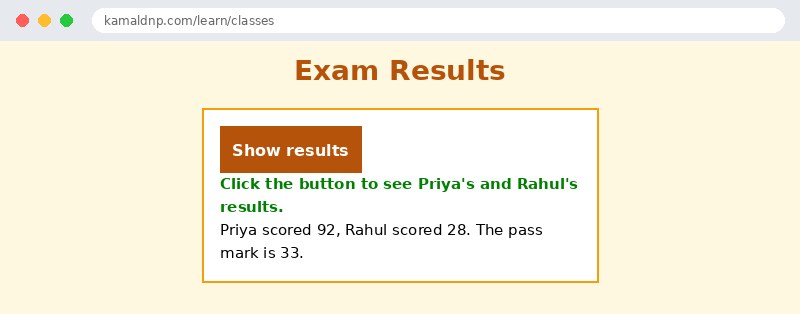
class Student { constructor(name, marks) { ... } }— the blueprint: every student has a name and marks.result() { return this.marks >= 33 ? "Pass" : "Fail"; }— a method every student object can use. The pass mark is 33.let priya = new Student("Priya", 92);— stamps out one student object from the blueprint.let rahul = new Student("Rahul", 28);— stamps out a second one. Same class, different values.document.getElementById("out").textContent = priya.name + ": " + priya.result() + " — " + rahul.name + ": " + rahul.result();— shows both results on the page: Priya passes, Rahul fails.
Example
<!DOCTYPE html>
<html>
<head>
<title>Exam Results — Classes</title>
<style>
body { font-family: Verdana, sans-serif; background-color: #fff8e1; }
h1 { color: #b45309; text-align: center; }
.card { background-color: white; border: 2px solid #f59e0b; padding: 16px; width: 360px; margin: 20px auto; }
button { background-color: #b45309; color: white; border: none; padding: 10px 18px; font-size: 16px; }
#out { font-weight: bold; color: green; }
</style>
</head>
<body>

<h1>Exam Results</h1>
<div class="card">
<p><button onclick="showResults()">Show results</button></p>
<p id="out">Click the button to see Priya's and Rahul's results.</p>
<p>Priya scored 92, Rahul scored 28. The pass mark is 33.</p>
</div>

<script>
class Student {
  constructor(name, marks) {
    this.name = name;
    this.marks = marks;
  }
  result() {
    return this.marks >= 33 ? "Pass" : "Fail";
  }
}
function showResults() {
  let priya = new Student("Priya", 92);
  let rahul = new Student("Rahul", 28);
  document.getElementById("out").textContent =
    priya.name + ": " + priya.result() + " — " + rahul.name + ": " + rahul.result();
}
</script>

</body>
</html>
Output
Try it yourself — live editor
Change the code below and press Run to see the result instantly. No file to save, no login needed.
Why learn this yourself — and not just ask AI?
AI can write code for you, but it cannot think for you. When you learn HTML yourself, your brain builds the real skill: you understand why a page looks the way it does, you can fix it when it breaks, and you can answer it in an exam or an interview without help. That is the skill that gets you a job — not a copied answer.
Get certified — just ₹10
Finish all 30 lessons, pass the test (80%), pay ₹10 and get your certificate.
Take the testPrefer watching? Video courses teach the same topics step by step.
Go further with a full course
Free tutorials teach you the basics. Our paid courses add live projects, mentorship and a certificate.
Browse all courses