JavaScript Classes — एक बार लिखिए, बार-बार बनाइए
4 मिनट पढ़ें · मुफ़्त · बिना लॉगिन
अब तक आपने objects एक-एक करके बनाए हैं: { name: "Priya", marks: 92 }, फिर दूसरा, फिर तीसरा — हर बार वही आकार copy करते हुए। जब आपको दस छात्र चाहिए हों, तो यह copy करना पुराना पड़ जाता है। class इसे ठीक करती है: आप आकार एक बार लिखते हैं, जैसे blueprint, और फिर जितने objects चाहिए, उतने बना लेते हैं।
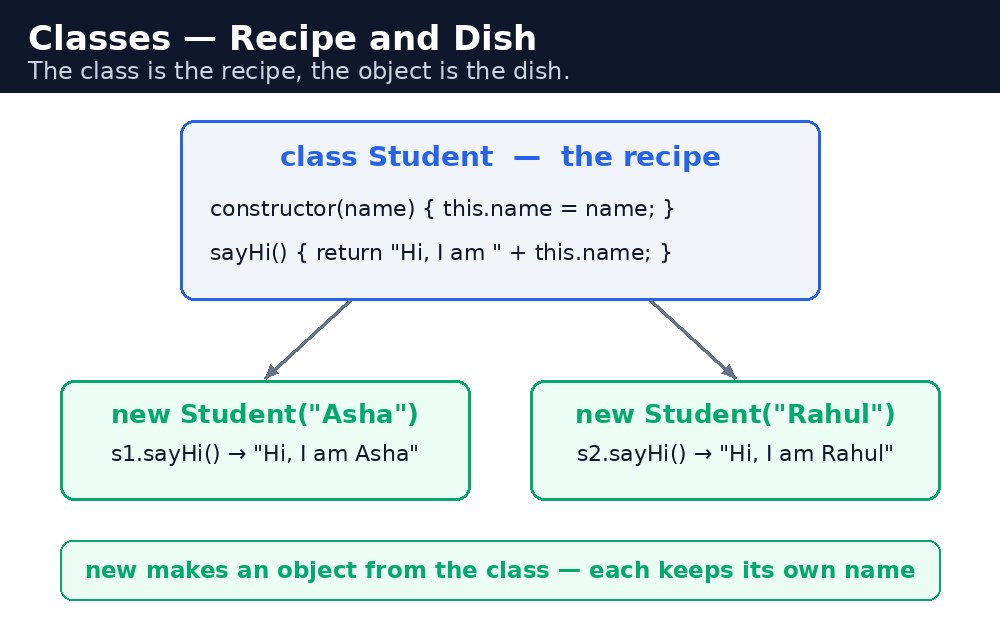
Recipe की तरह सोचिए। मसाला चाय की recipe एक बार लिखी जाती है — चाय, दूध, अदरक, चीनी। हर कप उसी recipe से बनता है, पर हर कप अपना कप है। Class recipe है। उससे बना हर object एक कप है। Recipe को class कहते हैं; कप को instance कहते हैं।
Class लिखना — class, constructor, methods
class Student {
  constructor(name, marks) {
    this.name = name;
    this.marks = marks;
  }
  result() {
    return this.marks >= 40 ? "Pass" : "Fail";
  }
}
let priya = new Student("Priya", 92);
console.log(priya.result()); // "Pass"
सीखने के लिए तीन हिस्से हैं। class keyword blueprint का नाम देता है। constructor एक खास method है जो तब चलता है, जब आप new से नया object बनाते हैं — वह शुरूआती values लेता है और उन्हें this पर save करता है। और methods — जैसे result() — वे चीज़ें हैं जो class से बना हर object कर सकता है। ध्यान दीजिए, methods के बीच कोई comma नहीं होता, और उनके सामने कोई function keyword नहीं होता: class के अंदर आप सिर्फ नाम लिखते हैं।
this का मतलब है 'यह object' — वह खास छात्र जिसके साथ आप काम कर रहे हैं। priya.result() priya.marks पढ़ता है; rahul.result() rahul.marks पढ़ता है। वही method, अलग object, अलग जवाब।Inheritance — extends और super
कभी-कभी एक blueprint दूसरे जैसा ही होता है। Teacher के पास नाम और subject है; Student के पास नाम और अंक हैं। दोनों के पास नाम है। नाम वाला हिस्सा दो बार लिखने की जगह, एक class दूसरी class को extend कर सकती है:
class Person {
  constructor(name) { this.name = name; }
}
class Student extends Person {
  constructor(name, marks) {
    super(name);      // calls the parent's constructor
    this.marks = marks;
  }
}
extends कहता है 'यह class उस पर बनती है'। super(name) पहले parent का constructor बुलाता है — यह child के constructor में this इस्तेमाल करने से पहले आना चाहिए, नहीं तो JavaScript error फेंकता है। Child को parent की हर चीज़ मिलती है, साथ में उसकी अपनी extras भी।
super हमेशा पहले आता है — माता-पिता पहले मेज़ सजाते हैं, फिर बच्चा बैठता है।आम गलतियाँ
newभूल जाना —Student("Priya", 92)बिनाnewके constructor को सादे function की तरह चलाता है औरundefinedदेता है। हमेशाnewलिखिए।- Child constructor में
super()से पहलेthisइस्तेमाल करना — JavaScript error फेंकता है। पहलेsuper()बुलाइए। - Class में methods के बीच comma डालना — methods के बीच कुछ नहीं होता, बिल्कुल object literal की तरह बिना comma के। वहाँ comma syntax error है।
- Class के अंदर method के नाम से पहले
functionलिखना — वह keyword वहाँ इस्तेमाल नहीं होता। सिर्फresult() { ... }लिखिए।
याद रखें
- Class एक blueprint है; उससे बना object एक instance है।
constructorतब चलता है, जब आपnewलिखते हैं, और शुरूआती values set करता है।- Class के अंदर methods में कोई
functionkeyword नहीं होता और उनके बीच कोई comma नहीं होता। extendsएक class को दूसरी पर बनाता है;super()पहले parent का constructor बुलाता है।- Class recipe है, object पकवान है।
उदाहरण समझिए
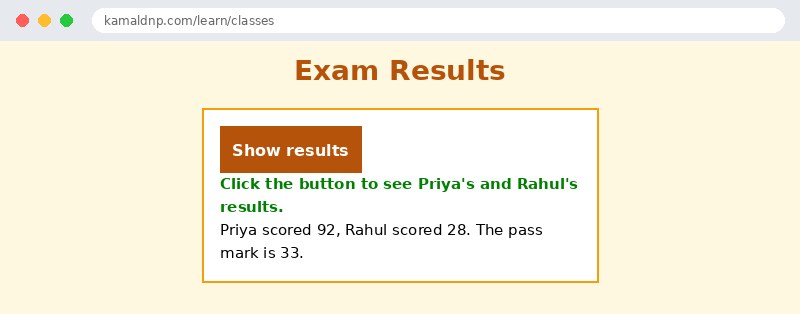
class Student { constructor(name, marks) { ... } }— blueprint: हर छात्र का नाम और अंक होते हैं।result() { return this.marks >= 33 ? "Pass" : "Fail"; }— एक method जिसे हर छात्र object इस्तेमाल कर सकता है। पास होने के अंक 33 हैं।let priya = new Student("Priya", 92);— blueprint से एक छात्र object बनाता है।let rahul = new Student("Rahul", 28);— दूसरा बनाता है। वही class, अलग values।document.getElementById("out").textContent = priya.name + ": " + priya.result() + " — " + rahul.name + ": " + rahul.result();— दोनों नतीजे पेज पर दिखाता है: Priya पास, Rahul fail।
उदाहरण
<!DOCTYPE html>
<html>
<head>
<title>Exam Results — Classes</title>
<style>
body { font-family: Verdana, sans-serif; background-color: #fff8e1; }
h1 { color: #b45309; text-align: center; }
.card { background-color: white; border: 2px solid #f59e0b; padding: 16px; width: 360px; margin: 20px auto; }
button { background-color: #b45309; color: white; border: none; padding: 10px 18px; font-size: 16px; }
#out { font-weight: bold; color: green; }
</style>
</head>
<body>

<h1>Exam Results</h1>
<div class="card">
<p><button onclick="showResults()">Show results</button></p>
<p id="out">Click the button to see Priya's and Rahul's results.</p>
<p>Priya scored 92, Rahul scored 28. The pass mark is 33.</p>
</div>

<script>
class Student {
  constructor(name, marks) {
    this.name = name;
    this.marks = marks;
  }
  result() {
    return this.marks >= 33 ? "Pass" : "Fail";
  }
}
function showResults() {
  let priya = new Student("Priya", 92);
  let rahul = new Student("Rahul", 28);
  document.getElementById("out").textContent =
    priya.name + ": " + priya.result() + " — " + rahul.name + ": " + rahul.result();
}
</script>

</body>
</html>
परिणाम
खुद करके देखें — लाइव एडिटर
नीचे दिया गया कोड बदलें और चलाएँ दबाएँ — परिणाम तुरंत दिखेगा। कोई फाइल सहेजनी नहीं है, कोई लॉगिन नहीं चाहिए।
खुद क्यों सीखें — AI से पूछने के बजाय?
AI आपके लिए कोड लिख सकता है, लेकिन वह आपके लिए सोच नहीं सकता। जब आप HTML खुद सीखते हैं, तो आपका दिमाग असली कौशल बनाता है: आप समझते हैं कि पेज ऐसा क्यों दिखता है, टूटने पर उसे ठीक कर सकते हैं, और परीक्षा या इंटरव्यू में बिना मदद के जवाब दे सकते हैं। यही कौशल नौकरी दिलाता है — कॉपी किया हुआ जवाब नहीं।
सर्टिफिकेट पाएँ — सिर्फ ₹10
सभी 30 पाठ पूरे करें, टेस्ट पास करें (80%), ₹10 दें और अपना सर्टिफिकेट पाएँ।
टेस्ट देंदेखकर सीखना पसंद है? वीडियो कोर्स में वही विषय एक-एक करके सिखाए जाते हैं।
Go further with a full course
Free tutorials teach you the basics. Our paid courses add live projects, mentorship and a certificate.
Browse all courses